Travel connectivity guide
Lookout eSIM: Mobile Internet in Montserrat
Lookout eSIM: Mobile Connection and Internet for Your Trip to Montserrat
Lookout is a small settlement on the island of Montserrat, not a large city with a dense downtown or extensive public transport. That scale changes the way you plan mobile internet: you may use your phone to coordinate an airport pickup, find your accommodation, message a driver, check a route across the island, or confirm a tour before heading out. A travel eSIM can help with those online tasks, provided the selected plan covers Montserrat and your device can use it.
This guide focuses on Lookout and the practical journey around it. It also separates what is established about Montserrat’s local mobile market from what you should confirm for a particular travel eSIM. Network availability can vary by provider, handset, terrain and exact location, so no plan should be assumed to work at every house, road or viewpoint.
First, place Lookout on the map
Lookout (also written “Look Out” in transport listings) is a settlement in the inhabited north of Montserrat, not a dense downtown or self-contained resort district. It can be a useful base if your accommodation, vehicle or local contact is there. The name is also shared with the Spanish mountain and monastery destination, so confirm that bookings and map searches refer to Montserrat in the Caribbean.
Before booking, check the precise property address, distance from the main road, pickup arrangements, and access to meals or groceries. A short straight-line distance on a hillside may not be an easy walk. Save the exact pin and ask your host for a nearby landmark or turnoff; arrange a ride if arriving with luggage or after dark.
Arriving in Montserrat and continuing to Lookout
Many visitors connect through another Caribbean island. John A. Osborne Airport is at Geralds, north of Lookout. Flights from Antigua are short, but services and timetables change; check the airline’s current information and leave enough time for connections. Visitor information also describes sea travel from Antigua, but ferry service can be seasonal or suspended. Confirm a sailing is operating on your dates before planning around it.
Lookout is not the arrival point. Arrange onward transport separately: ask your accommodation about a taxi or reserve a rental car. Keep your host’s details and pickup plan offline. If you are delayed, use airport Wi‑Fi or your home carrier to contact the driver before your travel eSIM is active.
Before departure, save your accommodation pin, host contact and transport confirmation. Complete required entry forms and keep your travel details available. Install the eSIM before travel only if the plan’s activation rules allow it; activation may require internet access, and a deleted profile may not be recoverable.
Getting around from Lookout
Montserrat has a compact road network, but moving between communities still takes planning. The main road connects settlements, and driving is on the left. Local buses and minibuses run along routes, but service may be informal or intermittent rather than a frequent urban timetable. Ask locally about the route, fare and last return journey. A taxi offers more control over timing; a rental car can make a multi-stop day easier if you are comfortable with hillside roads and local conditions.
| Plan | Arrange it this way | What data helps with |
|---|---|---|
| Airport to Lookout | Pre-book a driver or confirm rental pickup | Send arrival updates and share your location |
| Local errand | Ask your host about bus service or request a taxi | Confirm the destination and message a driver |
| Several stops | Plan with a local driver or rent a car | Keep maps and meeting details accessible |
| Outdoor day | Check access and transport first | Save directions and share your plan |
| Airport return | Confirm pickup the day before | Recheck the flight and coordinate changes |
Do not assume a bus will come at a particular minute because a map shows a route. Check service on the day and carry a backup plan, especially for evening travel. Agree on taxi fares and waiting arrangements in advance. If renting, confirm visitor permit requirements and pickup details.
Save offline directions to your accommodation, airport and planned meeting points. A live map can help with route changes, but it depends on current map data and reception. Do not change navigation while driving; ask a passenger or stop safely.
What to expect from mobile coverage
Montserrat’s mobile market includes services associated with Digicel and Flow. eSIM support depends on carrier and device. Apple’s carrier information lists both Digicel and Flow for eSIM activation methods in Montserrat, while its traveler prepaid eSIM section identifies Digicel. This is carrier-support information, not proof that every travel eSIM store offers a Montserrat plan or that a particular plan will connect in Lookout.
A travel eSIM may connect through a local network or a roaming arrangement named in the plan terms. Before paying, check that Montserrat is explicitly included. For a regional Caribbean package, read the eligible-country list instead of assuming that every island is covered. If the plan names a local partner, rely on the current plan details rather than inferring it from local carriers’ own offers.
No coverage map guarantees reception inside a particular building. Hills, walls, weather, maintenance and network load can affect service. Test the connection at your accommodation and along your usual route before relying on it for a time-sensitive call. Your host’s experience can help, but it does not guarantee the same result for a different provider or phone.
Prepare an offline fallback: save the address and host contact, download a map, keep transport confirmations in screenshots, share your itinerary with someone, and carry a power bank for a day of navigation. This helps even when reception is usually good.
Choosing a travel eSIM for Lookout
Choose for your whole Montserrat itinerary, not only the address where you sleep. Consider arrival, the road to Lookout, trips to other communities and onward travel. A plan has its own data allowance, validity period, supported network, activation rule and top-up policy; review these before purchase.
| Check | Why it matters |
|---|---|
| Destination list | Confirm Montserrat by name; a regional package may exclude some islands. |
| Data allowance | Maps and messages use less than video calls, streaming or frequent uploads. |
| Validity | Check whether the period starts at purchase, installation, first connection or another stated event. |
| Network and roaming | Review the supported network and any restrictions. |
| Hotspot | Confirm whether sharing data with a laptop is allowed. |
| Calls and SMS | Many travel eSIMs are data-only; check if you need a number or text messages. |
| Top-up and expiry | Check whether more data can be added and when unused data expires. |
| Refund and transfer | Review installation, transfer and refund rules before changing devices. |
A short stay with maps, email and messaging may need less data if you avoid background syncing. Longer visits, remote work and hotspot use need a larger allowance or a confirmed top-up option. Check fair-use limits, speed changes and validity even when a plan is described as unlimited.
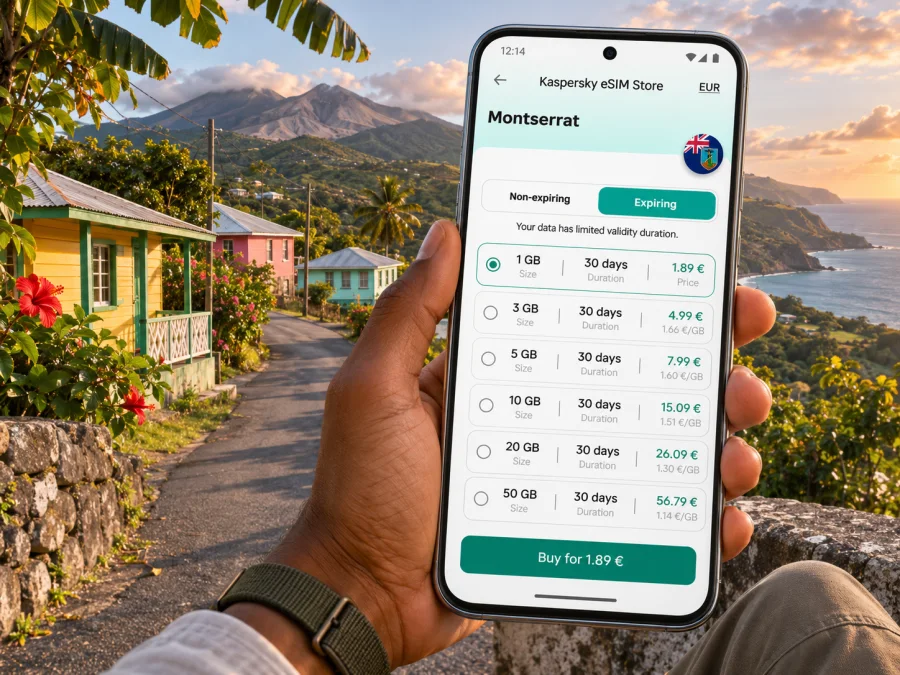
Kaspersky eSIM Store is an app and website where you can select, purchase and activate an eSIM with a suitable plan for mobile internet during an overseas trip. It does not operate Montserrat’s mobile networks. If a Montserrat destination is available, check the live plan details and ensure the country and conditions fit your itinerary. You can browse current eSIM options for Montserrat and review coverage, allowance and validity before deciding.
Check the exact device before purchase
An eSIM-ready product name does not prove that your specific handset can use eSIM. Support may differ by manufacturer, model number, country or regional variant, carrier lock, operating system and account status. Some versions of a model sold in one market may use a different SIM configuration from versions with the same retail name sold elsewhere.
Before you buy:
- Find the full model number in your device settings or on the original packaging.
- Check the manufacturer’s current specifications for that exact regional variant.
- Look for an option such as “Add eSIM” or “Add mobile plan,” or check for an EID in the device information. Menu names vary.
- Confirm that the phone is not locked to a carrier that restricts adding another profile.
- Verify the operating system and installation method required by the selected plan.
- Keep access to Wi‑Fi and your account email while installing.
A device that supports eSIM may still have a carrier restriction or software condition that blocks activation. Check the exact model before purchase using the device compatibility checker. If the device does not support eSIM, ask whether a physical SIM or your home carrier’s roaming service is a better fit. Do not buy a plan on the assumption that a similar-looking model will work.
Install and activate without losing your main line
Installation is easiest with stable Wi‑Fi and the provider’s instructions. You may be able to keep your home SIM and travel eSIM on one phone, but combinations and labels vary. Note which line handles calls, messages and data. Keep the home line for calls or verification messages if needed, and select the travel profile for data when appropriate.
Use the plan’s installation method; QR code, in-app setup and manual entry are not always interchangeable. Follow the operating-system guide: eSIM installation instructions for Android and eSIM installation instructions for iOS.
- Recheck destination, allowance, validity and activation terms.
- Install on the device you will take, and label the profile if possible.
- Select the travel eSIM for data when appropriate. Turn on data roaming for that profile only if the plan requires it.
- Avoid deleting the profile if it does not connect. Check the provider’s instructions or contact support.
- On arrival, allow the phone to register, then test a simple webpage. If needed, check the data line, roaming setting, network selection and plan status.
Validity may start at purchase, installation, first connection or another event stated by the provider. If unclear, ask support before installing, especially if preparing well ahead of travel.
Data habits for a quiet island stay
Lookout can be a calm base for exploring, working remotely or visiting family. Match your data habits to the plan: turn off automatic photo backups on mobile data, download maps and media in advance, and use lower video quality when a call matters but reception is variable. Remote workers should test the connection before a meeting, check accommodation Wi‑Fi and review hotspot terms before connecting a laptop.
| Activity | Practical approach |
|---|---|
| Messages and email | Sync manually; avoid large attachments on mobile data. |
| Maps | Download offline coverage and use live updates when available. |
| Calls | Test ahead of time; use audio if video is unstable. |
| Photos and video | Pause automatic backups and upload selected files over Wi‑Fi. |
| Hotspot | Check plan rules and monitor data on both devices. |
The phone’s usage counter may not match the plan’s billing period. Check the provider’s account as well, and set an alert before reaching the allowance.
If the connection does not work
A new eSIM may need several minutes to register, and the right troubleshooting step depends on the plan. Start with the order details and avoid deleting the profile as a first response.
- Confirm that the plan includes Montserrat and that its validity has started.
- Check that the travel eSIM is enabled and selected for mobile data.
- Check whether data roaming must be enabled for that profile.
- Move to an open area and restart the phone once if the provider recommends it.
- If automatic network selection fails, follow the provider’s current instructions before selecting a network manually.
- Confirm that airplane mode is off and that your device has not reached a data limit.
- Contact the plan provider over Wi‑Fi, with your order details and device model ready.
A working data connection does not necessarily include a local phone number, voice calls or SMS. If you need to call a Montserrat number, check the plan for voice support or use another calling method. Internet messaging apps can work over data, but both parties need a suitable app and a connection.
Short stays, work trips and island-wide days
A brief visit based in Lookout. Arrange airport transport, save your accommodation pin and download a map in advance. A small allowance may cover messages and basic navigation if you limit background syncing.
A work trip. Test accommodation Wi‑Fi and mobile data before a meeting. Keep files offline, check hotspot conditions and prepare a backup call method. An advertised data allowance does not guarantee a particular indoor speed.
A day beyond the settlement. Decide on transport, confirm access or opening details with the local provider, and save your return plan and driver’s contact offline. Use live maps as support for local directions, not as the only preparation.
Continuing to another island. Montserrat coverage does not automatically include Antigua or another destination. Check each country in the eligible list before departure.
Frequently asked questions
Is Lookout a city?
Lookout is described in Montserrat planning material as a settlement rather than a large urban centre. This guide treats it as the requested destination and focuses on mobile internet for a stay there.
Is mobile reception guaranteed throughout Lookout?
No. Reception depends on the provider’s arrangement, exact location, terrain, building and device. Confirm Montserrat is included and test the plan before relying on it for a call or route.
Does Montserrat have local eSIM service?
Device-maker information lists Digicel and Flow for local eSIM activation methods, with traveler prepaid support listed separately. This does not show which network a separate travel plan uses. Check the terms for that specific plan.
Will an eSIM give me a Montserrat phone number?
Not necessarily. Many travel eSIMs are data-only and do not include a regular number, calls or SMS. Check the plan if you need local calls or text messages. Your home SIM may remain useful, subject to your carrier’s terms.
Can I use the same eSIM in another Caribbean country?
Only if that country is listed in the plan’s eligible destinations. Check the full list, validity, data allowance and any network restrictions.
Should I install the eSIM before arriving?
Check when validity begins. If it starts at installation, installing early may use part of the period; if it starts at first connection, early installation may be possible. Follow the plan’s terms and retain its instructions.
What if my phone has no eSIM option?
A physical SIM slot does not prove eSIM support. Verify the exact regional model with the manufacturer. If it cannot use eSIM, consider home-carrier roaming or ask whether a physical local SIM is suitable.
Is Wi‑Fi enough for a short visit?
Possibly, if your accommodation and planned venues provide access for your needs. Keep offline maps, transport details and important contacts in case Wi‑Fi outside your lodging is limited.
A simple pre-departure checklist
Before leaving for Lookout, confirm the following:
- The travel plan explicitly includes Montserrat and matches every destination on your route.
- Your phone’s exact regional model supports eSIM and is not restricted by a carrier lock.
- You understand when validity begins, how much data is included and how to check usage.
- Your airport connection, onward transport and accommodation contact are saved offline.
- You have downloaded a map and essential bookings, and know what to do if mobile data is unavailable.
- Your home SIM settings are clear, especially for calls, SMS, data and roaming charges.
- You know how to contact the eSIM provider over Wi‑Fi if activation needs help.
These checks make mobile internet one useful part of your arrival plan rather than the single point on which every detail depends. In Lookout, a little advance coordination can save time when you are connecting between a flight, a driver and a hillside address.
Prepare your eSIM for Lookout
When you are ready, use Kaspersky eSIM Store on the website or in the app to review whether a suitable plan is currently listed for Montserrat. Compare the live destination coverage, data allowance, validity and activation terms, then install and activate the selected eSIM according to its instructions. Browse current eSIM options for Montserrat and choose a plan that fits your full island itinerary and your device.


