
Travel connectivity guide
Los Angeles eSIM for mobile internet
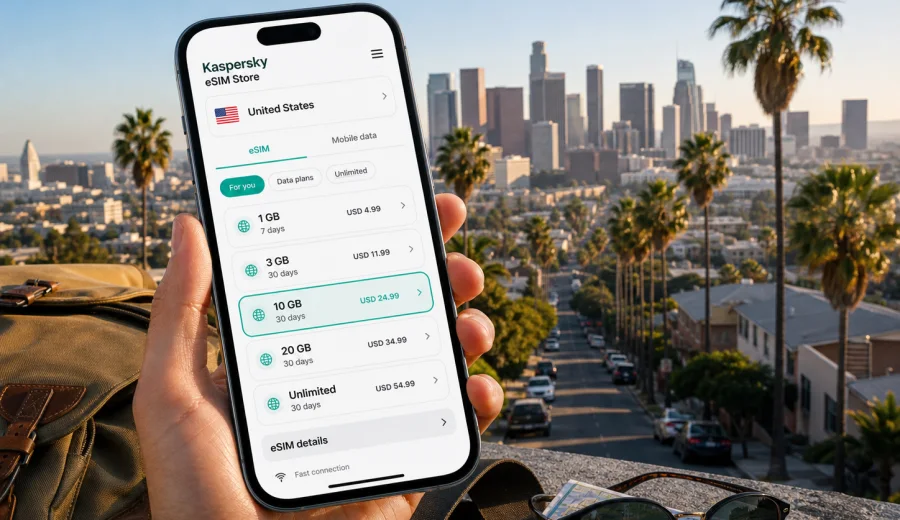
Los Angeles eSIM: mobile connection and internet for your trip
Los Angeles is a city where mobile internet quickly becomes part of the travel plan. You may land after a long flight, open a rideshare app at LAX, check traffic before choosing a route to Hollywood or Downtown, message a hotel, and navigate a city spread across beaches, hills, studios, airports, and business districts. An eSIM can make this first hour easier because you do not need to look for a physical SIM card before using maps, messages, bookings, or transport apps.
For a trip to Los Angeles, the practical question is not only whether you will have internet in the United States. It is how soon you can get online, how much data you may need, whether your phone supports eSIM, and whether the selected tariff is suitable for your route. Kaspersky eSIM Store is an app and website where you can quickly choose, order, and activate an eSIM with a suitable mobile internet tariff for an international trip. It helps you prepare mobile data for travel without turning your arrival day into a search for an offline SIM counter.
This guide focuses on city scenarios: arrival, local movement, navigation, hotels, business trips, stopovers, and short trips from Los Angeles.
Why mobile internet matters in Los Angeles
Los Angeles is not a compact walking city. Even if your itinerary looks simple on a map, the distance between areas can be significant. Santa Monica, Beverly Hills, Hollywood, Downtown Los Angeles, Koreatown, Venice, Burbank, Pasadena, Anaheim, and Long Beach often belong to the same trip, but they can feel like separate travel zones.
Mobile internet is useful in Los Angeles because many routine decisions happen on the move:
- checking traffic before leaving the airport or hotel;
- comparing rideshare pickup points at LAX;
- navigating freeway exits and parking entrances;
- finding the right Metro line, bus stop, or rail connection;
- confirming hotel access codes and reservation messages;
- using maps in large venues, campuses, studios, and convention areas;
- translating menus, signs, and service messages when needed;
- sharing location with colleagues, family, or friends;
- joining video calls during a business trip;
- booking same-day tickets, tables, tours, or car rentals.
Public Wi-Fi can help in airports, hotels, cafes, and conference venues, but it is not a complete plan for Los Angeles. You may need internet between Wi-Fi points, in a car, outside a venue, at a beach, in a parking area, or while walking between stops. An eSIM gives you a separate mobile data option for those moments, provided that your device supports eSIM and the selected tariff is valid for the United States.
Arrival at LAX, Burbank, Long Beach, or Orange County
Most international visitors arrive through Los Angeles International Airport, but Los Angeles trips may also begin at Hollywood Burbank Airport, Long Beach Airport, or John Wayne Airport in Orange County. In each case, the first mobile internet use is usually practical rather than recreational.
At LAX, terminals, rideshare pickup areas, hotel shuttles, car rental buses, and traffic updates can create a busy first hour. If your eSIM is installed before departure, you can usually switch to the eSIM line for mobile data after landing and:
1. message your hotel about arrival time;
2. open a rideshare or taxi app;
3. check shuttle instructions;
4. download the route to your first stop;
5. tell someone that you have landed;
6. verify a booking code or digital ticket.
If you prefer to install the eSIM after arrival, keep in mind that installation normally requires an internet connection. Airport or hotel Wi-Fi can be enough for that step, but it is better to prepare before the moment when you are standing outside with bags and a low battery.
For Burbank, Long Beach, or Orange County, mobile data is useful for highway navigation, rideshares, hotel messages, and rentals outside central Los Angeles.
Getting around the city with eSIM mobile data
Los Angeles travel is strongly shaped by routing. A 20-minute ride can become much longer at the wrong time of day, and a route that looks direct may be affected by freeway traffic, event closures, or parking limits. Mobile data helps you adjust without waiting for Wi-Fi.
Common movement scenarios include:
| Scenario | Why internet helps | Practical data use |
|---|---|---|
| Airport transfer | Pickup points, traffic, hotel messages | Maps, rideshare apps, messaging |
| Driving a rental car | Freeway routing, parking, fuel stops | Navigation, parking apps, search |
| Metro or bus | Service alerts, station exits, walking links | Transit apps and maps |
| Beach day | Finding bathrooms, parking, restaurants | Maps, reviews, messaging |
| Business trip | Meetings, calendar changes, file access | Email, calls, documents |
| Event day | Tickets, venue maps, group coordination | Wallet apps, chat, maps |
For many visitors, the biggest advantage of an eSIM is continuity. You can move from an airport to a hotel, meeting, restaurant, or beach while keeping the same phone available for maps and messages. Actual connection quality depends on the local network, device, tariff conditions, and location.
Districts and travel styles in Los Angeles
Your data needs depend on where you stay and how you move. Los Angeles areas often create different mobile internet patterns:
| Area | Typical need |
|---|---|
| Downtown Los Angeles | Walking directions, convention schedules, rideshares, Union Station routes |
| Hollywood and West Hollywood | Tickets, restaurant searches, nightlife transport, studio visit details |
| Santa Monica and Venice | Parking, beach routes, bike or scooter apps, photo uploads |
| Beverly Hills and Westwood | Meetings, shopping routes, medical or university appointments |
| Burbank and Studio City | Studio visits, local driving, business messages, hotel coordination |
| Long Beach, Pasadena, Anaheim | Wider metro trips where a United States tariff is usually more relevant than a single city idea |
How much data to plan for
There is no single correct amount of data for Los Angeles. The right tariff depends on trip length, hotel Wi-Fi, work needs, video habits, navigation, and whether you share a hotspot with another device. The table below is a planning aid, not a guarantee.
| Trip type | Typical mobile internet use | What to consider |
|---|---|---|
| 1-day stopover | Maps, rideshare, messaging, tickets | A small data package may be enough if you avoid video |
| 3-4 day city break | Maps, search, photos, bookings, chat | Choose enough data for daily navigation and uploads |
| 1-week vacation | Navigation, social media, streaming, day trips | A larger package gives more flexibility |
| Business trip | Email, documents, calls, calendar, tethering | Check whether hotspot use is allowed by the selected tariff |
| Family trip | Multiple bookings, tickets, shared routes | Each traveler may need their own eSIM or a clear sharing plan |
Data can disappear quickly when you stream video, use cloud backup, run app updates, or use your phone as a hotspot. Download offline maps, turn off automatic media backup on mobile data, update essential apps over home Wi-Fi, and keep hotel Wi-Fi for heavier downloads.
Choosing an eSIM tariff for a Los Angeles trip
For a city article, the relevant destination is the country that Los Angeles belongs to: the United States. That matters if your route includes more than one place, such as Los Angeles plus Las Vegas, San Diego, San Francisco, or a national park. A tariff for the United States can be more practical than thinking only about one neighborhood or airport.
When comparing options, look at five details:
1. Destination. Check that the tariff is valid in the United States for your route.
2. Data volume. Match the package to maps, messages, bookings, work, and media use.
3. Validity period. The duration should cover your full stay, including arrival and departure days.
4. Activation rules. Understand when the validity period starts and whether activation happens after installation or after connecting to a supported local network.
5. Device setup. Make sure you know which SIM line will be used for mobile data, calls, and messages.
If you want to prepare before departure, you can choose an eSIM plan for your Los Angeles trip in Kaspersky eSIM Store and review the available United States options. The store helps you select, order, and activate an eSIM with a suitable mobile internet tariff for travel; the conditions, data volume, validity period, and price depend on the selected tariff.
What to check before you order
Before ordering an eSIM tariff, check your device. eSIM requires compatible hardware and software, and some phones may differ by model, region of sale, or carrier lock status. If your phone is locked to a carrier, a travel eSIM may not work as expected.
Use this quick checklist:
- Check whether your device supports eSIM.
- Confirm that the device is not locked to a mobile operator.
- Make sure your operating system is up to date enough for eSIM installation.
- Keep access to Wi-Fi or another internet connection for installation.
- Save the QR code or installation details where you can reach them.
- Read the selected tariff conditions before activating.
- Check whether data roaming must be enabled for the eSIM profile.
- Decide whether your primary SIM should stay active for calls or SMS.
An eSIM for travel is mainly a mobile data solution. It usually does not include a local phone number, regular voice calls, or SMS unless the selected tariff says otherwise. For calls and messages, travelers often use internet-based apps through mobile data or Wi-Fi.
Installing and activating eSIM for Los Angeles
You can often install an eSIM before the trip and activate it when you arrive, but the exact steps depend on your phone and the tariff. The safest approach is to read the instructions before departure and avoid installing while rushed at the airport.
General setup flow:
1. Choose the United States or another suitable destination for your route.
2. Select a tariff by data volume and validity period.
3. Complete the order and open the eSIM details in your profile or email.
4. Install the eSIM using the QR code or the on-screen instructions.
5. Name the line clearly, for example "Travel eSIM" or "US data".
6. After arrival, select the eSIM line for mobile data.
7. Enable data roaming for the eSIM if the instructions or your device require it.
8. Wait a few minutes for the device to register on a local network.
For device-specific setup, use the Android installation instructions or the iOS installation instructions. Many travelers keep their regular SIM available for banking SMS or calls while using the eSIM profile for mobile data.
Practical scenarios in Los Angeles
| Scenario | Useful preparation |
|---|---|
| Short stopover | Keep data for maps, rideshare, luggage details, and return timing |
| First-time vacation | Download offline maps, then use mobile data for live traffic and bookings |
| Business trip | Check email, calendars, ride changes, and whether hotspot use is allowed |
| Family trip | Decide which phones need their own eSIM before the group splits up |
| Road trip from LA | Save offline resources for San Diego, Santa Barbara, Las Vegas, Palm Springs, or national parks |
Before leaving home, install essential apps, save hotel details offline, disable automatic cloud backup on mobile data, keep a power bank ready, and confirm how to switch mobile data between your primary SIM and eSIM. Use Wi-Fi for heavy downloads and eSIM mobile data for the moments when you are moving through the city.
Common questions
Is eSIM useful for Los Angeles if my hotel has Wi-Fi?
Yes. Hotel Wi-Fi does not help while you are in a rideshare, walking to a venue, looking for parking, or checking live traffic. eSIM mobile data is most valuable between fixed Wi-Fi points.
Can I use eSIM for calls and SMS in Los Angeles?
Usually no, unless the selected tariff explicitly includes those services. eSIM tariffs for travel through Kaspersky eSIM Store are focused on mobile internet. You can use messaging and calling apps through data.
Should I install the eSIM before flying to Los Angeles?
It is often more convenient to install it before departure while you have stable Wi-Fi. Activation rules depend on the selected tariff, so read the instructions and conditions carefully.
Can one eSIM cover Los Angeles and other United States cities?
A United States tariff is designed around the country destination, not only one city. Check the selected tariff conditions if your route includes several states or remote areas.
What if the eSIM does not connect right away after landing?
Check that the eSIM line is selected for mobile data, data roaming is enabled if required, airplane mode is off, and your device has registered on a local network. Connection can take several minutes. If questions remain, contact support with your device model and tariff details.
Choose mobile internet for your Los Angeles trip
Los Angeles is easier when your phone is ready before the first ride, first route change, and first hotel message. An eSIM can help you stay connected for maps, transport apps, bookings, work messages, and day trips without searching for a physical SIM card after arrival.
Before you travel, check device compatibility, review the data volume and validity period, and decide how you will use mobile data in the city. Then choose a suitable eSIM plan for the United States in Kaspersky eSIM Store and prepare your mobile internet for Los Angeles in advance.