Travel connectivity guide
Luang Namtha eSIM: Mobile Internet in Laos
Luang Namtha eSIM: mobile connection and internet for your trip
Luang Namtha is a compact provincial town in northwestern Laos, surrounded by green hills and used by many travellers as a base for the Nam Ha area. A phone with mobile internet is useful here for confirming a pickup, checking a map, messaging a guesthouse, translating a menu or coordinating a trek. It is also useful to plan for gaps: a connection that works in town should not be treated as a promise of service on every rural road, river or forest trail.
This guide is about Luang Namtha town and the practical steps around it. The name is also used for the wider province, which includes remote districts, border areas and protected landscapes. If your itinerary continues beyond the town, choose connectivity for the whole route rather than assuming the experience in the centre will carry over unchanged.
What mobile internet helps with in Luang Namtha
The town is small enough that you may walk between guesthouses, restaurants, shops and local services, but directions still help when an accommodation sits off the main road or a driver uses a different name for a pickup point. A connected phone can help you:
- share your live location with a driver or travel companion;
- save a map pin for your guesthouse, the market or a tour meeting point;
- check opening details before setting out;
- message a guide if weather or transport changes the plan;
- keep tickets, booking messages and translation tools available;
- download maps or trail information before travelling beyond town.
These are everyday uses rather than a need for uninterrupted high-speed service. For a short visit, messaging, maps, browsing and occasional photo uploads may be enough. Video calls, frequent cloud backups and posting large files use more data and are harder to rely on when you leave the built-up area. Decide what you need before selecting a package, then check the included data and validity period in the offer itself.
Arrival: plan the first connection before you travel
Luang Namtha has a local airport, and the town is also connected by road to other parts of northern Laos. The Laos–China Railway serves the province at Nateuy, which is outside the town; it is a separate transfer point, not a station in central Luang Namtha. Your final leg may involve a pre-arranged transfer, shared transport or a vehicle booked locally. Check your current itinerary and arrival details directly with the airline, rail service, hotel or driver, because timetables and transfer arrangements can change.
On arrival, save your accommodation’s name, pin, booking reference and host contact for offline access. Agree on the exact pickup point and a fallback with your driver; screenshots of the route and confirmation are useful if either of you loses service.
Do not assume public Wi-Fi will be available at a transfer point. If using a travel eSIM, confirm it covers Laos, install it over a stable connection and check whether validity starts at installation or first connection.
A useful arrival checklist
- Keep your home SIM active if you need one-time passcodes or calls to your usual number.
- Set the travel eSIM as the mobile-data line when you want to use it.
- Turn off data roaming on your home line if your carrier charges for roaming and you do not intend to use it.
- Keep the eSIM’s data roaming setting aligned with its installation instructions; some travel plans require it.
- Save your hotel or guesthouse location offline and confirm the transfer plan in advance.
- Carry a power bank if you will use maps, camera and messaging throughout a long travel day.
Moving around town and finding your way
Luang Namtha town is the useful reference point for services, accommodation and arranging excursions. Roads and place names may appear differently across maps, booking messages and local directions, so keep the destination name in both its written form and as a saved pin. When arranging a pickup, share a location rather than relying on a broad description such as “near the market.” If you hire a tuk-tuk or another local vehicle, confirm the fare and destination before departure; a mobile map is a reference, not a substitute for agreeing on the ride.
Download an offline town map before your trip and mark your lodging, tour meeting point and a central landmark. Use mobile data for live updates, but check whether a walk leaves the built-up area; if so, tell someone your route and expected return time.
For town walks, save your lodging pin and an offline map. For pickups, exchange the exact location and agree on a fallback. For an excursion, download directions, save the operator’s contact and check return transport before leaving.
This table is a planning aid, not a coverage map. Signal depends on the network, terrain, device and exact location; a plan for Laos does not guarantee the same service in town, hills and remote areas.
Town base, nearby sights and longer excursions
Nam Dee Waterfall is a nearby excursion commonly made from Luang Namtha town; the provincial tourism information describes it as about 5.5 km from town near Ban Nam Dee. That distance is useful for orientation, but it does not tell you the condition of the route, the time needed or the best transport on the day. Check locally before setting out, save the destination and return point, and arrange a ride back if you are not travelling independently.
Other plans can take you much farther. The Nam Ha National Protected Area is known for trekking and outdoor activities, while trips to other districts such as Muang Sing or Nalae involve leaving the town area. For guided treks, follow your operator’s meeting instructions and ask what communication is realistic on the route. A phone can still be valuable for photographs, offline reference and emergency details even when mobile data is unavailable. Download maps and any necessary instructions in advance rather than expecting a trail connection.
Before a countryside excursion, check transport and weather, message your guide, download the route and share your plans. Protect your phone, conserve battery and follow the guide’s instructions; do not leave the group to search for a signal. Let your contact know when you return.
The province borders China and Myanmar, but a border on the map does not mean a Laos data plan includes either neighbouring country. If your journey crosses a border, verify that the selected plan explicitly includes the next country or choose a separate suitable option. Likewise, a Laos-wide travel product and an operator’s local plan may use different partner arrangements. Read the plan details for the actual destination and supported network access rather than inferring it from the brand name or a map colour.
Choosing a travel eSIM for Luang Namtha
For a town-focused stay, choose based on the number of days, how often you use maps and messaging, and whether you will upload photos or make video calls. If Luang Namtha is one stop on a longer Laos itinerary, include the whole route in your decision. Check whether the offer is country-specific or regional, which destinations it covers, how much data it includes and when its validity begins.
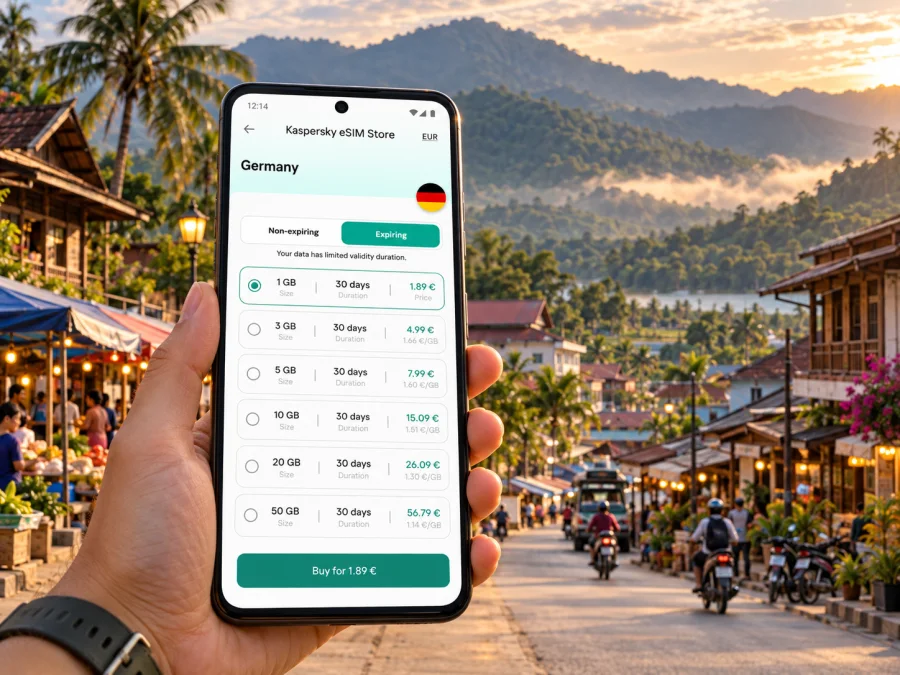
Kaspersky eSIM Store is an app and website where you can select, arrange and activate an eSIM with a suitable plan for mobile internet while travelling abroad. In Laos, local providers such as Unitel and Lao Telecom operate their own mobile services. A travel eSIM may access a partner network under separate roaming arrangements, so do not assume it uses a particular Lao provider: check the network details for the selected plan. Local coverage and a travel plan’s access are related but distinct.
If you are comparing options for this trip, review the available eSIM plans for Laos and check the conditions for your dates and itinerary. A plan’s country label alone is not a promise of continuous service in mountain or protected areas. If you need reliable contact during a remote activity, discuss communications with your guide or tour provider and do not make a mobile-data plan your only safety arrangement.
Match data to your travel habits
For maps, messages and occasional searches, saved offline maps can reduce data use. Photo sharing, automatic backups and video calls require more allowance. Match the validity period to your stay, and confirm the plan covers every stop if you are travelling beyond Luang Namtha. Disable automatic video playback and large photo backups over mobile data; use Wi-Fi for software updates and large uploads when appropriate.
Device compatibility and regional variants
Before choosing a plan, confirm that your phone supports eSIM and is not locked to a carrier. A device name alone may not be enough: the same model family can have different hardware or SIM configurations depending on the country or region where it was sold. Some regional versions use physical SIM only, or have different eSIM support. Check the exact model number and the manufacturer’s current compatibility information; check whether your device supports eSIM before purchase.
Also check that your phone can keep your usual number available if you need calls or verification messages while the travel eSIM handles data. On a dual-SIM device, label the lines clearly, select the correct line for mobile data and confirm which line can use data roaming. Menu names differ between phone makers and operating-system versions, so follow the on-screen instructions for your device.
Install and activate before the trip
Install the eSIM while connected to reliable Wi-Fi and follow the activation instructions shown with the plan. Avoid deleting an eSIM profile to troubleshoot unless the provider’s instructions tell you to; some profiles cannot simply be installed again. If you prefer to wait until arrival to use the plan, check whether installation and activation are separate steps and when the validity period begins.
- Check compatibility. Confirm eSIM support, carrier-unlock status and available eSIM slots.
- Choose the destination and plan. Review coverage destinations, data allowance, validity and activation terms.
- Install the profile. Use the QR code or in-app method while you have a stable connection.
- Label the lines. Give the travel eSIM a clear label such as “Laos data” so you can identify it later.
- Select mobile data. Choose the travel eSIM for data when you want to use the plan; keep your usual line configured for calls or messages if needed.
- Check roaming settings. Enable data roaming for the travel eSIM only if its instructions require it. Keep your home line’s roaming setting appropriate for your carrier charges.
- Test and preserve the details. Confirm the profile is installed, keep the order information, and wait for the network connection if the plan activates on arrival.
For device-specific steps, use the Android eSIM installation instructions or the iOS eSIM installation instructions. The exact screens may vary by phone model and software version. Do not remove your home SIM if you rely on it for account access; on many devices both a physical SIM and an eSIM can remain available, but how they work together depends on the model.
During your stay: keep the connection useful
At your lodging, save maps and booking details and confirm the intended data line is selected. Before a countryside trip, charge your phone, carry a power bank and download what you need.
If data does not work, confirm that the eSIM is on and selected for mobile data, check its roaming instructions and review destination, validity and remaining data. If service is still unavailable, move to an open area and allow the phone time to register; contact support over Wi-Fi if needed. Weak reception may reflect your location rather than a damaged profile. Avoid repeatedly reinstalling the eSIM.
Short stop, work trip or outdoor-focused visit?
- Short stopover: Save your lodging and pickup point before arrival; use data for directions and confirmations.
- Work trip: Check whether your tools need steady bandwidth. Treat mobile data as a backup for light work, not a guarantee of stable video calls.
- Trek or outdoor visit: Keep essential information offline, share your route and expected return time, and ask the provider about communication before departure.
- Journey onward: Confirm the plan’s included destinations. A local signal, Laos coverage and a neighbouring country are separate conditions.
Frequently asked questions
Is Luang Namtha a city or a province?
Both names are used in travel contexts. Luang Namtha is the provincial capital and also the name of the province. This article focuses on the town and distinguishes it from rural districts and protected areas across the province.
Is there a railway station in Luang Namtha town?
The railway’s Nateuy station is in Luang Namtha Province, outside the town. Plan a separate transfer to or from Luang Namtha and confirm its details for your travel date.
Will a Laos eSIM work on a trek?
It may connect in some places, but coverage can vary with terrain, network and exact route. Download maps and trip information before leaving town and follow your guide’s communication and safety advice.
Does a Laos plan include China or Myanmar?
Not necessarily. Check the included destinations in the specific plan. Geographic proximity to a border does not extend a plan’s coverage.
Can I keep my regular number active?
Often you can keep a physical SIM and travel eSIM configured together, depending on the device. Select which line handles data and check your home carrier’s roaming charges if that line remains enabled.
Does a travel eSIM include calls and SMS?
A data-only plan generally provides mobile internet rather than a regular phone number, voice service or SMS. Check the individual plan terms. Internet messaging and voice apps can work over data when the connection allows.
When should I install the eSIM?
Install it when you have a stable internet connection and enough time to follow the instructions. Check when the plan’s validity starts: it may begin at installation or at first connection, depending on its terms.
Get ready to connect in Luang Namtha
Before departure, verify your device, compare the plan’s data and validity with your stay, and save the essential addresses and maps offline. For a countryside excursion, prepare for a period without mobile internet and keep your guide or accommodation informed of your plans.
When you are ready, choose an eSIM plan for Laos in Kaspersky eSIM Store, install it over a reliable connection and follow the plan’s activation steps. That preparation helps you use mobile data for the parts of Luang Namtha where it is available while keeping a practical backup for the parts of the journey where it is not.


