
Travel connectivity guide
Lucerne eSIM Guide for Mobile Internet
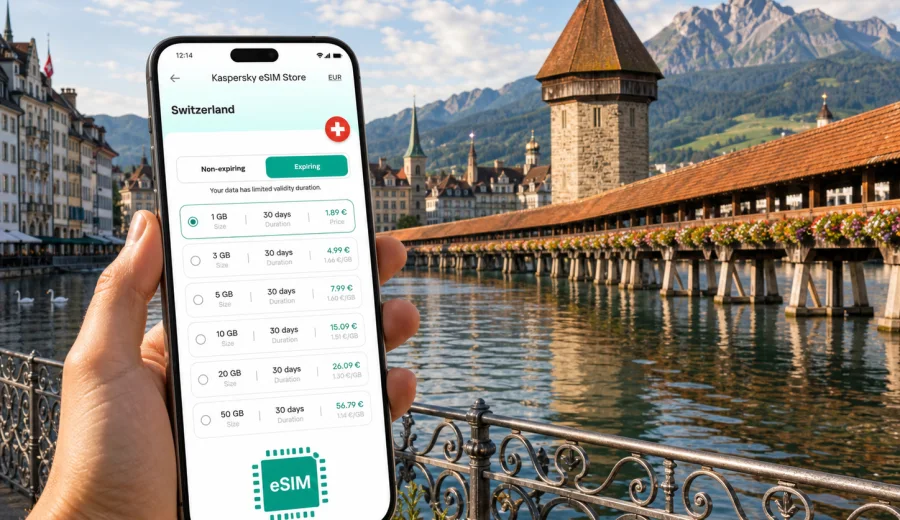
Lucerne eSIM guide: mobile connection and internet for your trip
Lucerne is compact, scenic, and easy to love, but it is not a city where you want to spend your first hour hunting for Wi-Fi. You may arrive by train from Zurich Airport, step out near the lake, and immediately need maps for the hotel, a boat timetable, a restaurant reservation, or a message to your driver. A working mobile connection makes the city feel simple from the first few minutes.
An eSIM is useful in Lucerne because many travel moments happen outdoors or in transit: walking across Chapel Bridge, checking ferry times on Lake Lucerne, finding the right platform at the station, or navigating toward the Lion Monument and the old town. Public Wi-Fi can help in some hotels, cafes, and transport hubs, but it is not a dependable plan for a whole day of movement.
This guide focuses on practical mobile internet for Lucerne: arrival, city districts, hotels, transport, business trips, stopovers, and day trips into central Switzerland. Switzerland is the country context, but the travel problem is local: staying online while you move around Lucerne.
Why mobile internet matters in Lucerne
Lucerne looks small on the map, but a typical day can involve several types of movement. You might walk through the old town in the morning, take a lake boat at midday, ride a mountain railway in the afternoon, and return to a hotel near the station in the evening. Each step is easier when your phone is already online.
Useful online tasks in Lucerne include:
- checking train platforms and short connections at Lucerne station;
- following walking routes through the old town, Musegg Wall, and lakeside promenades;
- using maps when narrow streets and bridges make orientation less obvious;
- opening hotel messages, entry codes, or booking confirmations;
- checking weather before boat trips or mountain excursions;
- using translation tools for menus, signs, and service messages;
- paying attention to data use when uploading photos and videos by the lake.
The city is friendly to pedestrians, but it is also a hub. Many visitors use Lucerne as a base for Mount Pilatus, Mount Rigi, Stanserhorn, Engelberg, or onward trains to Interlaken and Zurich. If your mobile internet works only inside the hotel, you lose the main value of a connected travel day: making decisions while the day is unfolding.
eSIM in Lucerne: what it actually helps with
An eSIM is a digital SIM profile installed on a compatible phone or tablet. For a trip to Lucerne, it can give your device mobile data without a physical SIM card. You choose a suitable tariff for Switzerland, install it before departure or after arrival, and use mobile data for maps, messages, bookings, and browser access.
For most travelers, an eSIM is not about replacing every communication channel. It is mainly a practical mobile internet setup for travel. Standard phone calls and SMS are not included unless a specific tariff says so. For calls, many visitors use internet-based apps over mobile data.
Before you rely on an eSIM in Lucerne, check three things:
- your device supports eSIM;
- your device is not locked to one carrier;
- the tariff conditions match Switzerland, your trip duration, and your expected data use.
If you are unsure whether your phone supports eSIM, use the compatibility check before buying: check your device. This is especially important for older phones, devices bought through a carrier contract, and tablets with limited cellular support.
Arrival scenarios: Zurich Airport, trains, and the first hour
Lucerne does not have a major international airport, so many visitors arrive through Zurich Airport and continue by train. The rail journey is straightforward, but the first hour still creates many small online needs: checking the platform, confirming the next train, messaging your hotel, or tracking the walk from the station to your accommodation.
If you install your eSIM before the trip, you can switch it on when it is time to use travel data. Some travelers prefer to install it at home over stable Wi-Fi and activate it after arrival, depending on the tariff instructions. Read the activation conditions carefully, because validity may start at installation, activation, or first network connection depending on the selected tariff.
If you wait until arrival, use airport or hotel Wi-Fi only for the setup step, then complete the eSIM installation before you leave the reliable connection. In Switzerland, train stations are efficient, but they are not ideal places to troubleshoot your phone while managing luggage and a tight connection.
Where you will use data in Lucerne
Lucerne’s most common visitor zones create different mobile internet habits.
| Area or route | Why mobile data helps | Typical data use |
|---|---|---|
| Lucerne station and Bahnhofplatz | Train changes, hotel routes, ticket checks, messaging | Maps, transport apps, email |
| Old town and Chapel Bridge | Walking navigation and restaurant search | Maps, reviews, translation |
| Lake Lucerne waterfront | Boat times, weather, photo sharing | Timetables, browser, uploads |
| Lion Monument and Musegg Wall | Route planning between attractions | Maps, audio guides |
| Hotels near the station or lake | Check-in messages and onward planning | Email, browser, calls over apps |
| Pilatus, Rigi, and nearby excursions | Timetables, weather, route changes | Maps, transport, messenger apps |
The practical point is simple: Lucerne is not only one postcard view. It is a connected travel base, and your phone often becomes your timetable, map, booking folder, camera backup, and translation tool in the same afternoon.
How much data to prepare for Lucerne
There is no single correct data allowance. A traveler who mainly uses maps and messaging needs much less than someone who uploads high-resolution video from lake cruises and mountain viewpoints. Estimate based on your habits rather than the number of days alone.
For a short Lucerne visit, think in scenarios:
- light use: maps, messaging, hotel emails, occasional browsing;
- moderate use: maps, transport apps, social media, photo uploads, internet calls;
- heavy use: video uploads, frequent hotspot use, cloud backup, streaming, remote work.
A weekend in Lucerne can be comfortable with a smaller data package if you avoid video streaming on mobile data. A week based in Lucerne with day trips around central Switzerland may need more, especially if you upload media, use navigation all day, or work from your laptop through a hotspot. Always check whether tethering is allowed in the tariff conditions before planning to connect a laptop.
A practical setup before your trip
Good preparation is short and calm. You do not need to turn your phone into a technical project before visiting Lucerne. You only need to make sure the essentials are ready before the first travel day.
Recommended preparation:
1. Confirm that your phone supports eSIM and is unlocked.
2. Choose Switzerland as the destination for your Lucerne trip.
3. Compare tariffs by data amount, validity period, and conditions.
4. Install the eSIM while you have a stable Wi-Fi connection.
5. Keep your primary SIM available if you need your usual number for banking or verification messages.
6. Save hotel details, tickets, and emergency contacts offline as a backup.
Kaspersky eSIM Store is an app and website where you can choose, arrange, and activate an eSIM with a suitable mobile data tariff for an international trip. For Lucerne, the relevant destination is Switzerland, so compare the available options for Switzerland rather than looking for a separate city product.
Installing eSIM for Lucerne
When your device is compatible, eSIM installation is usually a guided process. You may scan a QR code, follow in-app instructions, or use the device settings to add a cellular plan. The exact steps depend on your phone and operating system.
Use these guides if you need installation help: Android installation instructions and iOS installation instructions. Install while connected to reliable Wi-Fi, follow the tariff instructions, and avoid deleting an eSIM profile after activation unless the instructions specifically say it can be reinstalled.
After installation, check these settings before you start using data in Lucerne:
- set the eSIM as the line for mobile data when you want to use the travel tariff;
- keep your home SIM for calls or SMS if you still need it;
- enable data roaming for the eSIM if the tariff instructions require it;
- turn off automatic app updates and cloud backup on mobile data;
- monitor data use during the first day so you understand your pace.
Choosing a Switzerland tariff for a Lucerne city break
When you are ready to prepare mobile internet for Lucerne, choose Switzerland in the destination list and compare tariffs by data allowance and validity. For a city stay, validity matters almost as much as gigabytes: a 30-day tariff may be more convenient for a longer Swiss route, while a shorter option can suit a weekend.
You can review mobile data options for Switzerland before you leave, then install the eSIM while you still have a stable connection. This is the first moment in the planning flow when the country landing page becomes useful: you already know the city, the trip length, and your likely data use.
For Lucerne specifically, choose based on the shape of your visit:
| Trip type | Good fit | Watch out for |
|---|---|---|
| One-day stopover | Smaller data allowance, short validity | Maps and messaging may be enough |
| Weekend city break | Moderate data allowance | Photo uploads can use data quickly |
| Business trip | More data and longer validity | Check hotspot rules before relying on a laptop |
| Lucerne plus mountains | Moderate or larger data allowance | Weather checks, transport apps, and uploads add up |
| Switzerland rail route | Longer validity | Country-wide use matters more than city-only planning |
Do not choose only by price. Check the country, data amount, validity, activation rules, and whether the tariff supports the way you plan to use your phone. The cheapest-looking option is not helpful if it does not match your route or expires before the end of your stay.
Movement, hotels, and short routes
Lucerne is best explored on foot, by short bus rides, by train, and by boat. Mobile data helps when you move between Chapel Bridge, Weinmarkt, Musegg Wall, the Lion Monument, the station, and the lakefront. It also helps with taxi coordination, hotel entry codes, restaurant bookings, and last-minute platform changes.
For hotels and apartments, use Wi-Fi for heavy tasks: cloud backup, app updates, large uploads, and long video calls. Use the eSIM for the travel moments that happen outside: navigation, messages, tickets, short internet calls, and quick searches. Business travelers should also check whether hotspot use is allowed before planning laptop work through mobile data.
Lucerne is also a strong stopover and day-trip base. A short route can run from the station to Chapel Bridge, the old town, the lakefront, and the Lion Monument before a return train. Longer plans often include Mount Pilatus, Mount Rigi, Stanserhorn, Engelberg, Zurich, Interlaken, or Bern. Mobile internet is useful on these routes, but tunnels, mountains, boats, and rail corridors can affect signal quality, so save critical tickets and maps offline.
Data-saving habits and mistakes to avoid
Lucerne encourages photo and video use, so manage data early:
- download offline maps for Lucerne and day-trip areas;
- disable automatic photo backup on mobile data;
- use hotel Wi-Fi for app updates and large uploads;
- avoid video streaming unless your allowance is large;
- check usage after the first full day;
- keep a reserve for departure day.
Avoid the common mistakes: buying before checking device compatibility, installing in a rush at the station, ignoring when validity starts, expecting a data tariff to include a normal phone number, and letting cloud sync run in the background.
FAQ: eSIM and mobile internet in Lucerne
Do I need a separate eSIM for Lucerne?
Usually no. Lucerne is in Switzerland, so choose a tariff that covers Switzerland. The city focus helps with planning, but the data destination is the country or region stated in the tariff conditions.
Can I install the eSIM before I arrive?
Often yes. Installing over reliable Wi-Fi before travel is usually more comfortable than doing it at the station. Check the tariff rules because validity may start at installation, activation, or first network use.
Is public Wi-Fi enough for Lucerne?
It can help in hotels and cafes, but it is not a complete plan for walking routes, lake travel, station changes, day trips, or business movement. Mobile data is more practical when you are outside.
Final preparation for a connected Lucerne trip
Lucerne is easiest when your phone is ready before the scenic part starts. With mobile data prepared, you can move from the station to the old town, check boat and train times, adjust day trips, message hotels, and use maps without depending on the next Wi-Fi sign.
Before departure, check device compatibility, choose a Switzerland tariff that matches your dates and data habits, and install the eSIM over a reliable connection. When you are ready to prepare your phone for the trip, you can choose an eSIM tariff for Switzerland through Kaspersky eSIM Store and keep your Lucerne plans easier to manage from arrival to departure.