Travel connectivity guide
Luxembourg City eSIM: Mobile Internet Guide
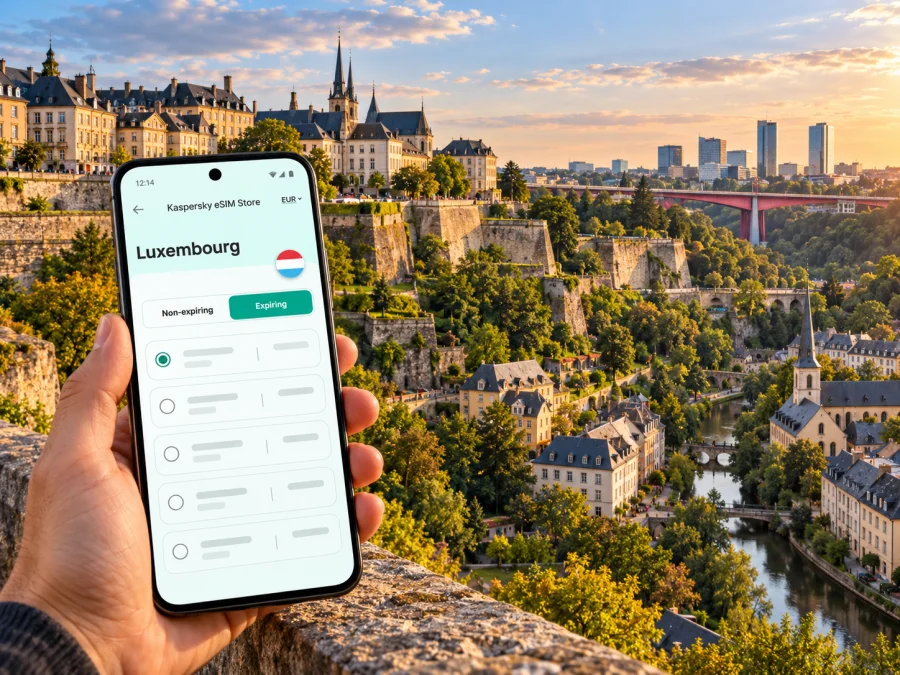
Luxembourg City eSIM: mobile connection and internet for your trip
Luxembourg City is compact enough to explore on foot, but its layout makes mobile internet especially useful. The historic centre sits high above the Alzette and Pétrusse valleys; districts such as Grund and Pfaffenthal are lower down, while Kirchberg occupies a plateau across the red bridge. A map can help you distinguish a short walk from a steep climb, find a lift or tram stop, and keep an airport or hotel transfer on track.
An eSIM can provide mobile data without swapping out your physical SIM. It is useful for checking directions, public transport changes, bookings, work messages and meet-up points. The right choice depends on your phone, the terms of the specific plan and where you expect to use data. A phone’s signal may vary between streets, buildings and valley routes, so avoid treating any coverage description as a guarantee for every corner of the city.
What to plan for in Luxembourg City
A first visit often combines places that look close together on a map but sit at different heights. Ville Haute is the central historic district; from there, bridges and public lifts connect to lower neighbourhoods. The city’s official visitor guide describes 24 districts, so it helps to save the names of the areas where you will stay and spend time rather than relying on a single pin labelled “centre.”
The old quarters and fortifications are part of a UNESCO World Heritage property. The city developed around a rocky promontory and deep river valleys, and that terrain still shapes walking routes and transport choices. Navigation is therefore more than a convenience: it can help you choose an accessible route, check the next connection, and find your way back after an evening in the lower town.
| Travel situation | Why mobile data helps | Useful preparation |
|---|---|---|
| Arrival at Luxembourg Airport | Check the current tram or bus route and reach your accommodation | Save the hotel address and a map before boarding |
| A day in Ville Haute | Find museums, restaurants and meeting points among compact streets | Pin the next stop, not only the day’s first destination |
| Going down to Grund or Pfaffenthal | Compare a walking route with a lift or other public transport | Check elevation and the return route before setting off |
| Work in Kirchberg | Find the right building, entrance or conference venue | Save the exact address and allow time to cross the plateau |
| Rail or onward travel | Review departure information and cross-border ticket requirements | Confirm the route and fare rules for the whole journey |
On arrival: airport, transfer and first connection
Luxembourg Airport is close to the capital, and its passenger information lists both a tram connection and bus services. The tram route shown by the airport connects Aéroport with Stadion via stops including Bonnevoie and Kirchberg. Bus line 6 also connects the airport with Bertrange and includes Hamilius and the Kirchberg bus station. Routes, service patterns and departure times can change, so check the live information for your arrival time instead of relying on an old screenshot or a remembered line number.
Before leaving the terminal, connect to a trusted Wi-Fi network if one is available and confirm that your eSIM profile is installed. If you intend to use it for data, make sure you know which SIM is selected for mobile data in your phone settings. Keep your home SIM enabled if you need to receive calls or messages on it, but check your home operator’s roaming terms; leaving a SIM active can still incur charges depending on its settings and plan.
A simple arrival checklist:
- Open the airport’s current public transport information and confirm the direction and stop for your accommodation.
- Check whether your eSIM plan is valid in Luxembourg and when its validity period begins.
- Select the travel eSIM for mobile data only if the profile is installed and the plan is ready to use.
- Keep the hotel address and any ticket or reservation details accessible offline.
- After boarding, follow the route on your map and confirm the stop name before you get off.
An eSIM plan is generally designed for mobile data; it should not be assumed to include a regular local phone number, voice calls or SMS unless the terms expressly say so. Internet calling and messaging apps can work over data, but they depend on the app, your contacts and a functioning connection. If someone needs to reach your usual number, check how your home SIM will behave abroad before departure.
Choose a plan around your route, not just your arrival day
A city stay can be a weekend break, a conference visit or a base for travel elsewhere in Luxembourg. Estimate data from what you will actually do: maps and messaging use less than frequent video streaming, large file uploads or a laptop hotspot. If you expect to work remotely, account for meetings and cloud files, and check whether tethering is permitted by the plan. Do not choose only by the largest data allowance; validity, destination coverage, top-up options and device restrictions matter too.
A practical way to estimate data:
- Light use: maps, messages, email, transport lookups and occasional browsing. Choose an allowance based on the number of travel days and how often you will have Wi-Fi.
- Regular use: frequent navigation, photo sharing, music and work messaging. Add room for updates and background app activity.
- High use: video calls, streaming or hotspot use. Review the plan’s exact data and tethering conditions and consider connecting to trusted Wi-Fi for large transfers.
There is no universal data amount for every visitor. A person using offline maps and hotel Wi-Fi will have different needs from someone on video calls throughout a workday. You can reduce surprise usage by disabling automatic app updates over mobile data, downloading maps and travel documents in advance, and checking the phone’s data-usage screen during the trip.
Device and eSIM checks before purchase
The country or city name in a product description does not confirm that a particular phone can use eSIM. Support depends on the exact device model and regional variant, as well as whether the device is carrier-unlocked. Availability can differ between versions sold in different markets; do not rely on a family member’s similar-looking phone or a generic model name. Check whether your device supports eSIM and confirm the status in the phone’s settings or with the manufacturer or seller before you buy.
Use this short checklist:
- Confirm the exact model number and regional variant in the device settings or original documentation.
- Check that the device supports eSIM and is not locked to a carrier that prevents another profile from being used.
- Confirm that you can access a stable Wi-Fi connection during installation.
- Make sure you can open the purchase account and any installation instructions while travelling.
- Read the plan’s activation rules: some plans start on installation, while others start on first network connection or another stated event.
Do not delete an installed eSIM profile as a troubleshooting shortcut unless the provider’s instructions say it can be installed again. Some profiles are single-install or have specific transfer rules. If you change phones, first verify the plan’s terms and available support options; an eSIM cannot automatically be assumed to move with your number or data allowance.
Kaspersky eSIM Store is an app and website where you can select, arrange and activate an eSIM with a suitable plan for mobile internet on an international trip. Before paying, check the plan’s destination list, data allowance, validity, activation conditions and any restrictions shown for your selected option. To review current options for the country, browse eSIM plans for Luxembourg. This destination page is for Luxembourg; it is not a city-specific tariff, and the terms of an individual plan determine where it can be used.
Installing and activating the eSIM
When practical, install the profile before you leave home, while you have reliable Wi-Fi and time to read the prompts. Follow the steps shown in your purchase flow and the relevant Android installation instructions or iOS installation instructions. Menu names vary between phone versions, so use the instructions for your operating system and follow the on-screen sequence rather than guessing at a setting.
Installation and first use are not always the same event. Read the plan conditions to learn when its validity starts. If it should start on arrival or on first connection in Luxembourg, leave the profile installed but follow the stated activation guidance. If the instructions require mobile data roaming for that eSIM, enable it for the travel profile only after confirming the correct line is selected. Roaming settings for your home SIM are separate, so check them carefully to avoid unintended use.
A sensible setup sequence is:
- Update the phone and make sure it has enough battery and storage.
- Connect to stable Wi-Fi and install the eSIM using the provided instructions.
- Label the new line something clear, such as “Luxembourg data,” if your phone offers labels.
- Set the intended line for mobile data and keep calls and messages on the line you prefer.
- Turn off automatic data switching if you do not want the phone to change lines without your choice.
- When the plan is ready to activate, follow its instructions and test a simple webpage or map.
If data does not work after setup, first check the selected mobile-data line, the plan’s destination and validity, and any APN or roaming instructions supplied with it. Toggle airplane mode briefly or restart the phone only after confirming that doing so will not interrupt an installation step. If the problem remains, use the support channel shown with the purchase and share the device model, operating-system version and the point where setup stopped. Avoid posting personal account details publicly.
Getting around: valleys, lifts, tram and bus
Luxembourg City’s terrain is part of its character and a practical factor in a day’s itinerary. The official city guide describes the Alzette and Pétrusse valleys and notes that the Grund and Pfaffenthal can be reached by public lifts; Kirchberg is connected by the city’s funicular. Bridges link the upper city with the Gare and Kirchberg plateaus. A route planner can help you compare walking with public transport, especially when a steep lane or a long staircase would be inconvenient with luggage, children or limited time.
Public transport within Luxembourg is free for passengers in second class on domestic buses, trams and trains. First-class travel is not included, and a valid ticket is required for cross-border public transport beyond the country. Confirm the current rule for your specific journey, especially if your route continues into France, Belgium or Germany. Free transport does not remove the need to check where to board, the direction of travel, service changes or any international fare.
Mobile data can help you decide among three practical ways to move:
| Option | Useful when | What to check |
|---|---|---|
| Walk | The route is short and you want to explore the old quarters | Elevation, steps, weather and the return climb |
| Lift or funicular | You are moving between the upper city, valley districts and Kirchberg | Operating hours, entrance location and any service notice |
| Tram, bus or train | You are crossing districts or connecting with the airport or station | Current route, direction, stop and whether your journey is domestic or cross-border |
A blue-dot map is not a substitute for route context. In the old centre, narrow streets and nearby buildings can make it easy to miss a turn; in a valley, your destination may appear close in plan view but be separated by a slope. Save the route back to your hotel and check the final stretch on foot before you start. If your battery is low, take a screenshot of the route or note the stop name.
Where to stay and how connectivity needs change by district
Luxembourg City’s districts offer different starting points. Match the accommodation address to your daily route, not only to a listing marked “central”; a short map distance may still involve a steep change in elevation.
| District | Often useful for | Mobile-data detail |
|---|---|---|
| Ville Haute | Historic centre, shops and central sights | Save exact entrances and check walking routes between levels |
| Gare | Railway arrivals and transport connections | Keep departure details and hotel address handy |
| Grund and Pfaffenthal | Valley walks, historic streets and views | Check the lift or return route before descending |
| Kirchberg | European institutions, offices and cultural venues | Save the exact building entrance across the large plateau |
| Residential districts | Quieter stays or a specific nearby destination | Check the route and late-evening transit before booking |
For a dinner or meeting in the lower town, share a venue pin rather than just a district name. If you have luggage, children or limited time, compare the walking route with a lift, funicular, tram or bus connection. Service availability can change, so check current information when you travel.
City breaks, business visits and short layovers
For a weekend, download an offline map of central Luxembourg City and pin the airport, hotel, station and a few planned stops. Use live data for updates and spontaneous detours; keep tickets and key addresses available offline.
For a business visit, save the venue, hotel and station, including the building entrance. If you plan to use a laptop hotspot or make video calls, check tethering conditions and estimate the extra data before choosing a plan. Keep essential files offline where possible.
For a short layover, check the time needed to reach the centre and return to the airport, including current transport schedules and airport procedures. A map can help plan the route but cannot guarantee service timing. If you leave Luxembourg for a neighbouring country, confirm both plan coverage and cross-border transport fares; the domestic free-travel rule does not cover the whole international journey.
A compact preparation checklist
Before departure: verify the exact model, eSIM support and carrier-lock status; compare plan coverage, validity and data with your itinerary; install over reliable Wi-Fi if permitted; save maps, tickets and addresses offline; review roaming settings for both SIMs.
On arrival: check the current airport route and destination stop; select the right line for mobile data; test a simple page; save a return route to the airport or station.
During the stay: monitor data use for streaming, uploads or hotspot; check service notices before relying on a lift or scheduled connection; keep the eSIM profile installed unless support instructs otherwise.
Frequently asked questions
Is public transport free in Luxembourg City?
Domestic buses, trams and second-class trains are free throughout Luxembourg. First class and cross-border travel are exceptions; cross-border journeys require a valid fare. Verify the current rules for your route before boarding, particularly if you are travelling onward to a neighbouring country.
Can I use an eSIM for ordinary calls and text messages?
Do not assume so. A travel eSIM plan may provide mobile data only and may not include a local number, standard voice calls or SMS. Check the exact plan terms. Internet-based calling and messaging apps can use data, while your usual SIM may remain available under your home operator’s roaming conditions.
Will the same eSIM work in every Luxembourg City district?
No plan can guarantee identical reception at every location. Signal can vary indoors, underground, among dense buildings and along the city’s lower valley routes. Check the plan’s destination terms and treat coverage maps as guidance rather than a promise for a specific room or street.
What if I travel from Luxembourg City into a neighbouring country?
Check that the selected plan explicitly covers each destination outside Luxembourg, and confirm whether it has regional coverage or is limited to one country. Separately check public-transport fare requirements: domestic free travel does not automatically apply to the full cross-border route.
Prepare your mobile internet for Luxembourg City
A little preparation makes it easier to move between the airport, the upper town, the river valleys and Kirchberg. Check device compatibility, choose a plan whose country coverage and validity match your itinerary, and install it using the instructions for your phone. Kaspersky eSIM Store provides an app and website for selecting, arranging and activating an eSIM plan for an international trip. Explore current eSIM options for Luxembourg and review the terms of the option you choose before travel.


