
Travel connectivity guide
Luxor eSIM: Mobile Internet for Egypt Travel
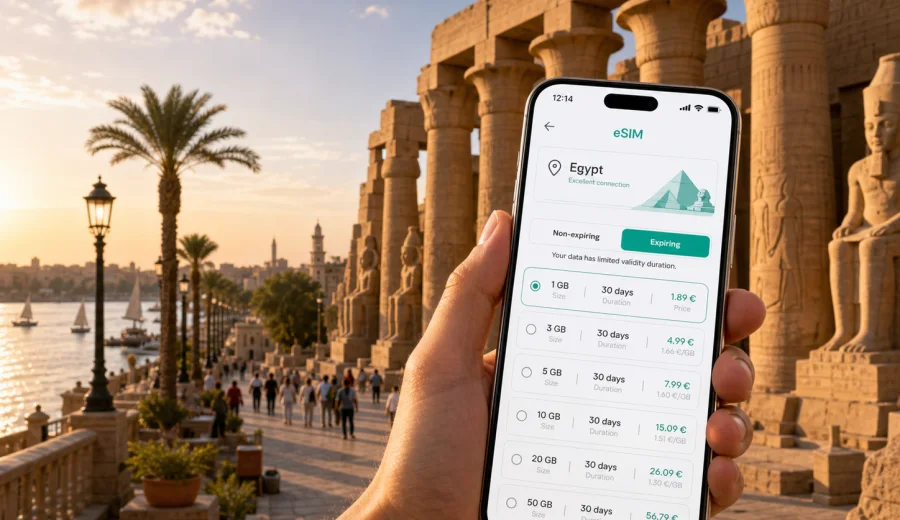
Luxor eSIM: mobile connection and internet for your Egypt trip
Luxor is a city where mobile internet quickly becomes part of the travel plan. You may land at Luxor International Airport, cross the Nile to a West Bank guesthouse, meet a driver before sunrise, check a temple route, or confirm the boarding point for a Nile cruise. In each case, a working mobile connection helps you move through the city with fewer delays.
This guide focuses on Luxor, not Egypt in general. The country matters for choosing the correct travel eSIM destination, but the practical details are city-specific: East Bank and West Bank movement, airport transfers, hotels, tomb and temple days, business visits, short stopovers, and onward trips to Aswan, Dendera, or Cairo.
Why mobile internet matters in Luxor
Luxor looks compact on a map, but the Nile divides the city into two very different travel zones. The East Bank has the airport road, Luxor Temple, Karnak, the train station, larger hotels, restaurants, and many Nile cruise docks. The West Bank has the Valley of the Kings, Hatshepsut Temple, Medinet Habu, the Colossi of Memnon, village stays, and desert-edge roads.
With mobile internet on your phone, you can:
- navigate between the East Bank and West Bank;
- message a driver, hotel host, guide, or tour coordinator;
- check pickup details for sunrise balloon tours;
- keep maps available near temples, ferry points, and hotel zones;
- translate short transport or check-in messages;
- open booking confirmations without searching for Wi-Fi;
- use internet calls and messaging apps if voice calls are not included in your tariff.
Luxor also rewards early starts. Many travelers leave the hotel before the heat builds, and balloon tour transfers may begin well before sunrise. If you need to identify a vehicle, share your location, or confirm a changed pickup point at 4:30 a.m., mobile data is more useful than hoping that lobby Wi-Fi reaches the street.
What an eSIM does for a Luxor trip
An eSIM is a digital SIM profile installed on a compatible phone or tablet. For travel, it helps you use mobile internet without replacing your physical SIM card. You choose a destination and data package, install the eSIM, and use it according to the selected tariff conditions.
For Luxor, eSIM is useful before the first transfer and throughout the city:
- at the airport or train station, when you need maps and messages;
- on the East Bank, where hotels and sites are close but traffic and pickup points still matter;
- on the West Bank, where landmarks and driver coordination are often more useful than street names;
- on Nile cruise days, when dock details, schedules, and guide messages can change;
- during business travel, when email, documents, and online calls need a backup outside hotel Wi-Fi.
Most travel eSIM tariffs are focused on mobile data. They may not include a local phone number, regular voice calls, or SMS unless the tariff says so. For many Luxor visitors, messaging apps are enough, but you should check the plan terms if a hotel, airline, bank, or business contact expects traditional calls or text messages.
Arrival: airport, train station, and the first ride
Luxor International Airport is close to the city, but the first hour can still be confusing if you do not have data. Hotels may use similar names, cruise boats may have specific dock instructions, and West Bank stays may require a bridge route, ferry, or private boat. A connected phone lets you confirm the address, message your driver, and check whether you are going to the East Bank or West Bank.
The train station is central, but mobile internet is useful there too. Travelers often continue from the station to a cruise boat, airport road hotel, West Bank guesthouse, or private transfer to another city. If you can send your live location and open your booking details, the handoff is easier.
A simple arrival sequence:
1. Install the eSIM before departure if the tariff allows advance installation.
2. Keep your main SIM active if you need banking or account messages.
3. After arrival, set the eSIM line as the mobile data line.
4. Open your hotel address, map pin, and transfer contact before leaving the terminal or station.
5. Save the same details offline in case battery or coverage becomes a problem.
East Bank and West Bank planning
The practical question in Luxor is often not "How far is it?" but "Which bank am I on, and how am I crossing?" Mobile internet helps you answer that question in real time. You can check a ferry point, message a driver after a tomb visit, or compare the bridge route with a boat crossing.
| Luxor moment | Why mobile data helps |
|---|---|
| Airport to East Bank hotel | Confirm pickup, route, and hotel entrance |
| East Bank to West Bank sites | Coordinate ferry, boat, bridge route, or driver |
| Valley of the Kings visit | Keep tickets, maps, and pickup messages ready |
| Karnak and Luxor Temple day | Navigate between sites, cafes, and hotel areas |
| Nile cruise boarding | Confirm boat name, dock area, and timing |
| Sunrise balloon tour | Receive early pickup updates |
| Business stay | Join calls, manage email, and move between meetings |
Before a long sightseeing day, save your hotel, temple entrance, ferry point, meeting location, and one backup landmark. Mobile data gives flexibility, while offline pins and screenshots give you control if a connection is weaker inside a building or on a quieter road.
How much data is enough?
Luxor trips are often map-heavy and message-heavy. You may not stream video, but you will probably use data many times each day for transport, searches, ticket checks, restaurant locations, and group coordination.
A practical estimate:
- Light use: maps, messaging, email, and a few searches for a short stay.
- Medium use: daily navigation, social media, photo uploads, and regular browsing.
- Heavy use: video calls, laptop hotspot, cloud backups, streaming, or remote work.
For two or three days in Luxor, choose enough data for maps and transport messages with a buffer. For a week, a Nile cruise extension, or remote work, choose a longer validity period and more traffic. If Luxor is part of a wider Egypt route, plan for the full itinerary rather than only the city center.
Choosing an eSIM tariff for Luxor
Start with your itinerary. A traveler staying two nights near Luxor Temple has different needs from someone working on the West Bank, joining a Nile cruise, or traveling onward to Aswan. Price matters, but it should not be the only filter.
Use this checklist:
- Trip length: cover arrival, sightseeing days, and departure.
- Data volume: include maps, messaging, uploads, work apps, and possible hotspot use.
- Destination: choose Egypt if Luxor is part of your Egypt route.
- Activation: check when the validity period starts.
- Device: confirm eSIM support before you pay.
- Main number: decide whether to keep your usual SIM active for verification messages.
Kaspersky eSIM Store is an app and website where you can quickly choose, arrange, and activate an eSIM with a suitable mobile internet tariff for travel abroad. For a Luxor itinerary, you can choose a mobile internet tariff for Egypt before your trip and keep the setup ready for arrival, provided your device is compatible and the selected tariff conditions fit your route.
The best option is not simply the largest data package. It is the tariff that matches how long you stay, how often you move between banks of the Nile, and whether you continue beyond Luxor. A short stopover may need a small but reliable buffer. A business visitor may need more data for documents and calls. A cruise traveler may need coverage for several Egyptian stops.
Check device compatibility first
Before relying on eSIM in Luxor, confirm that your phone or tablet can use it. Not every device supports eSIM, and some devices bought through mobile operators can be locked. It is better to find this out before departure than at the airport.
Quick check:
- confirm that your model supports eSIM;
- make sure the device is not carrier-locked;
- update the operating system if needed;
- learn where your phone stores mobile data line settings;
- keep your main SIM available if you need verification messages;
- save installation details securely.
You can also check your device before selecting a tariff. This is especially useful if you travel with an older phone, a dual-SIM setup, or a device you have not used abroad before.
Installing eSIM for Luxor
The exact steps depend on your phone and the selected tariff, but the sequence is straightforward. Install the eSIM when you have a stable connection, read the activation terms, and do not delete the eSIM profile unless you are sure you no longer need it. Some profiles cannot be moved or reinstalled after removal.
Step-by-step preparation:
1. Choose Egypt as the destination for your Luxor trip.
2. Select the data volume and validity period.
3. Complete the purchase flow and keep the installation details available.
4. Install the eSIM on a compatible device.
5. Decide which SIM line will handle mobile data.
6. After arrival, enable mobile data for the eSIM line.
7. If required by the tariff, enable data roaming for the eSIM line only.
For setup details, use the Android installation instructions or the iOS installation instructions. Install while your phone is charged and connected to reliable Wi-Fi, especially if you prepare the eSIM before your flight.
Hotels, cruises, and everyday movement
Accommodation changes how you use data. A large East Bank hotel may have Wi-Fi, but you still need mobile internet during transfers and sightseeing. A West Bank guesthouse can be ideal for early tomb visits, yet you may depend more on mobile data for pickup points and route coordination. A Nile cruise adds dock names, boat schedules, and guide messages to the plan.
Before check-in, save:
- the hotel or boat name;
- the exact map pin;
- the property contact;
- the nearest landmark;
- the booking confirmation;
- the next transfer time.
Do not treat hotel Wi-Fi as the whole connectivity plan. It can help with large downloads and backups, but mobile internet is what helps on the corniche, outside a temple, at a ferry point, or returning from the West Bank after sunset.
Business trips and remote work
Luxor also receives travelers for archaeology, education, tourism projects, media work, hotel operations, and regional meetings. For these trips, mobile internet supports email, files, maps, calls, and schedule changes, not only sightseeing.
For work travel:
- choose data that covers work apps, not just navigation;
- check whether hotspot use is allowed if you may connect a laptop;
- keep essential documents offline;
- test video-call settings before an important meeting;
- keep your primary number reachable if colleagues use it for account verification;
- keep a backup meeting point in case a contact cannot call you directly.
An eSIM can reduce arrival friction because you do not need to look for a physical SIM after landing. For important work, still combine eSIM, hotel Wi-Fi, offline files, and a charged power bank.
Stopovers and trips from Luxor
Some travelers have only one day in Luxor: a cruise stop, a train break, a long transfer, or a quick temple route before continuing to Aswan or Cairo. In a short visit, mobile data is useful because there is little room for mistakes.
A connected stopover plan:
1. Save the arrival point, departure point, and luggage plan.
2. Decide whether you stay on the East Bank or cross to the West Bank.
3. Pin two or three realistic sights.
4. Keep transport contacts in one messaging app.
5. Use mobile data for timing, maps, and quick changes.
Luxor is also a base for Dendera, Abydos, Aswan, and Nile routes. For longer trips, save offline maps, keep driver and guide contacts available, carry a power bank, and check whether your tariff validity covers the full route. Coverage and speed can vary by location, route, building, network conditions, and selected tariff, so keep key travel details available offline.
Data-saving habits in Luxor
You can make a travel data package last longer without making the trip inconvenient. The goal is to reserve mobile internet for moments where it matters most.
Useful habits:
- download offline maps before long sightseeing days;
- upload large photo batches on hotel Wi-Fi;
- turn off automatic cloud backups over mobile data;
- reduce video streaming on mobile data;
- close navigation when you no longer need live directions;
- save tickets, vouchers, and hotel addresses offline;
- avoid using hotspot unless you have enough data and battery.
Battery management matters too. Luxor sightseeing can mean long hot days, early starts, and extended time outdoors. Keep your phone charged, carry a power bank, and avoid leaving all practical travel details inside apps that need a live connection to open.
Common mistakes to avoid
Avoid these common eSIM mistakes:
- buying a tariff before checking eSIM compatibility;
- installing the eSIM on the wrong device;
- deleting an eSIM profile during the trip;
- assuming a data-only tariff includes calls or SMS;
- choosing a validity period that ends before departure day;
- relying only on hotel Wi-Fi for airport or temple transfers;
- using hotspot heavily without checking tariff conditions;
- keeping all booking details online without offline copies.
The simplest prevention is to test your setup early. Check that the eSIM appears in your phone settings, know which line is used for mobile data, and keep the installation instructions accessible. If you need your regular number for verification messages, keep that line available.
FAQ: eSIM and mobile internet in Luxor
Is eSIM useful in Luxor if my hotel has Wi-Fi?
Yes. Wi-Fi helps inside the property, but mobile internet is useful during transfers, ferry crossings, temple visits, tours, restaurant searches, and route changes.
Should I choose an Egypt plan for Luxor?
Yes, Luxor belongs to Egypt, and a country-level destination is practical if you also visit Cairo, Aswan, the Red Sea, or join a Nile cruise.
Can I install eSIM before arriving in Luxor?
Often yes, but check the tariff conditions. Some tariffs can be installed before travel, while validity may start according to specific plan rules.
Will eSIM replace my normal phone number?
Usually no. Travel eSIM tariffs often focus on mobile data. Regular calls and SMS may not be included unless the tariff says so.
What should I prepare before a sunrise balloon tour?
Charge your phone, save the pickup message, keep the hotel location offline, enable mobile data for the eSIM line after arrival, and confirm the contact channel with the operator or guide.
Choose eSIM for your Luxor route
Luxor is easier to enjoy when your phone is ready for the practical parts of travel: finding your hotel, meeting a driver, checking a ferry point, moving between East Bank and West Bank, handling early tours, and continuing through Egypt without starting over in each city.
Before you travel, check that your device supports eSIM, choose a data package that matches your days in Luxor and the rest of your route, and install it while you have a stable connection. Kaspersky eSIM Store helps you choose, arrange, and activate an eSIM with a suitable mobile internet tariff for a trip abroad, so you can prepare an eSIM tariff for Egypt before arriving in Luxor.