Travel connectivity guide
Mabaruma eSIM: Mobile Internet in Guyana
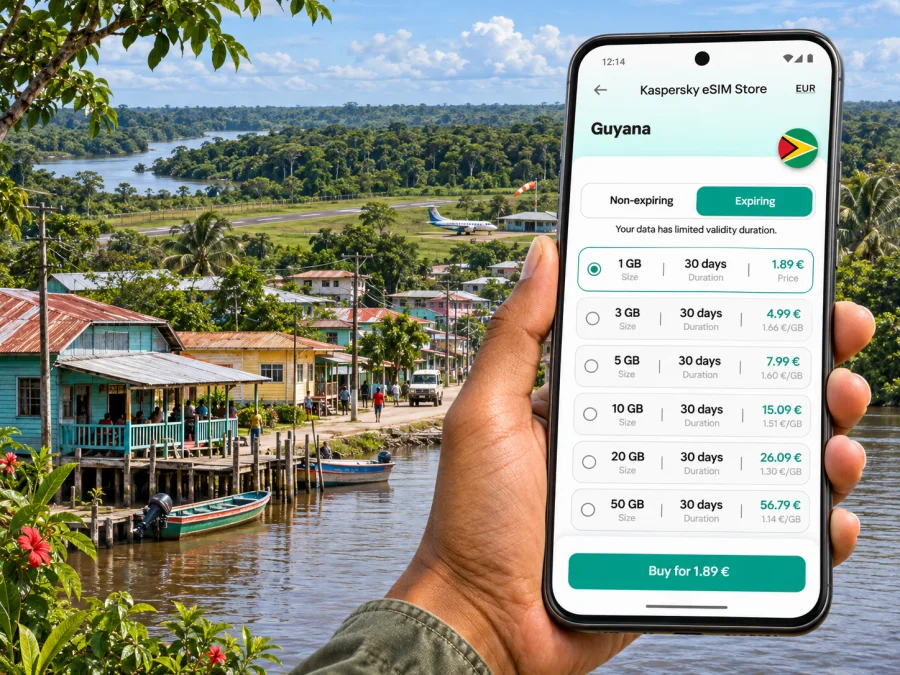
Mabaruma eSIM: mobile connection and internet for a remote Guyana trip
Mabaruma sits in northwestern Guyana, in Region 1, Barima-Waini. It is a small regional town surrounded by forest, waterways and dispersed settlements rather than a large urban centre. That setting shapes how to plan mobile internet: you may use data for arrival details, maps, messages and coordination in town, but a connection should not be treated as guaranteed once you travel beyond it.
An eSIM can keep a compatible phone ready for mobile data without swapping a physical SIM. For a trip to Mabaruma, however, choosing the right destination plan is only one part of preparation. You should also confirm where the plan can connect, save essential information offline, and make arrangements with your host or local guide before leaving a larger hub.
What to expect from connectivity in Mabaruma
Mabaruma is listed by Guyana’s Lands and Surveys Commission as a town in Region 1. The wider Barima-Waini region includes rainforest, river systems and coastal areas. Mabaruma is an administrative centre for the region and a practical base for travel to nearby communities, some of which are reached by boat. This is a very different travel pattern from moving between dense city neighbourhoods with continuous roads and many alternative services.
Mobile service may be available in parts of town, but coverage depends on the local network, the exact place, the phone and the conditions at the time. A travel eSIM also depends on its roaming partners and the plan’s destination terms. A country-level listing does not prove that signal is available at a particular guesthouse, airstrip, waterfront, river stretch or village. Confirm the local situation before relying on data for time-sensitive plans.
| Trip situation | What mobile data may help with | Sensible backup |
|---|---|---|
| Arrival and check-in in Mabaruma | Sending a message, checking saved booking details, contacting a host if service is available | Agree a meeting point and arrival window in advance |
| Moving around the town | Looking up a saved address or using an offline map | Keep the destination name written down and ask your host about local transport |
| Departure by boat or aircraft | Confirming arrangements before departure | Save tickets, names, contacts and timings offline; verify schedule changes directly |
| Travel to a river settlement or remote area | Occasional messages where a network is reachable | Do not assume continuous data; coordinate through your guide or accommodation |
| Work that needs stable internet | Email or light tasks if a connection is available | Download files beforehand and identify a reliable connection point with your host |
Treat the table as a planning aid, not a signal map: a phone’s signal indicator does not guarantee that data will support navigation, calls or uploads.
Plan around the journey, not just the town
Mabaruma is reached from elsewhere in Guyana by air and river routes connect it to nearby communities. Routes and schedules can change, so confirm current arrangements with your transport provider, accommodation or local organiser. Do not plan a tight connection on the assumption that a boat or flight will run at a particular time.
Prepare each leg separately, especially if your itinerary includes a domestic flight, the Kumaka waterfront or a boat onward. A map app cannot replace a confirmed pickup or local advice; destinations may be identified by a landmark, landing or community name rather than a street number.
Before leaving a place with dependable Wi-Fi or mobile data:
- Download an offline map covering Mabaruma and the places you expect to visit. Check that the saved area includes your route, not only the town centre.
- Save accommodation details, check-in instructions, transport contacts and any booking references on your phone and, if practical, on paper.
- Send your expected arrival time to the person meeting you. Agree what to do if your flight or boat is delayed or you cannot send an update.
- Ask whether your onward journey needs cash, a pre-arranged boat, a local guide or a particular departure point.
- Download boarding documents, work files, translation resources and entertainment before travelling.
- Carry a charged power bank. In a remote itinerary, preserving battery can matter as much as conserving data.
If the route includes communities beyond Mabaruma, treat the local contact as the primary source for current travel arrangements. Online maps and schedule pages can be incomplete, and mobile data may become intermittent away from the town. Share your route with someone who is not travelling with you, especially if you are heading out by river.
Choosing a Guyana eSIM for a Mabaruma itinerary
Kaspersky eSIM Store is an app and website where you can choose, arrange and activate an eSIM with a suitable plan for mobile internet on an international trip. For Mabaruma, select Guyana as the destination and read the plan details carefully. A plan that is valid for Guyana does not necessarily promise service in every remote settlement or along every route.
Before choosing, compare the information shown for the specific plan:
- Destination and validity. Confirm that Guyana is included and check when the plan’s validity begins. Installation and activation are not always the same event; follow the instructions attached to your chosen plan.
- Data allowance. Estimate your use by task. Messaging and checking a short text itinerary use less data than video calls, cloud photo uploads, map streaming or hotspot use. Download large files before departure.
- Plan duration. Include travel days and possible delays. If your route is flexible, leave some margin rather than choosing a period that ends on the planned return day with no buffer.
- Network and roaming terms. Read any stated network or activation information. If the available details do not confirm Mabaruma specifically, treat town and regional coverage as uncertain and ask support or your local contact for guidance.
- Device requirements. Your phone must support eSIM and be carrier-unlocked. Device variants can differ by country or operator, even when their names look identical. Check whether your device supports eSIM before purchase.
- Calls and SMS. A data-focused eSIM usually does not provide a regular phone number or conventional voice and SMS service unless the plan explicitly says otherwise. Keep your usual number available if you need calls, and use internet messaging only when data is working.
For a trip limited to Mabaruma, a modest data allowance may be enough if you mainly message, check information and use offline maps. If you expect to work online, make frequent video calls, share a hotspot or upload media, calculate that separately and consider whether the local connection can support those tasks. A larger allowance does not solve a weak or unavailable signal.
When you have reviewed the destination and conditions, you can browse current eSIM options for Guyana. Check the live details there before making a choice; availability, network arrangements and plan conditions can change.
When local service is uncertain
Guyana’s official sources identify mobile operators serving the country, and Digicel publishes a Guyana eSIM offer. Those facts establish that mobile and eSIM services exist in the market; they do not confirm the roaming network used by every travel plan or guarantee coverage at a particular Mabaruma address. The available public information does not provide a dependable, street-level coverage commitment for the exact trip described here.
Use a layered approach instead of relying on a single signal source:
- Before travel: Ask your accommodation, employer or guide whether visitors commonly have mobile data at the specific location and which local arrangements they recommend. Ask the eSIM provider which network the plan uses in Guyana if that is not shown in the offer details.
- At arrival: If data does not connect, check that the eSIM line is enabled, the correct line is selected for mobile data, and any required data-roaming setting is enabled for that eSIM. Follow the plan’s instructions and avoid deleting the profile while troubleshooting.
- For essential contact: Keep your regular SIM active if your phone supports dual SIM and your home operator’s roaming terms are acceptable. Tell your contact which number you will use. A second line is a fallback only where its own network has service.
- For remote travel: Agree check-in points and times in advance. Save emergency and accommodation details locally, and ask your host about communication options for the route. Do not assume that a phone will have signal on a boat or outside town.
- For work: Prepare documents offline, queue messages where possible and arrange a separate connection point if a live call or upload is essential.
Avoid repeatedly switching network settings without checking the plan instructions. If the eSIM registers but data does not load, verify the data line, roaming setting, remaining allowance and access point settings only as directed by the provider. Restarting the phone may help in some cases, but it cannot create coverage where none is available.
Getting around town and staying oriented
Mabaruma is not a place where every visitor will follow the same grid of named streets. You may move between your accommodation, a local business, a regional office, a landing or an airstrip. Ask your host which names locals use for the destination and whether a driver or pickup should be arranged. Save a pin before leaving Wi-Fi, but keep the written place name too: a pin can be misplaced or difficult to explain if the phone is offline.
At the waterfront, travel can involve boats, passengers and cargo moving between communities. The departure point and timing matter more than a route line on a map. Confirm the correct landing, boat operator and expected duration with the person arranging the trip. If weather or river conditions change the plan, a pre-agreed contact method will be more useful than depending on mobile data to find a new option.
For short walks, treat maps as a reference rather than your only source of directions. Ask locally about the route and road conditions. For a community outside Mabaruma, arrange travel with someone familiar with the area; a road shown in an app may not be open or suitable for visitors.
Keep an offline location note with your host’s contact, the locally used destination name, a saved map pin, pickup point, time and booking reference. Carry a paper copy of the most important details.
Install and activate your eSIM carefully
Set up the eSIM while you have a stable internet connection and enough time to follow the plan instructions. Depending on your device and plan, installation may use a QR code or an in-app method. Do not scan a code from an untrusted message, and keep the installation details available until the profile is working.
A practical sequence is:
- Confirm that the device supports eSIM, is not carrier-locked, and has enough battery.
- Check the plan’s destination, data allowance, validity period and activation instructions.
- Install the profile using the method supplied for that plan. Keep your regular SIM available if you need its number.
- Label the new line clearly, for example “Guyana data,” so you can identify it in mobile settings.
- Follow the plan’s guidance on when to turn the line on and whether data roaming is required. Avoid activating earlier than needed if the validity clock starts on first network connection.
- Once in the destination, select the eSIM for mobile data and check whether it registers. Allow a little time for connection; exact behavior depends on the plan and local network.
- Keep your regular line selected for voice calls if that is your preference, and check its roaming charges before travel.
Use the relevant Android eSIM installation instructions or iOS eSIM installation instructions for device-specific steps. Menu names may differ between software versions. If something does not match the screen, pause and consult the current instructions or support rather than deleting the profile.
After installation, test basic data access before leaving a reliable connection point. Open a simple page or send a short message, then save anything you may need offline. A successful test in one location does not prove that the eSIM will connect throughout Region 1, so retain your backup plan.
Data habits that suit a remote trip
You can make a limited or uncertain connection more useful by controlling what the phone does in the background. Turn off automatic photo and video uploads while travelling, pause app updates on mobile data, and download music, maps and documents in advance. Use lower data settings for media when available.
If you share a connection with another device, hotspot use can drain both the data allowance and the phone battery quickly. Confirm that tethering is allowed by the plan and use it only for essential tasks. Keep a charger or power bank in your day bag and avoid leaving navigation running with the screen at full brightness for long periods.
| Need | Prepare before departure | Use mobile data for |
|---|---|---|
| Navigation | Offline map, saved pin and written destination | Rechecking a route when a signal is available |
| Messages | Important contacts saved, expected arrival shared | Brief updates and coordination |
| Work | Files downloaded and meeting links stored | Email, light browsing and short uploads if service allows |
| Photos | Backup settings reviewed and storage cleared | Selective uploads when connection and power permit |
| Transport | Tickets and arrangements saved offline | Checking for changes before boarding |
These habits conserve data but do not improve local coverage or guarantee a particular speed.
Common questions about eSIM and Mabaruma
Does a Guyana eSIM guarantee internet throughout Mabaruma?
No plan should be assumed to work at every point. A Guyana destination plan may connect through a local roaming partner, but the exact service depends on its terms, local coverage, device and conditions. Confirm the network details where possible and ask your host about the places you will visit.
Is Mabaruma in Guyana or in another territory?
Mabaruma is a town in Guyana, in Region 1, Barima-Waini. It is in the country’s northwestern region. For a country-specific eSIM plan, select Guyana; do not select French Guiana, which is a separate destination.
Can I rely on Google Maps or another navigation app?
Use an offline map and saved locations, but do not rely on an app alone. Coverage may be intermittent, some destinations are reached by river, and current transport arrangements should be confirmed locally.
Will an eSIM let me make ordinary phone calls?
Only if the selected plan explicitly includes a voice service or phone number. Many travel eSIMs are data-only. Keep your usual SIM for calls if suitable, and check your home operator’s roaming terms. Internet calls and messaging require an active data or Wi-Fi connection.
Should I install the eSIM before arriving?
You can often install a profile before travel, but the exact activation moment depends on the plan. Read its instructions carefully and install while you have stable internet. If validity begins at first connection, you may want to wait to enable the line until the appropriate time.
What if the eSIM shows a signal but the internet does not work?
Check that the eSIM is selected for data, data roaming is set as the plan requires, and the plan is active with data remaining. Follow its APN and troubleshooting instructions. If the issue persists, contact the plan support team when you have a connection and ask your local contact about the network situation.
Can I use the same preparation for travel beyond Mabaruma?
Use the same offline preparation, but plan for greater uncertainty. Ask the local organiser about boats, pickup points and communications before leaving town. A phone connection in Mabaruma does not imply a connection in a nearby settlement or along the route.
A practical checklist before you leave
- [ ] Confirm your route and pickup details directly with your host or transport provider.
- [ ] Check the destination, validity and network terms of the Guyana plan you are considering.
- [ ] Confirm that your phone supports eSIM and is unlocked.
- [ ] Install the profile over a stable connection and follow its activation instructions.
- [ ] Save offline maps, bookings, contacts and work files.
- [ ] Agree how to check in if mobile data is unavailable.
- [ ] Keep a charged power bank and a fallback line or contact method where practical.
- [ ] Verify time-sensitive boat and flight arrangements close to departure.
Prepare your mobile connection for Mabaruma
Mabaruma is a regional town in a remote, river-connected part of Guyana. Mobile internet can be useful for arrival coordination and everyday tasks, but conditions outside the town and the exact reach of any travel eSIM should be checked rather than assumed. Pair a suitable Guyana plan with offline maps, confirmed transport arrangements and a local contact.
When you are ready, use Kaspersky eSIM Store to review and arrange an eSIM for your trip. Explore current options for Guyana, check the plan’s terms, and install it on a compatible device before you travel.


