
Travel connectivity guide
eSIM Macao: mobile connection and internet
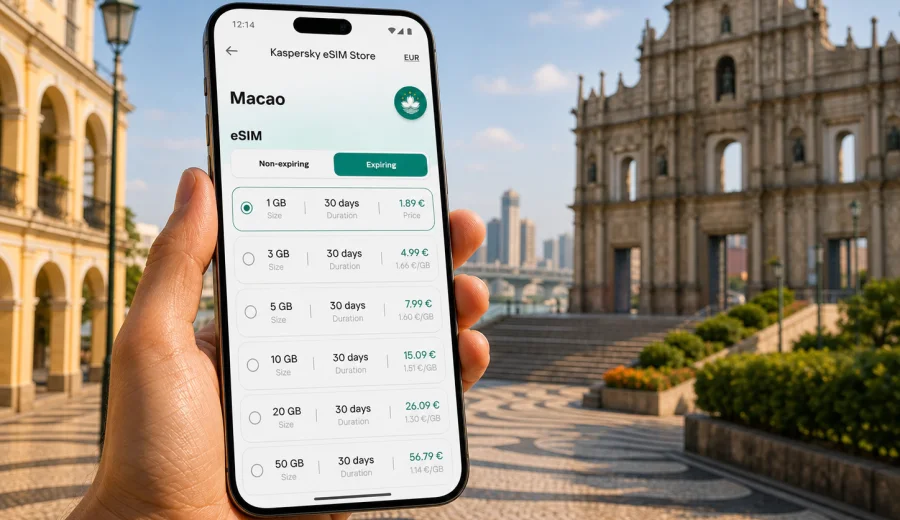
eSIM in Macao: mobile connection and internet for your trip
Macao is compact, busy, and connected, but that does not mean every traveler should rely on roaming or wait until arrival to solve mobile data. If your trip includes airport transfers, hotel check-in, ride-hailing, maps, translation, messaging, bookings, or work calls, a prepared eSIM can make the first hours much easier. Instead of looking for a physical SIM card after landing, you can set up a digital SIM profile on a compatible phone and use mobile internet through a suitable travel data plan.
This guide explains how to prepare mobile connection in Macao with eSIM, how to choose a data plan, what to check before purchase, and how to avoid common setup mistakes. The focus is practical: staying online during a short city break, a business visit, a regional route through the Greater Bay Area, or a longer stay where you need steady mobile data.
Why eSIM is useful for a trip to Macao
Macao is easy to explore, but many travel tasks depend on mobile data. You may need maps near Senado Square, messaging during a hotel transfer, translation in shops and restaurants, or quick access to booking confirmations. Public Wi-Fi can help in some places, but it is not always available at the exact moment you need it.
An eSIM helps because it is built into the device rather than inserted as a plastic card. You choose a suitable data plan for the destination, install the eSIM profile, and switch mobile data to that profile when the trip starts. This is convenient if your regular SIM card must stay active for banking messages or calls while the eSIM handles data.
Typical travel scenarios in Macao include:
- checking transport options after arrival;
- using maps around the historic center, Cotai, Taipa, and Coloane;
- messaging hotels, colleagues, drivers, or family;
- opening tickets, restaurant reservations, and travel documents;
- using translation tools in real time;
- joining a business call from a hotel or coworking space;
- sharing mobile data with a laptop if your device and plan allow tethering.
eSIM is not magic and it is not a guarantee of coverage in every building or corner. Local signal quality still depends on the available mobile network, device settings, and the selected plan conditions. The benefit is preparation: you can handle the data setup before you need it urgently.
eSIM, roaming, physical SIM, and Wi-Fi: what changes in practice
Different ways of staying online have different trade-offs. The best choice depends on trip length, expected data use, and how much time you want to spend arranging connectivity after arrival.
| Option | Best for | Main advantage | What to watch |
|---|---|---|---|
| eSIM travel data plan | Short trips, business visits, prepared travelers | No physical SIM card, setup before or during the trip | Device must support eSIM and be unlocked |
| Standard roaming | People who want to keep everything with their home operator | No separate setup if roaming is already enabled | Pricing and limits can vary by home plan |
| Physical local SIM | Longer stays or users who need a local number | Can include local voice or SMS depending on offer | Requires purchase, registration rules may apply, and a SIM slot is needed |
| Public Wi-Fi | Light browsing in hotels, cafes, or venues | No mobile data use while connected | Availability, speed, and security can vary |
For many visitors, eSIM is the middle path: more controlled than open Wi-Fi, often easier to arrange than a physical SIM, and more transparent than using roaming without checking the details. You can see the data allowance, validity period, destination, and price before you start.
How much mobile data do you need in Macao?
Macao is small, so navigation does not usually consume huge amounts of data by itself. The bigger variables are video, cloud backups, social media uploads, and work apps. A weekend visitor who mostly uses maps and messaging may need much less data than a traveler who streams video, joins video meetings, or shares hotspot access with a laptop.
Use this rough planning table before choosing a plan:
| Travel style | Common usage | Practical data approach |
|---|---|---|
| Light city break | Maps, messaging, tickets, occasional browsing | Choose a smaller package and keep video on Wi-Fi |
| Standard tourist trip | Maps, messaging, social media, restaurant searches, translation | Choose a mid-size package with a validity period matching the trip |
| Business visit | Email, calls, documents, ride-hailing, calendar, messaging | Allow extra data for calls and cloud files |
| Regional route | Macao plus nearby destinations | Check whether a country, regional, or global option best matches the full route |
| Heavy data use | Video, hotspot, frequent uploads, remote work | Choose a larger package and confirm tethering conditions |
If you are unsure, think in tasks rather than gigabytes. Maps and messages are usually light. Video calls, streaming, large file sync, and automatic photo backup can use data quickly. Before departure, download offline maps, hotel confirmations, tickets, and important documents. Then the eSIM data plan is used for live tasks instead of avoidable background traffic.
What to check before buying an eSIM for Macao
Before you choose any eSIM plan, check the technical and plan details. This takes a few minutes and can prevent most setup issues.
Start with your device. It must support eSIM, and it should not be locked to a single mobile operator. Some phone models differ by market, so the model name alone is not always enough. If you are not sure, check your device before purchase and review the phone settings for SIM restrictions.
Then review the plan:
- Destination: make sure Macao is included in the selected plan.
- Data allowance: match it to navigation, messaging, work, and media use.
- Validity period: choose a duration that covers arrival, stay, and departure day.
- Activation rules: check when the validity period starts.
- Tethering: confirm whether hotspot use is available if you need it.
- Voice and SMS: do not assume they are included; many travel eSIM plans are data-only.
- Refund and reuse conditions: review the terms before installing and activating.
The most reliable setup is the one you understand before you leave. If a plan is data-only, calls and messages can still work through internet-based apps, but the eSIM may not include a local phone number, regular voice calls, or SMS unless the specific plan says so.
When to install and when to activate
Installation and activation are often confused. Installing an eSIM usually means adding the eSIM profile to your device. Activation can involve switching the plan on and connecting it to a mobile network, depending on the plan rules. Some travelers install before departure and activate after arrival. Others complete the whole process after landing using airport Wi-Fi or hotel Wi-Fi.
A practical approach:
1. Before departure, check device compatibility and operator lock status.
2. Choose the destination and plan.
3. Install the eSIM profile while you have stable Wi-Fi.
4. Keep your primary SIM active if you need your regular number.
5. On arrival in Macao, set mobile data to the eSIM profile.
6. Enable data roaming for the eSIM profile if the instructions or device settings require it.
7. Test maps, messaging, and browser access before leaving the airport, ferry terminal, hotel, or first reliable Wi-Fi point.
If the plan validity starts at first network connection, installing before the flight can be convenient. If validity starts immediately after purchase or installation, timing matters more. Always follow the conditions shown for the chosen plan.
Choosing an eSIM plan for Macao in Kaspersky eSIM Store
Kaspersky eSIM Store is an app and website where you can choose, arrange, and activate an eSIM with a suitable data plan for mobile internet during an international trip. For Macao, the main decision is not only "how many gigabytes" but also how the plan fits the real route and the way you use your phone.
If Macao is your only destination, a destination plan can be straightforward. If you are combining Macao with Hong Kong, mainland China, or other parts of Asia, compare whether a regional or multi-destination option better fits the whole itinerary. Check the validity period carefully: a plan that covers the exact travel dates is usually more useful than one that is too short or unnecessarily large.
You can choose an eSIM data plan for Macao when you are ready to compare available options for the destination. Review the data amount, validity, and activation details before completing the purchase, especially if you plan to use maps, translation, messaging, and work tools every day.
Setup checklist before the flight, ferry, or border crossing
Use this checklist before your trip starts:
- Confirm that your phone supports eSIM.
- Check that the device is not locked to one operator.
- Update the operating system if an update is already planned and you have time to test the phone afterward.
- Save the eSIM installation details somewhere accessible.
- Install the eSIM profile on stable Wi-Fi when possible.
- Download offline maps for Macao and your hotel area.
- Turn off automatic cloud backup on mobile data if you want to control usage.
- Check whether your regular SIM should remain active for calls, SMS, or banking messages.
- Learn where to switch mobile data between SIM profiles.
- Keep the support contact and order information available.
This preparation is useful even for short visits. The first hour after arrival is often when you need mobile internet most: finding transport, messaging the hotel, checking an address, or confirming a booking.
How to install eSIM on iPhone or Android
The exact steps depend on the device model and operating system, but the basic flow is similar: add the eSIM profile, label it clearly, choose it for mobile data, and test the connection. If your phone shows several SIM profiles, naming the travel profile "Macao data" or "Travel eSIM" can make it easier to avoid switching the wrong line.
For device-specific setup, use the official installation guides: Android installation guide and iOS installation guide. Follow the steps shown for your device, and do not delete the eSIM profile unless you are sure the plan conditions allow reinstalling it.
After setup, check these settings:
- Mobile data line: set it to the travel eSIM when you want to use the plan.
- Data roaming: enable it for the eSIM profile if required by the instructions.
- Default voice line: keep your regular SIM if you still need your usual number.
- Low data mode: enable it if you want to reduce background traffic.
- Personal hotspot: test only if tethering is included and you need it.
If the phone does not connect immediately, wait a few minutes, toggle airplane mode, confirm the eSIM line is turned on, and check APN or roaming settings if the instructions mention them. Avoid repeatedly deleting and reinstalling the profile without reviewing the plan conditions.
Practical Macao travel scenarios
Macao trips are often short, but they can be dense. A reliable mobile data setup helps in several everyday situations.
Arrival by air, ferry, or land route. You may need to message the hotel, open maps, or check transport options before you reach your accommodation. Having eSIM prepared reduces dependence on public Wi-Fi at the first stop.
Historic center walking route. Around Senado Square, the Ruins of St. Paul's, and nearby streets, mobile data helps with navigation, restaurant searches, translation, and ticket information. A small amount of data can cover many of these tasks if video and backups are limited.
Cotai and Taipa plans. Large venues, shopping areas, and hotels can involve frequent messaging, ride-hailing, and map checks. If you are coordinating with other people, keep enough data for messaging and location sharing.
Business visit. Macao business trips often require email, calendar access, video calls, file previews, and secure account verification. Choose a plan with a buffer rather than calculating only the minimum.
Regional itinerary. If the trip includes Macao and nearby destinations, check plan coverage carefully. A plan for one destination may not match the full route; a regional option may be more convenient if it includes all relevant stops.
How to control data use during the trip
Even a suitable data package can disappear faster than expected if background apps are unrestricted. Before you switch to mobile data, adjust a few settings.
Recommended controls:
- Download offline maps before arrival.
- Set photo and video backup to Wi-Fi only.
- Disable automatic app updates on mobile data.
- Use lower streaming quality if you must watch video.
- Close cloud sync tools when they are not needed.
- Use messaging apps instead of sending large files by email.
- Check data usage by app in phone settings.
- Use hotel Wi-Fi for large downloads when you trust the network.
For business travelers, the biggest hidden consumers are cloud drives, video meetings, and device backups. For tourists, social video uploads and map previews are common sources of unexpected use. A quick settings review can make a smaller plan last longer.
Quick decision guide
Choose a smaller data package if:
- your trip is one to three days;
- you mainly use maps, messaging, and tickets;
- you will use trusted Wi-Fi for video and large downloads;
- you travel alone and do not share hotspot data.
Choose a larger package if:
- you will use video calls or hotspot;
- you need mobile data for work;
- your trip includes several busy days;
- you upload photos and videos frequently;
- you do not want to monitor usage closely.
Consider a regional or broader plan if:
- Macao is part of a route with nearby destinations;
- you cross borders during the same validity period;
- you prefer one setup for several stops instead of separate destination plans.
Common mistakes to avoid
The most common eSIM problems are usually caused by timing, device compatibility, or settings rather than the idea of eSIM itself.
Avoid these mistakes:
- buying a plan before checking whether the device supports eSIM;
- assuming every eSIM includes voice calls and SMS;
- installing the profile on the wrong device;
- deleting the eSIM profile too early;
- forgetting to switch mobile data to the travel eSIM;
- leaving heavy cloud backup active on mobile data;
- choosing a validity period that ends before departure day;
- assuming the same destination plan covers nearby regions without checking;
- waiting until you urgently need data before reading setup instructions.
If you travel with two phones, decide in advance which one will hold the eSIM. Some eSIM profiles cannot simply be moved between devices after activation. If you rely on one phone for banking confirmations, keep your regular SIM settings clear and test message delivery before the trip.
Frequently asked questions
Does eSIM for Macao include a local phone number?
Many travel eSIM plans are designed for mobile data. They may not include a local phone number, standard voice calls, or SMS unless those features are clearly listed in the plan conditions. You can usually use internet-based calling and messaging apps over mobile data.
Can I keep my regular SIM active?
Yes, on many dual-SIM phones you can keep the regular SIM active for calls or SMS and use the eSIM for mobile data. Check your phone settings carefully so the correct line is used for data and the correct line remains available for your usual number.
Should I install the eSIM before arriving in Macao?
Installing before departure can be convenient because you can use stable Wi-Fi and avoid setup pressure at arrival. Check the plan activation rules first. If validity starts only when the eSIM connects to a supported network, pre-installation may be practical. If validity starts earlier, time the setup carefully.
What if mobile data does not work immediately?
Check that the eSIM profile is enabled, mobile data is assigned to the eSIM, and data roaming is enabled if required. Toggle airplane mode, wait a few minutes, and review the installation instructions. If the issue continues, contact support with your order details and device model.
Is eSIM better than public Wi-Fi?
It depends on the situation. Public Wi-Fi can be useful in hotels and venues, but mobile data is more convenient when you are moving around, using maps, messaging during transfers, or avoiding unknown networks. Many travelers use both: eSIM for mobility and trusted Wi-Fi for large downloads.
Can I use hotspot with an eSIM?
Hotspot availability depends on the device and the selected plan conditions. If you need to connect a laptop or another phone, check tethering before purchase and monitor usage because shared data can run out quickly.
Final preparation before you go
For a smooth trip to Macao, prepare mobile internet with the same care as hotel bookings and travel documents. Check eSIM compatibility, choose a data allowance that fits your real usage, understand when the plan starts, and install the profile while you still have stable Wi-Fi. Keep your regular SIM active if you need your usual number, and switch mobile data to the eSIM when the trip begins.
Kaspersky eSIM Store helps you choose, arrange, and activate an eSIM with a suitable data plan for international travel. Before departure, compare the available options and prepare an eSIM data plan for your Macao trip so maps, messages, bookings, and travel tools are ready when you need them.