
Travel connectivity guide
Madrid eSIM: mobile internet for travel
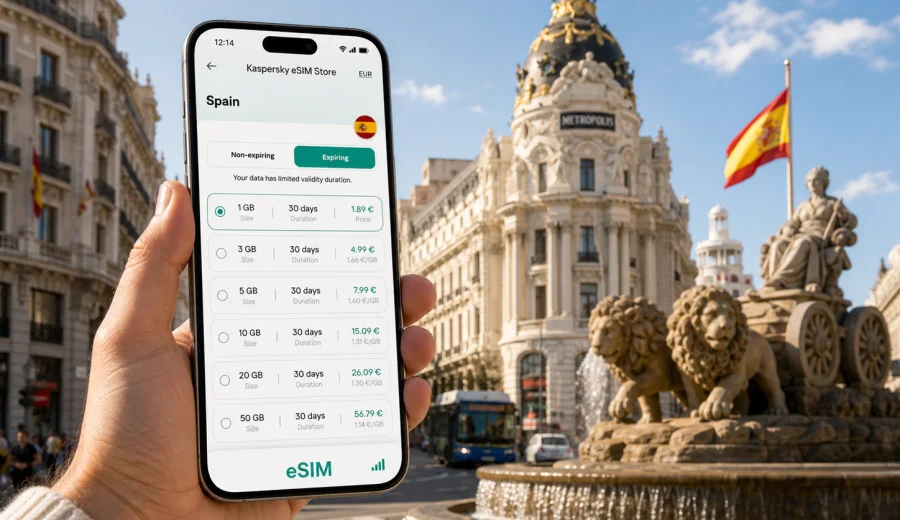
Madrid eSIM: mobile connection and internet for your trip
Madrid is a city where mobile internet becomes useful almost immediately. You may need maps before you leave Adolfo Suarez Madrid-Barajas Airport, a ride-hailing app for a late arrival, train updates at Atocha, hotel messages near Gran Via, restaurant bookings in Malasana, or video calls during a business trip around AZCA. A Madrid eSIM helps you prepare mobile connection for these moments without looking for a physical SIM card after landing.
This guide focuses on practical travel scenarios in Madrid: arrival, local transport, central districts, hotel check-in, business days, stopovers, weekend routes, and trips from the city to other parts of Spain. It also explains how to choose an eSIM tariff for mobile internet, what to check before purchase, and how Kaspersky eSIM Store can help you choose, set up, and activate an eSIM for a compatible device.
Why mobile internet matters from the first hour in Madrid
Madrid is easy to enjoy when you can move confidently between the airport, metro, taxis, trains, hotels, museums, and neighborhoods. It is also a city where travel decisions often happen on the go: you compare routes, check platform changes, message a host, reserve a table, scan a ticket, or translate a menu.
An eSIM can be especially useful because you can prepare it before the trip and activate mobile data when the tariff conditions allow. You do not need to remove your usual SIM card, and you can keep your main number available for banking confirmations or messaging apps, depending on your device settings.
Common Madrid situations where mobile internet helps:
- checking the route from the airport to the hotel before leaving the terminal;
- opening metro, bus, taxi, and walking directions without searching for Wi-Fi;
- using maps in dense central areas such as Sol, La Latina, Chueca, Salamanca, and Lavapies;
- receiving hotel check-in instructions or apartment access codes;
- keeping work chats active between meetings;
- managing train tickets for Toledo, Segovia, Valencia, Barcelona, or Seville;
- staying in touch with family while moving between museums, parks, and restaurants.
The important point is not only speed. The value is control: you know which tariff you selected, how much data it includes, how long it is valid, and which destination it is intended for.
Madrid arrival scenarios: airport, train station, and late check-in
Most international travelers arrive through Madrid-Barajas Airport. The airport is large, and your first online tasks can start before you see the city: checking baggage updates, finding the right terminal exit, messaging your driver, opening a hotel address, or choosing between metro, train, bus, and taxi.
If you arrive by train, Atocha and Chamartin are also easier with mobile data. Atocha is convenient for the historic center, Prado Museum, Retiro, and onward high-speed trains. Chamartin is useful for northern Madrid, business areas, and some long-distance routes. In both stations, online access helps with platform information, ticket changes, navigation, and meeting points.
For late arrivals, an eSIM can reduce friction. Hotel reception instructions, apartment door codes, ride-hailing pickup points, and last-minute route changes are all easier when you are not depending on public Wi-Fi. If your main SIM has expensive roaming, you can use your eSIM profile for mobile data and keep your usual number for calls or messages where your phone supports that setup.
How much data you may need in Madrid
Data use depends on your habits, trip length, and whether you use hotel Wi-Fi. Madrid is walkable in the center, but travelers often rely on maps, transport apps, messaging, translation, cloud tickets, and photo sharing.
| Madrid travel style | Typical data needs | Practical choice |
|---|---|---|
| Short stopover or one-night stay | Maps, messages, ride-hailing, boarding pass | Small data package for a few days |
| Weekend city break | Navigation, restaurant search, museum tickets, photos | Moderate package with enough buffer |
| Business trip | Work chats, email, maps, video calls when Wi-Fi is weak | Larger package and longer validity |
| Family trip | Multiple route checks, shared photos, entertainment for children | More data or separate plans per device |
| Spain route from Madrid | Trains, intercity maps, hotel changes, day trips | Spain or regional tariff that fits the route |
Avoid choosing only by the lowest price. A tariff should fit your real trip: number of days, expected data use, country or region coverage, and the moment when the validity period starts. If you plan to use your phone as a hotspot for a laptop, check whether tethering is allowed by the selected tariff.
Where an eSIM helps most inside Madrid
Madrid’s central districts are close to one another, but each creates different online needs.
In Sol and Gran Via, mobile data helps with walking routes, shopping searches, theater tickets, and meeting points. These areas are busy, so having maps ready before you enter crowded streets can save time.
In the Prado, Retiro, and Paseo del Arte area, you may use mobile internet for timed museum tickets, audio guides, restaurant bookings, and route planning after the museum. Retiro is large enough that offline guessing can cost time, especially if you are meeting someone at a specific gate or garden.
In La Latina and Lavapies, navigation is useful because small streets, slopes, and evening crowds can make routes less obvious. Translation apps and restaurant searches also come up often.
In Salamanca, Chamberi, and the Castellana business corridor, the main use case is reliability during the day: email, calendars, meeting links, taxi apps, and messages between offices, hotels, and restaurants.
For Real Madrid matches, concerts, and events around Santiago Bernabeu, Wi-Fi may be crowded or unavailable. Mobile data helps with tickets, route changes, and messages after the event.
Choosing an eSIM tariff for Madrid
For a city trip to Madrid, the correct destination is Spain. The city itself does not usually need a separate city-only tariff. What matters is that the selected eSIM tariff includes Spain and matches the route you will actually take.
Before you choose, answer five questions:
1. How many days will you be in Madrid?
2. Will you leave Madrid for Toledo, Segovia, Barcelona, Valencia, Seville, or another Spanish destination?
3. Will you stream video, join work calls, or use a laptop hotspot?
4. Do you need data immediately after landing, or only after hotel check-in?
5. Does your phone support eSIM and is it unlocked for another mobile profile?
If your trip is only Madrid, a Spain tariff may be enough. If Madrid is the first stop in a wider European route, compare whether a regional option better matches your itinerary. Conditions vary by selected tariff, so check destination, data allowance, validity period, and activation rules before payment.
Practical preparation before the flight
The simplest approach is to prepare the eSIM before you travel, while you still have stable internet at home. You can choose the destination, review the data package and validity, complete setup, and keep the eSIM ready for arrival. Activation timing can depend on the specific tariff and installation flow, so read the on-screen instructions carefully.
Use this checklist before departure:
- confirm that your phone supports eSIM;
- check that the device is not locked to one mobile operator;
- keep your primary SIM active if you need banking SMS or voice calls;
- download hotel, flight, and train details for offline access;
- save your passport, insurance, and booking details securely;
- install the eSIM while you have a stable connection;
- understand when the tariff validity starts;
- know which SIM profile will handle mobile data after arrival.
If you are traveling with a second device, such as a tablet, check its eSIM support separately. eSIM profiles and tariffs may not be transferable after activation, depending on the conditions.
A balanced way to prepare mobile internet for Madrid
Kaspersky eSIM Store is an app and website where you can quickly choose, set up, and activate an eSIM with a suitable tariff for mobile internet during an international trip. For Madrid, the relevant country page is Spain, because the tariff must match the country where the city is located.
Once you have estimated your data needs and trip length, you can choose an eSIM tariff for a trip to Madrid in Spain and review the available options for the destination. Check the tariff details before payment: data volume, validity period, coverage destination, price, and any usage rules shown for the selected plan.
This is useful if you want to avoid solving mobile internet only after arrival. You can prepare the eSIM in advance, keep instructions available, and switch mobile data to the eSIM profile when appropriate for your trip.
Installing and activating eSIM for Madrid
The exact installation steps depend on your phone model and operating system, but the travel logic is similar. You choose a tariff, install the eSIM profile, then select that profile for mobile data. On some devices, data roaming must be enabled for the eSIM profile so the plan can work correctly abroad.
For detailed setup steps, use the Android eSIM installation guide or the iOS eSIM installation guide. Follow the instructions on your device and avoid deleting the eSIM profile after activation unless you are sure the tariff terms allow reinstallation.
Before buying, also check your device compatibility. Compatibility matters because not every phone that accepts a SIM card supports eSIM, and some devices may be locked by a mobile operator. If the device is not compatible, the eSIM cannot be installed in the usual way.
Madrid transport, hotels, and day trips
Madrid has strong public transport, but mobile internet still makes movement easier. Metro, buses, Cercanias trains, airport routes, taxis, and walking directions often combine in one day. With data available, you can compare the airport metro, express bus, taxi, and ride-hailing options before you leave the terminal.
For sightseeing, maps help because central areas are close but not always aligned in a straight line. A route from Royal Palace to Sol, Prado, and Retiro is easier when you can adjust for opening times, weather, crowds, and restaurant bookings. For hotels and apartments, mobile data also helps with check-in messages, door codes, and route planning at the start and end of each day.
Madrid is also a base for quick trips. Toledo and Segovia are common day trips, and high-speed trains connect the capital with many Spanish cities. If your eSIM tariff is valid for Spain and your dates match the validity period, the same data plan can support navigation, tickets, and messages outside Madrid.
Business trips and short stopovers
Business travelers often move between the airport, hotels, meeting rooms, restaurants, and train stations in the same day. Mobile data is useful as a backup even when office or hotel Wi-Fi is available. Consider a larger data allowance if you expect email attachments, cloud documents, short video calls, or hotspot use for a laptop. Check the tariff conditions before relying on tethering.
For meetings around Paseo de la Castellana, AZCA, Nuevos Ministerios, and Chamartin, mobile internet also helps with timing. Traffic and transport choices can change quickly, and a few minutes can matter when you are moving between appointments.
Madrid can also be a stopover city. If you have several hours between flights or trains, mobile internet helps you decide whether leaving the airport is realistic, check the route to the center, store boarding pass details, and return without guessing transport schedules.
What eSIM does and does not include
For travel planning, it is important to separate mobile internet from a traditional phone plan. eSIM tariffs for international trips commonly focus on data. They may not include a local phone number, voice calls, or SMS unless the conditions explicitly say so.
That means you can usually use internet-based messaging and calling apps over mobile data, but ordinary calls and text messages may still depend on your main SIM or another service. Keep your primary SIM active if you need bank codes, airline messages, or calls to your usual number. Check your device settings so mobile data uses the eSIM profile and your main number does not accidentally use expensive roaming.
Also check when the data allowance starts being used. Some tariffs begin validity after installation, some after connection to a supported network, and some have other rules. The details shown for the selected tariff are the source you should follow.
Quick Madrid data-use guide
Use this simple guide to avoid underestimating your needs:
- Maps and walking navigation: usually light, but used often.
- Messaging and email: light unless you send many photos or files.
- Translation and restaurant search: light to moderate.
- Social media photo uploads: moderate to heavy.
- Video streaming: heavy and best saved for Wi-Fi if your package is small.
- Video calls: heavy and sensitive to connection quality.
- Hotspot for a laptop: potentially heavy; check tariff rules first.
If in doubt, choose a package with a little extra buffer. Running out of data during an airport transfer, train change, or late-night hotel search is more inconvenient than carrying a modest unused balance.
FAQ: eSIM and mobile internet in Madrid
Do I need a Madrid-specific eSIM?
Usually no. For a city article about Madrid, the practical destination is Spain. Choose a tariff that includes Spain and fits your route, trip length, and expected data use.
Can I install eSIM before arriving in Spain?
In many cases, yes. It is often convenient to install the eSIM before travel while you have stable internet. Read the selected tariff instructions carefully because validity and activation timing may vary.
Will eSIM replace my regular phone number?
No. A travel eSIM for mobile data usually does not replace your regular number. You can often keep your main SIM for calls or messages and use the eSIM for data, depending on your phone and settings.
Is public Wi-Fi enough in Madrid?
Public Wi-Fi can help in hotels, cafes, and some transport areas, but it is not always available exactly when you need it. Mobile internet is more useful for moving through the city, checking routes, and handling time-sensitive messages.
Can I use eSIM for trips from Madrid?
Yes, if the selected tariff includes Spain and remains valid during your travel dates. That can be useful for Toledo, Segovia, Valencia, Barcelona, Seville, and other routes that start from Madrid.
Final checklist before you use eSIM in Madrid
Before departure, confirm three things: your device supports eSIM, the tariff includes Spain, and the validity period matches your travel dates. Then install the eSIM with a stable connection and keep the setup instructions available in case you need to review them after landing.
On arrival, select the eSIM profile for mobile data, enable any required data roaming setting for that profile, and test maps or messaging before leaving the airport or station. Keep your primary SIM settings under control so you avoid unexpected roaming use.
If Madrid is your main destination, this preparation can make the first day smoother. If Madrid is the start of a larger Spain route, it also helps you keep mobile internet ready for trains, hotels, day trips, and changes in plans.
To prepare before you travel, review eSIM options for Spain in Kaspersky eSIM Store and choose the tariff that fits your Madrid itinerary, data needs, and compatible device.