
Travel connectivity guide
Mahaut eSIM for Mobile Internet in Dominica
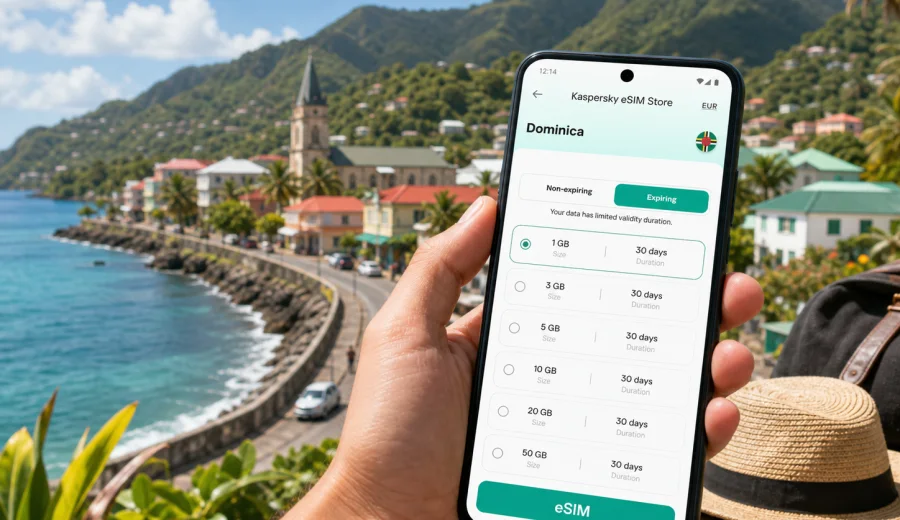
Mahaut eSIM: mobile connection and internet for a smoother trip
Mahaut is a practical base on Dominica's west coast: close enough to Roseau for meetings, ferry arrivals, shopping and government offices, but quieter than the capital and well placed for coastal drives, hillside guesthouses and short island routes. For travelers, that mix creates a simple need: reliable mobile internet before you start moving between the airport road, the coast, your hotel and nearby towns.
An eSIM helps you prepare that connection without searching for a physical SIM card after arrival. You can install a digital SIM profile on a compatible phone, choose a data package for Dominica, and use mobile data for maps, messages, ride coordination, hotel check-in details and travel updates. It is not a replacement for local emergency planning or for a voice number unless a specific tariff says so, but it is useful for the everyday internet tasks that make a small-island trip easier.
Mahaut is not a city of large transport hubs and metro lines. Connectivity matters here because movement is often practical and local: one road into Roseau, a coastal route toward northern villages, short transfers to Canefield, hillside turns to guesthouses, and day trips that may take longer than the map suggests. Having mobile data ready means you can confirm directions, call through messengers, check opening hours saved in your itinerary and keep hotel contacts within reach.
Why mobile internet matters in Mahaut
Mahaut works well for travelers who want a quieter stay near Roseau, but it is still a place where small details can affect the day. You may arrive in Dominica through Douglas-Charles Airport and cross the island by road, or come by ferry into Roseau and continue north along the coast. In both cases, mobile internet helps before you reach the hotel desk.
Common trip moments where data is useful:
- sharing your live location with a driver or host;
- checking the route from Roseau to Mahaut after dark or in rain;
- saving maps before heading into hilly inland roads;
- confirming a restaurant, shop or pharmacy before walking there;
- messaging a tour guide for a departure point;
- using translation, banking, airline and weather apps;
- keeping work chats open during a short business stay.
Mahaut also suits travelers who do not want to spend the whole trip in one place. Roseau is close, the west coast is easy to explore in stages, and the road network can lead to waterfalls, forest walks and northern coastal stops. A data-first eSIM is especially convenient when your plans shift during the day and you need to recheck the next leg.
What an eSIM gives you in a Mahaut trip
An eSIM is a digital SIM profile installed on a compatible smartphone or tablet. For travel, the usual value is mobile data. You keep your physical SIM or primary line in the phone, add the travel eSIM as a separate data line, and switch mobile data to the travel profile when you need internet abroad.
For a Mahaut itinerary, that can be enough for most daily tasks:
- maps and navigation along the west coast;
- messenger calls instead of ordinary voice calls;
- hotel confirmations and digital booking documents;
- photo backups when Wi-Fi is weak or unavailable;
- mobile boarding passes and ferry information;
- online payments and banking checks;
- hotspot use for a laptop if your device and tariff allow it.
Before buying any eSIM plan, check two things. First, your device must support eSIM and must not be locked to one operator. Second, read the exact tariff conditions: data volume, validity period, destination, activation rules, hotspot availability and whether voice or SMS are included. Many travel eSIM tariffs are data-only, so ordinary phone calls and SMS may not be part of the plan.
Arrival scenarios: airport, ferry and road transfer
Mahaut is usually part of a wider Dominica arrival plan rather than the first point where international travelers step off a plane. That makes early connectivity useful.
| Arrival route | Why data helps | Practical tip |
|---|---|---|
| Douglas-Charles Airport | Road transfer can cross the island before reaching the west coast | Install the eSIM before the trip, then activate according to the tariff instructions when appropriate |
| Roseau ferry terminal | You may need a short onward ride to Mahaut | Keep your hotel address, driver contact and map saved before leaving the terminal |
| Roseau or Canefield area | Mahaut is close, but roads and traffic can still affect timing | Share your location and confirm the exact pickup point |
| Private transfer from another village | The driver may use local landmarks rather than formal street addresses | Use maps, saved pins and messenger photos to clarify the meeting point |
If you arrive late, do not rely on finding a SIM shop as your first task. A prepared eSIM lets you handle the basics: message your accommodation, check the route and keep access to booking details. Public Wi-Fi may be helpful in some places, but it is not a reliable plan for every step of arrival.
Getting around Mahaut with mobile data
Mahaut's travel rhythm is coastal and practical. The main road is the key reference point, with homes, shops, churches, small businesses and sea views arranged between the water and the hills. Your accommodation may be near the road, above it on a slope, or in a nearby community that locals describe by landmarks. That is where mobile data becomes more than a convenience.
Use mobile internet for:
1. Saving the exact pin of your hotel or guesthouse.
2. Confirming whether your driver is waiting at the entrance, roadside or a nearby junction.
3. Checking the route before walking along narrow or busy stretches.
4. Sending photos of landmarks when written directions are unclear.
5. Looking up weather before heading inland or to the coast.
Dominica is mountainous, and a short route on a map can feel very different from a flat city walk. If your plan includes hillside roads, inland trails or stops outside Mahaut, download offline maps as a backup and use mobile data for live checks when the signal is available. This is a sensible travel habit, not a guarantee of coverage in every place.
Choosing the right data amount for Mahaut
The best eSIM package depends on how you use your phone. A traveler who mostly messages a hotel and checks maps needs much less data than someone who works from a laptop, uploads videos or uses hotspot daily.
| Traveler profile | Typical use in Mahaut | What to consider |
|---|---|---|
| Short stopover | Maps, messages, booking details, ride coordination | A smaller data package may be enough if you avoid video |
| Beach and coastal traveler | Navigation, weather, photos, restaurant searches | Choose enough data for daily maps and photo sharing |
| Business visitor | Email, calls over messenger, documents, hotspot | Check hotspot rules and consider a larger package |
| Remote worker | Laptop tethering, cloud files, video meetings | Estimate data carefully and keep hotel Wi-Fi as a backup |
| Island explorer | Routes from Mahaut to Roseau, waterfalls and northern villages | Prioritize validity period as well as data volume |
Streaming video, automatic cloud backups and app updates can use data quickly. Before the trip, switch off automatic downloads on mobile data, download playlists and maps on Wi-Fi, and set your travel eSIM as the data line only when you are ready to use it.
Practical setup before you travel
Preparation is the easiest part to control. You can do most of it before flying or boarding a ferry, while you still have stable Wi-Fi and time to check settings.
Pre-trip checklist:
- Confirm that your phone supports eSIM and is unlocked.
- Keep your primary SIM active if you need bank SMS or your regular number.
- Choose a data package that matches Dominica and your trip length.
- Read when validity starts: at installation, at first network connection or another event defined by the tariff.
- Save the QR code or installation details in a place you can access offline.
- Download offline maps for Dominica and pin Mahaut, Roseau and your hotel.
- Turn off mobile-data-heavy app updates and cloud sync.
- Tell your hotel or driver which messenger you will use on arrival.
If your phone supports dual SIM, you can often keep your home number for calls or SMS and use the eSIM for data. The exact menus differ by phone model, but the principle is similar: install the eSIM profile, label it clearly, choose it for mobile data, and keep data roaming settings aligned with the tariff instructions.
For this trip, you can use Kaspersky eSIM Store to choose a mobile internet plan for Dominica before you reach Mahaut. Check the destination, data volume, duration and activation rules, then install the eSIM while you still have a stable connection.
Using eSIM during a stay in Mahaut
Once you are in Mahaut, treat the eSIM as your travel data line. Keep your phone settings simple: one line for mobile data, clear labels for each SIM, and background data limited for apps you do not need.
Good daily habits:
- Use hotel Wi-Fi for large updates, video calls and backups when it is reliable.
- Use mobile data for maps, messages, transport and urgent work.
- Save important documents offline: passport scan, insurance, booking details and return tickets.
- Keep the phone charged before day trips, especially if you rely on maps.
- Watch your data balance if you share hotspot with a laptop.
If you visit Roseau from Mahaut, mobile data helps with practical city tasks: finding an office, checking a lunch spot, confirming ferry details, messaging a meeting contact or navigating back north. If you go the other direction along the coast, data is useful for route checks and timing, especially when plans depend on weather or road conditions.
Hotels, guesthouses and hillside stays
Many stays around Mahaut are small-scale: guesthouses, apartments, family-run accommodations or properties with a view of the coast. Wi-Fi quality can vary by building, room location and local conditions. An eSIM gives you an independent data option for essential tasks, but it should not be treated as a promise of perfect signal everywhere indoors.
Before check-in, ask for:
- the exact property name and a map pin;
- the best arrival landmark;
- whether the entrance is on the main road or uphill;
- the preferred contact method if you are delayed;
- Wi-Fi details and any backup instructions.
After check-in, test both Wi-Fi and mobile data before you need them for work or onward travel. If you plan a business call, do a short test first. If you need stable internet for a long meeting, ask the property about the best room or area for Wi-Fi and keep mobile data as a backup rather than the only plan.
Day trips from Mahaut
Mahaut is a useful base for short trips because it sits on the west coast near Roseau and the road network to other parts of Dominica. Travelers often combine the area with coastal viewpoints, city errands, nature stops and drives toward the island's interior.
For day trips, mobile internet is useful in three stages:
| Stage | What to do with data | Why it matters |
|---|---|---|
| Before leaving | Check weather, route, pickup time and opening details | Rain and road conditions can change the feel of a route |
| During the trip | Use maps, messaging and saved pins | Directions may depend on landmarks and local turns |
| Returning | Confirm transport, dinner plans and hotel access | It helps if the day runs later than expected |
Even with an eSIM, keep sensible offline backups. Download the map area, write down the hotel name, and save key phone numbers. Mobile internet is a tool for flexibility; it is not a substitute for basic travel preparation in a mountainous island environment.
How to install an eSIM before going to Mahaut
The installation process depends on your phone, but the travel workflow is usually straightforward. You select a suitable plan, receive installation details, add the eSIM profile to your device, and then choose when to activate it according to the tariff rules.
Basic steps:
1. Check whether your phone supports eSIM and is not locked to one operator.
2. Choose Dominica as the destination and compare data volume and validity.
3. Complete the plan setup in Kaspersky eSIM Store.
4. Install the eSIM profile using the QR code or manual details.
5. Label the line, for example "Dominica data".
6. When ready, select the eSIM for mobile data.
7. Follow the tariff instructions for data roaming and activation.
For device-specific guidance, use the Android installation instructions or the iOS installation instructions. Before purchasing, you can also check your device to confirm eSIM support.
Do not delete an installed eSIM profile unless you are sure it can be reinstalled under the conditions of that tariff. Some eSIM profiles cannot be moved to another device after activation. If you change phones during the trip, check the rules before making changes.
FAQ: eSIM and mobile internet in Mahaut
Is Mahaut a good place to use a travel eSIM?
Yes, if your device supports eSIM and the selected tariff includes Dominica. Mahaut is close to Roseau and sits on a practical west coast route, so mobile data is useful for navigation, messages, hotel coordination and day trips.
Should I install the eSIM before arriving in Dominica?
It is usually easier to install it before departure while you have stable Wi-Fi. Read the tariff rules first, because validity may start at installation, first connection or another defined activation point.
Will an eSIM include a local phone number?
Many travel eSIM plans are data-only. Use internet-based calls and messages if ordinary voice calls or SMS are not included in the tariff conditions.
Can I use hotspot from Mahaut?
Possibly, but it depends on your device and the selected tariff. If you need hotspot for a laptop, check the plan conditions and monitor data usage carefully.
Is Wi-Fi enough for a Mahaut trip?
Wi-Fi can be useful at your accommodation, but it may not help during airport transfers, ferry arrival, walks, road trips or sudden itinerary changes. Mobile data fills those gaps.
What should I do before a day trip from Mahaut?
Charge your phone, save offline maps, pin your accommodation, check the weather and keep your driver or guide contact available in a messenger. Use mobile data for live updates when needed.
Prepare your eSIM for Mahaut
Mahaut is a calm west coast base, but a smooth trip still depends on quick access to maps, messages, transport details and booking information. Preparing mobile internet before you arrive reduces the number of small problems you need to solve on the road.
Before your trip, compare data volume, duration and activation rules, then prepare an eSIM plan for your trip to Dominica through Kaspersky eSIM Store. Install it on a compatible device, keep your settings clear, and use mobile data where it helps most: arrival, local movement, day trips and practical communication around Mahaut.