
Travel connectivity guide
Makassar eSIM: mobile internet for your trip
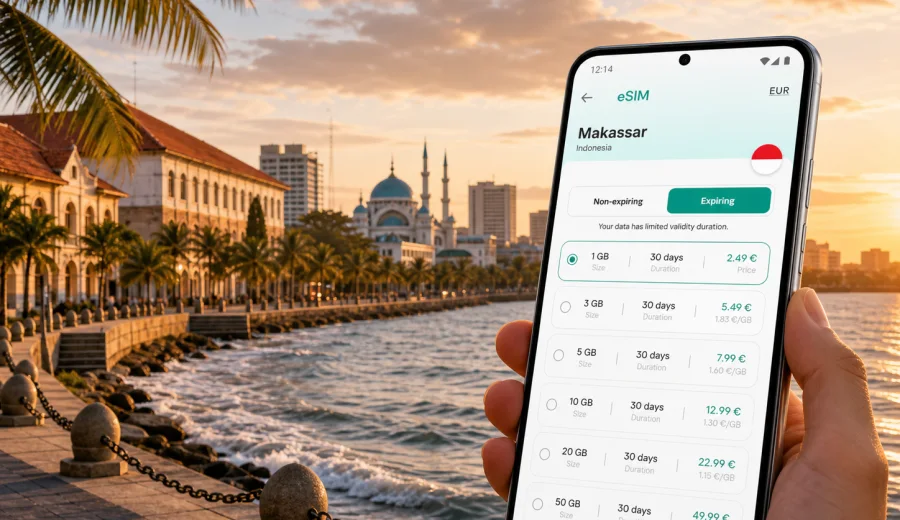
Makassar eSIM: mobile connection and internet for your trip
Makassar is a practical gateway to eastern Indonesia: a port city, a business hub, a stopover point for Sulawesi routes, and a place where many trips begin with a fast decision at the airport. You may arrive for meetings, connect onward to Tana Toraja, spend a weekend around Losari Beach, or use the city as a base before flying to another island. In each of these scenarios, mobile internet matters from the first hour.
An eSIM can help you prepare mobile data before you start looking for transport, hotel directions, ride-hailing apps, meeting addresses, ferry information, restaurant reviews, and messages from people waiting for you. Instead of searching for a physical SIM card after arrival, you can set up a digital SIM on a compatible device and use the selected plan for mobile data during your trip.
Kaspersky eSIM Store is an app and website where you can choose, arrange, and activate an eSIM with a suitable plan for mobile internet in a trip abroad. It is useful when you want a clear travel scenario: check your device, select the destination, review the data allowance and validity period, install the eSIM, and use the profile for mobile data when the plan is active. Conditions depend on the selected plan, device, and local network.
Why mobile internet matters in Makassar
Makassar is not a city where every useful point sits on one compact walking route. Sultan Hasanuddin International Airport is outside the central waterfront area, hotels are spread across business districts and coastal zones, and many useful movements involve cars, ride-hailing services, local taxis, or arranged transfers. If you land in the evening or arrive after a long connection, you will probably want maps, chat, and booking details available before you leave the terminal.
Mobile data can be useful for:
- checking your hotel address and estimated travel time from the airport;
- contacting a driver, colleague, host, or tour organizer;
- using maps around Losari Beach, Fort Rotterdam, Panakkukang, and port areas;
- confirming domestic flight updates or onward connections;
- translating short messages, menus, addresses, and transport details;
- managing work messages during a business trip;
- sharing your route with family or colleagues;
- looking up opening hours before moving across the city.
Public Wi-Fi can help in some hotels, cafes, airports, and coworking spaces, but it is not always available exactly when you need it. A travel eSIM gives you a separate mobile data option, so you are less dependent on finding a network at the moment when you need a map, a ride, or a confirmation code.
Arrival in Makassar: the first-hour internet checklist
The first hour after arrival often decides whether the trip feels controlled or improvised. In Makassar, that first hour may include immigration or domestic arrival procedures, baggage, messaging a driver, checking traffic toward the city, and confirming whether you should go directly to a hotel, office, port, or meeting point.
Before you leave the airport, make sure you can:
1. Open your hotel or meeting address in a map app.
2. Contact the person responsible for pickup or check-in.
3. Confirm the correct terminal exit or pickup area.
4. Check whether your route passes through busy traffic corridors.
5. Keep your main SIM available for calls or messages if you still need it.
6. Use mobile data on the eSIM profile if the plan is active and ready.
If you installed your eSIM before departure, you can usually finish the final mobile data setup after arrival. On some devices, you may need to select the eSIM profile for mobile data and enable data roaming for that profile. This does not mean you are using your home operator roaming; it is often a device setting required for the travel eSIM profile to use a local partner network. Always follow the instructions shown for your selected plan.
City scenarios where an eSIM helps
Makassar trips are often practical rather than purely sightseeing-based. The city works as a transport, trade, education, government, and business center for Sulawesi and eastern Indonesia. That means mobile internet is useful in several different travel patterns.
| Scenario in Makassar | Why mobile data helps | What to check before the trip |
|---|---|---|
| Airport arrival | Maps, pickup messages, hotel route, ride-hailing apps | Device compatibility and plan activation rules |
| Business trip | Email, chat, document access, meeting locations | Data allowance for work apps and hotspot use |
| Waterfront stay | Navigation around Losari Beach, Fort Rotterdam, cafes, restaurants | Validity period for the full stay |
| Stopover | Flight updates, hotel booking, short transfer route | Whether the plan duration matches a short visit |
| Trip beyond Makassar | Maps and messages on the way to nearby destinations or the next airport | Country or regional coverage in the selected plan |
| Family travel | Shared logistics, bookings, messaging, maps | Separate eSIM needs for each compatible device |
For a short stopover, a smaller plan may be enough if you mainly use maps, messaging, and booking apps. For a business week, you may want more data, especially if you join video calls, upload files, or use your phone as a hotspot. For a route that starts in Makassar and continues around Indonesia, check that the selected plan is valid for Indonesia and that its duration covers the whole route, not only the Makassar stay.
How much data might you need in Makassar?
There is no universal amount of data for every traveler. The right plan depends on how you use your phone, whether your hotel has reliable Wi-Fi, and how much time you spend moving between places. It is better to choose based on habits than on a general promise.
Light use usually means maps, text messages, email checks, ride-hailing, and a few searches per day. Medium use adds social media, photo sharing, restaurant research, and more frequent navigation. Heavy use includes video calls, cloud file uploads, streaming, frequent hotspot use, and work tasks on the move.
Use this simple planning frame:
- 1-3 days in Makassar: focus on maps, messaging, airport transfer, hotel check-in, and short local searches.
- 4-7 days: allow more data for daily navigation, business communication, photos, and app updates.
- More than a week: check both data volume and validity period carefully, especially if you continue through Indonesia.
- Business travel: add a margin for email attachments, document sync, and backup routes between meetings.
- Hotspot use: confirm whether tethering is allowed by the selected plan and remember that laptops can consume data quickly.
Avoid judging only by price. Review the destination, data allowance, validity period, and activation rules. A plan that looks larger than necessary may be useful if you will work from taxis, move between districts, or continue beyond Makassar. A smaller plan may be sensible for a compact stopover with reliable hotel Wi-Fi.
Choosing an eSIM plan for Makassar
For a Makassar article, the important destination is Indonesia. The city matters for your route and usage pattern, but the plan should match the country or region where you will use mobile data. If you will stay only in Indonesia, choose a plan that covers Indonesia. If Makassar is one step in a wider route across several countries, compare whether a regional or global option fits the itinerary better.
Before choosing, review:
- the country or region included in the plan;
- the amount of mobile data;
- the validity period;
- when the plan starts to count its usage period;
- whether top-up options are available;
- whether hotspot use is allowed;
- whether your device supports eSIM and is not locked by an operator;
- whether you need to keep your regular SIM active for bank messages or calls.
At this stage of planning, you can choose an eSIM plan for your Indonesia trip and compare the available options by data volume and duration. For Makassar, this is more useful than looking for a separate city plan: the mobile data plan should match Indonesia, while your city itinerary decides how much data and validity you need.
Device compatibility before you travel
Not every phone or tablet supports eSIM. Some models also differ by country of sale, and some devices can be locked by a mobile operator. Before you arrange a travel eSIM, check your device compatibility. This step is especially important if you bought the phone in another country, use a dual-SIM setup, or rely on the device for both personal and work communication.
Check these points before purchase:
- your device supports eSIM in its settings;
- the device is not locked to one mobile operator;
- the operating system is up to date enough for eSIM installation;
- you can access the internet during installation;
- you know which SIM or eSIM profile should handle mobile data;
- you know whether your regular SIM must remain active for calls or SMS.
An eSIM used through Kaspersky eSIM Store is mainly for mobile internet in a trip abroad. It does not normally provide a regular local phone number, voice calls, or SMS unless this is stated in the specific plan conditions. For calls and messages, many travelers use internet-based apps. If you need ordinary phone calls or SMS for a local service, check the conditions before relying on an eSIM data plan.
Installing an eSIM before departure or after arrival
You can prepare an eSIM before your trip or install it after arriving in Makassar, depending on the plan conditions and your travel routine. Many travelers prefer to install the profile before departure and activate mobile data only when they need it. This can reduce stress at the airport, especially if you arrive late, have a tight transfer, or need to join a meeting soon after landing.
The usual setup flow is simple:
1. Check that your phone supports eSIM and is not operator-locked.
2. Select Indonesia or your wider route as the destination.
3. Choose a plan by data allowance and validity period.
4. Follow the installation instructions or use the QR code provided after arrangement.
5. Name the eSIM profile clearly, for example “Indonesia data”.
6. After arrival, select the eSIM for mobile data if you are ready to use it.
7. Enable data roaming for the eSIM profile if the instructions or device settings require it.
8. Keep your primary SIM settings unchanged if you still need your usual number.
For detailed setup steps, use the Android eSIM installation guide or the iOS eSIM installation guide. The exact menus may differ by device model and operating system version, so follow the instructions shown on your phone and in your Kaspersky eSIM Store profile.
Using mobile data around Makassar districts
Makassar movement often combines practical districts and waterfront points. A visitor may start near the airport, continue toward hotels around the central city, visit Losari Beach for the evening, cross to Panakkukang for shopping or meetings, or head toward port and industrial areas for work. Each movement benefits from reliable access to maps and messages.
For central sightseeing, mobile data is useful for walking routes around Fort Rotterdam, the waterfront, cafes, and restaurants. For business travel, it helps when meeting addresses are shared in chat rather than in a formal calendar invitation. For family trips, it helps coordinate pickup points, hotel check-in, and meal plans without waiting for Wi-Fi.
Practical local habits:
- Save your hotel address offline, but keep mobile data available for live traffic.
- Pin key places before leaving the airport: hotel, office, meeting point, and backup cafe.
- Keep the eSIM profile name clear so you do not confuse it with your home SIM.
- Download large files on hotel Wi-Fi when possible to preserve data.
- Check plan balance in your profile or app if your usage changes during the trip.
Makassar can also be a starting point for routes outside the city. If you continue to other parts of Sulawesi or fly onward to another Indonesian destination, think about the full route rather than a single night in the city. A plan that covers only a short validity period may be enough for a stopover, while a longer Indonesian route may need more data or a longer duration.
Business trips and remote work in Makassar
For business travelers, the value of an eSIM is not only airport convenience. It is also about keeping a stable working routine when the schedule changes. Meetings may move between hotels, offices, government buildings, port-related sites, universities, conference venues, restaurants, and industrial areas. Mobile data helps you respond to changes without waiting for Wi-Fi.
Common business uses include:
- messaging with local partners;
- checking calendar updates during transfers;
- joining a short voice or video call;
- opening cloud documents before a meeting;
- sharing a hotspot with a laptop when allowed by the selected plan;
- checking flight changes during the final day;
- keeping navigation active while moving between appointments.
If you expect video calls or hotspot use, choose your data allowance carefully. A short call may use little data, but frequent conferencing can consume much more than maps and messages. If your work requires secure access to corporate systems, follow your company’s IT policy. An eSIM is a mobile data option for travel; it is not a VPN and should not be described or used as a tool for bypassing restrictions.
Checklist before you fly to Makassar
Use this checklist a few days before departure:
- Confirm your arrival airport and hotel address.
- Check whether your phone supports eSIM and is unlocked.
- Choose a plan that includes Indonesia and fits your trip length.
- Read when the validity period starts.
- Install the eSIM profile while you still have stable internet, if the plan allows it.
- Save installation instructions in case you need them after arrival.
- Decide whether your main SIM should stay active for calls or SMS.
- Turn off automatic downloads and large cloud backups on mobile data.
- Save key maps or addresses offline as a backup.
- Keep support information available in your profile or app.
This preparation is useful even if you plan to use hotel Wi-Fi most of the time. Airport transfers, late arrivals, ride-hailing, and short schedule changes are exactly the moments when mobile data is most valuable.
FAQ: eSIM for Makassar
Is there a separate eSIM plan only for Makassar?
Usually, you should look for a plan that covers Indonesia rather than a city-only plan. Makassar is the city where you will use mobile data, but the plan destination should match the country or region listed in the plan conditions.
Can I install the eSIM before arriving in Indonesia?
In many cases, you can install the eSIM profile before departure and use it after arrival, but activation and validity rules depend on the selected plan. Read the plan conditions before you install or activate it.
Will an eSIM give me a local Indonesian phone number?
Not usually. Travel eSIM plans in this context are mainly for mobile internet. Ordinary calls and SMS are not included unless the specific plan says otherwise. You can use internet-based calling and messaging apps over mobile data.
Do I need to remove my regular SIM?
No, if your device supports the setup you want. Many travelers keep the regular SIM for their usual number and use the eSIM profile for mobile data. Check your phone settings to decide which profile handles data, calls, and messages.
What if mobile data does not work after arrival?
Check that the eSIM profile is installed, selected for mobile data, and allowed to use data roaming if required. Restarting the device can also help. If the issue continues, review the installation instructions and contact support through the available channel.
Is eSIM useful for a short Makassar stopover?
Yes, it can be useful if you need maps, ride-hailing, hotel messages, and flight updates during a short stay. For a very brief stopover, choose a plan duration and data allowance that match limited use.
Final preparation for your Makassar trip
Makassar rewards practical preparation. If mobile data is ready before you leave the airport, it is easier to handle the first transfer, contact your hotel or driver, find your way around the waterfront, manage business meetings, and continue onward through Indonesia. The goal is not to overcomplicate the trip, but to remove one common source of friction: looking for connectivity at the exact moment when you need directions or messages.
Before you travel, check device compatibility, review the plan conditions, install the eSIM carefully, and keep the instructions available. When you are ready to plan mobile internet for Makassar, you can choose an eSIM plan for Indonesia through Kaspersky eSIM Store and prepare your phone for the trip in a few clear steps.