
Travel connectivity guide
Malaga eSIM: Mobile Internet for City Trips
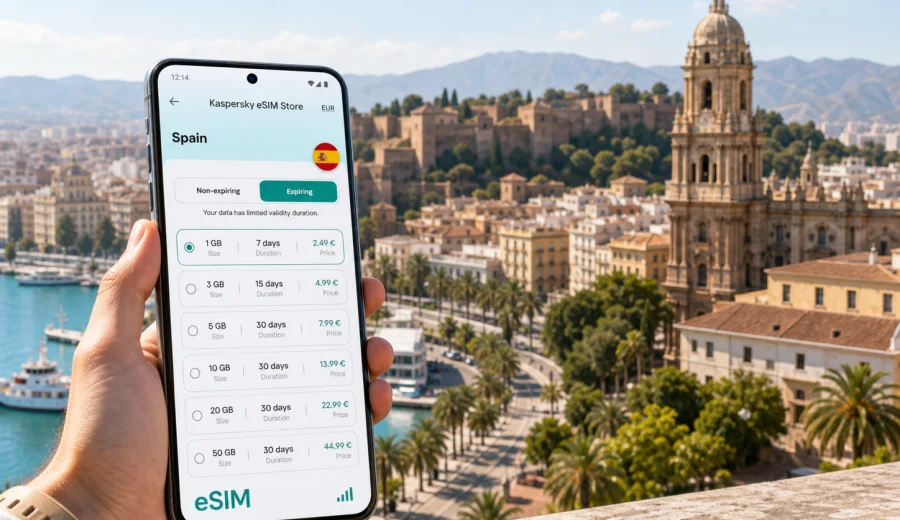
Malaga eSIM: mobile connection and internet for city trips
Malaga is an easy city to enjoy when your phone works from the first practical moment of the trip. The airport is close to the center, the port and old town are walkable, the beach districts stretch along the coast, and rail links make it simple to continue toward Torremolinos, Benalmadena, Fuengirola, Cordoba, Madrid, or other parts of Spain. But the same convenience depends on mobile internet: maps, hotel messages, taxi apps, train searches, restaurant bookings, translation, work chats, and boarding passes all sit on your phone.
An eSIM is useful for Malaga because it lets you prepare mobile data before you start moving through the city. Instead of looking for a physical SIM card after landing or relying on public Wi-Fi at the airport, hotel, or cafe, you can install a digital SIM profile on a compatible phone and use a prepaid data plan during the trip. Kaspersky eSIM Store is an app and website where you can choose, arrange, and activate an eSIM with a suitable mobile internet plan for travel abroad.
This guide focuses on practical Malaga travel scenarios: arriving at Malaga-Costa del Sol Airport, getting into the city, moving between districts, staying connected at hotels and coworking spaces, handling short business trips, and using Malaga as a base for the Costa del Sol and Andalusia.
Why mobile internet matters in Malaga
Malaga is compact in the historic center, but many useful parts of the trip are spread out. The airport is southwest of the city. The Maria Zambrano rail station and bus station are outside the old town core. The port, Soho, La Malagueta, Pedregalejo, El Palo, and beach areas each have a different rhythm. If you are staying for only two or three days, losing time to connectivity setup can affect the whole itinerary.
Mobile internet helps with everyday decisions:
| Travel moment in Malaga | Why mobile data helps |
|---|---|
| Arrival at the airport | Check hotel directions, train options, pickup messages, and ride-hailing apps. |
| Transfer to the center | Compare train, bus, taxi, and walking routes without waiting for Wi-Fi. |
| Old town navigation | Move between the Cathedral, Alcazaba, Picasso Museum area, markets, and restaurants. |
| Beach plans | Check routes to La Malagueta, Pedregalejo, or El Palo and coordinate meeting points. |
| Day trips | Look up rail or bus options for towns along the Costa del Sol or inland Andalusia. |
| Work travel | Join calls, answer messages, and use hotspot mode if your selected plan and device allow it. |
An eSIM does not replace every travel tool, and it does not usually include a local phone number, voice calls, or SMS unless a specific plan says so. Its main value is mobile internet. For calls and messages, many travelers use internet-based apps while keeping their usual SIM active for essential verification messages when their home plan allows it.
Before you fly: check device support
Before choosing any eSIM plan for Malaga, confirm that your phone or tablet supports eSIM and is not locked to a mobile operator. This step is important because eSIM setup depends on the device model, operating system, and carrier restrictions. If you are unsure, check your device before you arrange a plan.
For most travelers, the preparation checklist is simple:
- Confirm that your device supports eSIM.
- Make sure the device is unlocked for mobile service profiles.
- Keep your primary SIM available if you need your usual number for bank or airline messages.
- Install the eSIM while you still have stable Wi-Fi, if the plan instructions allow it.
- Read when the plan validity starts: after installation, after activation, or after first network use, depending on the plan terms.
- Save the QR code or installation details somewhere accessible, but do not share them.
If you travel with more than one device, remember that an eSIM profile usually cannot be freely moved after activation. Install it on the phone you will actually use for maps, tickets, messaging, and hotspot sharing.
Arrival at Malaga-Costa del Sol Airport
Malaga-Costa del Sol Airport is one of the main gateways to southern Spain. The most common first task is getting from the terminal to your accommodation. With mobile internet already prepared, you can open your hotel address, check the route, message a host about arrival time, and decide whether a train, bus, taxi, private transfer, or rental car makes sense.
For many visitors, the airport-to-city sequence looks like this:
1. Switch on the travel eSIM line or activate mobile data according to the instructions for your plan.
2. Keep your regular SIM active for calls or verification messages only if you need it and your roaming settings are under control.
3. Open your map app and confirm the hotel entrance, not just the street name.
4. Check whether your accommodation is closer to Centro Historico, Soho, the port, La Malagueta, or the Maria Zambrano area.
5. Save the route offline as a fallback, especially if you arrive late.
The city center is close enough that transfers are usually straightforward, but the first hour after arrival is exactly when mobile data is most useful. You may need to find the right platform, confirm a taxi pickup point, message a short-stay apartment, or adjust plans if a flight is delayed.
Choosing a data amount for Malaga
There is no single correct data amount for every trip. The right plan depends on trip length, how often you use maps, whether you upload photos, whether you work on the move, and whether you use hotel Wi-Fi for heavier tasks.
Use these practical estimates as a planning tool, not as a guarantee:
| Malaga trip type | Typical mobile data needs |
|---|---|
| One-day stopover | Maps, messages, boarding pass, a few searches, ride app use. |
| Weekend city break | Daily navigation, restaurant searches, museum tickets, social messaging, some photo uploads. |
| Beach and city week | More route checks, weather, streaming short clips, bookings, and day-trip planning. |
| Business visit | Email, calendar, messaging, document access, occasional hotspot use if supported. |
| Remote-work stay | Higher data needs; use accommodation Wi-Fi for video calls and large file transfers where possible. |
If you mostly need directions and messaging, a smaller plan may be enough. If you rely on your phone for work, video calls, cloud files, or hotspot mode, choose a plan with more data and check whether tethering is allowed under the selected terms. Conditions can differ by plan, so review the size, duration, destination, and usage rules before payment.
Where eSIM helps most inside the city
Malaga has several travel zones where mobile internet makes the day smoother.
Centro Historico. The old town is walkable but dense. Mobile maps help you move between the Cathedral, Alcazaba, Roman Theatre, museums, tapas streets, and meeting points without doubling back through narrow lanes.
Soho and the port. This area is useful for hotels, cafes, galleries, and evening walks. Data helps with restaurant bookings, port-side directions, and quick route changes between the waterfront and the center.
La Malagueta. Beach plans are easier when you can coordinate with other travelers, check walking times, and find the right entrance to a hotel, restaurant, or beach bar.
Pedregalejo and El Palo. These eastern beach districts are popular for seafood meals and quieter coastal walks. A working map is helpful when you are returning after dinner or choosing between bus, taxi, or walking.
Maria Zambrano and the bus station. If Malaga is part of a longer Spain route, this transport area often matters more than expected. Mobile data helps with platform checks, ticket PDFs, hotel transfers, and onward route planning.
After the first third of your trip planning is done, it is a good moment to prepare the connection itself: you can choose a mobile internet plan for Spain before your Malaga trip and install the eSIM on a compatible device before you need it in the city.
eSIM, Wi-Fi, and setup in Malaga
Public Wi-Fi can be helpful in hotels, airports, cafes, and coworking spaces, but it should not be your only connection plan. You may need mobile data before check-in, after check-out, at the beach, in a taxi, at the station, or when a cafe network is slow or requires registration. A practical split is simple: use mobile data for maps, messages, tickets, transport apps, and urgent searches, then use trusted accommodation Wi-Fi for app updates, long video calls, and large file uploads.
The exact eSIM setup depends on your device and selected plan. For device-specific steps, use the official guides: Android installation instructions and iOS installation instructions. Installation is usually easier before departure, when you have stable Wi-Fi and time to check settings calmly.
General setup flow:
1. Choose Spain as the destination for your Malaga trip.
2. Select a plan by data amount and validity period.
3. Confirm that your phone supports eSIM and is unlocked.
4. Install the eSIM profile using the provided QR code or manual details.
5. Set the eSIM as the mobile data line when you are ready to use it.
6. Check whether data roaming must be enabled for that eSIM line.
7. Keep your main SIM settings under control to avoid unexpected roaming use.
Do not delete the eSIM profile unless you are sure you no longer need it. Reinstallation rules can vary, and deleting a profile too early may create unnecessary trouble during the trip.
Transport, hotels, and work trips
Malaga rewards flexible movement. You can walk much of the center, but the best option changes by route, time, luggage, weather, and hotel location. Mobile internet helps you compare airport transfer options, check rail tickets at Maria Zambrano, find bus routes to Pedregalejo or El Palo, and coordinate taxi or ride-app pickup points after dinner.
Hotels and apartments create their own connectivity moments. In the historic center, some streets are pedestrianized or narrow, so your map may need to guide you from a taxi drop-off point to the exact door. In apartment stays, hosts may send door codes, key-box instructions, or last-minute check-in details through messaging apps. A travel eSIM covers the gap before you receive the accommodation Wi-Fi details.
For business trips, prepare mobile internet before the first meeting. Check your calendar, meeting address, access codes, and transport options while still at the hotel. If your plan and phone support hotspot mode, it can be a backup for a laptop in a cafe or meeting room, but it should not be treated as unlimited office internet. Video calls, cloud sync, and large attachments can use data quickly.
Stopovers and trips from Malaga
Malaga works well for short stays because the airport, port, beach, and old town are close enough for a compact visit. With only a few hours, keep your eSIM ready before leaving the airport or station, choose one area such as Alcazaba and the old town, Muelle Uno and the port, or La Malagueta, and use mobile maps to monitor the return route.
Many visitors also use Malaga as a base for the Costa del Sol and Andalusia. Mobile data is useful when planning day trips, checking return routes, and adjusting plans when the day runs long.
| From Malaga | Why mobile internet helps |
|---|---|
| Coastal towns | Check train or bus options, beach locations, and return times. |
| Granada or Cordoba | Access tickets, maps, station directions, and hotel messages. |
| Caminito del Rey area | Coordinate transport and keep offline backups where coverage may vary. |
| Marbella or Estepona | Compare bus routes, taxi points, and meeting locations. |
| Madrid by train | Keep tickets, platform information, and onward navigation available. |
If your route continues beyond Malaga, choose a Spain plan that matches the whole itinerary. Download offline maps as a backup and keep ticket PDFs saved locally; an eSIM is useful, but a charged battery and offline documents still matter.
Data-saving tips and common mistakes
You can make a fixed data allowance last longer with a few small habits:
- Download offline maps for Malaga and nearby towns before the trip.
- Turn off automatic cloud photo backup on mobile data.
- Use hotel Wi-Fi for app updates and large file downloads.
- Lower video quality if you stream short clips on mobile data.
- Close navigation when you no longer need live directions.
- Keep messaging, maps, transport, banking, and airline apps prioritized.
Avoid the most common mistakes: buying before checking compatibility, installing the eSIM on the wrong phone, activating too early without reading validity rules, deleting the profile during the trip, or using mobile data for every heavy task. Many travel eSIM plans are focused on data, so if you need voice calls or SMS, check the selected plan terms and keep your regular number available where appropriate.
FAQ: eSIM for Malaga
Is an eSIM useful for a Malaga city break?
Yes, especially if you want mobile internet for airport arrival, maps, hotel check-in, restaurant searches, transport apps, and day trips. It is most useful when installed before you need it.
Should I choose Malaga or Spain as the destination?
For a city article and most travel plans, choose the country that the city belongs to. Malaga is in Spain, so select a Spain plan and review the conditions for your trip.
Can I install the eSIM before departure?
In many cases, yes. Check the plan instructions and validity rules. Some plans start counting at activation or first network use, while others may have different conditions.
Will an eSIM give me a Spanish phone number?
Usually, travel eSIM plans are focused on mobile data and do not include a regular local phone number, voice calls, or SMS unless the plan states otherwise.
Can I use hotspot mode in Malaga?
Possibly, if your device and selected plan allow it. Check the plan terms before relying on tethering for work or multiple devices.
What should I do if mobile data does not work after arrival?
Check that the eSIM line is enabled, selected for mobile data, and configured according to the instructions. Some plans require data roaming to be enabled on the eSIM line. If the problem continues, contact support through the app or website.
Prepare your Malaga mobile internet before the trip
Malaga is simple to navigate when your phone is ready: airport transfer, old town walks, beach districts, hotel check-in, rail connections, business meetings, and day trips all depend on timely information. An eSIM can reduce the amount of setup you need to do after arrival and help you stay focused on the trip itself.
Before you travel, check device compatibility, choose a data amount that matches your itinerary, read the validity rules, and install the eSIM on the phone you will carry in Malaga. Through Kaspersky eSIM Store, you can prepare an eSIM plan for travel in Spain and keep mobile internet ready for the city, the coast, and onward routes.