
Travel connectivity guide
Maldives eSIM: mobile internet for travel
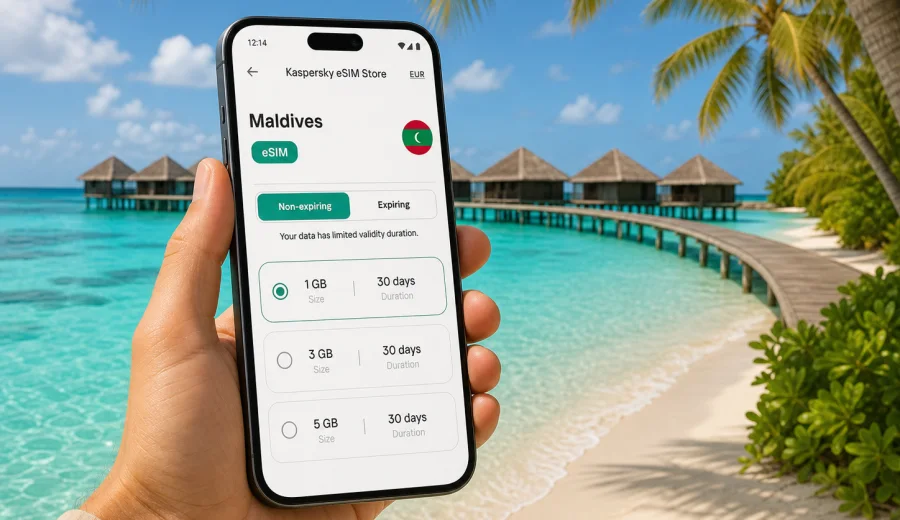
eSIM in the Maldives: mobile connection and internet for your trip
The Maldives is a country where mobile internet matters from the first hour of the journey. Your route may begin at Velana International Airport near Male, continue by speedboat, domestic flight or seaplane, and end on an island where the hotel desk, transfer schedule, dive center and booking confirmations all depend on your phone. An eSIM helps you prepare mobile data before departure or shortly after arrival without looking for a physical SIM card.
This guide explains how to plan mobile connection and internet access for the Maldives, how to choose an eSIM data plan, what to check before buying, and how to avoid common setup mistakes. The focus is practical: maps, transfers, messages, resort apps, video calls, work chats, photo uploads and everyday travel coordination.
Why eSIM is useful in the Maldives
The Maldives is not a one-city destination. It is an island country spread across atolls, so even a simple resort holiday can include several connection points. Mobile data is useful for:
- airport and airline messages;
- transfer coordination with a resort or guesthouse;
- maps around Male, Hulhumale and local islands;
- online check-in, boarding passes and hotel vouchers;
- messaging with family, travel companions and tour operators;
- dive, surf, spa or excursion bookings;
- mobile banking confirmations and payment checks;
- weather updates before boat trips or seaplane transfers.
Hotel Wi-Fi can be enough in the room or lobby, but it may not help while you are moving between airport, harbor, domestic terminal, beach, cafe or pier. An eSIM gives you a separate mobile data profile on a compatible device, so you can use internet access while keeping your regular SIM in the phone.
The main advantage is preparation. You can choose a plan before the trip, install the eSIM while you still have stable Wi-Fi, and keep the profile ready for arrival. This reduces the need to search for a SIM counter when you are tired after a flight or trying to catch a transfer.
What an eSIM does and does not do
An eSIM is a digital SIM profile built into a compatible smartphone, tablet or other device. For travel, it is usually used for mobile data. In the Maldives, that means your phone can connect to internet through the selected eSIM data plan while your regular SIM remains available for calls or SMS if your device and home operator support that setup.
Set expectations clearly:
| Travel task | How eSIM helps | What to check |
|---|---|---|
| Messaging and app calls | Use WhatsApp, Telegram, FaceTime, Teams or similar apps over mobile data | Ordinary voice calls and SMS are not usually included unless the plan says so |
| Maps and transport | Load routes, ferry details, hotel location and airport information | Download offline maps as a backup |
| Work and banking | Open documents, receive app alerts and manage bookings | Keep your primary SIM available if your bank sends SMS codes |
| Photo sharing | Upload images and short videos without waiting for hotel Wi-Fi | Large backups can consume data quickly |
| Island transfers | Stay online between airport, boat, local island and accommodation | Availability depends on local networks and selected plan conditions |
An eSIM is not a VPN, not a privacy masking tool, and not a way to change the rules of local internet access. It is a practical option for mobile internet in a foreign country. It also does not automatically include a local phone number. If you need ordinary voice calls or SMS, read the plan terms carefully and keep your main SIM active if needed.
Maldives travel scenarios where mobile data helps
Arrival through Male. Most international travelers arrive through Velana International Airport. Even if you are not staying in Male, the airport often becomes a coordination point for speedboats, seaplanes, domestic flights and resort representatives. Mobile data helps you open hotel messages, send arrival updates and check whether your transfer point has changed.
Resort island stay. On a resort island, you may rely on hotel Wi-Fi most evenings. Still, eSIM data can be useful around the jetty, beach, restaurant areas, excursion desks or during boat transfers. It also gives you a fallback if the hotel network is slow, overloaded or limited to specific zones.
Local island trip. If you stay on islands such as Maafushi, Dhigurah, Thoddoo, Ukulhas or Fulidhoo, you may move between guesthouses, beaches, harbors and cafes more often. Mobile data is helpful for maps, ferry updates, digital menus, local tour messages and ride coordination.
Diving, snorkeling and boat excursions. You may not have signal on every boat route or remote sandbank, and no eSIM can guarantee coverage in every place. But mobile data before departure and after return is useful for meeting points, weather checks, dive center messages and sharing location with your group.
Remote work or longer stays. For longer trips, eSIM data can support email, messengers, cloud documents and video meetings when Wi-Fi is not convenient. For heavy work, compare data size and validity period carefully.
How much data do you need in the Maldives?
The right amount depends on how you use your phone. The Maldives encourages photo and video sharing, but high-resolution uploads can consume data faster than expected. Use this table as a planning reference, then choose a plan based on your own habits.
| Trip style | Typical use | Data planning idea |
|---|---|---|
| Light user | Messaging, maps, email, booking apps | A smaller package may be enough for several days |
| Standard traveler | Messaging, maps, social media, occasional calls | Choose a balanced package with validity matching the trip |
| Family coordinator | Transfers, reservations, shared maps, frequent messaging | Add extra data because one phone often becomes the travel hub |
| Content-heavy traveler | Reels, large photo uploads, video calls | Consider a larger package and use Wi-Fi for heavy backups |
| Remote worker | Email, documents, calls, hotspot use | Check whether tethering is allowed and choose more data |
Simple rule: use mobile data for travel tasks and Wi-Fi for heavy downloads, app updates, long video streaming and full photo backups. Before departure, update apps, download offline maps, save hotel documents and preload entertainment. That way your eSIM data is reserved for the moments when it matters.
How to choose an eSIM data plan for the Maldives
Choosing an eSIM plan is easier when you start from the trip, not from the largest data number. Ask five questions:
1. How many days will you be in the Maldives?
2. Will you stay on one island or move between several islands?
3. Will you rely on mobile data only between transfers, or every day?
4. Will you use hotspot for a laptop, tablet or another traveler?
5. Do you need only Maldives coverage, or will you also visit another country on the same route?
For many travelers, a country plan for the Maldives is the cleanest option. It keeps the destination simple and matches the main trip. If your journey includes a stopover or a wider route across several countries, compare country, regional or global options and read the coverage and validity terms before purchase.
After you know your route and data needs, you can choose an eSIM plan for your Maldives trip through Kaspersky eSIM Store and review the available data size, duration and plan conditions before installing it on a compatible device.
What to compare before you decide
- Data size: enough for your expected maps, messages, uploads and calls.
- Validity period: long enough for the full stay, including arrival and departure days.
- Activation rules: some plans begin counting from installation, others from first network connection; check the terms.
- Hotspot rules: important if you want to share data with a laptop or another device.
- Top-up options: useful if you may extend the trip or use more data than planned.
- Device support: your phone must support eSIM and must not be locked to one operator.
A practical pre-purchase checklist
Use this checklist before you pay for any travel eSIM:
- your phone model supports eSIM;
- the device is not carrier-locked;
- the plan covers the Maldives;
- the validity period covers the whole trip;
- the data size matches your expected use;
- you understand when the validity period starts;
- you know whether hotspot is allowed;
- you have stable Wi-Fi for installation;
- you have saved the QR code or installation instructions;
- you know which SIM profile should be used for mobile data after arrival.
If you are not sure whether your phone supports eSIM, check your device before choosing a plan. This is especially important for phones bought through carriers, dual-SIM variants, imported models and older devices.
When to install and activate the eSIM
For most travelers, the safest approach is to install the eSIM before departure while you still have reliable Wi-Fi. Installation adds the digital SIM profile to your phone. Activation and data use may depend on the plan terms and when the device connects to the supported local network.
The usual sequence is:
1. Check that your device supports eSIM and is not locked.
2. Choose the Maldives plan that matches your trip.
3. Complete the purchase and open the eSIM details in your account or app.
4. Install the eSIM using the QR code or manual details.
5. Keep your primary SIM for calls or SMS if you need it.
6. On arrival, select the eSIM profile for mobile data.
7. Enable data roaming for the eSIM if the installation instructions require it.
8. Test messaging, maps and browser access before leaving the airport or harbor.
For detailed setup steps, use the Android installation guide or the iOS installation guide. The exact labels on your phone can vary by device model and software version, so follow the instructions shown on your screen as well.
How to avoid wasting data
The Maldives is a visual destination, and phones can use data quickly. A few settings can keep your package useful for longer:
- turn off automatic app updates on mobile data;
- pause cloud photo and video backup until Wi-Fi is available;
- download offline maps for Male, your resort area and any local islands;
- save boarding passes, hotel vouchers and transfer details offline;
- reduce video call quality when the connection is only needed for a quick check-in;
- use messaging apps for calls when ordinary voice service is not included;
- monitor data use in your phone settings and in the relevant app or account area.
For families or groups, decide which device will be the main travel phone. That person usually receives transfer updates, stores booking confirmations and coordinates with the hotel. It is often worth giving that phone the most reliable setup and enough data for the whole route.
FAQ: eSIM and mobile internet in the Maldives
Can I use eSIM in the Maldives without removing my regular SIM?
Yes, on compatible dual-SIM devices you can usually keep your regular SIM in the phone and add an eSIM profile for mobile data. The exact setup depends on the device.
Does a travel eSIM include a Maldives phone number?
Usually no. Travel eSIM plans are often data-only unless the plan terms say otherwise. Use internet-based apps for calls and messages, and keep your regular SIM available if you need SMS verification.
Should I install the eSIM before flying?
Installing before departure is often more convenient because you can use stable Wi-Fi and fix setup questions without airport pressure. Check the plan terms to understand when validity starts.
Do I need data roaming enabled?
Some eSIM profiles require data roaming to be enabled for the eSIM line. Follow the installation instructions for your device and plan.
Can I use hotspot with an eSIM?
It depends on the selected plan and device settings. If you want to share data with a laptop or another traveler, check hotspot rules before choosing the plan.
What if mobile data does not start after arrival?
Check that the eSIM line is turned on, selected for mobile data, and allowed to use data roaming if required. Restart the phone, test again away from Wi-Fi, and contact support if the profile is installed but data still does not work.
Choose an eSIM plan for the Maldives
A good Maldives connectivity plan is simple: check device compatibility, choose a data package that matches the full trip, install the eSIM on Wi-Fi, and keep your main SIM available for calls or SMS if needed. This gives you mobile internet for the practical parts of the journey: arrival, transfers, maps, messages, bookings and everyday travel coordination.
Kaspersky eSIM Store is an app and website where you can quickly choose, arrange and activate an eSIM with a suitable data plan for mobile internet during an international trip. Before you fly, review the available options and prepare an eSIM plan for the Maldives so your phone is ready for the first connection point of the journey.