Travel connectivity guide
Malindi eSIM: Mobile Internet in Kenya
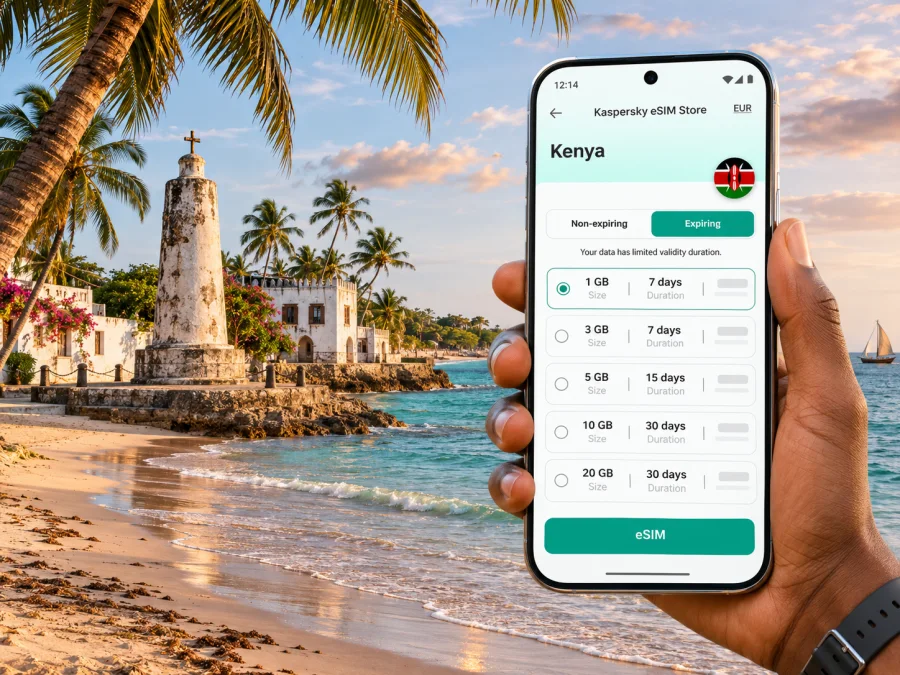
Malindi eSIM: Mobile Connection and Internet for Your Trip
Malindi is a coastal town in Kilifi County, on Kenya’s Indian Ocean shore. A visit may combine a beach stay, time in the historic centre, a flight through Malindi Airport, or day trips towards Watamu and the lower Sabaki River. Mobile internet helps with the practical transitions between those plans: confirming a pickup, finding your accommodation, checking a route, messaging your host, or keeping a map available while you explore.
An eSIM can be a convenient way to prepare mobile data before travelling, provided your phone supports it and the selected plan covers Kenya. It is a digital SIM profile installed on a compatible device. It does not automatically include a Kenyan phone number, voice calls or SMS; check the terms of the particular plan and keep another way to make essential calls. Coverage and performance depend on the local network used by the plan, your exact location, the device and network conditions. No plan should be assumed to work equally well on every beach, inside every building or along every road.
What to plan before arriving in Malindi
The town is compact compared with Kenya’s largest cities, but a visitor’s route can quickly extend beyond the central streets. You may arrive by air, travel overland from Mombasa, or use Malindi as one stop on a longer coast itinerary. Each option puts a different first task on your phone: locating a driver, confirming the address, checking a connection, or coordinating a late check-in.
| Arrival or travel situation | What mobile internet can help with | A useful backup |
|---|---|---|
| Landing at Malindi Airport | Messaging your accommodation, checking the pickup point, and opening a route | Saved address, booking details and the driver’s phone number |
| Coming from Mombasa by road | Reviewing the final approach, updating your host, and checking a revised arrival time | Offline map and a written destination name |
| Reaching a beach hotel after dark | Sharing your location and confirming the correct entrance | Arrange the transfer with the property in advance |
| Taking a day trip outside town | Checking meeting details and keeping navigation available | Download map areas and carry a power bank |
Before departure, decide which functions matter most. Navigation and messaging need relatively little data when used thoughtfully; video calls, cloud backups, automatic photo uploads and streaming can use much more. You can reduce unexpected use by disabling app updates and photo backup over mobile data, downloading entertainment on Wi-Fi, and setting a data warning on your phone.
Getting oriented: town, coast and nearby trips
Malindi’s identity is tied to the coast, but a visitor will encounter distinct places rather than one continuous resort strip. The central area is useful for errands and local services; the waterfront and beach-facing accommodation may be some distance from the exact point named in a booking. Search for the full hotel or venue name, then confirm the address with the property. A map result can identify a place with a similar name or a pin at the wrong entrance.
The Vasco da Gama Pillar stands on Malindi’s coastal headland and is a familiar landmark when exploring town. The historic centre and waterfront can fit into one outing, but heat and sun exposure make breaks and water part of a sensible plan. Check local opening arrangements before travelling to a specific attraction.
Watamu and the protected marine environment lie south of Malindi; the Sabaki River reaches the ocean north of town, and Gedi (also written Gede) is another excursion in the area. Treat each as a separate trip: confirm transport, journey time and the return plan with your accommodation or tour provider.
Choosing an area to stay
When comparing accommodation, look beyond the word “beachfront.” Confirm whether the property is in central Malindi, on the coast, or outside the main town; ask how guests usually travel between the property and the places they plan to visit. A map can help you see relative position, while a direct message to the host can clarify the practical details: gate location, late arrival procedure, transport availability and whether the property has Wi-Fi in the room or only in common areas.
| Your priority | Questions to settle before booking |
|---|---|
| Easy access to town | How far is the property from the shops, restaurants or meeting points you expect to use? |
| Quiet beach stay | Is transport needed for meals and errands, and can it be arranged after dark? |
| Early flight | What time should you leave, and has the transfer been confirmed directly? |
| Day trips | Where does the tour depart, and is that pickup included in the booking? |
| Remote work | Is Wi-Fi available in the room, and is there a mobile-data backup if it is interrupted? |
Prepare mobile internet for Kenya
A city name is not usually the right unit for selecting a travel eSIM. Malindi is in Kenya, so check the country or regional destination shown in the plan details and verify that Kenya is included. If your route continues elsewhere, check every destination and any regional limits rather than assuming a Kenya plan applies across borders. The plan page should be treated as the authority for its included locations, data allowance, validity, activation conditions and other restrictions.
Check your phone before choosing a plan
Confirm that your exact device variant supports eSIM and is not restricted by a carrier lock. Support can differ between models with similar names, and availability can depend on the country or region where a device was sold. Check the manufacturer’s specifications for the precise model number and your current carrier’s unlocking status. You can also check whether your device is compatible before purchase.
Do not rely only on a general “eSIM supported” list for a product family. If you have a dual-SIM phone, check how it handles two active lines, which line is selected for mobile data, and whether one line must be disabled for the other to work. The travel eSIM is generally used for data, while your usual SIM can remain available for services supported by your home plan; roaming charges may still apply to that home line, so review its settings and terms.
Pick a data amount that fits your trip
Estimate use by activity, not by the number of days alone. A traveller who mainly checks maps, text messages and email may use far less data than someone who uploads video or joins long video meetings. The estimates below are planning prompts, not guarantees; apps, screen settings and media quality make usage vary.
| Typical use | Data planning approach |
|---|---|
| Maps, messaging and occasional searches | Keep background data controlled and check usage after the first day |
| Frequent photo sharing and social feeds | Allow a larger margin, especially if media plays automatically |
| Work calls and cloud documents | Test the connection early, and keep Wi-Fi or another backup available |
| Streaming or large uploads | Prefer Wi-Fi where appropriate; these activities can consume data quickly |
Look at the plan’s data quantity and validity together. A larger data allowance is not useful if the plan expires before the end of your stay, and a long validity period does not guarantee enough data for intensive use. Confirm when validity begins: installation, first connection or another trigger may apply depending on the plan. If the provider’s terms are unclear, seek clarification before buying rather than inferring the rule from the word “activation.”
You can review eSIM options for a trip to Kenya in Kaspersky eSIM Store. The app and website help travellers choose, purchase and activate a suitable eSIM plan for mobile data abroad. The exact plan terms are shown for the option you select; availability, supported destinations and conditions can vary, so read those details before checkout. This is a country destination page, not a promise about coverage at a particular hotel or beach in Malindi.
Installation and activation: a careful sequence
If possible, install the eSIM while you have stable internet access and enough time to read each prompt. Some plans require a QR code or an in-app installation flow; follow the instructions supplied for the plan you chose. Avoid deleting an installed profile to troubleshoot unless the instructions or support team tell you to do so, because reinstallation rules can differ.
- Confirm the destination, data allowance, validity and activation trigger in the plan details.
- Check that your phone is compatible, unlocked and updated enough for the installation flow.
- Connect to reliable Wi-Fi, then follow the plan’s installation steps on your device.
- Give the new line a clear label such as “Kenya data” so it is easy to identify beside your home SIM.
- Before travel, review the phone’s cellular settings but do not change settings that your plan instructions say to leave alone.
- When appropriate under the plan terms, select the travel eSIM for mobile data and verify that data roaming is configured as instructed for that eSIM.
- Keep your home line’s roaming setting under your control to avoid unplanned charges from your usual carrier.
For device-specific steps, use the Android eSIM installation instructions or the iPhone and iOS eSIM installation instructions. Menu names vary across operating-system versions and manufacturers, so follow the screen on your own device rather than relying on a generic screenshot. If you are unsure whether the line is active, check the plan’s status and instructions before removing or reinstalling it.
Using data around Malindi
Airport and first transfer
Before boarding, save the address of your accommodation, the booking confirmation and any pickup instructions. Once you have landed, use mobile data to confirm where the driver will meet you only if the airport’s current instructions allow that arrangement. If the connection is not ready immediately, the offline details still give you a practical starting point. For a late arrival, agree on a fallback contact method and pickup plan before the flight.
Walking and short journeys in town
A map is useful for checking the direction of a route, but a moving blue dot is not a substitute for local signs or a confirmed destination. Keep your phone charged, download map data in advance, and make sure the place name in your directions matches the one given by your host. For short trips, ask the driver to confirm the destination aloud or show the saved name; this can prevent confusion between a hotel, restaurant or similarly named venue.
Beach days and marine excursions
Coastal conditions and plans can change. If you are meeting a guide, keep the meeting point and contact details accessible, and check the return plan before you leave town. Signal may vary by exact position, building materials, distance from populated areas and network load. A live map may stop refreshing even when a route is saved, so share the day’s plan with someone and keep enough battery for navigation and essential messages.
Work calls and longer stays
When the connection does not work as expected
Start with the plan status and basic settings before changing anything advanced. Confirm that the eSIM is enabled, selected for mobile data, within its validity period and not out of data. Follow the plan’s instructions for data roaming and network selection. Move to an open area and allow the phone time to reconnect; use trusted Wi-Fi to read troubleshooting guidance or contact support. Avoid deleting the profile unless instructed.
If a network name appears but apps cannot load, check the selected data line, mobile data switch, data limit and app-specific settings. If no network appears, record your device model, approximate location, time and error message before contacting support.
Kenya has multiple mobile network operators, but a travel eSIM’s local network arrangements depend on the specific plan. The name displayed on your phone may not match the travel brand or app through which you acquired the plan. Before purchase, check the plan’s network information if it is provided. In a particular area of Malindi, actual performance can still differ by indoor location, congestion, terrain and device radio support. The national coverage picture is not a guarantee of signal in a specific room or on a boat.
A practical checklist for your Malindi trip
Before you leave
- Confirm your accommodation address, check-in hours and arrival instructions.
- Save booking references, transfer details and the phone number of your host offline.
- Check eSIM support for the exact device variant and confirm the phone is unlocked.
- Choose a Kenya plan only after checking destination, validity, allowance, activation and network terms.
- Install the eSIM on stable Wi-Fi if the plan instructions permit installation before travel.
- Download the relevant map areas and disable unnecessary background data.
- Keep a charger or power bank available for days when navigation and photos use the phone heavily.
On arrival
- Follow airport signage and your confirmed transport arrangements.
- Set the travel eSIM as the data line only when appropriate under the plan instructions.
- Keep the home SIM’s roaming settings in mind if it remains enabled.
- Test a small data task before relying on the connection for navigation or work.
- Save the route to your accommodation in case live service becomes intermittent.
For day trips
- Confirm the meeting point and return transport before departure.
- Keep the guide’s contact details and booking information available offline.
- Tell someone your approximate itinerary if you will be away from town.
- Bring water, sun protection and enough battery for the return journey.
Common questions
Will an eSIM work everywhere in Malindi?
No plan can be guaranteed in every location. Service depends on the plan’s local network arrangements, your exact position, device compatibility and temporary network conditions. Keep saved maps and accommodation details available offline.
Does a travel eSIM give me a Kenyan phone number?
Not necessarily. Many travel eSIM plans provide mobile data only. Check the selected plan for voice, SMS or a local number. Internet calling apps use data but do not replace ordinary or emergency phone service in every situation.
Can I keep my usual SIM active?
A compatible dual-SIM device may allow both lines, but behavior depends on the model and settings. Select which line uses data and check your home carrier’s roaming charges before leaving.
Should I install the eSIM before flying?
If the plan allows pre-installation, stable Wi-Fi can make setup easier. Check when validity begins first; follow the plan’s instructions if it says to install only at the destination.
What if mobile data stops during the trip?
Check the selected data line, plan status, remaining allowance and required settings. Try another location, then use trusted Wi-Fi for support. Keep an offline map and your accommodation details ready.
Choose a plan that fits your route
For a short stay in Malindi, prepare the details you will need before arrival: the accommodation address, airport transfer plan, day-trip meeting points and offline maps. Then compare the Kenya eSIM options by destination, data allowance, validity and activation terms. Kaspersky eSIM Store is an app and website that helps you select, purchase and activate an eSIM plan for mobile data while travelling abroad; the local network and service conditions depend on the specific plan and destination.
When you are ready, choose an eSIM plan for your Kenya trip, read its conditions, and install it on a compatible unlocked device according to the instructions. Keep offline travel details and a backup connection option available, and you can use mobile internet more deliberately as you move between Malindi’s town centre, coastline and nearby excursions.


