
Travel connectivity guide
Malmok eSIM for Mobile Internet in Aruba
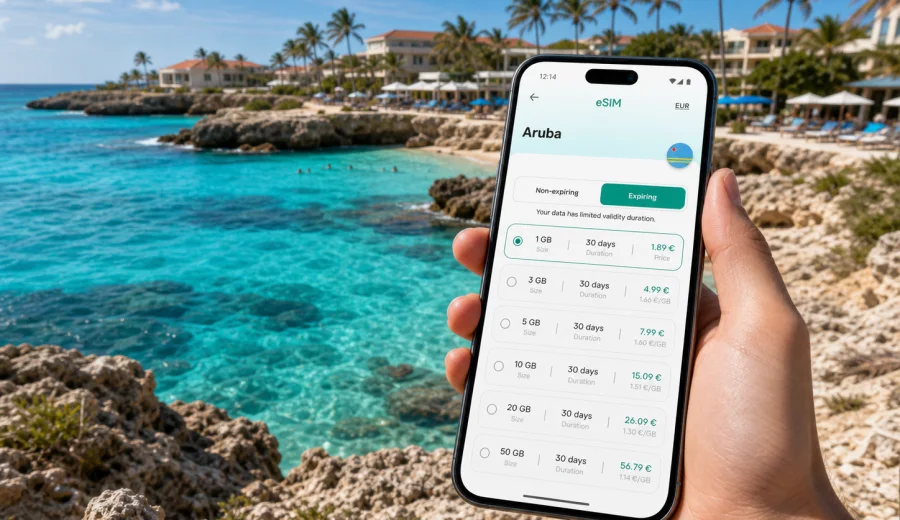
Malmok eSIM: mobile connection and internet for Aruba travel
Malmok is one of the most practical places in Aruba to plan around a reliable mobile connection. The area sits on the island's northwest coast, close to Boca Catalina, Arashi Beach, Palm Beach, Noord, and the road to the California Lighthouse. It is relaxed rather than urban, which means the moments when you need internet often happen between fixed Wi-Fi points: arriving from the airport, finding a villa entrance, meeting a boat crew, checking a restaurant booking, or navigating back after sunset.
An eSIM is useful for Malmok because the trip is rarely limited to one beach chair. You may land at Queen Beatrix International Airport, drive through Oranjestad, stop for groceries in Noord, check in near the coast, and then spend several days moving between snorkeling spots, hotels, restaurants, and short island drives. Public Wi-Fi can help at accommodation, but it does not cover the road, the beach path, or the moment when a driver asks for your exact pickup point.
This guide explains how to think about eSIM, mobile internet, and data planning for Malmok. The focus is the city area and its travel routines: arrival, local movement, beach days, hotel stays, business-friendly work blocks, stopovers, and trips from Malmok to other parts of Aruba.
Why mobile internet matters in Malmok
Malmok feels simple on a map, but the practical details of a trip still depend on your phone. You may need maps for small roads, messages from a property manager, weather updates before snorkeling, or a quick search for a late dinner near Palm Beach. When the sun is bright and the coast looks similar from one access point to the next, a live map and location sharing can save time.
Mobile data is useful in Malmok for:
- navigating from the airport to accommodation;
- coordinating taxi, private transfer, or rental car pickup;
- checking restaurant hours and booking confirmations;
- using maps between Malmok, Palm Beach, Noord, Eagle Beach, and Oranjestad;
- messaging tour operators for snorkeling, diving, sailing, or island trips;
- translating short service details or menus;
- managing airline, hotel, banking, and travel apps;
- staying reachable during a mixed vacation and business trip.
The goal is not to stay online every minute. The goal is to have internet ready when it prevents friction: on arrival, on the road, outdoors, or away from hotel Wi-Fi.
Quick eSIM planning guide for Malmok
Choose an eSIM data package by matching it to your actual itinerary, not just to the number of nights. A traveler who spends three days near one resort and uses Wi-Fi in the evening has different needs from someone who drives around Aruba, uploads photos, joins video calls, and uses maps all day.
| Malmok trip style | Typical data use | Practical eSIM tip |
|---|---|---|
| Weekend beach break | Maps, messages, restaurant searches, airline apps | A smaller package may work if hotel Wi-Fi covers evenings |
| One-week vacation | Daily navigation, bookings, photo sharing, ride coordination | Choose enough spare data for outdoor days |
| Family villa stay | Shared locations, grocery searches, entertainment, bookings | Decide which devices need mobile data separately |
| Remote-work mix | Email, calendar, messenger calls, files | Prioritize data volume and validity period |
| Cruise or stopover day | Fast navigation, pickup points, quick updates | Install before arrival so setup does not consume the short visit |
Most travel eSIM tariffs for mobile internet are data-focused. They usually do not include an ordinary local phone number, voice calls, or SMS unless the selected tariff states that clearly. For calls and messages, plan to use internet-based apps. If you need bank SMS or calls on your normal number, keep your primary SIM settings clear and watch roaming charges from your usual operator.
Arrival: from Queen Beatrix International Airport to Malmok
The drive from Aruba's airport area to Malmok is manageable, but arrival is one of the most valuable times to have mobile internet. You may be tired, carrying luggage, looking for a rental car counter, or confirming whether check-in is at a resort desk, villa gate, apartment entrance, or separate property office.
Before leaving the airport or your first stable Wi-Fi point, prepare:
- the accommodation address in your maps app;
- check-in instructions saved offline;
- contact details for the host, hotel, driver, or rental company;
- the route to Malmok and a backup stop for groceries or fuel;
- airline and booking references in apps that are already signed in;
- your eSIM installed and ready to activate according to the tariff instructions.
If you arrive late, data matters even more. Reception desks may have limited hours, self-check-in instructions may be sent by message, and road signs are harder to read at night. A prepared eSIM lets you confirm details before you start searching for Wi-Fi with bags in hand.
Getting around Malmok, Noord, and the beaches
Malmok is closely connected to nearby beach and hotel areas. A normal day might include an early stop at Arashi Beach, snorkeling near Boca Catalina, lunch near Palm Beach, a rest at your accommodation, and sunset near the lighthouse. None of this is difficult, but each step can require a small online action.
For rental car days, mobile internet supports live navigation, fuel searches, and quick route changes. For taxi or private-transfer days, it helps you share your location and confirm whether the driver is at a hotel lobby, villa entrance, or beach access point. For walking and beach-hopping, it helps with maps, restaurant searches, and messages to people traveling with you.
Malmok also attracts travelers who want a quieter base near the coast while still using the services of Palm Beach and Noord. If that is your plan, your eSIM data package should cover the full movement pattern: airport, accommodation, beaches, restaurants, errands, tours, and the return route.
Beach-day internet: small tasks that matter
Beach days often use less data than workdays, but the tasks are time-sensitive. You might need to find the correct snorkeling entrance, check whether a boat trip has changed its meeting time, call a ride when everyone is carrying wet gear, or look up a restaurant before driving south.
Useful mobile-data moments around Malmok include:
- loading maps for Boca Catalina, Arashi Beach, and the lighthouse road;
- checking wind or weather updates before a water activity;
- receiving tour, dining, or airline notifications;
- sharing a location with family or friends;
- sending a quick photo or message from the coast;
- confirming parking, pickup, or check-in instructions;
- using a payment, translation, or travel app away from Wi-Fi.
Coverage and speed can vary by local network conditions, device, tariff, terrain, building materials, and temporary congestion. Keep offline backups of essential information such as your address, booking references, and emergency contacts. An eSIM is a practical mobile-data tool, not a reason to skip basic travel preparation.
Choosing a data package before you go
Start with the route you expect to follow. Count full days in Aruba, note whether you will drive, and decide how much work or media use will happen on mobile data. Maps and messaging are moderate. Video calls, streaming, hotspot use, and frequent cloud uploads require more.
Use this checklist before choosing:
- Trip length: include arrival and departure days.
- Movement: list airport transfer, beach days, dinners, tours, and day trips.
- Work needs: include calls, files, and calendar use if the trip is partly business.
- Media habits: photos and short videos can add up quickly.
- Hotspot expectations: check whether tethering is allowed by the selected tariff.
- Validity period: make sure the package remains active for the full stay.
- Device support: check eSIM compatibility before payment.
When you have a realistic idea of your data needs, you can use Kaspersky eSIM Store to choose an eSIM data package for a trip to Malmok and Aruba. Kaspersky eSIM Store is an app and site where you can choose, arrange, and activate an eSIM tariff for mobile internet abroad. It is not a mobile operator, and the final experience depends on the selected tariff, your device, and local network conditions.
Device compatibility check
Before you buy a tariff, confirm that your phone or tablet supports eSIM and is not locked in a way that prevents adding a travel eSIM. This is especially important for older devices, phones bought through a carrier, and company-managed devices.
Check your device before purchasing. Do it while you still have time to adjust your plan, contact your operator, or prepare another connectivity option if the device is not suitable.
Check every traveler's device separately. In a family or business group, one phone may support eSIM while another similar-looking model does not. A quick compatibility check is easier than troubleshooting at the airport or outside a villa gate.
Installing and activating an eSIM for Malmok
Install the eSIM while you have stable internet, usually before departure or on trusted accommodation Wi-Fi. Activation timing can depend on the selected tariff, so read the instructions before scanning a QR code or completing setup. Some travelers install the eSIM before the flight and turn on mobile data after arrival. Others complete setup at the hotel. The right choice depends on validity rules and your travel schedule.
General steps:
1. Confirm device compatibility and carrier-lock status.
2. Choose Aruba as the destination and select a suitable data and validity period.
3. Follow the purchase and installation flow in the app or on the site.
4. Add the eSIM to your device settings.
5. Label it clearly, for example Aruba Travel.
6. After arrival, select the eSIM for mobile data if required.
7. Turn on data roaming for the eSIM only if the tariff instructions say to do so.
8. Keep your primary SIM available for calls or SMS if you still need your usual number.
For device-specific setup, use the Android installation instructions or the iOS installation instructions. The exact screens can differ by operating system version and phone model, so follow the relevant guide instead of relying on memory.
Practical scenarios in Malmok
A couple staying near the coast. Use mobile data for airport arrival, maps, restaurant searches, and messages outside the hotel. Trusted Wi-Fi can handle larger uploads in the evening.
A family in a villa. Decide who needs independent data. One phone may be enough for navigation, but teenagers, separate beach plans, and grocery runs can make multiple connected devices useful.
A solo traveler. Prioritize navigation, ride coordination, and check-ins. Keep enough spare data for late returns and route changes.
A business traveler. Test the eSIM before the first meeting day. If you will join video calls, use accommodation Wi-Fi when it is reliable and keep mobile data as a backup for messages and urgent tasks.
A cruise or short stopover visitor. Install before arrival. A short visit leaves little time to solve setup issues, and the value of mobile internet is highest when you need quick maps, messages, and pickup coordination.
An island explorer. If you plan to drive beyond Malmok, size the package for the full Aruba route: Oranjestad, Noord, beaches, viewpoints, restaurants, and the airport return.
Public Wi-Fi and safer travel habits
Wi-Fi at hotels, apartments, restaurants, and cafes can be useful, especially for large uploads or long calls. Still, it should not be your only plan. Shared networks can be slow, password-protected, unavailable outdoors, or inconvenient when you are trying to confirm a ride or open a booking.
Good habits for Malmok:
- update important apps before departure;
- sign in to airline, hotel, maps, banking, and messaging apps before travel;
- use strong screen lock and account protection;
- avoid unknown open Wi-Fi for sensitive activity;
- monitor data use in your phone settings;
- save booking details and maps offline;
- keep your primary SIM settings under control to avoid unwanted roaming charges.
An eSIM gives mobile data for travel tasks. It is not a VPN, anonymity tool, or substitute for careful account security.
Common eSIM mistakes to avoid
Most eSIM problems come from rushing. Avoid buying before checking compatibility, waiting until the taxi ride to read instructions, choosing a validity period shorter than your stay, or deleting an eSIM profile without checking whether it can be reinstalled.
Also avoid assuming that data-only service includes calls and SMS. If you need your usual number for bank codes, airline alerts, or family calls, decide how your primary SIM will be used before departure. Many phones let you keep one SIM for calls and another for mobile data, but the exact setup depends on the device.
If the eSIM does not connect immediately, check the basics methodically: installed profile, selected mobile-data line, roaming setting for that eSIM if required, airplane mode, and local network selection. Do not change several settings at once if you can avoid it; it makes troubleshooting harder.
FAQ about eSIM and internet in Malmok
Is an eSIM useful for Malmok if my hotel has Wi-Fi?
Yes. Hotel Wi-Fi helps indoors, but mobile data is useful for arrival, navigation, beaches, rides, bookings, and messages when you are away from the property.
Should I install the eSIM before flying to Aruba?
Often, yes. Installing before departure lets you use stable internet and avoid setup pressure on arrival. Check activation and validity rules before completing the process.
Does a travel eSIM include a local phone number?
Usually not. Many travel eSIM tariffs are for mobile internet only. Use internet-based apps for calls and messages unless the selected tariff clearly includes other services.
Can I use one eSIM for all of Aruba?
Choose the destination and tariff that match your route. For a Malmok trip, plan for the whole island movement you expect, not only the beach area.
How much data should I choose?
Maps, messaging, and searches are moderate. Video calls, streaming, hotspot use, and frequent uploads require more. Pick a package with a buffer if you work remotely or move around daily.
Final checklist before your Malmok trip
Before you leave, confirm that:
- your device supports eSIM and is not locked;
- your Aruba tariff has enough data and validity;
- your eSIM installation instructions are saved;
- your accommodation address and check-in details are available offline;
- maps for Malmok, Noord, Palm Beach, and Oranjestad are ready;
- travel, banking, hotel, and messaging apps are signed in;
- you understand how your primary SIM will handle calls, SMS, and roaming;
- you know whether hotspot use is allowed by the selected tariff.
Malmok is easier when mobile internet is ready before you need it. Prepare the eSIM while you have time, keep offline backups for essentials, and use mobile data for the moments that matter most: arrival, routes, rides, bookings, and communication.
Before your trip, use Kaspersky eSIM Store to prepare an eSIM data package for Aruba that fits your Malmok itinerary. Choose the data volume and validity period carefully, install it on a compatible device, and arrive with a clear plan for mobile connection and internet on Aruba's northwest coast.