
Travel connectivity guide
eSIM for Malta: mobile internet guide
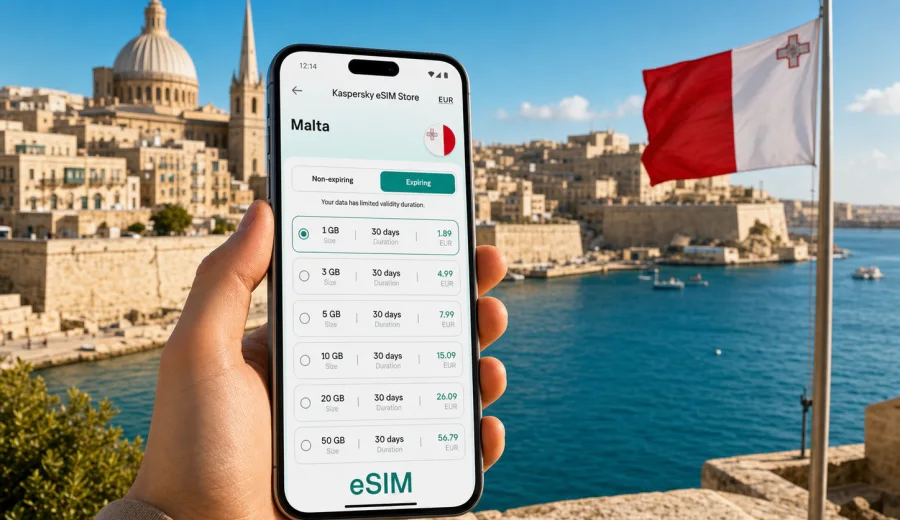
eSIM for Malta: mobile connection and internet for your trip
Malta is a compact country, but a trip there can involve many small online tasks: finding your transfer from Malta International Airport, checking ferry times to Gozo, using maps in Valletta, sending booking details to a hotel in Sliema, or sharing photos from the Blue Lagoon. A working mobile connection is not just convenient. It helps you move around the islands with less friction.
An eSIM is one practical way to prepare mobile internet for Malta before you travel. Instead of looking for a physical SIM card after arrival, you can install a digital SIM profile on a compatible phone and use a selected data plan for the trip. Kaspersky eSIM Store is an app and website where you can choose, arrange, and activate an eSIM with a suitable data plan for mobile internet abroad.
This guide covers eSIM for Malta, how much data you may need, what to check before purchase, how installation usually works, and how to avoid common mistakes while travelling around the Maltese islands.
Why eSIM can be useful in Malta
Malta is easy to underestimate from a connectivity point of view. The country is small, but your online needs can be frequent: navigation through narrow streets, taxi apps, restaurant bookings, ferry updates, museum tickets, translation, video calls, and mobile payments. If your regular roaming option is expensive or unclear, preparing an eSIM can give you more control over mobile internet costs and conditions.
With an eSIM, you do not need to replace your physical SIM card. Your main SIM can remain in the phone for calls, banking messages, or account verification, while the eSIM profile is used for mobile data. This is especially helpful if you want to keep your usual number active but avoid relying on standard roaming for everyday internet use.
The main benefits for Malta are practical:
- you can prepare mobile internet before departure;
- you do not need to search for a SIM shop at the airport or in a busy tourist area;
- you can see the data allowance, validity period, destination, and price before choosing a plan;
- you can use maps, messengers, email, and travel apps without waiting for hotel Wi-Fi;
- you can manage the eSIM through the site or app after purchase.
The key point is to choose the plan according to the real shape of your trip. A long weekend in Valletta and Mdina is different from a workation in St Julian's, a family holiday with video streaming, or a route that includes Gozo and Comino.
Typical mobile internet scenarios in Malta
The right data amount depends less on the country and more on your behaviour. Malta is often a short-break destination, but it can still use a lot of data if you navigate constantly, upload media, or work from your phone.
| Travel scenario | What you may use mobile data for | Data planning tip |
|---|---|---|
| Weekend in Valletta | Maps, messaging, restaurant searches, ride-hailing, boarding passes | A smaller data package may be enough if you use hotel Wi-Fi for heavy downloads. |
| Beach holiday | Navigation, weather, music, photo uploads, messaging from beaches and cafes | Choose more data if you upload videos or use cloud photo backup. |
| Gozo day trip | Ferry information, maps, tickets, taxi apps, messaging | Keep enough data available before boarding the ferry so you are not dependent on public Wi-Fi. |
| Remote work stay | Email, video calls, hotspot use, cloud documents | Pick a larger allowance and check whether tethering is allowed in the selected plan conditions. |
| Family trip | Several travellers sharing maps, bookings, chats, and entertainment | Each traveller may need their own connection, or one larger plan if hotspot use is permitted and practical. |
For light use, mobile data is mostly maps, messaging, search, and tickets. For medium use, add social media, photo uploads, and regular browsing. For heavy use, include video calls, streaming, hotspot use, cloud backup, and large app updates. Those heavier tasks can consume data quickly, so it is better to download offline maps, playlists, and travel documents before leaving home.
How to choose an eSIM data plan for Malta
When choosing an eSIM plan for Malta, start with the trip details rather than the plan list. A clear travel profile helps you avoid both underbuying and paying for data you will not use.
Check these points before you decide:
- Destination. Make sure the plan includes Malta. If your route continues to another country, compare a country plan with a regional option if available.
- Validity period. Match the plan duration to your actual stay, including arrival and departure days.
- Data allowance. Estimate daily use and add a small buffer for navigation, delays, and unexpected calls.
- Activation rules. Read when the validity period starts: after installation, after first network connection, or according to the specific plan conditions.
- Top-up options. Check whether you can add more data if needed.
- Hotspot use. If you plan to connect a laptop or another phone, confirm that the selected plan allows it.
- Voice and SMS. Many travel eSIM data plans focus on mobile internet and do not include a standard phone number, voice calls, or SMS unless stated in the plan terms.
A useful rule is to separate essential and optional data use. Essential use includes maps, boarding passes, hotel messages, banking confirmation, and transport apps. Optional use includes video streaming, large uploads, and automatic cloud backup. If you control optional use, a moderate data package can often feel more predictable.
What to check before buying
Before you pay for any eSIM plan, confirm that your phone or tablet can actually use it. eSIM support depends on the device model, market version, software settings, and whether the device is locked to a mobile operator.
Use this pre-trip checklist:
- Check whether your device supports eSIM.
- Confirm that your phone is not locked to your home mobile operator.
- Update the operating system if an update is pending.
- Make sure you know which SIM profile will handle mobile data during the trip.
- Keep access to Wi-Fi for installation, because the eSIM profile needs an internet connection to download.
- Save your purchase email and QR code in a place you can access while travelling.
- Read the plan conditions for data allowance, validity, destination, and activation.
Do not skip compatibility. A phone can look new and still lack eSIM support in some market versions. It is also better to check before departure, when you still have stable Wi-Fi, time to read instructions, and access to your usual support channels.
At this point in the trip planning, you can choose an eSIM data plan for Malta and compare the available options by data amount and validity period. Do this after you know your dates, route, and expected data use, not as the first step in planning.
How to install and activate eSIM for Malta
The exact installation path depends on your device, but the usual flow is simple: choose a plan, complete the order, install the eSIM profile, then select it for mobile data when you are ready to use it in Malta. For detailed device steps, use the Android installation guide or the iOS installation guide.
A typical sequence looks like this:
1. Choose Malta as your destination and select a suitable data plan.
2. Complete the purchase through the website or app.
3. Open the eSIM details in your profile or purchase email.
4. Install the eSIM by following the on-screen instructions or scanning the QR code.
5. Name the eSIM profile clearly, for example "Malta data".
6. Keep your primary SIM for calls and messages if you need it.
7. Set the eSIM as the mobile data line when you arrive or when the plan conditions say it should be activated.
8. If required by the device or plan, enable data roaming for the eSIM profile.
After installation, avoid deleting the eSIM profile unless you are sure you no longer need it. In many cases, an eSIM profile cannot simply be transferred to another device after activation. If you change phones before the trip, check the conditions before removing anything.
When to prepare mobile internet for Malta
The most comfortable option is to prepare the eSIM before departure, while you still have stable home Wi-Fi. This gives you time to check the device, read the plan conditions, and make sure the profile appears correctly on your phone.
You do not always need to start using the data immediately after installation. The start of validity depends on the selected plan conditions, so read them carefully. Some plans start when they first connect to a supported local network, while others may follow different activation rules. The safest habit is to install in advance, then activate mobile data for the eSIM when you are ready and the plan instructions allow it.
Malta routes where eSIM helps most
Malta rewards spontaneous movement. You may start the day in Valletta, take a ferry to the Three Cities, cross to Sliema, and end the evening in St Julian's. On another day, you may travel to Mdina, Rabat, Dingli Cliffs, or the north of the island. If you add Gozo, you will probably check ferry times, bus routes, maps, and return options several times.
Mobile internet is especially useful in these moments:
- Airport arrival. Use maps, transfer details, hotel messages, and ride apps before you leave the terminal.
- Valletta and the Three Cities. Narrow streets and waterfront routes make live navigation useful.
- Sliema and St Julian's. Restaurant bookings, event searches, and transport apps can save time in busy areas.
- Gozo. Ferry planning, walking routes, and taxi coordination are easier when you are not waiting for Wi-Fi.
- Comino and beach trips. Data can help with boat updates and weather checks, although signal quality may vary by exact location.
- Business travel. Email, document access, and messaging are easier when you have a backup to hotel or conference Wi-Fi.
Even in a small country, coverage and speed can vary by building, terrain, congestion, local network conditions, and device settings. eSIM is a way to prepare mobile internet; it is not a promise that every indoor corner, ferry route, or beach area will have the same connection quality.
How much data do you need for Malta?
You can estimate data more accurately by looking at daily habits. The numbers below are practical planning categories, not guarantees, because app behaviour and settings vary.
| Usage level | Typical behaviour | Planning approach |
|---|---|---|
| Light | Maps, chats, email, bookings, basic browsing | Keep app updates and video uploads off mobile data. |
| Medium | Maps, social media, photo sharing, regular browsing, occasional calls over internet | Choose a data buffer for delays, ferry days, and extra navigation. |
| Heavy | Video calls, streaming, hotspot, cloud backup, large attachments | Consider a larger plan and check hotspot permissions and top-up options. |
To reduce data use, download offline maps before the trip, turn off automatic cloud photo backup on mobile data, update apps before departure, and use Wi-Fi for video streaming. Also check whether your messaging apps automatically download media files, because group chats can consume more data than expected.
If you travel with children or a partner, remember that data use is not evenly distributed. One person may only need maps and chat, while another uses video, games, or hotspot. It is often better to plan individually than assume one data amount fits everyone.
FAQ: eSIM and mobile internet in Malta
Does an eSIM for Malta give me a local phone number?
Many travel eSIM data plans are designed for mobile internet and do not include a standard local phone number, voice calls, or SMS unless the plan conditions say otherwise. You can usually use messengers and internet calling apps over mobile data.
Can I keep my regular SIM card active?
Yes, on many dual-SIM phones you can keep your regular SIM active and use the eSIM for mobile data. Check your device settings carefully so calls, messages, and data are assigned to the right lines.
Should I install the eSIM before I arrive in Malta?
Installing before departure is usually more convenient because you have stable Wi-Fi and time to check settings. Read the selected plan conditions to understand when validity starts.
Do I need Wi-Fi to install the eSIM?
Yes, you need an internet connection to download and install the eSIM profile. Use a trusted Wi-Fi connection before departure or another stable connection if you install after arrival.
Can I use hotspot with an eSIM in Malta?
Hotspot availability depends on the selected plan and device settings. If you plan to connect a laptop or share data with another device, check the plan conditions before relying on it.
What happens if I use all my data?
Options depend on the selected plan. You may be able to top up or choose another plan through the site or app. Check the available options before the trip if you expect heavy data use.
Prepare your eSIM for Malta
For Malta, eSIM is most useful when you treat it as part of trip preparation: check device compatibility, choose a data allowance that matches your route, install the profile while you have Wi-Fi, and keep your primary SIM settings under control.
Kaspersky eSIM Store helps you choose, arrange, and activate an eSIM with a suitable data plan for mobile internet in an overseas trip. Before you leave, review the available options and prepare an eSIM data plan for your Malta trip so maps, transport, bookings, and messages are ready when you need them.