Travel connectivity guide
Man eSIM: Mobile Internet for Your Trip
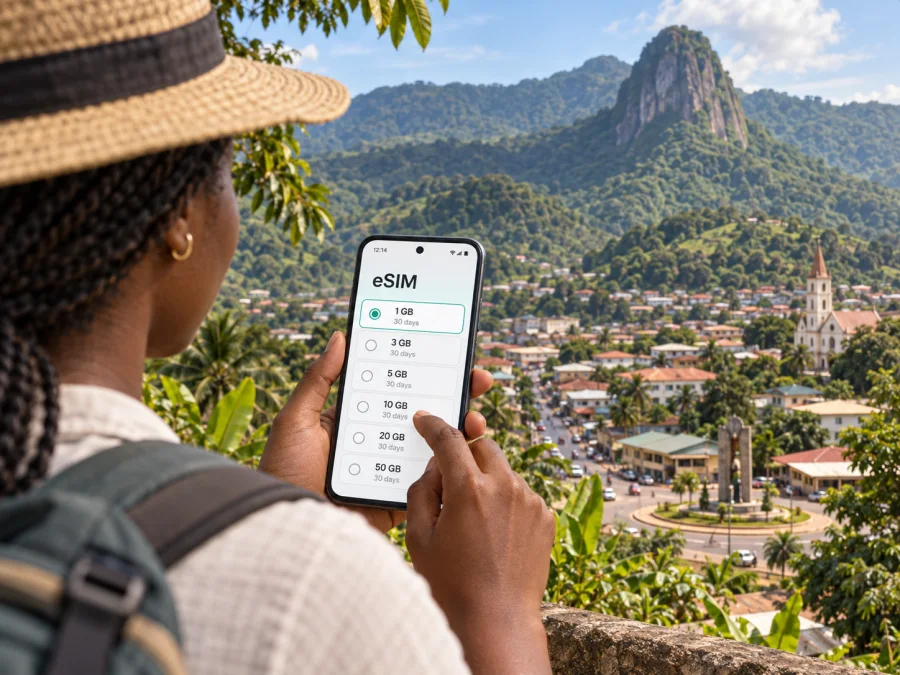
Man eSIM: mobile connection and internet for your trip
Man is a practical base for exploring western Ivory Coast, where a compact urban centre sits among green mountain scenery. A reliable mobile connection can make the first hours in town easier: confirm where your driver will meet you, contact your accommodation, check a route, or message someone when plans change. An eSIM lets you prepare mobile internet for the trip without swapping a physical SIM card.
The key is to plan for the way you will actually use your phone. A visit limited to central Man has different needs from a trip that includes a waterfall, a hillside viewpoint, or villages beyond the town. This guide explains how to prepare an eSIM, move around Man with fewer surprises, and use mobile internet sensibly during a stay in the mountains.
What to expect when arriving in Man
Man is in the west of Ivory Coast and is known for its mountainous setting. The city is a regional centre as well as a starting point for outings in the surrounding area. Its streets, markets, guesthouses, restaurants, and transport points form the practical layer of a visit; the landscape begins to rise around them. The best plan is to arrange the first transfer and accommodation details before you arrive, then use your phone for the parts that need flexibility.
Travelers may reach Man by road from other Ivorian cities or use the local airfield when a suitable service is available. Routes and transport options can change, so confirm the current itinerary with your carrier or accommodation before departure. If you are connecting through Abidjan, allow a realistic buffer between separate transport legs: a long overland journey and a domestic connection are different travel plans, and should not be treated as interchangeable.
Before leaving for Man, save the name and address of your accommodation in a format you can show a driver. Ask the host whether they recommend a particular arrival point or transfer arrangement. A map pin is useful, but a written landmark or phone number provides a backup if a map does not load or the driver prefers verbal directions.
A simple arrival checklist:
- Keep your accommodation name, address, and contact details available offline.
- Confirm whether someone will meet you and where to wait.
- Save your onward transport details and expected arrival time.
- Download an offline map of the town and the wider area you plan to visit.
- Keep your passport and essential travel documents separate from your phone.
- Make sure your phone has enough battery for navigation and messages.
Getting around the city
In central Man, distances that look short on a map can feel different on foot, especially in heat, rain, or on sloping streets. For local trips, travelers commonly arrange a taxi or ask their hotel to help with transport. Agree on the destination and the fare before setting off when the price is not fixed. If you are carrying bags, traveling after dark, or heading to an unfamiliar address, ask your accommodation to recommend a pickup plan.
Do not assume that a ride-hailing app, live vehicle tracking, or a particular payment method will be available at every moment. The simplest fallback is to have the destination written down, keep the accommodation reachable, and carry a suitable way to pay for local transport. Mobile internet can help with messaging and directions, but it does not replace confirming the ride with the driver.
For walking routes, use navigation as a guide rather than as a guarantee that every path is suitable. A route may take you onto a steep road, an unpaved section, or a street with limited pedestrian space. Check the terrain and daylight, and ask a local host about the safest practical way to reach a viewpoint or attraction. Keep the map open before you start if you expect coverage to become less consistent outside the centre.
| Situation | Useful preparation | Phone task |
|---|---|---|
| Transfer from a station or arrival point | Confirm the meeting place with your host | Message the driver if the arrival time changes |
| Short trip within town | Agree on the destination and fare | Show a saved address or map pin |
| Dinner or market visit | Save the return address before leaving | Arrange a pickup if needed |
| Excursion outside the centre | Confirm route, guide, and return plan | Keep key details available offline |
| Day with several stops | Set an order that avoids backtracking | Check directions between stops |
Exploring the mountains around Man
Man is associated with the landscape around it: steep green slopes, waterfalls, and routes toward local viewpoints. The Dent de Man and Mount Tonkoui are among the names travelers may encounter when researching the area. These are outdoor excursions, not ordinary city walks. Ask locally about access, the condition of the route, whether a guide is recommended, and how much time to allow. Do not rely on a mobile map as the only source of route or safety information.
The region is also known for traditional liana bridges. Treat a visit as a cultural experience that calls for local guidance and respect. Ask before photographing people or private places, follow instructions about crossing, and do not assume that a bridge is open or suitable for every visitor. A local guide or host can explain the current arrangements and the significance of the place far better than an online pin alone.
For excursions beyond the built-up centre, plan for weaker or intermittent mobile service. This is a general travel precaution, not a claim about a particular carrier’s coverage. Download maps, save your guide’s contact information, and agree on a meeting point before leaving. Tell someone at your accommodation where you are going and when you expect to return. Bring water and appropriate footwear, and follow local advice if weather changes.
If you are choosing a mobile data package for Man, think about where you will use it. Navigation and messaging in town are usually light tasks; uploading photographs, video calls, and frequent map use can consume more data. A day spent moving between remote stops also calls for offline preparation because signal availability can vary with terrain and network conditions.
Once you have mapped out your dates and expected use, you can choose an eSIM plan for a trip to Ivory Coast. Review the data allowance, validity period, and destination shown for the specific plan before checkout. Kaspersky eSIM Store is an app and website where travelers can select, arrange, and activate an eSIM with a suitable plan for mobile internet abroad; network coverage and service depend on the local network and the selected plan’s conditions.
Choosing an eSIM for a stay in Man
Start with the duration of the whole trip, not only the number of nights in Man. Include time in transit and any other destinations on your route. Then estimate what you will use mobile data for:
- Maps and directions between the airport, accommodation, and places in town.
- Messaging with your host, driver, guide, colleagues, or family.
- Looking up practical information while moving around.
- Email, cloud documents, and work calls during a business visit.
- Photos and video uploads, which may use substantially more data than text messages.
Choose a package by comparing its stated data amount, validity, price, and destination coverage. Those details vary by plan and can change, so check the current terms shown before purchase. If you expect to use Wi-Fi for large uploads and video calls, you may need less mobile data than if you rely on cellular data throughout the day. Avoid selecting a package based on an assumption that all networks or all locations will perform the same way.
An eSIM plan for mobile internet is not automatically a replacement for a regular phone number, voice calls, or SMS. Check the plan description for included services. For calls and messages, travelers can use internet-based apps when both parties have access to them, or retain another suitable way to make ordinary calls if required.
| Your travel pattern | What to consider when selecting data |
|---|---|
| Two or three days, mostly in town | Navigation, messages, and occasional browsing |
| Several days with guided outings | Extra data for coordination, plus offline maps for the route |
| Work trip with email and calls | Estimate meeting use and confirm where dependable Wi-Fi is available |
| Photo-heavy itinerary | Consider how often you will upload, and use Wi-Fi for large files when appropriate |
| Multi-city journey | Check that the plan covers every destination on your itinerary |
Before you install
Check whether your phone supports eSIM and is not restricted by a carrier. You can check your device’s eSIM compatibility before selecting a plan. Confirm that you can access the email or account used for the purchase and that your phone has a stable internet connection for setup. If you are already abroad, installation may require Wi-Fi or another working connection, so arranging the eSIM before travel can reduce last-minute steps.
Keep the QR code or activation details accessible on a second screen or in the method specified by the app. Follow the on-screen instructions for your device, and do not delete an installed eSIM profile unless you understand how it can be restored. The exact labels in settings vary across phone models and operating system versions.
Installing and activating the eSIM
The broad sequence is straightforward, although the screens differ between Android and iOS:
- Select the destination and a plan that matches your dates and expected data use.
- Complete the order and follow the setup steps in Kaspersky eSIM Store.
- Add the eSIM profile using the method shown for your device.
- Choose which line should use mobile data and check the plan’s activation instructions.
- When you are ready to use it, enable the eSIM line and data roaming if the plan instructions require it.
- Open a webpage or messaging app to confirm that data is working.
For device-specific steps, use the Android eSIM installation instructions or the iOS eSIM installation instructions. Follow the plan details rather than changing several network settings at once. If the connection does not start, check that the eSIM line is enabled, that it is selected for mobile data, and that any required roaming setting is on. Then restart the phone or contact support through the appropriate product channel if you still need help.
A useful distinction is that installing a profile and starting its validity are not always the same event. Read the plan’s activation conditions before setup so you know when the validity period begins. If you want to install before departure but use the plan only after arriving, confirm that the specific plan supports that timing.
Frequently asked questions
Can I use an eSIM for calls and SMS?
An eSIM plan for mobile internet may not include a standard phone number, voice calling, or SMS. Read the plan description. Internet-based calling and messaging apps can work over data when the other person is reachable through the same service.
How much data will I need for a trip to Man?
There is no single amount that fits every traveler. Consider how long you will stay, how often you use maps, whether you make calls over data, and how much content you upload. Compare that estimate with the package allowance and validity shown for the plan.
What if mobile data is unavailable outside town?
Use offline maps and keep the guide’s or accommodation’s contact details saved. Agree on a meeting point and return plan before leaving. Connectivity can vary, so outdoor plans should not rely on a live map or a last-minute message as the only safety measure.
Make the most of your time in Man
A smooth visit comes from combining practical city planning with room for the landscape around Man. Keep the first transfer simple, choose accommodation with your itinerary in mind, confirm outdoor plans locally, and save important details offline. Mobile internet can support navigation and coordination, while preparation gives you a workable backup when a signal is limited.
Before departure, compare the destination, data allowance, validity, and activation terms for your route. When you are ready, select an eSIM plan for Ivory Coast through Kaspersky eSIM Store and follow the setup instructions for your phone. That leaves you better prepared to arrive, move around Man, and explore at a pace that suits your trip.


