
Travel connectivity guide
Manama eSIM Guide: Mobile Connection and Internet
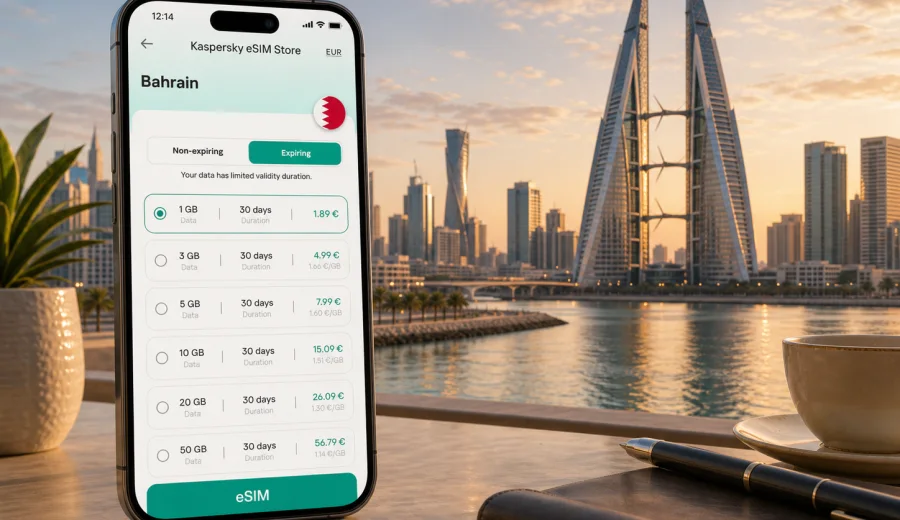
Manama eSIM: mobile connection and internet for a Bahrain city trip
Manama is compact, coastal, business-focused, and easy to underestimate. A single day can include arrival at Bahrain International Airport, a meeting near Bahrain Bay, shopping in Seef, dinner in Adliya, and a walk through Manama Souq. In each part of the city, mobile internet helps with maps, ride-hailing, hotel messages, translation, restaurant bookings, mobile banking checks, and quick contact with colleagues or family.
An eSIM is useful because it lets you prepare mobile data before the trip starts. Instead of looking for a physical SIM card after landing, you can use a compatible phone, choose a data plan for Bahrain, install the eSIM, and activate it according to the selected plan's rules. That matters in Manama because many visits are short: business trips, conference stays, regional stopovers, family visits, or weekend breaks where the first hour after arrival is already planned.
This guide is about Manama as a city, not a general country overview. Bahrain provides the country context and the correct destination for the data plan, but the practical focus is local: airport arrival, taxis, navigation, districts, hotels, business days, stopovers, and short trips from the capital.
Why mobile internet matters in Manama
Manama is not large, but a visitor rarely stays in one small area. The airport is on Muharraq Island, many offices and hotels are around Bahrain Bay, Seef, Diplomatic Area, and central Manama, while evenings often take travelers to Adliya, Juffair, the souq, or the waterfront. Even when distances are short, you may need internet at the exact moment when Wi-Fi is not available.
Mobile internet is especially helpful for:
- checking the route from Bahrain International Airport to your hotel;
- confirming a taxi pickup point at a mall, tower, or hotel lobby;
- sharing a live location with a driver, colleague, or family member;
- navigating between Bahrain Bay, Seef, Adliya, Juffair, and Manama Souq;
- receiving bank security codes or payment confirmations;
- translating short service messages, menus, or signs;
- checking opening hours before crossing the city;
- planning a quick trip to Muharraq, Riffa, or the Bahrain International Circuit area.
Public Wi-Fi can help at hotels, malls, cafes, and the airport, but it is not a complete travel plan. You may need maps while standing outside a building, messaging while waiting for a ride, or access to a booking confirmation while moving between districts. An eSIM data plan gives you a prepared way to use mobile data on your own device, subject to the terms of the selected plan and local network conditions.
Arrival at Bahrain International Airport
Bahrain International Airport is close to Manama, so the ride into the city can be quick. Still, arrival is where small connectivity gaps are most annoying. You may need to tell someone you have landed, find a driver, check a hotel address, open a ride app, or compare routes before leaving the terminal.
If your eSIM is already installed before the flight, the airport routine is simpler. After landing, you can enable the eSIM line, set it as the mobile data line, and allow data roaming for that line if the plan instructions require it. Registration can take a few minutes and depends on the device, plan, and local network conditions, so it is better to prepare while you still have reliable Wi-Fi at home or in your departure airport.
Before departure, use this checklist:
1. Check that your phone supports eSIM and is not locked to another carrier.
2. Install the eSIM using stable Wi-Fi.
3. Save installation details or the QR code where you can access them offline.
4. Keep your regular SIM active if you need calls or SMS on your usual number.
5. Download an offline map of Manama as a backup.
6. Save your hotel address and map pin before boarding.
Districts where eSIM data is useful
Manama is easier to navigate when you think in practical zones. Mobile data helps because each area has different visitor tasks: rides, walking routes, business appointments, restaurant bookings, or family coordination.
| Area | Typical visitor scenario | Why mobile data helps |
|---|---|---|
| Bahrain Bay | Waterfront hotels, offices, skyline views | Ride pickup points, hotel messages, navigation between towers |
| Diplomatic Area | Meetings, embassies, corporate offices | Calendar changes, document access, quick calls |
| Seef | Malls, hotels, offices, family travel | Indoor meeting points, rides, shopping coordination |
| Juffair | Hotels, restaurants, longer stays | Maps, food delivery, messaging, transport planning |
| Adliya | Restaurants, galleries, evening plans | Reservations, walking routes, taxi returns |
| Manama Souq | Markets, heritage streets, local shopping | Translation, location sharing, mobile payments |
| Muharraq | Airport and cultural stops | Transfers, short sightseeing routes, timing checks |
How much data do you need in Manama?
The right data amount depends on trip length, app habits, and how much you rely on hotel Wi-Fi. Maps and messaging use modest amounts of data. Video calls, streaming, cloud backup, hotspot use, and social media uploads can use much more.
| Trip type | Typical length | Main data use | Practical guidance |
|---|---|---|---|
| Airport stopover | 6-24 hours | Maps, taxi app, messages | A small short-term plan may be enough |
| Business visit | 2-4 days | Email, calls, documents, rides | Choose data for full workdays outside Wi-Fi |
| Weekend break | 2-3 days | Maps, restaurants, photos, chats | Allow extra data for social apps and calls |
| Family visit | 5-10 days | Messaging, navigation, video calls | A longer validity period can be convenient |
| Bahrain base trip | 1-2 weeks | Manama plus short trips | Check allowance for days away from hotel Wi-Fi |
If you upload many photos, use your phone as a hotspot, or join calls from taxis, choose a larger allowance. If hotel Wi-Fi is reliable and you mainly need maps and messages outdoors, a smaller plan may be enough.
Preparing an eSIM before flying to Manama
Preparation works best when it is clear and calm. Install the eSIM before you travel, but read the selected plan's rules so you know when validity begins. Some plans start counting after activation, while others may start after installation or the first network connection.
Before buying any eSIM data plan, check your device. Your phone or tablet must support eSIM, and it should not be locked in a way that prevents another mobile plan from being added. This check matters because eSIM is a device feature, not just a travel feature.
After compatibility is clear, follow a simple setup flow:
1. Choose Bahrain as the destination.
2. Compare data allowance, validity period, and price.
3. Install the eSIM on reliable Wi-Fi.
4. Label the line clearly, for example "Bahrain data".
5. Keep your usual SIM for calls if you need your regular number.
6. Set the eSIM as the mobile data line when the trip begins.
7. Turn on data roaming for the eSIM line if the instructions require it.
For installation steps, use the official guides for your device: Android installation guide or iOS installation guide. Menu names can vary by phone model and operating system version, so review the guide before you are standing in the airport.
When you are ready to compare options, Kaspersky eSIM Store helps you choose a mobile data plan for Bahrain before your Manama trip. The site and app let you review destination, data allowance, validity, and other plan conditions before installing and activating the eSIM on a compatible device.
Taxis, ride apps, and local movement
Rides are often the easiest way to move around Manama, especially in hot weather or when your route crosses several districts. Mobile data helps with route checks, pickup points, and communication with drivers. It also helps you avoid standing outside a hotel or mall while trying to reconnect to public Wi-Fi.
Useful local habits:
- set destinations from map pins, not only street names;
- check whether the pickup point is a lobby, car park, mall entrance, or service road;
- save your hotel as a favorite location;
- share your route if arriving late;
- screenshot the hotel address as a backup;
- use Wi-Fi for large downloads and mobile data for movement.
Because Manama has many large hotels, office towers, malls, and waterfront developments, the exact entrance can matter. A driver may be close but not visible. Mobile connection lets you send a short message, adjust the pickup point, or walk to the right gate without losing time.
Business trips to Manama
Manama is a frequent destination for finance, energy, consulting, logistics, technology, and regional management. Business travelers often need mobile data in short bursts: a calendar update before a meeting, a file in a lobby, a taxi route between offices, or a messaging app call with a colleague.
For a work trip, choose an eSIM data plan with enough allowance for:
- email and messaging throughout the day;
- maps and ride-hailing between appointments;
- cloud documents and calendar updates;
- backup connection if guest Wi-Fi is inconvenient;
- occasional hotspot use, if the selected plan and device settings allow it.
Do not assume every meeting room will have easy guest Wi-Fi. Some offices require registration, local approval, or SMS verification. Having mobile data on your own device can keep the day moving when you need to open a file, confirm a route, or send a message quickly.
Hotels, weekends, and evening plans
For leisure visitors, mobile internet is less about heavy work and more about making the city feel easy. You might use it to compare restaurants in Adliya, navigate to Bahrain Bay at sunset, coordinate with friends in Seef, or check whether a museum or mall visit fits before dinner.
Hotel Wi-Fi is useful, but it stops being useful when you leave the building. That matters if your plans include walking through Manama Souq, moving between The Avenues and Bahrain Bay, finding a pharmacy, checking a booking, calling your hotel from a taxi, or confirming airport transfer timing.
If you are staying in Juffair, Seef, Diplomatic Area, or Bahrain Bay, you may move between hotel, mall, restaurant, and waterfront several times a day. A prepared eSIM keeps those small transitions from becoming interruptions.
Stopovers and short city visits
A Bahrain stopover can be short enough that every minute matters. If you have a long layover and plan to leave the airport, install your eSIM before departure. You do not want to spend the stopover solving connectivity after immigration.
For a short stopover, keep the plan focused:
1. Save your return flight details offline.
2. Check the route from the airport to your chosen area.
3. Use a modest data allowance if you only need maps, messages, and a ride app.
4. Avoid large downloads until you are back on Wi-Fi.
5. Keep enough battery for the return ride and boarding pass access.
Good stopover plans are usually simple: a waterfront walk, a meal, a quick cultural stop in Muharraq, or a short visit to central Manama.
Trips from Manama to the rest of Bahrain
Manama is the base for many Bahrain routes. From the capital, visitors may travel to Muharraq heritage sites, Riffa, the Bahrain International Circuit area, beach districts, or family addresses outside the central neighborhoods. These trips are not long by regional standards, but you may be away from hotel Wi-Fi for hours.
Before a day trip from Manama:
- charge your phone and carry a power bank if you rely on maps;
- check whether your route includes parking areas or restricted entrances;
- save your hotel and airport as offline map points;
- confirm whether your data allowance is enough for the full day;
- wait for Wi-Fi before uploading large photo or video files.
If your Bahrain visit is part of a wider route, compare the itinerary before choosing a plan. A Bahrain-only plan can be a simple match for a Manama-focused stay. A regional plan may be more convenient for multi-country travel, depending on availability and included destinations.
eSIM, your regular SIM, and calls
Many travelers use eSIM for mobile data while keeping their regular SIM active for calls or SMS. This can be useful if you need bank verification, work calls, or messages on your usual number. Check your home carrier's roaming charges before leaving your regular SIM enabled abroad.
Keep these points clear:
- travel eSIM data plans usually do not include a local phone number unless the plan terms say so;
- voice calls and SMS are not included unless clearly listed in the plan conditions;
- messaging apps can work over mobile data;
- your regular SIM may still receive calls or texts, but roaming charges may apply;
- dual-SIM settings should be checked before you arrive.
For many Manama trips, a clean setup is regular SIM for your usual number, eSIM for mobile data, and hotel Wi-Fi for large downloads. This separates roles and reduces accidental roaming use.
Data-saving checklist for Manama
You do not need to count every megabyte, but a few settings can make a travel data plan last longer.
- Turn off automatic app updates on mobile data.
- Pause cloud photo backup until Wi-Fi.
- Download offline maps for Manama and Bahrain.
- Save hotel, airport, and meeting locations.
- Lower video streaming quality on mobile data.
- Restrict background data for apps you do not need during the trip.
- Keep messaging, maps, email, banking, and ride apps available.
During the trip, watch for quiet data use. Cloud backup, short-form video, and automatic media downloads in chat apps can use data while you are not paying attention. If you are traveling for work, large files can often wait until hotel Wi-Fi.
Common scenarios
| Scenario | What you need online | Good eSIM approach |
|---|---|---|
| Late airport arrival | Taxi, hotel messages, route check | Install before departure and activate on arrival |
| Conference in Bahrain Bay | Calendar, maps, messaging, documents | Choose data for full workdays outside Wi-Fi |
| Weekend in Adliya and Seef | Restaurants, rides, photos, chats | Use mobile data outside and Wi-Fi for uploads |
| Family visit from Manama | Navigation, messages, video calls | Pick enough validity for the whole stay |
| Day trip from the capital | Route changes, location sharing | Check allowance before leaving the city center |
The best option is not automatically the largest plan. It is the plan that matches your trip length, expected data use, and comfort level. A business traveler who joins calls from taxis may need more data than a weekend visitor who uses hotel Wi-Fi each evening.
Mistakes to avoid
Most eSIM problems are preparation problems. Avoid these common mistakes:
- buying before checking device compatibility;
- waiting until arrival to read installation instructions;
- deleting an eSIM profile after activation without checking whether it can be reinstalled;
- leaving your regular SIM as the mobile data line by mistake;
- forgetting to enable data roaming for the eSIM line when required;
- assuming that eSIM data includes voice calls or SMS;
- using mobile data for automatic video backup on the first day;
- choosing a validity period that ends before your final morning in Manama.
Also avoid relying only on public Wi-Fi. It is not always available where travel decisions happen: taxi lanes, sidewalks, car parks, older streets, or building entrances.
FAQ: eSIM and mobile internet in Manama
Can I install an eSIM before I fly to Bahrain?
Yes, in most cases you can install an eSIM before travel while using reliable Wi-Fi. Read the selected plan's activation and validity rules so you know when the usage period begins.
Is an eSIM useful for a short Manama stopover?
Yes, if you plan to leave the airport or need mobile data for maps, messages, or a ride app. For a very short airside connection, airport Wi-Fi may be enough, but it gives you less control.
Does eSIM replace my normal phone number?
Usually no. Travel eSIM data plans are mainly for mobile internet. They do not normally include a local number, voice calls, or SMS unless those features are included in the plan terms.
Can I use hotel Wi-Fi and eSIM together?
Yes. A practical setup is hotel Wi-Fi for large downloads and eSIM mobile data for movement around Manama. Your phone can switch between Wi-Fi and mobile data depending on your settings.
What if mobile data does not start immediately?
Check that the eSIM line is enabled, selected for mobile data, and allowed to use data roaming if the instructions require it. Restarting the phone can also help. If the issue continues, review the plan instructions and support options in the app or site.
Final preparation before your Manama trip
Manama is easier when the small details are ready before arrival. Save your hotel address, install offline maps, check your airport transfer, and make sure your phone settings are prepared before you land. With eSIM prepared in advance, your first hour in Bahrain can focus on getting to the hotel, finding your meeting place, or starting a short city break instead of searching for mobile data.
Use Kaspersky eSIM Store to prepare an eSIM data plan for your Bahrain trip before you arrive in Manama. Choose the destination, review the data allowance and validity period, install the eSIM on a compatible device, and activate it according to the selected plan's instructions.