
Travel connectivity guide
Manchester eSIM: mobile internet for travel
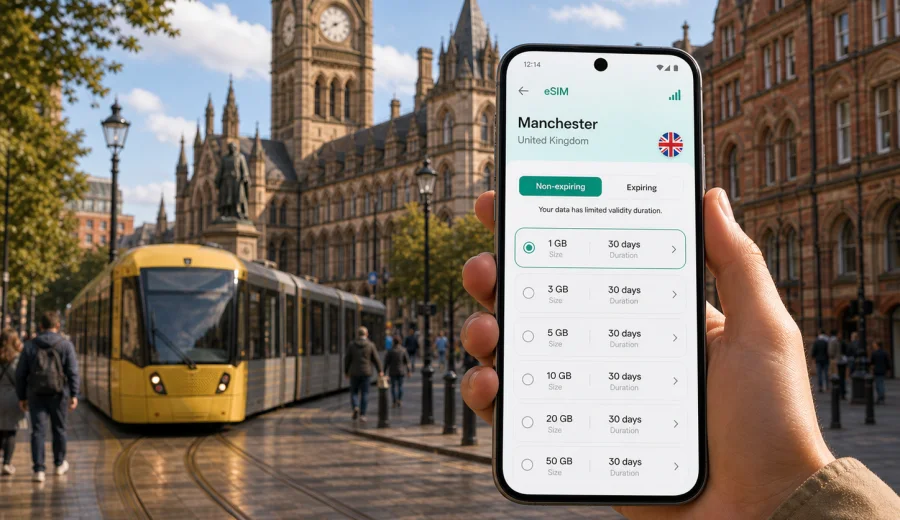
Manchester eSIM: mobile connection and internet for your city trip
Manchester is a practical city for travellers: the airport is close to the centre, trains connect the main stations with other UK cities, and many neighbourhoods are easy to explore by tram, bus, taxi, bike or on foot. Mobile internet matters from the first minutes of the trip. You may need maps for the route from Manchester Airport, a ride-hailing app after a late arrival, a hotel booking confirmation near Piccadilly, or messaging while moving between the Northern Quarter, Deansgate, Spinningfields, Salford Quays and the university area.
An eSIM helps you prepare mobile internet before you reach Manchester or shortly after you arrive. Instead of looking for a physical SIM card, you can use a compatible phone, choose a suitable data plan for the United Kingdom, install the eSIM profile and manage mobile data from your device settings. Kaspersky eSIM Store is an app and website where you can quickly choose, arrange and activate an eSIM with a suitable data plan for mobile internet during an international trip.
This guide focuses on Manchester city scenarios: airport arrival, local transport, hotels, workdays, football weekends, conferences, short stopovers and day trips from the city. It is not a general UK guide. The goal is to help you decide how much data you may need, when to install eSIM, what to check before buying and how to stay online without depending only on public Wi-Fi.
Why mobile internet is useful in Manchester
Manchester is compact enough for walking, but it is also a city where plans can change quickly. Rain may push you from a walking route to a tram. A train delay can change your arrival station. A hotel check-in code, event ticket or restaurant booking may be stored in an app. In these moments, having mobile internet on your own phone is often simpler than searching for Wi-Fi.
Common first-day uses include:
- checking the fastest route from Manchester Airport to Piccadilly, Deansgate, Oxford Road, Victoria, Salford Quays or your hotel;
- using maps while switching between train, tram and walking routes;
- confirming hotel address details, entry codes and check-in messages;
- messaging family, colleagues or travel partners after arrival;
- ordering a taxi or ride-hailing service if your train or tram route is inconvenient;
- checking event times for football, concerts, conferences or university visits;
- using translation, banking and travel apps without relying on public Wi-Fi.
An eSIM is especially useful if you are arriving from outside the UK and your home roaming is expensive, limited or uncertain. It can also be helpful for travellers who keep their physical SIM active for calls or bank messages while using eSIM for data.
Manchester arrival scenarios where eSIM helps
Manchester Airport is connected to the city by train, tram, coach and taxi. The best option depends on where you are staying, how much luggage you have and what time you arrive. Mobile data helps you compare the route while you are still in the terminal or on the platform.
| Arrival situation | What you may need online | Why eSIM can help |
|---|---|---|
| First visit to Manchester | Maps, station names, hotel route, ticket apps | You can navigate without waiting for Wi-Fi |
| Late evening arrival | Taxi app, hotel messages, live transport times | You can adjust the route if public transport is slower |
| Business trip | Calendar, email, meeting address, documents | You can move directly from airport or station to the office |
| Football weekend | Stadium route, tickets, group chat, crowd updates | You can stay coordinated before and after the match |
| Short stopover | Luggage plan, route timing, cafe or workspace search | You can use the few hours more efficiently |
If you install eSIM before travelling, keep in mind that the exact moment when the plan starts can depend on the selected tariff conditions. Some travellers prefer to install the profile before departure and activate mobile data after landing. Others install it after arrival using airport or hotel Wi-Fi. The safer choice is to read the plan conditions before purchase and make sure you understand when validity and data usage begin.
Moving around Manchester with mobile data
Manchester's main central areas are close together, but the wider travel pattern can be mixed. You may land at the airport, take a train to Piccadilly, use the tram to reach St Peter's Square or MediaCityUK, walk through the Northern Quarter, then take a taxi back from a late event. Mobile internet supports each step.
Useful city movement tasks:
- live navigation between stations, tram stops and hotel entrances;
- checking platform changes and walking times;
- saving offline maps but still using live traffic and public transport updates;
- opening digital tickets or booking confirmations;
- finding restaurants, pharmacies, ATMs and coworking spaces nearby;
- sharing your location with a travel partner;
- using mobile payments or banking apps when needed.
For many visitors, the most data-heavy city tasks are maps, video calls, cloud files, social media uploads and hotspot use. The lightest tasks are messaging, email, ticket checks and basic browsing. If you plan to stream video, upload many photos, join long video meetings or use your phone as a hotspot for a laptop, choose a larger data allowance than you would for a simple weekend.
Choosing an eSIM data plan for Manchester
For a city trip to Manchester, you usually need a United Kingdom eSIM plan rather than a separate city product. The plan should match your travel dates, route and data habits. If you are only visiting Manchester, a UK plan is usually the relevant direction. If your route includes several European countries, a regional plan may be worth comparing, but check the coverage countries and conditions carefully.
Before choosing a plan, answer five questions:
1. How long will you be in Manchester and the United Kingdom?
2. Will you use mobile data only on your phone, or also as a hotspot?
3. Do you need data mainly for maps and messaging, or also for video calls and streaming?
4. Will you travel from Manchester to Liverpool, Leeds, York, London, the Lake District or other UK destinations?
5. Do you want to install eSIM before departure or after arrival?
Here is a practical way to estimate data needs:
| Trip style | Typical online activity | Plan logic |
|---|---|---|
| 1-2 day stopover | Maps, messaging, tickets, light browsing | Smaller data allowance may be enough |
| Weekend city break | Navigation, photos, restaurant search, social apps | Moderate data allowance is more comfortable |
| Business trip | Email, documents, calls, hotspot backup | Choose more data and enough validity days |
| Football or event trip | Tickets, maps, group chats, media uploads | Allow extra data for crowds and waiting time |
| Multi-city UK route | Manchester plus other cities | Choose validity and allowance for the full route |
If you want to prepare before flying, you can choose a suitable eSIM data plan for your Manchester trip through Kaspersky eSIM Store. Check the data volume, validity period, destination, price and activation terms before completing the purchase.
Districts and travel patterns in Manchester
Manchester feels different depending on where you stay, and mobile internet helps for different reasons in each area.
| Area | Typical travel task | Data use to expect |
|---|---|---|
| Piccadilly and the city centre | Station arrival, hotel route, train updates | Maps, tickets, messaging |
| Northern Quarter and Ancoats | Cafes, evening plans, small streets | Reservations, walking routes, ride-hailing |
| Deansgate and Spinningfields | Offices, hotels, restaurants | Email, calendar changes, document access |
| Salford Quays and MediaCityUK | Waterfront hotels, work events, tram trips | Live tram times and route checks |
| Old Trafford and Etihad Campus | Football weekends and events | Digital tickets, group chats, transport updates |
| Oxford Road and university areas | Campus visits, conferences, study trips | Maps, video calls, hotel details |
If your trip combines meetings, football, restaurants and day trips, plan for more data than you would for a simple overnight stay.
How to install eSIM before or after arrival
The simplest preparation is to check your device, choose a plan, install the eSIM profile and then select it for mobile data when you are ready. Your phone must support eSIM, and it should not be locked to an operator in a way that prevents adding another mobile plan.
Basic setup flow:
1. Check that your smartphone or tablet supports eSIM.
2. Choose the United Kingdom as the destination for a Manchester trip.
3. Review the data allowance, validity period and plan conditions.
4. Complete the purchase and open the eSIM details in the site or app.
5. Install the eSIM profile using the on-screen instructions or QR code.
6. When you want to use it, select the eSIM line for mobile data.
7. If the plan conditions require it, enable data roaming for the eSIM profile.
For detailed setup steps, use the Android installation guide or the iOS installation guide. The exact path in settings can differ by device model, operating system version and manufacturer interface, so follow the instructions shown for your phone.
What to check before buying
Device compatibility is the first check. eSIM is not supported by every phone, and some models differ by region or carrier. Before arranging a plan, check your device and confirm that it can add and use an eSIM profile.
Also review these details:
- whether the plan covers the United Kingdom;
- the data volume and validity period;
- when the validity period starts;
- whether calls and SMS are included, or whether the plan is data-only;
- whether data roaming must be enabled for the eSIM profile;
- whether hotspot use is allowed under the selected plan conditions;
- whether the eSIM can be reinstalled or moved after activation;
- what support options are available if installation does not work as expected.
Most travel eSIM plans are designed for mobile data. They may not include a regular phone number, voice calls or SMS unless this is stated in the plan conditions. For calls and messages, many travellers use internet-based apps while keeping their primary SIM available for important texts or bank verification messages.
Data planning for hotels, work and events
Data use depends on behaviour, not only trip length. Light use means maps, messaging, email, bookings and occasional photo uploads. Heavy use means video calls, hotspot use, cloud backups, streaming, large documents and frequent social media uploads.
For business trips and conferences, leave a buffer. Manchester visitors often move between the airport, Piccadilly, Spinningfields, Oxford Road, MediaCityUK and hotel meeting spaces. A delayed train, changed meeting room or last-minute document can increase data use. Save key addresses offline, keep your primary SIM available if you need bank or corporate verification messages, and check whether your laptop will need hotspot data.
An eSIM is not a replacement for corporate security policies, local Wi-Fi rules or a VPN if your employer requires one. It is a way to prepare mobile internet for travel, so you are less dependent on public Wi-Fi and route changes.
Short stopovers in Manchester
If you have only a few hours in the city, mobile data can make the difference between a useful stop and a stressful one. From the airport or a railway station, you may want to visit the city centre, store luggage, find a cafe, return in time for a train or flight, and keep an eye on delays.
For a short stopover, prioritise:
1. route time from airport or station to your target area;
2. return route with a time buffer;
3. ticket and booking access;
4. battery level and charging options;
5. data plan validity that covers the stopover and any onward UK travel.
If your stopover is part of a longer UK trip, choose a plan that covers the full route rather than only the hours in Manchester. The same plan may then support navigation onward to Liverpool, Leeds, York, London, the Peak District or the Lake District, subject to the selected plan conditions. Keep offline backups for essential documents and routes, because mobile performance can vary by building, station, rural area and crowd levels.
eSIM vs roaming, local SIM and public Wi-Fi in Manchester
Different connection options suit different travellers. eSIM is often a convenient middle option because it can be prepared digitally and used without replacing a physical SIM card.
| Option | Advantage | What to consider |
|---|---|---|
| Home roaming | Keeps your usual SIM and number active | Cost and data limits may be less predictable |
| Physical local SIM | Can be familiar for long stays | Requires finding a seller and changing SIM cards |
| Public Wi-Fi | Useful in hotels, cafes and airports | Not always available, stable or appropriate for sensitive tasks |
| Travel eSIM | Digital setup, no physical SIM swap, useful for data | Requires compatible unlocked device and plan checks |
For many travellers, the best setup is simple: keep the primary SIM active for important calls or messages if needed, and use eSIM as the mobile data line in Manchester. Check your phone settings carefully so the correct line is used for data and unexpected roaming on your home SIM is avoided.
Quick checklist before you fly to Manchester
Use this list before departure:
- Confirm that your phone supports eSIM and is not carrier-locked.
- Choose a United Kingdom plan that matches your Manchester dates.
- Read the data allowance, validity period and activation terms.
- Install the eSIM profile while you still have stable internet, if you prefer to prepare early.
- Save hotel address, booking references and key routes offline.
- Keep your primary SIM settings under control if roaming costs are a concern.
- Pack a charger or power bank for long travel days.
- Know where to find the eSIM installation instructions if you need them after arrival.
Frequently asked questions
Do I need a Manchester-specific eSIM?
Usually no. For a trip to Manchester, you normally choose a United Kingdom eSIM data plan, because Manchester is in the UK. Check the destination and coverage in the selected plan before purchase.
Can I install eSIM before I arrive in Manchester?
In many cases, yes. You can install the eSIM profile before departure and use it when you are ready, but plan validity and activation rules depend on the selected tariff. Read the conditions before purchase.
Will eSIM give me a UK phone number?
Many travel eSIM data plans are data-only and do not include a regular phone number, calls or SMS unless this is stated in the plan details. You can use internet-based calling and messaging apps over mobile data.
Is eSIM useful if my hotel has Wi-Fi?
Yes, because you may need internet before check-in, between venues, at stations, in taxis, during day trips and after leaving the hotel. Hotel Wi-Fi is useful, but it does not cover the whole trip.
Prepare mobile internet for Manchester
A Manchester trip is easier when your phone is ready for the first route, the first message and the first change of plan. With eSIM, you can prepare mobile internet without a physical SIM card, check the plan terms in advance and use your compatible device for navigation, bookings, transport and everyday travel tasks.
Before you travel, review your device compatibility, choose a data allowance that fits your trip and keep the installation instructions close. When you are ready to arrange mobile internet for the city and the wider UK route, prepare an eSIM data plan for the United Kingdom through Kaspersky eSIM Store.