Travel connectivity guide
Maniitsoq eSIM: Mobile Internet in Greenland
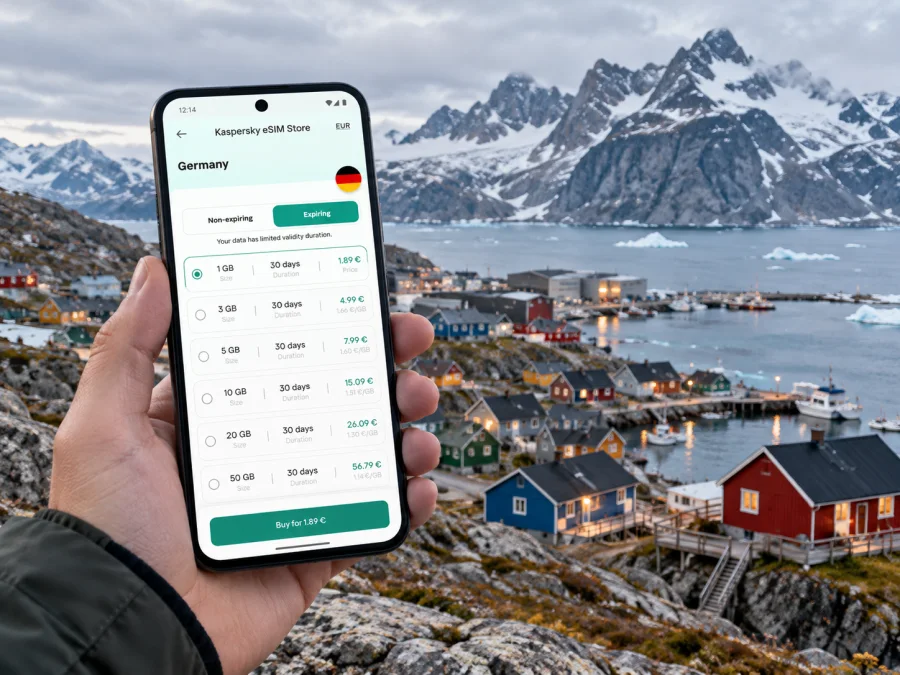
Maniitsoq eSIM: Mobile Connection and Internet in Greenland
Maniitsoq is a small west Greenland town between steep mountain slopes and the coast. A day can move from a harbour walk to a boat excursion into a fjord, while the next leg may depend on an aircraft or ferry. Mobile internet is useful for arrival updates, directions, messages to a host, checking the weather and confirming arrangements with a guide. Plan for connected use in town, but keep offline alternatives for travel beyond the built-up area.
Greenland is a self-governing part of the Kingdom of Denmark, with its own travel geography and mobile market. Maniitsoq lies about 140 km north of Nuuk and is a separate destination, not a suburb of the capital. It has its own airport, a passenger-ferry stop and seasonal fast-boat links. When choosing an eSIM, check explicitly that Greenland is included; a Denmark plan should not be assumed to include it unless the terms say so.
This guide covers arrival, navigation, local connectivity and preparation for excursions. Availability depends on your exact location, device and the network access included with the eSIM you choose.
What mobile internet is useful for in Maniitsoq
The central area is compact enough to explore on foot, but a data connection can still help you find accommodation, message a boat operator, check a changed departure, translate a short notice or navigate between the harbour and town. Stairways and uneven terrain make a map useful even on short walks.
For most visitors, practical tasks matter more than constant streaming. Saved maps, messages and booking confirmations use less data than video calls, large uploads or cloud backups. Estimate your use based on your actual plans rather than choosing an allowance by habit.
Useful tasks include:
- checking a route between the airport, accommodation, harbour and town centre;
- contacting a hotel, guide or boat provider about a meeting point;
- checking flight, ferry or fast-boat information before setting out;
- looking up local services or translating a short message;
- checking a forecast before a walk or excursion.
Mobile data should not be your only source of essential information. Save tickets, addresses, contact details and transport instructions before leaving a reliable connection. In a small Arctic community, offline preparation is a useful backup if a signal or service is unavailable.
Arrival: flights, harbour and the first journey into town
Maniitsoq has its own airport and is served by flights from Nuuk and Kangerlussuaq. It is also a stop on the Sarfaq Ittuk passenger-ferry route. A fast boat connects Nuuk and Maniitsoq seasonally from May to November, with year-round transfers to nearby settlements. These are general route descriptions: schedules and operating dates change, so verify the exact dates and connections for your booking.
Before departure, save your ticket, accommodation address, check-in instructions and pickup contact. If you will meet a driver or guide, agree on a precise meeting place such as the terminal entrance or a named harbour location. Keep the confirmation available offline in case data is not working on arrival.
The airport is outside the compact centre. Visit Greenland recommends a taxi for the transfer and lists a local taxi contact; confirm current details shortly before travel. If your accommodation offers pickup, confirm it directly. At the harbour, check with the operator where passengers should wait and when to arrive. Do not assume there is a frequent airport bus or app-based ride service.
| Arrival | Confirm in advance | Save offline |
|---|---|---|
| Maniitsoq Airport | Transfer, check-in and taxi details | Address and pickup messages |
| Harbour and ferry | Pier, check-in time and baggage rules | Ticket and operator updates |
| Seasonal fast boat | Operating date and departure point | Booking and meeting details |
| Connection via Nuuk or Kangerlussuaq | Transfer time and possible overnight stay | Each ticket segment separately |
Flights and boats can be affected by local operating conditions. Internet can help you receive a change notice or contact a provider, but it does not replace carrier instructions. Keep your phone charged and carry a suitable charger or power bank.
Mobile coverage: local network and destination details
Tusass, Greenland’s telecommunications company, lists Maniitsoq among ten towns where it currently offers 5G. The same page excludes satellite towns and settlements from that list. This is useful context for central Maniitsoq, but it does not promise 5G in every building, on every boat route or in nearby outdoor areas. Terrain, indoor conditions, weather, device capability and the network arrangement used by your SIM or eSIM can all affect service.
Local network availability and access through a travel eSIM are separate questions. An international eSIM can use a local network only where its provider’s current roaming arrangements allow it. Read the Greenland plan details for network access, data volume, validity, activation and restrictions. Do not infer access from a general coverage map or from another product’s terms.
Tusass also advertises a Greenland-specific tourist eSIM, Hello Greenland. That is a separate local offer; its existence does not establish what network another travel plan uses or what that plan includes. Compare the terms for the exact product you intend to use. Keep your regular SIM available if you need its number for calls or account verification.
For a trip focused on Maniitsoq, view the current Greenland eSIM options and check the destination, validity and data details shown for each plan. Kaspersky eSIM Store is an app and website that helps travellers choose, arrange and activate an eSIM for mobile data abroad; connectivity depends on the selected service and local network conditions. A Greenland listing is not a guarantee of service in every settlement or outdoor location.
Choose a data amount and validity period
Start with the length and style of your stay. A short visit with saved maps, messages and occasional searches differs from a longer stay with photo uploads, remote work or video calls. Check the allowance, validity, activation conditions and hotspot rules in the offer itself.
| Travel pattern | Likely use | Planning note |
|---|---|---|
| One or two nights in town | Messages, maps, bookings and searches | Save maps and documents first |
| Several days with boat trips | Updates, weather, meeting details and photos | Allow for check-ins; do not expect service all along the route |
| Work visit | Email, documents, calls and perhaps hotspot | Confirm hotspot rules and arrange a backup connection |
| Longer or regional itinerary | Repeated travel updates and navigation | Match validity to the full route and prepare offline access |
Text uses less data than video; photo backups and automatic sync can use a large allowance. Pause backups or updates until suitable Wi-Fi is available.
Validity may begin at purchase, installation or first connection. Read the activation wording: installing a profile does not confirm that the plan is active or that a network is reachable.
Check your device before arranging an eSIM
An eSIM requires a compatible device that is not carrier-locked in a way that prevents activation. Support varies by exact model, model number, sales region and software configuration. A familiar product name alone is not enough: check the manufacturer’s specifications for your exact variant and confirm the phone is unlocked for the service you plan to use.
You can look in device settings for an option such as “Add eSIM” or check whether the device has an EID. Menu names differ by manufacturer and operating system. Check whether your device is compatible before choosing a plan, especially if you have a regional model or bought the phone through a carrier.
If your phone supports two lines, choose which handles mobile data and whether your usual number needs to stay active. Review home-SIM roaming terms to avoid unexpected charges. These settings do not guarantee coverage.
Install and activate carefully
Install the eSIM while you have stable internet, enough battery and time to follow the instructions. Depending on the offer, setup may use a QR code, app or manual details. Follow the method supplied for your plan; some activation codes can be used only once.
- Confirm device compatibility and unlock status.
- Review the destination, data allowance, validity and activation conditions.
- Connect to Wi-Fi and follow the instructions for Android or iOS.
- Name the new line clearly and keep your home SIM settings available.
- Follow the plan’s directions on when to turn on the line and data roaming.
- At the relevant activation point, select the eSIM for mobile data and wait for registration.
- If it fails, check the selected data line and plan status before deleting the profile.
Validity may begin at a different point than installation. Keep the instructions and provider contact available offline, and do not share an activation code or QR image.
Getting around town with maps and data
Maniitsoq’s central area is compact, and walking is practical for many local trips. The terrain rises and falls: stairways connect different levels, so a short mapped route may include a climb. Wear footwear suited to the season. A map can orient you, but it cannot tell you whether an outdoor path is safe in current snow, ice or weather.
Visit Greenland describes a fixed-route local bus and says stops are served about every 20 minutes, with more frequent service at some times. Treat that as general guidance and confirm the current route, fare and timetable locally. Taxis can be useful with luggage, late arrivals or difficult weather. Save local transport contacts instead of relying on an app-based booking service.
Download an offline map area before you arrive and pin your accommodation, airport, harbour, shops and tour meeting points. Confirm names and spellings with your host or guide. If a route crosses steep ground, private property or an unmarked trail, ask locally before following it. GPS may locate you without data, but map tiles and search results might not load unless saved.
Check opening times or confirm a tour online, but verify details directly because hours can change. Carry a backup payment method; data access does not guarantee every point of sale is online.
Outdoor trips and coverage beyond town
Maniitsoq is known for mountains, fjords, glaciers, boat trips and seasonal outdoor activities. Coverage available in town should not be treated as coverage along a boat, hike, ski tour or snowmobile route. Ask the operator about communication arrangements, equipment and what to do if conditions change.
For a boat trip, save the departure point, time, operator contact and return instructions. Share hike or winter plans with a trusted contact, follow local safety advice and keep your phone warm; cold can reduce battery performance.
Save your accommodation contact, tickets, map, meeting instructions, emergency details and a recent forecast. Local advice takes priority: forecasts and coverage maps cannot guarantee conditions or reception at a specific point.
Accommodation, work and a short stopover
Choose accommodation with airport or harbour access in mind; ask about pickup, check-in hours and Wi-Fi. Visit Greenland lists harbour-side Hotel Maniitsoq with Wi-Fi and conference facilities. Confirm amenities and availability for your dates.
For remote work, verify the connection at the property before scheduling a meeting. An eSIM may help where service is available, but is not a guaranteed replacement for tested broadband. Download documents in advance.
On a short stopover, save the onward ticket and allow time to reach the airport or harbour. Follow check-in instructions and keep the itinerary offline; do not store it only in an online account.
If the connection does not work
Troubleshoot without deleting the profile or immediately purchasing another plan:
- Check that Greenland is included and you are in a place where the plan is intended to work.
- Confirm the eSIM is enabled and selected for mobile data.
- Check activation status, validity and remaining data.
- Follow the provider’s instructions for roaming and network selection.
- Toggle airplane mode once or restart if the plan’s guidance permits it.
- Try a suitable outdoor or window location and wait for registration.
- Contact the provider over Wi-Fi with the error, device model and approximate location.
Some QR codes cannot be reused, so deleting the profile can make recovery harder. Use saved tickets and maps or ask your accommodation for help. Do not leave for a scheduled activity based only on a map that cannot refresh.
Maniitsoq connection checklist
- Confirm Greenland is included, and compare data, validity, activation and hotspot terms.
- Verify eSIM support for your exact device variant and confirm it is unlocked.
- Save accommodation, transport, guide and support details, plus offline maps.
- Review data-line and roaming settings; carry a charger and protect the phone from cold.
- Activate as directed, confirm data works and check current local transport details.
- Keep offline information ready for boat trips and outdoor routes.
Frequently asked questions
Is Greenland part of Denmark for eSIM purposes?
Greenland is self-governing within the Kingdom of Denmark, but it is a distinct destination for travel and mobile-service planning. Do not assume a Denmark plan includes Greenland; check the destination list in the actual plan terms.
Is 5G available in Maniitsoq?
Tusass currently lists Maniitsoq among towns with 5G service. This describes the local network’s stated town availability, not every address or outdoor route, and it does not confirm access through a particular international eSIM. Check the plan and device, and expect service to vary by location.
Will an eSIM work on a boat or in the mountains?
There is no general guarantee of coverage on boat routes, in fjords or on trails. Ask the operator about communications and safety, save needed information offline and carry a separate emergency plan.
What if I arrive without mobile data?
Use your saved itinerary and offline map, connect to Wi-Fi if available, or contact your accommodation or transport provider. Troubleshoot when you have a stable connection, with the exact plan instructions and support contact at hand.
Prepare your Maniitsoq trip
Check that your device and exact regional variant support eSIM, read the Greenland plan conditions, install it using the supplied instructions and save essential travel details offline. Treat service in Maniitsoq as location-dependent, and make a separate communication plan for boat trips and outdoor routes.
Use Kaspersky eSIM Store on the website or in the app to review and arrange an eSIM for your trip. Explore the available Greenland options and compare the current data allowance, validity and activation requirements before choosing. Keep maps, tickets and local contacts available offline too, so your plans do not depend on a continuous signal.


