
Travel connectivity guide
Manta eSIM for mobile internet in Ecuador
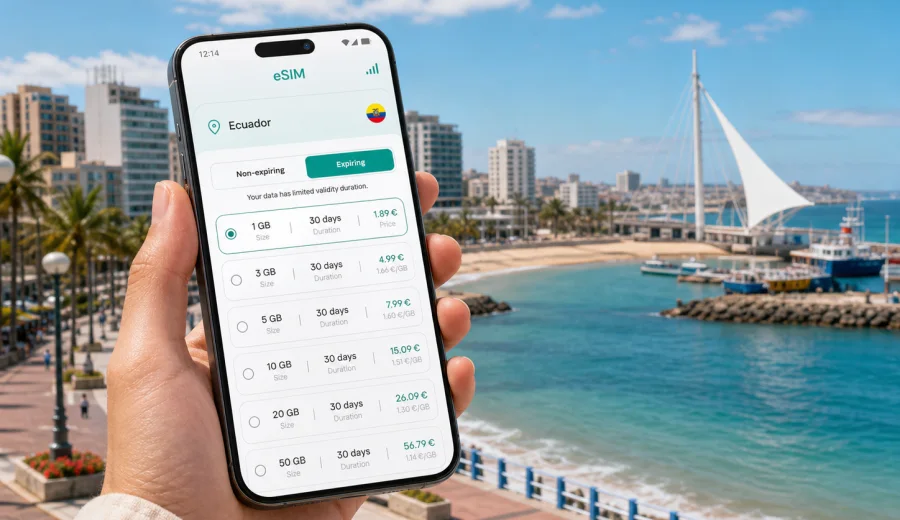
Manta eSIM: mobile connection and internet for a trip to Ecuador's coast
Manta is one of Ecuador's most practical coastal bases: a working Pacific port, a beach city, a seafood stop, a business destination, and a starting point for trips across Manabi Province. It is not the kind of place where mobile internet is useful only for posting photos. In Manta, your phone often becomes the tool that helps you find a taxi after landing, check a hotel address in Barbasquillo, navigate between Murcielago Beach and the port area, coordinate a meeting near the business district, or plan a day trip toward Montecristi, San Mateo, Pacoche, Puerto Lopez, or Machalilla National Park.
An eSIM can make that first day easier because you do not need to look for a physical SIM card shop before you can use maps, messengers, email, ride apps, or translation tools. With Kaspersky eSIM Store, you can use the app or website to choose and activate an eSIM with a suitable data plan for mobile internet in Ecuador, as long as your device supports eSIM and the selected plan fits your route and data needs.
This guide focuses on Manta itself: arrival, transport, hotel areas, beach days, work trips, stopovers, and short journeys from the city. Ecuador is the country context, but the connectivity decisions are different when your main base is Manta rather than Quito, Guayaquil, or the Galapagos.
Why mobile internet matters in Manta
Manta is compact compared with Ecuador's largest cities, but it is spread across very different travel zones. A typical visitor may move between the airport, a hotel near the waterfront, restaurants in the commercial center, the port area, beach neighborhoods, and roads leading out toward Montecristi or the southern coast. These movements are easier when you can stay online without depending on hotel Wi-Fi or a cafe password.
Mobile internet is especially useful in Manta for:
- checking the route from the airport to your hotel before you get into a taxi;
- sharing your location with colleagues, family, or a tour operator;
- comparing travel time between central Manta, Barbasquillo, Tarqui, San Mateo, and Santa Marianita;
- using maps when streets, coastal roads, or access points are unfamiliar;
- translating short messages in Spanish when arranging transport or confirming a booking;
- keeping boarding passes, reservations, and payment notifications available;
- using messaging apps for calls when your eSIM plan is data-only;
- checking weather and sea conditions before a beach or coastal day trip.
Manta's rhythm also changes by purpose. A cruise passenger may need only a few hours of reliable data around the waterfront. A business traveler may need stable internet for several workdays. A digital nomad or long-stay visitor may need enough data for maps, hotspot use, and regular messaging, while still keeping heavier tasks for secure hotel or office Wi-Fi.
Arrival in Manta: what to prepare before you land
If Manta is your first stop in Ecuador, prepare mobile internet before the arrival day. You do not need to activate every setting too early, but you should know where the eSIM details are, how to install the profile, and which SIM line your phone will use for data.
Before departure, check that your smartphone supports eSIM, choose a data plan that covers Ecuador, save installation instructions, keep your usual SIM available if you need banking messages or calls, and download your first hotel address and map area.
The arrival workflow in Manta is usually simple: airport, taxi or arranged transfer, hotel check-in, then the first movement around the waterfront or business area. The challenge is timing, so eSIM preparation works best before you are standing outside the terminal with luggage.
Manta travel scenarios and data needs
Different trips need different mobile internet habits. Use the trip purpose to decide how much data and validity you need.
| Trip type | Typical Manta use | What to prioritize |
|---|---|---|
| Weekend beach trip | Maps, restaurant search, messaging, taxi coordination | Enough data for navigation and sharing |
| Business visit | Email, maps, calendar changes, urgent calls | Comfortable data and clear validity dates |
| Cruise or stopover | Port navigation, messages, quick searches | A compact plan ready on arrival |
| Coastal route | Manta plus Montecristi, Pacoche, or Puerto Lopez | Ecuador coverage and offline maps |
Maps and messaging use less data than video, cloud backups, or long social media sessions. Turn off photo sync, video autoplay, and app updates over mobile data before you rely on a travel eSIM.
Where connectivity helps most inside the city
Manta has several areas where being online changes the travel experience:
- Murcielago Beach and the waterfront: walking routes, restaurant searches, ride pickup points, and meeting spots.
- Barbasquillo: hotels, restaurants, business stays, hillside streets, and evening plans.
- Tarqui and central areas: markets, local errands, transport connections, and city navigation.
- Port and cruise zones: maps, messages, and onward plans during short visits.
- San Mateo and Santa Marianita: beach routes, pickup coordination, and offline map checks.
- Roads toward Montecristi and inland Manabi: route checks and travel timing.
Hotel Wi-Fi can be enough once you are checked in, but it does not help between fixed Wi-Fi points: airport to hotel, hotel to restaurant, beach to taxi, meeting to dinner, or Manta to a coastal day trip.
eSIM, roaming, local SIM, and Wi-Fi in Manta
There is no single best connection option for every traveler. A travel eSIM can be prepared before the trip and avoids a physical SIM swap, but it requires an eSIM-compatible, unlocked device. Roaming keeps your existing line active, yet costs and data conditions depend on your home operator. A local physical SIM may suit longer stays, but it takes more setup time. Hotel Wi-Fi helps with large downloads, but not while you are moving through Manta.
Choosing an eSIM plan for Manta
When Manta is your main destination, choose the plan based on your real route rather than only the city name. A visitor who stays near Murcielago Beach for three days needs less data than someone who uses Manta as a base for daily coastal trips.
Look at four plan details before you decide:
- Destination coverage: choose Ecuador if your route stays within the country; consider a regional or global option only if your itinerary crosses borders.
- Data allowance: maps, messaging, browsing, and reservations are light; video, hotspot use, and cloud backup are heavy.
- Validity period: match the plan to the full time you need mobile internet, including arrival and departure days.
- Activation rules: check when the validity starts and what steps are required before travel.
If you want to prepare mobile internet before flying to the coast, you can choose an eSIM plan for Ecuador through Kaspersky eSIM Store and review the available data options for your trip length. The store helps you choose, arrange, and activate an eSIM with a suitable tariff for travel; conditions depend on the selected plan.
A practical data budget for Manta
Exact data use depends on your apps and habits, but you can estimate your needs by activity:
Light use in Manta usually means messaging, location sharing, map navigation, restaurant searches, email, and booking checks. Heavy use means video calls, hotspot mode, streaming, and automatic photo backup. For a short city stay, choose enough data for navigation and communication, then protect it from background use. For work or a coastal route, add a buffer for route changes, attachments, or hotspot use.
Device compatibility before you buy
Not every phone supports eSIM, and some devices may be locked to a carrier. Before buying a plan, check your device and confirm that it can install and use an eSIM profile. This is especially important if your phone was purchased through a mobile operator or if you are using an older model.
Also check these settings before the trip:
- you have stable internet for eSIM installation;
- you know which line will be used for mobile data;
- data roaming can be enabled for the eSIM line if the selected plan requires it;
- your primary SIM remains available if you need calls, SMS, or bank verification messages.
Most travel eSIM plans focus on mobile data. They usually do not include a standard local phone number, voice calls, or SMS unless those features are clearly stated in the plan conditions. For many Manta trips, transport coordination, hotel messages, and calls can happen through internet-based apps.
How to install an eSIM before a Manta trip
Installation is easiest when you are not rushed. Use a stable Wi-Fi connection at home, in the office, or at your hotel before you need mobile data on the street. Kaspersky eSIM Store provides installation guidance for supported devices; you can follow the Android eSIM installation instructions or the iOS eSIM installation instructions depending on your phone.
A careful setup flow looks like this:
1. Open the eSIM plan details and read the validity, data allowance, and activation notes.
2. Install the eSIM profile using the provided QR code or manual details.
3. Name the line clearly, for example "Ecuador travel".
4. Set the eSIM line as mobile data when you are ready to use the plan.
5. Turn on data roaming for the eSIM line if the instructions require it.
6. Test mobile data with a simple webpage or map search.
Do not delete the eSIM profile after activation unless you are sure you no longer need it. Reinstallation or transfer depends on plan conditions.
Moving around Manta with mobile data
Manta is manageable, but first-time visitors can still lose time if they rely only on memory or screenshots. Mobile data helps with small decisions: where to meet a driver, which entrance to use, whether a route is reasonable, or how long it takes to return to the hotel.
Useful city habits: save your hotel location, keep the Spanish address available for drivers, share your live location on late transfers, download offline maps for Manta and nearby coastal roads, and use Wi-Fi for large downloads.
For business travel, mobile data is a practical backup between fixed Wi-Fi points. Manta is used for port-related business, logistics, seafood industry meetings, regional trade, and coastal project visits. If an address changes or a document must be opened away from the hotel, an eSIM can keep the day moving.
For beach days, the priorities are simpler: maps, messages, restaurant searches, translation, and pickup coordination. Keep a screenshot of your hotel address, limit automatic photo backup over mobile data, and save the return route before leaving the central city.
Trips from Manta and short visits
Manta is often a starting point as much as a destination. Montecristi, Pacoche, Santa Marianita, Puerto Lopez, Machalilla, Crucita, and other Manabi routes all make mobile data useful outside hotel Wi-Fi. Before you leave the city, download map areas, save meeting points, and keep key contacts available offline.
If you have only a few hours in Manta during a cruise visit or stopover, a working mobile connection can save time. Install the eSIM before arrival if possible, save the port or pickup point, set a return alarm with enough buffer, and use data for navigation and messages. The goal is not to be online every minute; it is to make the necessary online moments reliable.
Common mistakes to avoid
Many mobile internet problems during travel are preventable. Before your Manta trip, avoid these mistakes:
- buying a plan before checking eSIM compatibility;
- choosing a plan for the wrong country or route;
- assuming a data-only eSIM includes voice calls or SMS;
- waiting until the taxi queue to read installation instructions;
- deleting an eSIM profile after activation;
- leaving app updates, cloud backup, or video autoplay enabled on mobile data;
- relying only on public Wi-Fi for transport and safety-critical communication.
Quick pre-trip checklist: your phone supports eSIM, the Ecuador plan matches your travel days, you know when validity starts, instructions are saved, the hotel address is available offline, background downloads are limited, and your main SIM remains available if you need calls or SMS.
FAQ: eSIM and mobile internet in Manta
Is an eSIM useful for Manta if my hotel has Wi-Fi?
Yes, because hotel Wi-Fi helps only when you are on the property. Mobile data is useful for airport transfers, taxis, maps, beach areas, restaurants, and day trips.
Should I choose a Manta-specific plan?
For a city article, the relevant destination is the country the city belongs to. Choose a plan for Ecuador unless your route requires wider regional coverage.
Can I keep my usual SIM active?
In many dual-SIM phones, yes. You can keep your usual SIM for calls or SMS and set the eSIM as the mobile data line, depending on your device settings.
Choose an eSIM plan for your Manta trip
Manta is easiest to navigate when mobile internet is ready before you need it. Whether you are arriving for a beach weekend, a port-related business visit, a cruise stop, or a route along Ecuador's Pacific coast, prepare your phone before the first transfer.
With Kaspersky eSIM Store, you can prepare an eSIM plan for Ecuador through the app or website, review the available data amount and validity, install the eSIM on a compatible device, and use mobile internet for the practical parts of your Manta trip: maps, messages, hotel details, transport coordination, and day-trip planning.