Travel connectivity guide
Manzini eSIM: Mobile Internet for Your City Visit
Manzini eSIM: Plan Your Mobile Connection and Internet in the City
Manzini is a practical base for arriving in central Swaziland, arranging onward travel and getting around a busy commercial centre. A working mobile connection helps you check directions, contact a driver, confirm a hotel booking and keep plans accessible as you move between the market, the bus rank and business addresses. An eSIM can simplify the data part of that preparation: choose a suitable destination tariff before you travel, install it on a compatible phone and use it for mobile internet when your trip begins.
The centre is compact, while the wider urban area includes destinations that may be described as “Manzini” even when they are outside the core. Your plans might include an airport transfer, a hotel in Matsapha, a meeting on the edge of town or a drive toward another part of the country. This guide focuses on how to prepare for those situations: what to save, when to use maps and how to choose a data plan that fits your itinerary.
Getting oriented in Manzini
The main bus rank, Manzini Market, Bhunu Mall and the Catholic cathedral are useful landmarks in the compact central area. They can help you orient yourself when a driver gives a landmark instead of a street address. Some short trips may be walkable, but traffic, weather and luggage affect comfort, so check the route before setting out.
The market area can be busy. Keep your phone secure, and step aside before checking a map. Save a map of planned stops and each address in text form. Manzini also includes destinations beyond the centre: a booking may use the city name while its pin is in a surrounding neighbourhood or Matsapha. Compare the exact address with the pin and ask your host to confirm the entrance if needed.
A quick navigation routine:
- Save your hotel, transfer and first appointment before departure.
- Compare each map pin with the written address.
- Choose a travel mode that suits the time, route and luggage.
- Share the destination pin with your driver or host if directions are unclear.
- Keep important details available offline.
Arriving from the airport
King Mswati III International Airport is in Sikhuphe, around 50 kilometres from Manzini, according to the national civil aviation authority. Plan it as a separate transfer into town. Arrange onward transport before travel, then confirm the pickup point and driver contact with your accommodation or transfer provider.
Journey times depend on flight operations, road conditions and the transfer. If someone is meeting you, share your flight details and agree what to do if arrival changes. Keep your hotel address and contact number ready even if you cannot get online after landing. Matsapha is another airport location associated with Manzini. Check the name printed on your ticket; an older reference to “Manzini airport” may not identify your current arrival point.
Before leaving home, confirm the airport, pickup instructions, full hotel address, backup contact and eSIM activation conditions. Charge your phone for the ride and save key details offline.
Choosing mobile data for your Manzini trip
The right data allowance depends on your itinerary. A short visit with hotel Wi-Fi and occasional maps is different from a work trip with video calls, frequent navigation and file access. Start with your length of stay and the tasks you expect to do, then review the selected tariff’s destination, data allowance, validity, price and activation conditions.
For a brief stop, think about how often you will use maps, messaging and email away from Wi-Fi. For a longer visit or a route beyond Manzini, include time spent travelling and the apps you will use on the road. Video and automatic photo backups can use data quickly; downloading large files over Wi-Fi and limiting background uploads can make usage easier to manage.
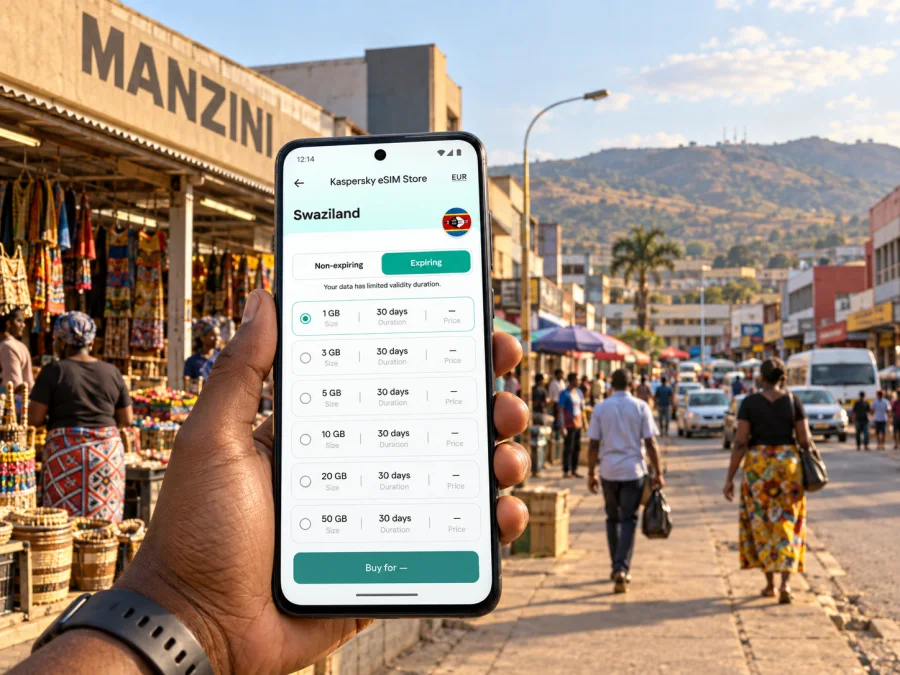
Kaspersky eSIM Store is an app and website where you can choose, arrange and activate an eSIM with a suitable tariff for mobile internet during an international trip. Conditions vary by tariff, so review the offer details before purchase. For your visit, compare eSIM options for Swaziland and consider the full itinerary, including any travel outside the city.
| Travel pattern | What to consider |
|---|---|
| A short stay in the centre | Map and messaging use, plus the tariff’s validity period |
| Several workdays | Email, document access and calls through internet apps |
| Frequent road trips | Whether the destination conditions fit the entire route |
| Hotel Wi-Fi for most tasks | How much data you need while away from the hotel |
| Regular video or photo uploads | Whether those habits may use more than navigation and messages |
Use plan details rather than a generic estimate of daily usage. Your phone’s data-usage screen may help you estimate from previous trips. If you do not have a baseline, allow for time away from Wi-Fi and avoid assuming that every connection will be available. An eSIM tariff intended for mobile internet may not include a regular phone number, voice calls or SMS; check the specific terms. Keep your usual number available if you rely on it for calls or verification messages.
Local transport, landmarks and meeting points
The central bus rank is an important point for onward journeys. Local minibuses and taxis can be part of getting around, but confirm routes, departure points and operating patterns locally. Ask your accommodation which stop serves your destination, where to board and how fares are handled. For a hired taxi, agree on the destination and fare before setting off when appropriate.
A map helps with the final part of a trip, such as finding a hotel entrance or following a driver’s pin. It cannot confirm whether a vehicle is running at a particular time or which pickup point is right. For meetings, agree on a named landmark or entrance; “I’m outside” may be unclear on a busy street. Save the other person’s number and the address in case data is unavailable.
For an unfamiliar journey, confirm the stop, share a pin, check payment arrangements and leave time for connections. If you drive, check the map before moving off and stop safely before changing a route.
Accommodation and the last mile
Manzini has accommodation used by business visitors and travellers using the city as a base. Note the full address, map pin, Wi-Fi availability and whether the property is in the centre, Matsapha or farther out. Compare the pin with your booking confirmation; a hotel name alone may not identify the right entrance.
Walking may suit a short central errand, while a taxi or local transport can be more comfortable with luggage, poor weather or a longer distance. If your room is outside the centre, plan the return as well as the outbound trip. Ask the property how guests arrange transport, especially for a later return, and save the answer offline. Hotel Wi-Fi is convenient, but keep mobile data or saved directions available for contacting a driver and locating the property on arrival.
Business visits and work between appointments
A work trip may include offices, suppliers, site visits or appointments at several addresses. Mobile internet can help with calendar changes, directions, messages and document access. Save every address beforehand, and ask the organiser for the correct entrance and a local contact number, especially for a site outside the centre. Leave time between meetings when arranging transport; a shared pin and concise update can prevent confusion if an appointment moves.
Download important files in advance and check whether your organisation permits storing them on a personal device. A data eSIM is not necessarily a voice line: internet-based calls depend on the app and tariff, while standard calls and SMS require an available voice service. If work verification codes go to your usual number, make sure you can still receive them. Charge your phone and keep essential files accessible offline.
Short stopovers and trips beyond town
If Manzini is a one-night stop, match the eSIM tariff to the whole route rather than just the first city. Check whether destination and validity include your next stop; never assume a neighbouring country is covered. Keep transfer, hotel and onward travel details together, and confirm departure arrangements directly with your transport provider.
Matsapha is a nearby reference point for airport and business arrangements. Malkerns and other places beyond the centre may also be part of a day’s itinerary. Check the route and return transport with a local host or driver instead of assuming a destination is walkable because it looks close on a map. The main MR3 corridor connects Manzini with Mbabane, but travel time depends on traffic and road conditions. Save destination details offline in case live navigation or data is unavailable.
Set up your eSIM before you need it
Check that your phone supports eSIM and is not locked against adding a mobile plan. Support can vary by model and region, so check your device compatibility before selecting a tariff. Set up over reliable Wi-Fi and read the installation and activation conditions; validity may begin at a specific step.
- Choose a tariff whose destination and validity fit the full trip.
- Review its data allowance and activation conditions.
- Install it with the Android setup instructions or iOS setup instructions.
- Label the new line, then check which line is selected for mobile data.
- Follow the tariff’s instructions for activation and data roaming.
Keep your regular SIM if you need its number, and check your home operator’s roaming settings and charges. If setup fails, check Wi-Fi, compatibility and the installation details, then use the support channel shown with your purchase.
Make data use easier to manage
Maps, messaging and email use data differently from video, app updates and photo backups. Use your phone’s usage controls rather than a universal estimate. Before leaving Wi-Fi, download offline maps, save important addresses, pause automatic photo uploads if your plan is limited and download work documents. Check which apps use data in the background; save a route screenshot for a longer drive.
Frequently asked questions
Is Manzini easy to navigate on foot?
Parts of the central area are compact. Comfort depends on route, time, weather and luggage; use a map and ask locally if unsure.
Which airport should I use for Manzini?
Use the airport printed on your ticket. King Mswati III International Airport is in Sikhuphe, about 50 km away; Matsapha is a separate location, so confirm your transfer.
Can an eSIM help on a short business visit?
Yes, if the device supports eSIM and the tariff’s destination, data allowance and validity fit. Standard voice calls and SMS depend on the service you use.
Will one plan cover trips outside Manzini?
Only if its destination terms include the places on your route. Check every country or region, particularly for a cross-border journey.
A calmer arrival starts with a few saved details
For a Manzini visit, prepare the details that depend on precision: the airport on your ticket, the transfer into town, the exact hotel or meeting address, and the transport point for your next journey. Use mobile internet for directions and updates, but keep essentials available offline and confirm local transport arrangements directly.
Before departure, check device compatibility, choose a tariff that fits the itinerary and install the eSIM with the relevant instructions. When you are ready, choose an eSIM tariff for your trip to Swaziland through Kaspersky eSIM Store, then follow the offer’s conditions for activation. With those basics in place, you can spend less time rebuilding plans on arrival and more time getting where you need to go.


