
Travel connectivity guide
Mao eSIM: mobile internet for your trip
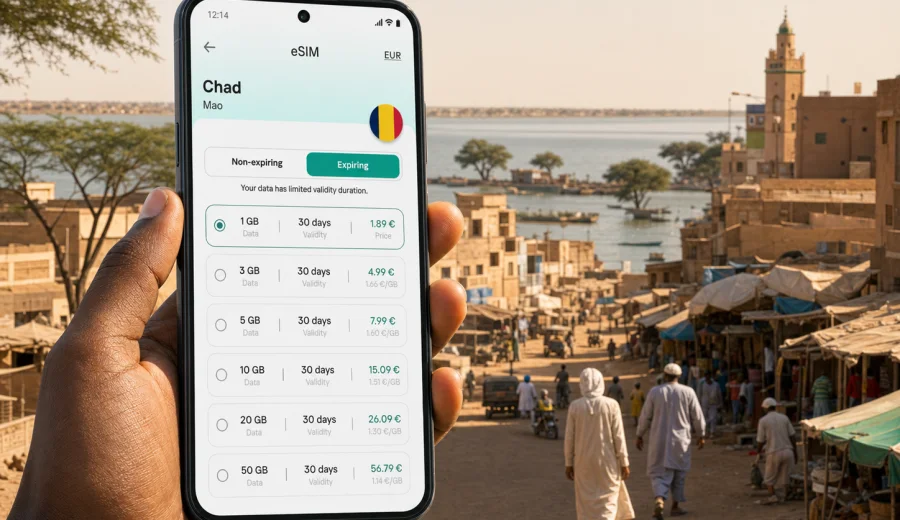
Mao eSIM: mobile connection and internet for your trip
Mao is a practical travel base in western Chad, where mobile internet helps with the small decisions that shape the whole day. You may need to confirm a driver after arriving from N'Djamena, follow a route through sandy streets, message a hotel before check-in, translate a short phrase at a market, or keep work documents available before continuing toward Kanem Region routes. An eSIM can make that part of the trip easier because you can prepare mobile data before you are standing outside with luggage and limited Wi-Fi.
This guide is about using an eSIM in Mao, not about Chad in general. It focuses on arrival, local movement, hotels, business visits, stopovers, navigation, and trips from Mao to nearby settlements or onward routes. It also explains how to choose a data plan, what to check before purchase, and how Kaspersky eSIM Store fits into a travel setup without turning mobile connection into another errand after arrival.
Why mobile internet matters in Mao
Mao is smaller and more spread out than a capital city, so travel tasks often depend on coordination rather than dense public transport. Visitors may arrive by road, meet a local host, continue to project sites, or use Mao as a staging point for work in Kanem Region. Mobile internet supports the practical layer of the trip: maps, messages, saved documents, weather checks, and route confirmation.
You may use mobile data in Mao for:
- confirming a pickup time with a driver or local contact;
- checking the route from your guesthouse to an office, compound, market, or meeting point;
- keeping hotel booking details, passport scans, and travel documents available;
- sharing your live location with colleagues or relatives when moving across town;
- using messaging apps for calls when a data connection is available;
- translating short phrases in shops or service points;
- checking onward travel details before leaving the city;
- reducing dependence on public Wi-Fi that may be limited, slow, or unavailable.
What an eSIM does for a trip to Mao
An eSIM is a digital SIM profile installed on a compatible smartphone or tablet. For travel, it is usually used for mobile data in the destination country. You do not need to swap a plastic SIM card, and you can often keep your regular SIM active for calls or banking messages while the eSIM handles internet access.
For Mao, this is useful because the first hours can be busy. You may be dealing with luggage, heat, local directions, transport arrangements, and a route that was agreed by message before the trip. If your eSIM is already installed, you can switch mobile data to the travel profile when you are ready to use it.
| Mao travel moment | How mobile data helps |
|---|---|
| Arrival by road | Message your host, check your route, and confirm the exact meeting point. |
| Hotel or guesthouse check-in | Open booking details, send your arrival time, and share documents if needed. |
| Local errands | Use maps, translation, and messenger calls between offices, shops, and markets. |
| Business visit | Receive schedule changes and keep email or cloud files available outside Wi-Fi. |
| Stopover | Handle essential messages without making a local SIM purchase your first task. |
| Onward route | Download maps, confirm contacts, and prepare documents before leaving town. |
An eSIM is not a promise that coverage will be identical in every street, building, or road segment. Network availability depends on local operators, device settings, terrain, and the selected plan. The value is preparation: you can choose a data plan before the trip and avoid making connectivity decisions under pressure.
Arrival planning: from N'Djamena to Mao
Many international visitors to Mao first arrive in Chad through N'Djamena and then continue by road or organized transport. Plans should be checked with your host, employer, tour organizer, or local contact, because road timing can vary. For a connectivity plan, the important point is simple: prepare your mobile data before the onward leg starts.
Before you leave N'Djamena for Mao, save:
1. The full address or landmark for your accommodation in Mao.
2. Phone numbers for your driver, host, and backup contact.
3. Offline maps for N'Djamena, Mao, and the road corridor you expect to use.
4. Copies of booking confirmations and work documents.
5. A screenshot of the route or meeting point in case the app is slow later.
If you install your eSIM before departure, do it while you still have stable Wi-Fi. Installation may need a QR code, account access, or an in-app flow. Activation timing depends on the selected plan, so read the plan details before switching the eSIM on or using mobile data.
Local movement in Mao
Mao is a city where navigation is often based on landmarks, neighborhoods, local contacts, and practical route knowledge. A map app helps, but it should not be your only tool. Save the name of your guesthouse, the phone number of your contact, and a clear meeting point that a driver or host can recognize.
Mobile data can support local movement in several common situations:
- moving between a guesthouse, administrative office, market area, and meeting location;
- checking where a driver is waiting if there are several possible pickup points;
- sending a photo of a landmark to confirm that you are in the right place;
- receiving a route change when a road is blocked, busy, or difficult after weather changes;
- keeping translation and currency tools available during errands;
- coordinating a return pickup before evening.
For short movements, do not burn data on background apps. Keep maps open, messaging active, and email available, but pause automatic cloud backup and large downloads. A smaller data plan can last much longer when your phone is not syncing photos, apps, and videos in the background.
Choosing the right eSIM data plan
The right amount of data depends on how you travel in Mao. A two-day stopover with messaging and maps needs much less than a week of work with cloud documents and hotspot sessions. Before choosing a plan, think in days, apps, and backup needs rather than only in gigabytes.
| Trip style | Likely data use | Planning tip |
|---|---|---|
| One-day stopover | Messaging, maps, hotel confirmation | A small plan may be enough if you avoid video and large downloads. |
| 2-4 days in Mao | Maps, messenger calls, email, translation | Add a buffer for route changes and weak Wi-Fi periods. |
| Business week | Email, documents, calendars, navigation, limited hotspot use | Choose more data and control background sync. |
| Mao plus regional travel | Offline maps, contacts, travel documents, status updates | Check that the plan is valid for Chad and fits the whole route. |
Video calls, streaming, cloud backups, social media uploads, and app updates can use data quickly. Maps, email, messaging, and translation usually use less. If the trip is for work, choose a data allowance that leaves room for unexpected schedule changes instead of planning to use every megabyte.
Device checks before purchase
Before you arrange an eSIM for Mao, check your device. Not every smartphone supports eSIM, and some models differ by region. A phone can also be locked by an operator, which may prevent adding another mobile profile.
Check these points first:
- your phone or tablet supports eSIM;
- your device is not locked to one mobile operator;
- the operating system is up to date enough for eSIM setup;
- you can access stable internet during installation;
- the selected plan is valid for Chad;
- the data volume and validity period match your dates;
- you understand whether the plan is data-only or includes other services;
- you know when the validity period or data use begins.
If you are unsure, check your device before choosing a plan. This is especially important for older phones, company-managed devices, dual-SIM setups, and models bought in markets where eSIM support can vary.
How Kaspersky eSIM Store fits into a Mao trip
Kaspersky eSIM Store is an app and website where you can quickly choose, arrange, and activate an eSIM with a suitable plan for mobile internet during an international trip. It helps you prepare the data part of your journey before you need it in Mao.
The process is practical:
1. Select the destination country for your trip.
2. Compare plan details such as data volume, validity period, destination, and cost.
3. Check that your device supports eSIM and is not locked by an operator.
4. Arrange the selected eSIM plan through the site or app.
5. Install the eSIM profile and choose it for mobile data when needed.
For a trip to Mao, use the country page for Chad rather than searching for a separate city plan. When you are ready to compare options, you can prepare an eSIM plan for your trip to Mao and review the conditions before you travel.
Installing an eSIM before departure or after arrival
Installing an eSIM before travel is often the calmer option. You can use stable home, office, or hotel Wi-Fi, read the setup screens carefully, and label the profile before the travel day. Some travelers prefer to install after arrival; that can also work if you have reliable Wi-Fi and enough time.
Use the official setup steps for your device:
- follow the Android installation guide if you are setting up an eSIM on an Android phone;
- follow the iOS installation guide if you are setting up an eSIM on an iPhone.
A careful setup flow looks like this:
1. Connect to stable Wi-Fi.
2. Open the eSIM details in your account, app, or email.
3. Add the eSIM profile using the available installation method.
4. Label the profile clearly, for example Chad data.
5. Keep your primary SIM available if you need regular calls or SMS.
6. Select the eSIM profile for mobile data when you are ready.
7. Enable data roaming for the eSIM profile if the instructions require it.
8. Wait a few minutes for network registration.
Do not delete an eSIM profile after installation unless you are sure you no longer need it. Depending on the plan conditions, some eSIM profiles cannot be reinstalled or moved to another device after removal.
Business travel and field work around Mao
Mao can be a base for administrative visits, humanitarian work, logistics, field projects, research, or meetings connected with Kanem Region. These trips often involve changing pickup times and locations that are easier to confirm by phone than by address alone.
For business travel, prepare this checklist before arrival:
- save calendar entries with local contact names;
- download key documents before leaving reliable Wi-Fi;
- keep offline copies of permits, letters, hotel details, and itinerary notes;
- disable automatic cloud backup on mobile data;
- bring a power bank for long days away from accommodation;
- check whether your company device allows adding an eSIM profile.
If your phone is managed by an employer, ask your IT team before the trip. Some device-management policies restrict mobile profile changes.
Short stopovers in Mao
For a short stopover, the main value of mobile internet is speed. You may only need to send an arrival message, check a route, confirm the next leg, and stay reachable until departure. Keep the phone simple: install the eSIM, save contacts, download maps, avoid video streaming, and use trusted Wi-Fi for large files.
Trips from Mao to nearby areas
Travel from Mao may continue to smaller settlements, project sites, desert-edge routes, or onward connections toward other parts of Chad. Plan mobile internet before leaving the city because connectivity, power, and support can become less predictable outside larger towns.
Before leaving Mao:
- download offline maps for the route;
- save important contacts on the device;
- keep documents available offline;
- charge your phone and power bank;
- confirm departure time and backup meeting points;
- reduce background data use;
- check that your plan covers Chad as the destination.
An eSIM is one part of preparation, not a substitute for local guidance. For routes outside Mao, follow the advice of your host, organizer, or employer.
FAQ about eSIM in Mao
Should I install the eSIM before arriving in Chad?
Installing before travel is often easier because you can use stable Wi-Fi and avoid setup pressure. Check the selected plan's activation and validity rules before you install or start using it.
What if the connection is weak outside Mao?
Coverage can vary by area, terrain, building, and local network conditions. Download maps, save contacts, and keep important documents offline before leaving the city.
Final checklist before you travel
Before you leave for Mao, make sure you have:
- a compatible, unlocked device;
- the eSIM profile installed or ready to install on stable Wi-Fi;
- offline maps for Mao and onward routes;
- saved contacts for your host, driver, hotel, and backup person;
- cloud backups and app updates paused on mobile data;
- enough data for maps, messages, email, and unexpected changes.
Mao rewards practical preparation. If mobile internet is ready before you need it, arrival, local movement, workdays, and onward travel become easier to manage. Choose a data allowance that fits your trip length, check your device in advance, and keep offline backups.
To prepare the mobile internet part of your journey, choose an eSIM plan for travel to Mao and Chad through Kaspersky eSIM Store before departure or when you have reliable Wi-Fi.