Travel connectivity guide
Mardin eSIM: Mobile Internet in Turkey
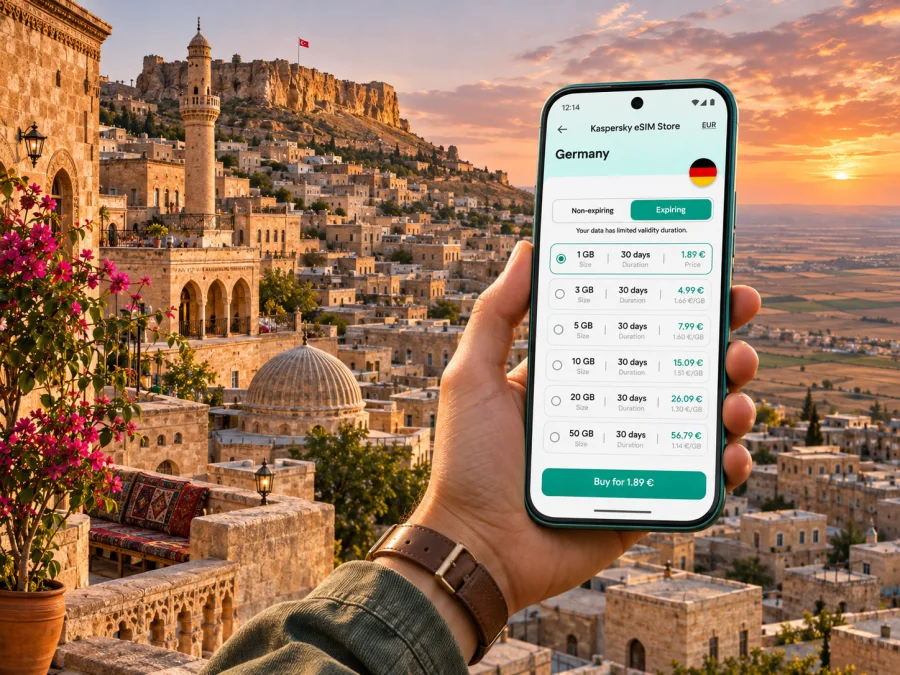
Mardin eSIM: mobile connection and internet for your trip
In Mardin, a dependable mobile data plan is useful before you even reach the old stone streets: you may need to check an airport transfer, message your host, find a hotel entrance or confirm a day trip. A travel eSIM can provide mobile internet without replacing your physical SIM. Kaspersky eSIM Store is an app and website where you can select, purchase and activate an eSIM plan for an international trip. The plan’s destination, data allowance, validity and network arrangements depend on the option you choose.
Mardin is in southeastern Turkey. The historic quarter climbs above the Mesopotamian plain, while newer districts extend beyond the old lanes. Prepare your data connection, save essential details offline and leave time for slopes, transfers and site visits.
Why mobile internet helps in Mardin
Mardin rewards unhurried exploring. In the historic centre, streets and passages wind between stone buildings, courtyards, shops and religious sites. A map is useful for orientation, but the old quarter is best explored at walking pace, with time to stop and ask for directions. A live connection also helps when a driver needs your pin, your guesthouse is tucked away from the main road, or you need to check a message about your arrival.
Mobile data can be useful for several small tasks that add up during a trip:
- confirming a transfer, accommodation address or meeting point;
- checking directions and meeting points around the bazaar and historic centre;
- messaging a guide or driver if a pickup changes;
- reviewing visitor information before travelling outside the centre;
- translating a short sign or menu, with care for cultural nuance.
A connection is a planning aid, not a substitute for local advice. Maps may place a pin at the nearest vehicle access rather than at a pedestrian entrance. In the old town, an alley can be too narrow or steep for a car, and a route that looks short on screen may involve steps. Check the final approach with your host or guide, and allow extra time when you have luggage.
Arriving at Mardin Prof. Dr. Aziz Sancar Airport
The city is served by Mardin Prof. Dr. Aziz Sancar Airport. The airport authority lists it as 13 km from the city centre and notes that access options include municipal buses, HAVAŞ services, commercial taxis, rental cars and private vehicles. It also describes the airport as 5 km from Kızıltepe. The authority currently says the airport has no scheduled international flights, so check your itinerary and any connection carefully. These are useful orientation figures, but journey time depends on the pickup point, traffic and destination. Check current departure times and routes shortly before travel; schedules can change.
Before landing, save the name and address of your accommodation in both text and map form. If your hotel is in the historic quarter, ask whether a car can reach its door or whether you should meet the host at a broader street or square. Send a message before leaving the airport if you need to coordinate a pickup. For a bus or shuttle, check the current timetable and the stop that best matches your destination rather than assuming that every service continues into the narrow old-town lanes.
A practical arrival sequence:
- Before departure, confirm the transfer, meeting point and fare arrangement.
- Save the accommodation address in Turkish, its map pin and any contact number offline.
- After landing, select the travel eSIM for data and check its connection. If it fails, review the plan instructions over Wi‑Fi if available; do not delete the installed profile unless instructed.
The airport is outside the historic centre, so an airport connection is not the same thing as being at your hotel. If your arrival is late or you have heavy bags, arrange the last leg in advance. A charged phone, a power bank and a paper or offline copy of the address are simple safeguards against a low battery or a temporary loss of data.
Moving around the old town and newer districts
Mardin is not a flat grid. The historic neighbourhood follows the hillside, and the elevation changes between streets and viewpoints. Wear comfortable shoes, keep water with you in warm weather and plan the day around the climb rather than the distance shown by a map. For short visits, it can be easier to choose accommodation near the places you want to explore on foot and use a vehicle for longer transfers.
The wider urban area includes newer districts and commercial streets as well as the historic core. Name the neighbourhood when booking a ride: “Mardin” alone may not identify the destination. A local host or driver can clarify where a vehicle can stop; share a nearby landmark and written address as well as a map pin.
| Trip situation | Useful phone preparation | What to keep in mind |
|---|---|---|
| Airport to hotel | Saved address, host’s contact, map pin | Confirm whether the hotel is in the old quarter or a newer district. |
| Walking through the historic centre | Offline map, charged battery | Expect slopes, steps and lanes where GPS positioning may be imprecise. |
| Taxi or pre-arranged car | Pickup pin and destination written clearly | Ask your host which meeting point is practical for vehicles. |
| Day trip outside Mardin | Route, return plan, opening details | Confirm the transport and return arrangement before leaving town. |
| Work call from a hotel | Test the room connection and have mobile data available | Signal strength and indoor performance can vary by building and network. |
This table is a planning guide, not a promise of network coverage or travel time. A phone may switch networks as you move, and stone walls, enclosed courtyards, terrain and indoor rooms can affect reception. If a navigation app loses its position, pause in a safe place, check the street signs or ask a local person rather than continuing down an uncertain route while looking at the screen.
Historic sights and getting your bearings
Many visitors begin with the lanes and landmarks of Artuklu, the central district associated with Mardin’s historic city. The Ministry of Culture and Tourism’s local route information groups sights such as Kasımiye Madrasa, the museum, Ulu Mosque, Zinciriye Madrasa, the old streets and Deyrulzafaran Monastery into routes around the area. Use a route list as a starting point, then check each site’s current visiting arrangements before setting out. Religious services, restoration, holidays and local decisions can affect access.
Kasımiye Madrasa stands on the southern side of the city with an open aspect toward the plain. The courtyard and stonework make it a rewarding stop, and a map can help you plan the approach from the historic centre. The slope is part of the visit: if you are travelling with a stroller, mobility aid or someone who finds uneven ground difficult, check access details in advance and consider a vehicle for the steepest section.
Around the bazaar and Cumhuriyet Square, combine map directions with visible landmarks. Save place names in a note; copying the Turkish spelling can make it easier to share a destination with a driver.
For a visit to Deyrulzafaran Monastery, confirm the day’s access and visitor arrangements before leaving the city. It is a short trip from central Mardin by road, but it is not simply another lane in the old quarter. For Dara Ancient City, the provincial culture authority places the archaeological site in Oğuz village, about 30 km southeast of Mardin. Arrange transport and a return plan before you go. Mobile data is helpful for coordination, yet do not assume that a connection will be equally strong throughout a rural route or at every part of an archaeological site.
Choosing an eSIM plan for a city stay
Mardin does not require a special “city” eSIM if the chosen plan is valid in Turkey. Check the destination and network conditions shown for the actual plan: an eSIM is a digital profile, while the mobile service is carried by local partner networks. Kaspersky eSIM Store helps you review available travel options on its website or app; it does not operate a mobile network. Availability, data allowance, validity, price, supported networks and activation rules are plan-specific and may change.
To decide what fits, think about how you will use your phone rather than choosing by the name of the city alone:
- Short stay: maps and messages use less data than video or frequent uploads; estimate your needs and use Wi‑Fi for large downloads when appropriate.
- Longer stay: match validity to your dates and check what happens when data runs out. Do not assume rollover or automatic renewal.
- Work trip: check tethering rules and test your setup before relying on it for a meeting.
- Regional itinerary: confirm that every country is included; a Turkey plan should not be assumed to cover neighbouring destinations.
When you are ready to compare current options for the country, review eSIM plans for travel in Turkey. The page currently notes that new eSIMs cannot be purchased from within Turkey. If you are already in the country, check eligibility before relying on this option; consider arranging a plan before travel or checking local connectivity options after arrival. In all cases, check the displayed destination, data amount, validity period, price and activation conditions. Turkey is the relevant destination for Mardin; there is no separate city tariff implied here.
Check your phone before you travel
An eSIM is not supported by every handset, and support can depend on the exact model and the regional version sold in a particular market. A phone may also be locked to a carrier. Check the device manufacturer’s specifications for your exact model, look for an option to add a mobile plan in the settings, and confirm that the phone is unlocked. Check whether your device supports eSIM before placing an order.
A useful pre-purchase checklist:
- The exact regional variant supports eSIM and is not carrier-locked.
- You can connect to Wi‑Fi while adding the profile.
- You can access the plan’s QR code or installation details.
- You know when validity begins and when to activate the plan.
- You have checked whether the plan includes data only or other services.
Keep your home SIM installed if you need its number for calls or verification texts, but check your device’s dual-SIM settings and your home carrier’s roaming charges. Set the travel eSIM as the data line only when you are ready to use it. Some plans require data roaming to be enabled for that eSIM; follow the plan-specific setup instructions and keep roaming disabled on your home line if you want to avoid unintended charges.
Install the eSIM before departure or after arrival
Installing an eSIM and starting its validity are not always the same event. Read the plan’s terms so you know whether the clock starts when the profile is installed, when it first connects to a supported network or at another point. If the process requires a stable internet connection, installing before departure on reliable Wi‑Fi can reduce work at the airport. If you prefer to install after arrival, make sure you can get online long enough to complete the setup.
A simple setup sequence is:
- Confirm the plan’s destination, validity, activation rule and device requirements.
- Connect to Wi‑Fi and keep the QR code visible on another screen if needed.
- Add the plan through the phone’s mobile-network settings and label the profile clearly.
- Follow the instructions on when to switch the travel line on and whether data roaming is needed.
- On arrival, select the travel profile for data and test a webpage before leaving the airport.
For device-specific steps, follow the Android eSIM installation guide or the iPhone and iOS eSIM installation guide. Menu names can differ by operating-system version and manufacturer. Do not scan the same QR code repeatedly if the profile is already installed; first check the plan status and the device’s list of SIMs.
Manage data and battery on the move
Download an offline map for Mardin before you travel, then use mobile data for live directions and messages. Save hotel and transfer details as text as well. Video calls, streaming and automatic photo backup can use more data than maps and messaging, so set cloud uploads to Wi‑Fi if you want to conserve your allowance. A bright screen, GPS and camera use drain a battery; bring a power bank for a long walking day.
For remote work, ask about the accommodation’s Wi‑Fi and test your setup before an important call. A mobile plan can be a backup, not a guarantee that a particular room will support video meetings. Check whether tethering is allowed and pause laptop updates over mobile data.
If the connection does not work
A missing data connection after installation can have several causes. Check the basics in order and avoid deleting the eSIM profile as a first reaction, since some QR codes are single-use.
- Confirm that the travel profile is installed, switched on and selected for data.
- Check that destination and validity cover your location and date.
- Toggle airplane mode, then review any data-roaming or network-selection instruction for the plan.
- Restart the phone. If it still does not connect, use Wi‑Fi to check the account details and contact support.
If only one app fails, check that app’s mobile-data permission before changing network settings. If calls or SMS from your regular number are missing, check that the home SIM is still enabled; a data-only eSIM may not provide voice service. When exploring outside the city, download offline maps and agree on meeting points ahead of time so a short outage does not disrupt the day.
Practical scenarios
Arriving late: Arrange the transfer, save the hotel address offline and keep the host’s contact details handy. Confirm the pickup and ask where the driver should leave you if the property is on a narrow lane.
A walking day in Old Mardin: Save a route, but leave room for hills, steps and longer visits. Use the map to orient yourself at junctions and keep landmark names in Turkish in case you need directions.
A visit to Dara: Confirm access and transport, charge your phone and agree on the return journey before leaving. Do not assume mobile coverage will be continuous along the route.
A work call from the hotel: Test Wi‑Fi first, check tethering rules and choose a quiet location. Keep mobile data as a possible alternative, not a guaranteed connection.
A multi-city trip: Compare every overnight country with the plan’s coverage and validity. A country not listed needs a separate connection plan; service can still vary by route and indoor location.
Frequently asked questions
Is there an eSIM specifically for Mardin?
A city-specific plan is not necessary if a selected eSIM plan covers Turkey. Check the destination shown in the plan details and confirm that the terms match your stay. The local network used and service conditions depend on the plan.
Will an eSIM work everywhere in Mardin?
No. Coverage depends on the partner network, terrain, buildings, device and current network conditions. Hillside streets, stone walls and rural excursions can affect reception.
Can I keep my usual number?
Many dual-SIM phones can keep a physical SIM and an eSIM profile available together. Check your model and home carrier’s roaming charges; select the travel profile for data if that suits your setup.
Does a travel eSIM include calls and SMS?
Do not assume so. Many travel eSIM plans are intended for mobile data, and the included services depend on the specific plan. Review its description before purchase. Internet-based messaging and calls may work through apps when you have a data connection.
Should I install the profile before I fly?
Usually you can install it on reliable Wi‑Fi if the plan allows it. Read when validity begins; installation and activation may be separate steps.
What if my phone has no eSIM option?
Check the exact regional model with its manufacturer. If eSIM is unsupported or the phone is locked, consider a compatible unlocked device or ask your home carrier about roaming.
Can I use the connection on a laptop?
Only if your phone and plan allow tethering. Check first, and remember that updates and video meetings can use data quickly.
Prepare your connection for Mardin
A little preparation makes the first hours in Mardin easier: save your address, coordinate the airport transfer, check your phone’s eSIM compatibility and review the plan’s destination, allowance, validity and activation conditions. Download an offline map for the old quarter and keep your battery charged for navigation, messages and photos. Use local guidance for steep lanes and out-of-town visits, and treat signal quality as variable rather than guaranteed.
Kaspersky eSIM Store is an app and website that lets you select, purchase and activate an eSIM plan for an international trip on a compatible device. Check the current Turkey page and purchase eligibility before departure; it presently states that new eSIMs cannot be purchased from within Turkey. If eligible before travel, review the Turkey eSIM options for your Mardin trip, confirm the current conditions and install the profile using your phone’s instructions.


