Travel connectivity guide
Marigot Bay eSIM: Mobile Internet in Saint Lucia
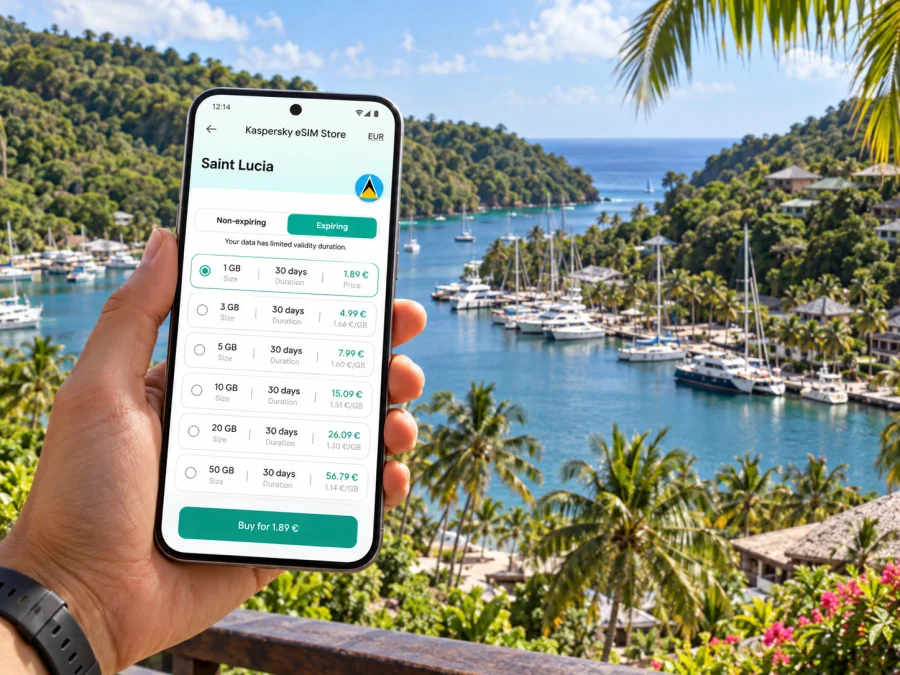
Marigot Bay eSIM: mobile connection and internet for your Saint Lucia trip
Marigot Bay is a sheltered harbor on Saint Lucia’s west coast, just south of Castries. It is a compact coastal destination rather than a large urban center: the marina, waterfront places to eat, hillside accommodation and boat access shape the visitor experience. That makes mobile data useful in very practical moments—confirming a transfer, finding the right waterfront entrance, messaging your host or checking plans before you leave the bay.
An eSIM can give you a way to use mobile data during the trip without swapping the physical SIM in your phone. Before travelling, check that your exact phone model and regional variant support eSIM, review the destination and validity conditions of the plan, and decide when you want its validity to begin. These details matter whether Marigot Bay is your base for several nights or one stop on a longer island itinerary.
What makes connectivity useful in Marigot Bay
Marigot Bay is known for its calm inner harbor, marina and steep green surroundings. Visitors spend time around the waterfront and may stay in accommodation on the hills or across the water. The scenery is part of the appeal, but it also means your day may involve more than walking from one city block to the next. You may need to coordinate a pickup, confirm a boat crossing, follow a route from the main road, or send a change of plans while away from your room.
Mobile internet is useful for small tasks that keep a relaxed trip running smoothly:
- checking the route and estimated arrival time before setting out from the airport or another part of the island;
- messaging a driver, accommodation host, restaurant or excursion contact if a meeting point changes;
- opening a booking confirmation or transfer details while away from hotel Wi-Fi;
- checking maps around the marina and saving directions before a walk or drive;
- sharing an updated itinerary with family or colleagues;
- looking up weather, opening hours or transport arrangements before committing to a longer outing.
The bay itself is often best explored at an unhurried pace. You might spend much of the day close to your accommodation, then travel to Castries, Anse La Raye or Soufrière on another day. A connection is most valuable when you need it: at the start and end of those journeys, during coordination, and when a booking or route needs to be checked. You do not have to keep every app refreshing in the background to benefit from having data available.
A small destination with several kinds of arrival
“Marigot Bay” can refer to the harbor and the visitor area around it, rather than a single downtown with one obvious arrival point. Some stays are beside the marina; others are uphill or on the opposite side of the inner bay. Confirm the property’s exact meeting point before travelling. A map pin labelled with the bay name may not indicate the boat landing, reception or road entrance you actually need.
The Saint Lucia Tourism Authority describes the resort area on the opposite side as accessible by a short boat crossing. That is a useful reminder to check the final leg with your accommodation: ask whether a boat transfer is needed, where to board, how to arrange it and what to do if your arrival is delayed. Mobile data can help you send that message, but it does not replace confirming local arrangements in advance.
Plan the airport journey before landing
Saint Lucia has two airports with different roles. Hewanorra International Airport (UVF) is in Vieux Fort in the south of the island; the tourism authority gives its distance from Castries as about 40 miles. George F. L. Charles Airport is just outside Castries and serves inter-island travel. Check the airport code on your ticket before planning the transfer to Marigot Bay. A trip from UVF begins much farther south than a trip from the Castries airport, so do not use a generic “Saint Lucia airport to Marigot Bay” estimate without confirming which airport and transfer you mean.
The drive from UVF is listed at about 1 hour 10 minutes. Treat this as a broad planning reference, not a guaranteed arrival time: traffic, weather, stops, road conditions and the transfer arrangement can change the journey. Ask your driver or accommodation for a current pickup plan and allow room for delays, especially if you have a boat connection after the road transfer.
| Arrival situation | What to confirm before travelling | How mobile data helps |
|---|---|---|
| Landing at UVF | Driver name, pickup location, fare or payment arrangement, and the onward route to the bay | Contact the driver if baggage or arrival timing changes |
| Landing at George F. L. Charles Airport | Whether your transfer begins in Castries and the correct road pickup point | Share your live status or confirm the meeting point |
| Arriving by sea | Which port or marina is your arrival point and how you will continue to your accommodation | Check messages and transfer details after disembarking |
| Staying across the inner bay | The boat landing, crossing arrangements and any timing instructions from the property | Coordinate the final crossing if your schedule shifts |
Save the accommodation address, booking reference, transfer contact and any boat instructions for offline access. A screenshot or note remains useful if your phone is temporarily without service, the battery is low, or you are in a place where reception is weak. Keep the same details in a travel companion’s phone when possible.
Getting around from the bay
Marigot Bay works well as a coastal base, but it is not a transport hub with a dense grid of streets. The marina and nearby waterfront are walkable, while trips to other parts of the island generally require a road transfer, a planned excursion or travel by water. Ask your accommodation which options are practical for your specific destination and time of day. Do not assume that a map’s shortest line across the coast is a road route or that a boat will be available on demand.
A simple planning routine can prevent avoidable confusion:
- Pin the actual destination. Save the hotel, villa, restaurant or meeting point—not only “Marigot Bay.” Check whether the pin sits on the road side or across the water.
- Confirm how the last part works. Ask whether you should walk, meet a driver, use a water crossing or call the property on arrival.
- Share a clear meeting point. A named entrance, jetty or landmark is more useful than “near the bay.”
- Download or screenshot directions. Keep a route available before leaving Wi-Fi, and note the return plan as well as the outward journey.
- Allow time for island travel. Ask a local driver or host for a realistic journey window rather than extrapolating from distance alone.
If your plans include Castries, Soufrière or another coastal community, think of Marigot Bay as one stop on the route rather than a substitute for checking the full island journey. A route may involve winding roads and changing terrain; allow extra time and avoid relying on a live map as your only source of directions. If you are joining a tour, follow the operator’s chosen meeting point and timing.
Mobile data around a harbor and hills
A map can help you orient yourself, but reception and data performance are not guaranteed at every point. Actual service depends on the local network used by the plan, device settings, terrain, buildings, weather and network load. A sheltered bay, hillside room, boat and road route can present different conditions even within the same day. Do not treat a coverage graphic or a general claim about island coverage as a promise of signal in a particular room or on the water.
For a more resilient setup, download an offline map of the area, keep reservation details available offline and save key phone numbers in your contacts. Use live directions when a connection is available, then rely on saved information if service drops. If you need to send a large file or join a video call, try it over trusted Wi-Fi first; mobile data is better kept available for navigation, messages, confirmations and other travel essentials.
Choosing an eSIM plan for this trip
Start with the places you will visit, not only the name of the bay. A Saint Lucia plan may be suitable for time on the island, while a regional plan may be relevant if your itinerary continues to other islands. Read the plan’s country list and terms carefully: nearby islands have separate geographic and mobile markets, and a regional label alone does not prove that every stop is included. Verify the exact destinations before purchase and check whether the allowance is data-only, how long it remains valid, and when validity starts.
Saint Lucia is its own mobile market. For example, Digicel’s Saint Lucia site advertises visitor eSIM offers under that local operator’s name. That does not identify the network or conditions behind a separate travel plan. Check the destination list and the plan’s stated network information where provided. A phone’s regional variant is a separate compatibility question; do not use it to infer which operator a plan uses.
In Kaspersky eSIM Store, the app and website help you choose, arrange and activate an eSIM with a suitable plan for mobile internet on an overseas trip. You can review eSIM plan options for Saint Lucia and compare the destination, allowance and validity details shown for the option you are considering. Availability and conditions belong to the individual plan, so read them before completing your choice.
A practical comparison can be made without guessing how much data you will use:
| Your travel pattern | What to compare |
|---|---|
| A few days mostly around Marigot Bay | Validity period, included data, activation timing and whether Saint Lucia is explicitly covered |
| A longer stay with frequent maps and messaging | Total data allowance, validity, top-up or renewal conditions, and how the plan handles usage after the allowance is reached |
| Several stops around Saint Lucia | Confirm that the plan covers the whole country and consider how often you will use maps, uploads and calls over apps |
| Island-hopping after Saint Lucia | Check every destination against the plan’s country list; do not infer coverage from geographic proximity |
| A work trip with hotspot needs | Review tethering rules, any speed or usage limits, and your employer’s security requirements |
There is no single “right” allowance for every traveller. A person who mostly reads messages and checks a map will use data differently from someone who uploads video or works remotely. Estimate from your habits, use Wi-Fi for large downloads where appropriate and check the plan conditions rather than choosing by the largest number alone.
Check the exact device, not just its product family
Before purchasing, confirm that your handset supports eSIM and is not restricted by a carrier lock. Support can differ by country or regional variant even when two phones share a familiar model name. Check the full model identifier in your device settings or manufacturer documentation, then compare it with the compatibility information for that exact variant. For a tablet or a secondary phone, check that device separately; compatibility on your main handset does not establish compatibility on another model.
Also consider how you want to use your existing number. An eSIM for travel data can sit alongside a physical SIM on some devices, but dual-SIM behavior depends on the handset and its settings. Decide which line should use mobile data, whether your home line should remain enabled for calls or messages, and what roaming charges may apply to that line. You can check whether your device supports eSIM before choosing a plan.
Install and activate with a little preparation
If possible, set up the eSIM while you have reliable Wi-Fi, enough battery and time to follow the instructions. The steps and labels vary by phone and operating-system version, so use the guide for your device: eSIM installation instructions for Android or eSIM installation instructions for iOS. Follow the plan’s own activation instructions as well. Installing a profile and starting its validity are not always the same event; check the plan terms so you do not start a limited period earlier than intended.
A straightforward preparation checklist:
- [ ] Confirm the exact destination list, data amount and validity period.
- [ ] Check eSIM support for the precise device and regional model variant.
- [ ] Make sure the phone is not carrier-locked and can connect to a supported network.
- [ ] Install over a dependable internet connection and keep the QR code or activation details accessible as instructed.
- [ ] Label the travel profile clearly so you can distinguish it from your home line.
- [ ] Before departure, note which line is selected for mobile data and review data roaming settings as required by the plan.
- [ ] Keep your home line’s roaming conditions in mind if you leave it switched on.
- [ ] Save key reservations, addresses and transfer contacts offline.
After arrival, follow the plan’s directions to select the travel profile for mobile data. Check that mobile data is enabled for that line and apply any roaming setting the instructions require. If data does not start, confirm the selected line, plan validity, device settings and activation steps before reinstalling anything. Some eSIM profiles may not be reusable after removal, so use the provider’s support instructions before deleting a profile.
Frequently asked questions
Is Marigot Bay a city?
Marigot Bay is a bay and visitor destination on Saint Lucia’s west coast, not a large city center. In practical travel planning, the name can refer to the harbor and surrounding accommodation area. Confirm the exact property or meeting point because the marina, road access and boat landing may be different places.
Which airport should I use for Marigot Bay?
Check your ticket. Hewanorra International Airport (UVF) is in Vieux Fort in the south; George F. L. Charles Airport is just outside Castries and serves inter-island travel. The trip to the bay is different from each starting point. Arrange your transfer for the airport you are actually using.
Is there a boat crossing within the bay?
Some accommodation on the other side of the inner bay is accessed by a short boat crossing. Ask your specific property about its boarding point, availability and arrival instructions rather than assuming every visitor needs the same crossing.
Will an eSIM work everywhere around Marigot Bay?
No plan can be assumed to work everywhere. Service depends on the plan’s supported local network, device, terrain and other conditions. Check the coverage and use terms for the plan you select, and keep offline directions and important details available as a backup.
Can I use the same eSIM on another Caribbean island?
Only if the plan’s terms include that destination. Saint Lucia and neighboring islands are distinct markets; check every country or territory on your route in the plan’s destination list. Do not rely on a regional-sounding name by itself.
Does an eSIM replace my regular phone number?
A travel data eSIM is not automatically a replacement for your home number. What it supports depends on the specific plan. Many travel data options are intended for mobile data; check the plan details for voice calls or SMS. Internet messaging apps can work over data, while calls to ordinary numbers may require your existing line or another service.
When should I install the eSIM?
If the instructions allow it, installing before departure over Wi-Fi gives you time to complete setup without rushing. Check when the plan’s validity begins, then follow its activation steps at the appropriate time. Keep the activation details until setup is complete.
A calm connection plan for Marigot Bay
For this destination, preparation is mostly about matching the plan to your route and knowing how the final leg works. Confirm whether you land at UVF or George F. L. Charles, get the exact address and transfer instructions, and ask whether your accommodation requires a boat crossing. Check the eSIM destination list, validity and data terms, and verify compatibility for your exact phone variant. Save the information you may need offline before setting out.
When you are ready, use Kaspersky eSIM Store’s app or website to choose an eSIM plan for your Saint Lucia trip. Review the plan conditions, arrange and activate the eSIM according to its instructions, and keep your saved directions close at hand for the journey to Marigot Bay.


