
Travel connectivity guide
Marmaris eSIM: mobile internet guide
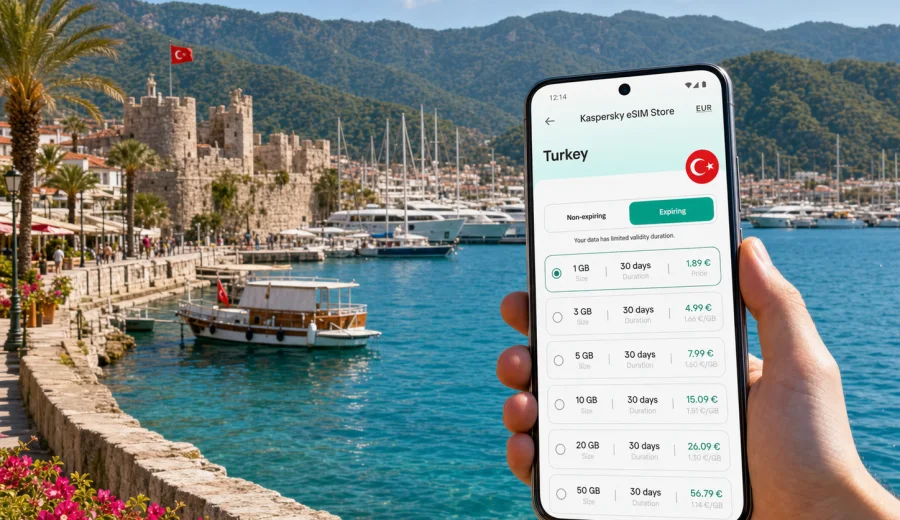
Marmaris eSIM: mobile connection and internet for your trip
Marmaris is a practical place to plan mobile internet before you arrive. The city is built around a long waterfront, a busy marina, beach hotels, boat trips, hillside roads and day routes toward Icmeler, Turunc, Dalyan and Datca. You may land at Dalaman Airport, meet a transfer driver, check a hotel address, join a yacht itinerary or move between resort districts on the same day. In all these moments, an eSIM can help you use mobile data without searching for a physical SIM card shop first.
This guide focuses on Marmaris, not Turkey in general. It explains where mobile connection matters most in the city, how to estimate data use, what to check before buying an eSIM tariff, and how Kaspersky eSIM Store can help you choose, order and activate an eSIM with suitable mobile internet conditions for a trip to Turkey.
Why mobile internet matters in Marmaris
Marmaris is compact on a map, but travel days are often spread out. Many visitors start at Dalaman Airport, continue by private transfer, shuttle or rental car, and then spend time between the marina, Uzunyali beach, Siteler, Armutalan, Icmeler and nearby bays. A short walk can become a taxi ride, and a beach day can turn into a boat tour or a late dinner in another district.
Reliable mobile data is useful for:
- messaging a transfer driver after landing;
- checking the hotel pin before the car leaves the airport;
- using maps in the marina and Old Town streets;
- confirming boat tour times and meeting points;
- booking taxis or ride services where available;
- translating menus, signs and hotel messages;
- sharing your live location with family or colleagues;
- using banking apps and travel documents when needed.
Public Wi-Fi can be convenient in a hotel lobby, cafe or marina venue, but it is not always available when you are moving. An eSIM gives your compatible phone a separate mobile data profile, so you can prepare mobile internet for the trip before you depend on local Wi-Fi or an offline shop.
Arrival scenarios: airport, transfer and first evening
Most international travelers reach Marmaris through Dalaman Airport. The road transfer usually takes around one and a half hours, depending on traffic, hotel location and stops. That first stretch is exactly when mobile internet is useful: you may need to confirm a pickup, follow the route, message the hotel about late arrival or check whether your booking address is in Marmaris center, Icmeler or another nearby resort area.
If you activate your eSIM only after reaching the hotel, you may still need mobile data before then. If you activate it before leaving home, check the tariff conditions first: some tariffs start their validity period when the eSIM connects to a supported local network, while others may have different activation rules. Read the conditions in the selected tariff and keep the QR code or installation details available before departure.
For the first evening in Marmaris, mobile data is useful for simple tasks: walking from the hotel to the promenade, finding the correct marina gate, checking restaurant reviews, messaging friends after a boat trip, or navigating back from Bar Street to a quieter hotel area. These are not heavy-data activities, but they are frequent, and they work better when your phone already has a prepared data option.
Marmaris areas where eSIM is especially useful
The city has several travel zones with different mobile internet needs. Use this table to plan your data allowance and activation timing.
| Area or route | Typical use of mobile data | Practical note |
|---|---|---|
| Dalaman Airport to Marmaris | Transfer messages, maps, booking details | Install the eSIM before departure so you are ready after landing. |
| Marmaris Marina and Old Town | Walking navigation, restaurant bookings, photos, payments | Streets can be narrow and busy; maps help with exact meeting points. |
| Uzunyali and Siteler | Beach hotels, cafes, buses, evening walks | A moderate data package is usually enough for maps and messaging. |
| Icmeler | Hotel transfers, beach clubs, day trips | Keep data active for return transport and location sharing. |
| Turunc and nearby bays | Boat trips, road routes, remote beaches | Download key maps in advance and use mobile data for updates. |
| Datca or Dalyan day trips | Longer navigation, tickets, travel messaging | Choose a validity period that covers the full regional route. |
Marmaris is also a common stop on sailing and blue cruise routes. If your trip includes marina check-ins, yacht charter messages or changing meeting points, a prepared eSIM can reduce the need to borrow Wi-Fi from cafes or ask crew members for hotspot access.
How much data to choose for Marmaris
The right eSIM tariff depends on how you use your phone. A traveler who only checks maps and messages needs far less data than someone who uploads videos, works remotely or uses video calls every day. The safest approach is to estimate by scenario rather than by country name alone.
| Traveler profile | Likely data need | What to watch |
|---|---|---|
| Weekend visitor | 1-3 GB | Maps, messaging, booking apps and light browsing. |
| One-week beach holiday | 3-10 GB | Social apps, restaurant searches, transport and photo backups on Wi-Fi. |
| Remote worker or business traveler | 10 GB or more | Video calls, cloud documents and hotspot use can consume data quickly. |
| Family trip with one main phone | 5-20 GB | Navigation, tickets, shared photos and messaging for several people. |
| Regional route from Marmaris | 5-15 GB | Longer navigation and repeated hotel or transport changes. |
Video streaming, cloud backups and app updates can use data quickly. Before the trip, turn off automatic updates on mobile data, download offline maps for Marmaris and nearby routes, and save hotel confirmations in your wallet or email app. This keeps the eSIM tariff for the tasks that matter most while you are moving.
Choosing an eSIM tariff for Marmaris
For a city trip, do not choose only by the largest number of gigabytes. Check the full fit:
1. Destination: select Turkey or a regional tariff that includes Turkey if your route continues beyond one country.
2. Validity period: match the number of travel days, including the arrival and departure days.
3. Data volume: estimate maps, messaging, browsing, calls through internet apps and work use.
4. Activation rules: check when the validity period starts and how installation differs from activation.
5. Device support: confirm that your phone or tablet supports eSIM and is not locked to one operator.
6. Top-up options: if you may extend the trip, check whether top-up is available for the selected tariff.
Kaspersky eSIM Store helps you compare these conditions in one travel scenario: destination, data volume, validity period and price are visible before you order. For Marmaris, the country landing page is the correct place to start because the city belongs to Turkey. When you are ready to prepare mobile data for the route, you can choose an eSIM tariff for your trip to Marmaris and review the available options for Turkey.
A quick checklist before you buy
Before ordering an eSIM tariff, spend a few minutes on device and trip checks. They can prevent most avoidable problems.
- Confirm that your phone supports eSIM. If you are unsure, check your device before buying.
- Make sure the device is not locked to one mobile operator.
- Update the operating system before the trip if an update is already planned.
- Check that you can receive the installation email or open your Kaspersky eSIM Store profile.
- Keep a stable internet connection for installation, such as home Wi-Fi before departure.
- Read whether the tariff is data-only. Many travel eSIM tariffs do not include a regular phone number, voice calls or SMS unless stated in the tariff conditions.
- Save your hotel address, transfer details and booking references offline.
For Marmaris, it is also sensible to save the hotel district name. A transfer may distinguish between Marmaris center, Icmeler, Turunc or another nearby area. Having that information available offline is useful even when your eSIM is working normally.
How to install and activate an eSIM
The exact steps depend on the device, but the general flow is simple: choose the destination and tariff, order the eSIM, install the eSIM profile on a compatible device, then activate it according to the tariff instructions. Installation usually requires an internet connection, so it is often easier to install the eSIM at home or at the hotel before you need it on the road.
If you use Android, follow the Android installation guide. If you use an iPhone, follow the iOS installation guide. During setup, name the line clearly, for example "Turkey travel", so you can distinguish it from your home SIM. Keep your home SIM available for calls or SMS if you need it, and use the travel eSIM for mobile data.
After arrival, your phone may need a few minutes to register on a supported local network. Some devices also require data roaming to be enabled for the eSIM line. This does not mean you are using your home roaming plan; it is often a device setting required for the travel eSIM data profile. Check the selected tariff instructions and your device settings before assuming something is wrong.
Marmaris trip scenarios and mobile data tips
Beach holiday
If your plan is a week near the beach, you will probably use mobile data for maps, restaurant searches, messenger calls, weather checks and booking confirmations. Use hotel Wi-Fi for heavy uploads and streaming when it is reliable. Keep mobile data for movement: getting from the hotel to the marina, finding a pharmacy, checking a boat tour time or sharing a live location.
Family travel
Families often use one phone as the main navigation and booking device. Keep enough data for maps, ticket emails, translation, messaging and photo sharing. If children use tablets, connect them to hotel Wi-Fi rather than using the phone hotspot all day. Hotspot use can reduce the data allowance faster than expected.
Business trip or remote work
Marmaris is not only a holiday city. Some visitors come for marina business, hospitality meetings, real estate appointments or remote work from a hotel. For this scenario, choose more data and a validity period that covers buffer days. Video meetings and document sync can be heavy. Test the eSIM line before the first meeting and keep hotel Wi-Fi as a backup where possible.
Short stopover or yacht route
If Marmaris is one stop in a wider coastal route, you may need mobile internet in bursts: marina arrival, crew messages, port paperwork, weather checks, restaurant bookings and onward transport. A smaller tariff can be enough if your trip is short, but check whether the route stays inside Turkey or crosses into another country. If the itinerary changes, your tariff destination must still match the route.
Practical data-saving settings
Before your flight to Turkey, review these phone settings:
- disable automatic app updates over mobile data;
- pause cloud photo backup until Wi-Fi is available;
- download offline map areas for Marmaris, Icmeler and your transfer route;
- set messaging apps to download media only on Wi-Fi;
- reduce video call quality when mobile data is limited;
- keep travel documents available offline.
These steps are especially useful if your Marmaris trip includes day tours, boat routes or long transfers where Wi-Fi is not guaranteed.
FAQ: eSIM for Marmaris
Is Marmaris covered by a Turkey eSIM tariff?
For city articles, the correct destination is the country the city belongs to. Marmaris is in Turkey, so you should start with eSIM tariffs for Turkey or a regional option that includes Turkey. Always review the selected tariff conditions before ordering.
Do I need an eSIM if my hotel has Wi-Fi?
Hotel Wi-Fi can be useful, but Marmaris trips usually involve movement: airport transfer, beach areas, marina walks, boat tours and day trips. eSIM mobile data helps when you are away from the hotel network.
Can I call or send SMS with a travel eSIM?
Many travel eSIM tariffs are designed for mobile data and do not include a regular phone number, voice calls or SMS unless the tariff says otherwise. You can usually use internet-based calling and messaging apps through mobile data.
Should I activate the eSIM before flying?
You can often install the eSIM before departure, then activate or use it according to the tariff rules. Check when the validity period starts. If it starts only after connecting to a supported local network, installing before travel can be convenient.
What if I visit Icmeler, Turunc or Datca from Marmaris?
If those places are part of the same trip within Turkey, choose a Turkey tariff with enough data and validity for the whole route. For cross-border travel, check whether a regional tariff is more suitable.
Final preparation for Marmaris
Before you leave, make your phone travel-ready: confirm eSIM compatibility, choose the right destination, install the eSIM while you have reliable Wi-Fi, save the QR code or profile details, and keep hotel and transfer information offline. This gives you a calmer arrival at Dalaman Airport and a simpler first day in Marmaris.
Kaspersky eSIM Store helps you choose, order and activate an eSIM with a suitable tariff for mobile internet in a foreign trip. If Marmaris is your next destination, review eSIM options for Turkey and prepare mobile data before you need maps, messages, transport details or hotel information on the move.