
Travel connectivity guide
Marrakech eSIM: Mobile Internet Guide
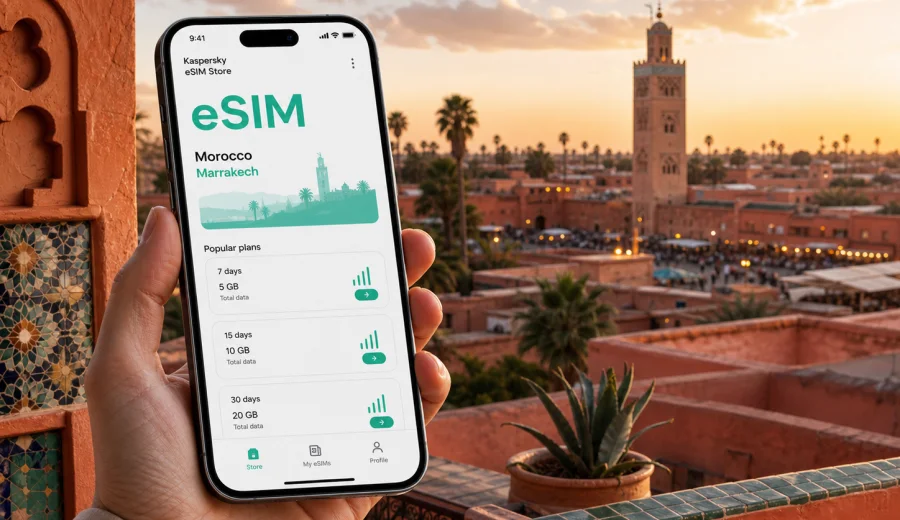
Marrakech eSIM: mobile connection and internet for your trip
Marrakech is a city where mobile internet quickly becomes part of the travel plan. You may need maps before you understand the medina lanes, a ride-hailing app after a late arrival, a message to your riad host when a taxi cannot reach the door, or a translation app while checking details in a small shop. An eSIM can help you prepare a mobile data connection before the trip, without looking for a physical SIM card after landing.
For a Marrakech trip, the practical question is not only "Do I need internet?" It is "When will I need it, how much data should I prepare, and what should I check before I rely on it?" This guide focuses on the city scenario: arrival, airport transfer, navigation inside the medina, hotel check-in, business travel, day trips, and short stays.
Kaspersky eSIM Store is an app and website where you can choose, set up, and activate an eSIM tariff with a suitable data package for international travel. It is useful when you want to review traffic volume, validity period, destination, and price before the trip, then keep the eSIM ready on a compatible device.
Why mobile internet matters in Marrakech
Marrakech is easy to enjoy, but it is not always easy to navigate on the first day. The old medina is dense, many streets are narrow, and some hotels or riads are reached by short walks from the closest car access point. A stable mobile data plan helps you keep control of the small tasks that happen between the airport, your accommodation, and your first walk around the city.
Common online tasks in Marrakech include:
- opening a map when walking from a taxi drop-off to a riad;
- sending your arrival time to a host or hotel reception;
- checking ride details or transfer messages;
- translating menu items, signs, or short messages;
- confirming restaurant bookings and tour pick-up points;
- sharing your live location with travel companions;
- downloading tickets, boarding passes, or reservation confirmations;
- checking opening hours before crossing the city.
Public Wi-Fi may be available in hotels, cafes, or some public places, but it is not something to build your whole travel plan around. You may need internet before you reach the hotel, while moving between districts, or when you are outside during a day trip. An eSIM gives you another way to use mobile data during those moments, subject to the selected tariff, device settings, and local network conditions.
Arrival at Marrakech Menara Airport
Many visitors begin the trip at Marrakech Menara Airport. The airport is close to the city compared with many major destinations, but the first 30 minutes still involve decisions: transport, address details, payment messages, and meeting points. If you land in the evening, the need for mobile data can feel more urgent because you may want to avoid searching for Wi-Fi while managing luggage and transfer instructions.
Mobile internet is useful at arrival for:
| Arrival moment | Why data helps |
|---|---|
| Passport control and baggage wait | Message your hotel or driver if the flight is delayed. |
| Leaving the terminal | Check the exact meeting point or transfer instructions. |
| Taxi or ride planning | Compare route time and keep the hotel address ready. |
| Medina drop-off | Use walking navigation for the final streets to a riad. |
| First check-in | Open booking details, codes, or messages without asking for Wi-Fi first. |
If you install your eSIM before departure, you can usually keep it ready and turn on the correct mobile data line when appropriate. Check the activation rules in the selected tariff: the validity period may start at purchase, at installation, or when the eSIM first connects to a supported local network, depending on the tariff conditions.
Marrakech districts and the online tasks they create
Marrakech is compact in some ways and spread out in others. The online tasks change by district. In the medina, you may need walking navigation and messaging. In Gueliz or Hivernage, you may use maps, restaurant reservations, and ride apps more often. Around Palmeraie or resort hotels, you may rely on mobile data during transfers and day trips.
Use this city-based view when estimating your data needs:
| Area or scenario | Typical internet use |
|---|---|
| Medina and souks | Maps, translation, messaging, photo backups on Wi-Fi later. |
| Jemaa el-Fnaa area | Meeting points, restaurant search, route checks, quick calls through messengers. |
| Gueliz | Ride apps, cafe work sessions, navigation between shops and restaurants. |
| Hivernage | Hotel transfers, business meetings, reservations, event details. |
| Majorelle Garden area | Ticket confirmations, route checks, photo sharing. |
| Palmeraie | Transfer coordination, maps, messaging from resort areas. |
| Day trips from Marrakech | Offline maps plus mobile data for pick-up changes, weather, and messages. |
The medina deserves special attention. GPS can be less precise in narrow lanes, and a map may not solve every turn, but having data still helps. You can compare your position with the nearest main street, message the riad, save a location pin, or call through a messenger if voice service is not included in the eSIM tariff. Many travel eSIM tariffs focus on mobile data and do not include a local phone number, voice calls, or SMS unless stated in the tariff conditions.
Short stays, stopovers, and weekend trips
For a short Marrakech stay, convenience matters more than a very large allowance. If you are in the city for two or three days, you may mainly need data for arrival, maps, messaging, and bookings. A compact package can be enough if you keep heavy downloads and cloud photo backup for hotel Wi-Fi.
A weekend data checklist:
- Save your hotel address and arrival instructions before the flight.
- Download an offline map of central Marrakech.
- Keep your flight, hotel, and transfer confirmations available offline.
- Use mobile data for live navigation, messaging, and urgent searches.
- Avoid automatic cloud backup on mobile data unless your package is large enough.
- Check whether your eSIM tariff validity covers the full stay, including the departure day.
For a stopover, prepare the route in advance and use mobile data for live changes: airport messages, transfer updates, one route into the center, and the return journey.
Business trips and remote work in Marrakech
Business travelers need a more predictable setup. A conference, client meeting, remote work block, or team call creates different requirements from a sightseeing trip. Hotel Wi-Fi may be enough for some work, but mobile data is useful as a backup when you move between meetings or need to join a call from a taxi, cafe, or lobby.
For business travel, pay attention to:
- validity period, especially if the trip includes arrival and departure days;
- data volume, because calls and file sharing can use more traffic than maps;
- whether tethering is allowed by the tariff and supported by your device;
- device compatibility with eSIM and any carrier lock;
- the moment when tariff validity begins;
- support options if installation does not work as expected.
Before relying on an eSIM for work, test the installation while you still have a stable connection. Keep your primary SIM available for banking confirmations or work systems that expect your usual number.
How much data to prepare for Marrakech
Data use depends on habits, not only on city size. A traveler who uses maps, messages, and occasional searches may use far less than someone who streams video, uploads many photos on mobile data, or works from a laptop hotspot.
Use these practical estimates as planning guidance:
| Traveler type | Likely data pattern | Planning note |
|---|---|---|
| Light city explorer | Maps, messengers, searches, tickets | Keep media uploads for Wi-Fi. |
| Active tourist | Maps, translation, ride apps, frequent photo sharing | Choose a package with room for daily movement. |
| Business visitor | Email, calls, file previews, hotspot use | Check tethering and consider a larger package. |
| Family or group organizer | Navigation, bookings, chats, route planning for several people | The organizer often uses more data than others. |
| Day-trip traveler | Maps, weather, driver messages, route changes outside the city | Do not plan only around hotel Wi-Fi. |
If you are unsure, choose a tariff based on your highest-risk moments: airport arrival, first day navigation, work calls, day trips, and departure logistics. The best option is the one that fits your actual itinerary, not the largest package by default.
Choosing an eSIM tariff for a Marrakech trip
For Marrakech, the relevant destination is Morocco. City articles use the country tariff because mobile data plans are normally organized by country or region, not by one neighborhood or landmark. When you review options, check that the tariff covers Morocco and that the validity period matches the full travel window.
When you are ready to compare options, you can choose an eSIM tariff for your trip to Marrakech in Kaspersky eSIM Store. Review the data volume, validity period, destination, and price before ordering, and keep the confirmation details available before you fly.
Use this simple decision path:
1. Confirm your route: Marrakech only, Morocco with other cities, or a wider regional trip.
2. Estimate your data use: light maps and messages, active sightseeing, business, or hotspot use.
3. Match the validity period to your arrival and departure dates.
4. Check whether the tariff conditions mention tethering, top-up, or activation timing.
5. Make sure your phone supports eSIM and is not locked to another carrier.
6. Install the eSIM while you have a stable connection, then activate it according to the tariff instructions.
Device compatibility before you buy
Not every phone supports eSIM, and some compatible phones can still be locked by a carrier. This is the most important technical check before you order any eSIM tariff.
Before purchase, check:
- your phone or tablet supports eSIM;
- the device is not carrier locked;
- your operating system is up to date enough for eSIM setup;
- you can access the internet during installation;
- you understand which line will be used for mobile data;
- you can receive important messages on your primary number if needed.
You can check your device before choosing a tariff. If your device is not compatible, keep using your existing roaming plan, a physical local SIM, or another travel setup that fits your phone.
How to install and activate an eSIM for Marrakech
The exact flow depends on your device and the selected tariff. Kaspersky eSIM Store lets you choose a destination and tariff, complete the order, then install and activate the eSIM on a compatible device. Keep a stable connection available during setup.
Typical steps:
1. Choose Morocco as the destination for your Marrakech trip.
2. Select the data volume and validity period that fit your itinerary.
3. Complete the order and open the eSIM installation details.
4. Install the eSIM using the on-screen instructions or QR code if provided.
5. Set the eSIM as the mobile data line when you are ready to use it.
6. Turn on data roaming for the eSIM if the instructions or device settings require it.
7. Keep your primary SIM active for calls or SMS if you need your usual number.
For device-specific setup, use the Android installation guide or the iOS installation guide. Install the eSIM before the trip if possible, but read the tariff rules first so you know when validity begins.
Using mobile data around the city
Once you are in Marrakech, treat mobile data as a tool for movement and decisions. Make your phone travel-ready before leaving the hotel each morning, then use data for tasks that need a live connection.
Morning setup:
- download or refresh the map area you expect to visit;
- save the hotel or riad location as a favorite;
- screenshot booking references and meeting addresses;
- check the day trip pick-up time and contact details;
- turn off automatic app updates on mobile data;
- decide whether photo backup should wait for Wi-Fi.
During the day, mobile internet helps most with route changes. If you split from your group in the souks or leave a garden by a different exit, data helps you rejoin without waiting to find Wi-Fi.
Transport, taxis, and walking navigation
Transport in Marrakech often combines car travel and walking. A taxi may bring you near the medina, but the final route to a riad may be on foot. For day trips, you may need driver messages, meeting points, and timing updates.
Mobile data is especially useful for:
- checking the route before accepting a transfer;
- sharing a pin with a driver or guide;
- finding the nearest accessible street to your accommodation;
- confirming a tour pick-up point;
- coordinating with companions after a crowded stop;
- checking departure time for a bus, train, or onward transfer.
Do not rely only on live maps. Save key addresses in advance and keep a screenshot of your accommodation name in Arabic or French if your hotel provides it.
Hotels, riads, and accommodation check-in
Marrakech has many riads inside the medina, and this affects how you use mobile data. A riad can be close to a main square but still hidden behind several turns. Some hosts send detailed arrival instructions, door codes, or a suggested meeting point. Having data lets you open those messages without searching for public Wi-Fi in a busy street.
If you stay outside the center, you may have good Wi-Fi on site but still need mobile data for transfers, restaurant trips, spa bookings, or visits into the medina.
Accommodation checklist:
- Save the hotel address, phone number, and map pin.
- Ask whether the taxi can reach the entrance or only a nearby drop-off point.
- Keep check-in instructions offline.
- Confirm whether late arrival requires a message.
- Use Wi-Fi for large uploads and app updates.
- Keep mobile data available for the return route at night.
Day trips from Marrakech
Marrakech is a base for trips to Essaouira, the Atlas Mountains, Agafay Desert, Ouarzazate routes, waterfalls, and small group excursions. These trips make mobile data more valuable because you may spend hours away from hotel Wi-Fi.
For day trips, prepare before leaving:
| Item | Why it matters |
|---|---|
| Offline map | Useful if signal conditions vary outside the city. |
| Driver or guide contact | Helps with pick-up changes and meeting points. |
| Weather check | Mountain and desert trips can change by time of day. |
| Battery plan | Navigation and photos drain power quickly. |
| Data balance | A full-day route can use more data than a city walk. |
Practical settings to control data use
Good mobile internet planning is partly about settings. A travel eSIM can be more efficient if your phone does not spend data on background tasks.
Useful settings before departure:
- Disable automatic app updates on mobile data.
- Restrict cloud photo and video backup to Wi-Fi.
- Download offline maps and translation packs.
- Set the eSIM as the data line only when you are ready.
- Keep your primary SIM for calls and SMS if needed.
- Check data roaming settings for the eSIM profile.
- Monitor data use after the first full day.
If you use a dual-SIM phone, label the lines clearly, for example "Home" and "Travel data." If you need banking or work verification, keep your usual number active according to your home operator's roaming settings, because many travel eSIM tariffs are data-only.
Quick answers
Is an eSIM useful for Marrakech?
Yes, especially for airport arrival, medina navigation, hotel messages, maps, ride coordination, business tasks, and day trips from the city. It helps you use mobile data without buying a physical SIM card after arrival.
Does a Marrakech eSIM mean a city-only tariff?
Usually no. For a Marrakech trip, you normally choose a tariff for Morocco or a relevant region. The city matters because it shapes your data needs, but the destination coverage is usually country or region based.
Can I install the eSIM before flying?
In many cases, yes. Install it while you have a stable connection, but check the selected tariff conditions so you know when the validity period starts.
Will I get a Moroccan phone number?
Travel eSIM tariffs are often focused on mobile data. Voice calls, SMS, or a local number are not included unless the selected tariff clearly says so.
Can I use messengers and maps with an eSIM?
Yes, mobile data can support maps, messengers, email, translation apps, and booking tools, subject to the selected tariff and device settings. Offline maps are still useful in dense medina streets and on day trips.
Prepare your Marrakech mobile internet before you travel
Marrakech rewards flexible planning. You may start in the medina, cross to Gueliz for lunch, meet a guide near your hotel, and return after sunset through streets that look different at night. Mobile internet helps you manage those changes without turning every small decision into a search for Wi-Fi.
Before you go, check that your device supports eSIM, choose the right destination and validity period, install the eSIM while you have a stable connection, and keep your key travel details available offline. For a city trip focused on Marrakech and other places in Morocco, you can prepare an eSIM tariff for Morocco in Kaspersky eSIM Store and use it as part of a practical mobile data plan for arrival, navigation, transport, hotels, work, and day trips.