
Travel connectivity guide
Marsa Alam eSIM: Mobile Internet Guide
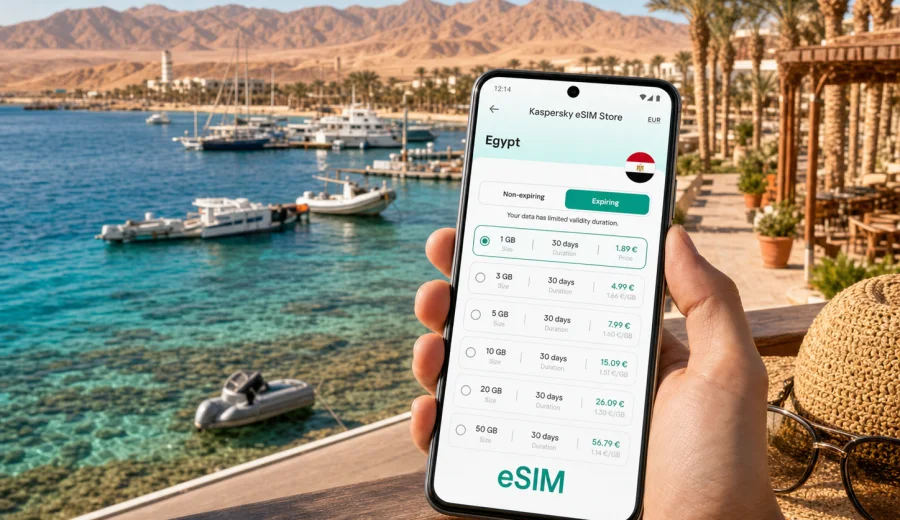
Marsa Alam eSIM: mobile connection and internet for a Red Sea trip
Marsa Alam is a practical destination to plan around mobile internet before you arrive. The city is spread along the Red Sea coast, many hotels sit outside the compact town center, and a typical trip may include airport transfers, dive centers, marina pickups, desert roads, and day trips to beaches or national parks. In that kind of itinerary, an eSIM can make the first hours easier because you do not need to search for a physical SIM card before opening maps, messaging your driver, or checking a booking.
This guide focuses on using eSIM for mobile data in Marsa Alam, Egypt. It is written for travelers who want a steady, simple way to stay online for navigation, hotel coordination, transport, work messages, and everyday travel tasks. Kaspersky eSIM Store is an app and website where you can choose, arrange, and activate an eSIM with a suitable data plan for an international trip. The conditions, data allowance, validity period, and destination depend on the plan you select, so it is worth matching the plan to your real route rather than buying more or less data by habit.
Why mobile internet matters in Marsa Alam
Marsa Alam is not only one point on a map. Travelers often move between Marsa Alam International Airport, coastal resorts, Port Ghalib, dive boats, beaches, and desert excursion meeting points. Even when the distance looks short, you may spend time on highways with limited stops, in hotel zones away from the town, or at pickup points where written directions are clearer than a phone call.
Mobile internet is useful for:
- confirming transfer details after landing;
- following the route from the airport to your resort;
- messaging hotels, dive centers, tour operators, and drivers;
- checking weather and wind conditions before boat trips;
- using maps around Port Ghalib, the corniche, beaches, and resort areas;
- translating short messages or menus when staff and travelers use different languages;
- receiving airline updates for the return flight;
- staying in touch with family while moving between hotel zones.
An eSIM is especially convenient when you want to keep your regular physical SIM in the phone and use a separate data profile for the trip. On many compatible phones, you can leave your main number active for important messages while choosing the eSIM profile for mobile data. The exact options depend on your device, operating system, and the plan you activate.
Arrival at Marsa Alam International Airport
The airport is a common moment when travelers need internet quickly. After passport control and baggage claim, you may need to find your transfer representative, message a private driver, check the name of the hotel zone, or open a saved booking. Public Wi-Fi may not be the most convenient option, and a physical SIM counter may not fit your timing, especially if you arrive late or with a group.
With an eSIM prepared in advance, your airport routine can be simpler:
1. Install the eSIM profile before departure while you still have reliable Wi-Fi.
2. Keep the activation instructions available offline or in your email.
3. After landing, choose the eSIM line for mobile data when the plan is ready to activate.
4. Enable data roaming for the eSIM profile if the plan instructions require it.
5. Open maps, messages, and booking apps before leaving the terminal.
Do not rely on the airport as the only place to solve connectivity. Marsa Alam is a resort destination with long transfers, and it is easier to handle setup while you are calm, connected to home Wi-Fi, and not trying to identify luggage or find a driver in arrivals.
Local movement: resorts, Port Ghalib, beaches, and town
Many visitors do not move around Marsa Alam like they would in a dense city with a metro network. Movement is often organized through hotel shuttles, private transfers, dive centers, taxis, or tour pickups. That makes mobile data important in small, practical moments: sharing your location, checking pickup time, reading a message from a tour desk, or confirming which hotel gate the driver should use.
| Travel scenario in Marsa Alam | Why internet helps | Practical data use |
|---|---|---|
| Airport to resort transfer | Confirm driver, hotel name, and route | Maps, messaging, booking app |
| Dive center pickup | Check meeting point and boat time | Messenger, email, weather app |
| Port Ghalib evening visit | Navigate restaurants, marina, and taxi return | Maps, reviews, ride coordination |
| Beach or lagoon day | Share location and check return time | Messaging, offline map updates |
| Business stopover | Join calls and approve documents between transfers | Email, chat, hotspot if allowed |
The most important point is consistency. You may not use large amounts of data every hour, but you want access at the exact moment a pickup changes, a meeting point is unclear, or a booking confirmation is needed.
How much data to consider for Marsa Alam
The right data allowance depends on your habits, hotel Wi-Fi quality, and trip length. Marsa Alam travelers often use hotel Wi-Fi for heavy tasks such as long video calls or uploading large photo albums, while mobile data covers movement, maps, messaging, and checks during excursions. If you plan to work remotely from the resort or use your phone as a hotspot, review the plan conditions carefully because tethering availability and data consumption can vary by plan and device settings.
Use this simple planning model:
- Light use: maps, messaging, email checks, airline apps, and booking apps.
- Moderate use: all light use plus daily photo sharing, short video clips, social apps, and more frequent browsing.
- Heavy use: video calls, cloud backups, streaming, hotspot sessions, or uploading diving footage.
For a short resort break, a smaller data plan may be enough if hotel Wi-Fi is reliable and most movement is pre-arranged. For a longer trip with diving, desert excursions, remote work, or several hotel changes along the Red Sea coast, choose a plan with more allowance and a validity period that covers the full stay.
Choosing an eSIM plan for Marsa Alam
For a city article, the correct destination is the country that contains the city. Marsa Alam is in Egypt, so you should choose an Egypt plan rather than looking for a separate city plan. If your itinerary continues to another country, compare country, regional, or global options and choose the one that matches the whole route.
Before you choose a plan, check five details:
- Destination: the plan should cover Egypt for a Marsa Alam trip.
- Data allowance: match it to maps, messaging, work, and media use.
- Validity period: cover arrival day, the full stay, and the return journey.
- Activation rules: understand when the validity period starts.
- Device compatibility: make sure your phone or tablet supports eSIM and is not locked by an operator.
If Marsa Alam is your main destination, you can review data plan options for Egypt before departure and choose one that fits the length and style of your trip. This is the first point in the planning process where the country landing page is useful: by now you have estimated your route, your transfer needs, and the amount of data you may actually use.
Device compatibility before you buy
Not every smartphone supports eSIM, and some models differ by region of sale. A phone may also be locked to a mobile operator, which can prevent adding another cellular profile. Before buying any travel eSIM plan, check the device model, operating system settings, and operator lock status.
Check your device before you leave for Marsa Alam, especially if you are traveling with a work phone, an older device, or a model bought in a market where eSIM support can differ. It is also sensible to update your operating system and make sure you can receive email or scan a QR code during setup.
Quick compatibility checklist:
- Your phone supports eSIM in its settings and documentation.
- The device is not locked to one operator.
- You have stable Wi-Fi for installation before travel.
- You can access the email or profile where the eSIM details appear.
- You understand which line will be used for mobile data after activation.
Installing eSIM before the trip or after arrival
For Marsa Alam, installing the eSIM profile before departure is often the more relaxed option. You can use home Wi-Fi, read each step carefully, and avoid solving setup during a late arrival. Activation timing depends on the specific plan, so follow the instructions shown for the plan you select.
A practical setup flow looks like this:
1. Choose Egypt as the destination and select a plan with the right data allowance and validity period.
2. Complete the purchase and open the eSIM details in your profile, app, or email.
3. Add the eSIM profile to your compatible device.
4. Keep your regular SIM for calls or messages if you need it, and set the eSIM as the mobile data line when appropriate.
5. After arrival, check that mobile data is assigned to the eSIM profile.
6. If instructed by the plan, enable data roaming for the eSIM profile.
If you need device-specific setup help, use the Android installation guide or the iOS installation guide. The exact menu names can vary by phone model and operating system version, so follow the on-screen instructions on your device as well.
Practical Marsa Alam scenarios
Resort holiday
For a classic Marsa Alam resort stay, mobile data is most useful outside the room: arrival, transfer, beach movement, restaurant searches, excursion pickups, and return-flight updates. You may rely on hotel Wi-Fi for video calls or streaming, but an eSIM gives you a separate data option when you leave the lobby or move between resort zones.
Recommended approach: choose a plan that covers all travel days, keep offline maps downloaded, and reserve mobile data for navigation, messages, and urgent tasks if the hotel Wi-Fi is enough for heavier use.
Diving and snorkeling trip
Marsa Alam is strongly associated with Red Sea diving, snorkeling, reefs, and boat excursions. You may need mobile data to confirm meeting times, identify the correct marina point, receive schedule changes, or message the dive center after a day at sea. Coverage and signal quality can vary by location, especially on the water or away from built-up areas, so download essential details before leaving the hotel.
Recommended approach: save operator contacts, pickup instructions, and passport or certification details offline if you need them for the dive center. Use mobile data for coordination before and after the excursion, but do not assume continuous service offshore.
Business trip or remote work from a resort
Some travelers combine a Red Sea stay with work calls, email, or approvals. In this case, the main issue is not only data volume, but also reliability planning. Hotel Wi-Fi may be fine for the room, while mobile data can serve as a backup for messages, document approvals, and light hotspot use if the selected plan and device allow it.
Recommended approach: choose a larger data allowance, check hotspot rules in the plan details, and avoid scheduling critical calls during transfers or remote excursions.
Short stopover
If Marsa Alam is part of a wider Egypt route, you may arrive, stay briefly, and continue to Hurghada, Luxor, Cairo, or another city. A country-level Egypt plan is usually the relevant starting point because your travel does not stop at one resort zone.
Recommended approach: choose a validity period that covers the whole Egypt segment, not only the nights in Marsa Alam. If you continue beyond Egypt, compare whether a regional plan is more appropriate for the full journey.
eSIM versus hotel Wi-Fi and roaming
Most travelers in Marsa Alam use a mix of connectivity options. Hotel Wi-Fi can be useful in the room or lobby. Standard roaming from your home operator may be convenient if the price and conditions suit you. An eSIM can be a separate travel data option for movement around the destination.
| Option | Best for | What to check |
|---|---|---|
| Hotel Wi-Fi | Large uploads, streaming, long calls from the resort | Signal in your room, login limits, security habits |
| Home-operator roaming | Keeping your regular line active with familiar billing | Daily fees, data limits, speed policy, destination coverage |
| Travel eSIM | Mobile data for maps, messages, bookings, and movement | Device compatibility, plan coverage, validity, data allowance |
The safest way to think about eSIM is not as a promise that every location will behave the same. It is a practical way to prepare mobile data for a foreign trip without depending only on public Wi-Fi, hotel networks, or finding a physical SIM after landing. Before arrival, pause cloud photo backup on mobile data, download maps on Wi-Fi, check which SIM profile handles mobile data, and keep the hotel address and transfer contacts available offline.
FAQ: eSIM for Marsa Alam
Is Marsa Alam covered by a city-specific eSIM plan?
For city travel, choose the plan for the country that contains the city. Marsa Alam is in Egypt, so the relevant destination is Egypt. If your route includes more countries, compare country, regional, and global options according to the actual itinerary.
Should I install the eSIM before flying to Marsa Alam?
Installing the eSIM profile before departure is usually more convenient because you can use reliable Wi-Fi and follow the steps without airport pressure. Activation timing depends on the selected plan, so read the plan instructions before turning it on.
Can I use eSIM for maps and taxi coordination?
Yes, mobile data is useful for maps, messaging, booking apps, and transport coordination. Download key map areas and booking details as a backup, especially if you are going to beaches, dive points, or desert routes.
Does an eSIM replace my normal phone number?
Usually no. Travel eSIM plans are commonly used for mobile data and do not include a regular phone number, voice calls, or SMS unless the plan conditions say otherwise. You can often keep your usual SIM active and choose which line handles mobile data.
Can I activate eSIM only for a few days?
Plan validity depends on the selected offer. Choose a period that covers arrival, the full stay, and the departure day. If you are traveling around Egypt after Marsa Alam, plan for the entire route rather than only the resort nights.
What if I have questions during setup?
Check the installation instructions first and make sure your device supports eSIM, has internet access for setup, and is not operator-locked. If something still does not work, contact support through the available Kaspersky eSIM Store support channel.
Final preparation before your Marsa Alam trip
Before you leave for Marsa Alam, make mobile internet part of the same checklist as flights, hotel, transfer, and travel documents. Confirm that your device supports eSIM, choose Egypt as the destination, select a data allowance that matches your real travel style, and install the profile while you have stable Wi-Fi.
For a resort trip, eSIM helps with arrival, transfers, maps, tour coordination, and messages when you are away from hotel Wi-Fi. For diving, work, or a longer Egypt route, it helps you plan mobile data around the moments when being online matters most.
You can choose an eSIM data plan for your trip to Marsa Alam in Egypt through Kaspersky eSIM Store and prepare mobile internet before you travel.