
Travel connectivity guide
Marseille eSIM: mobile internet guide
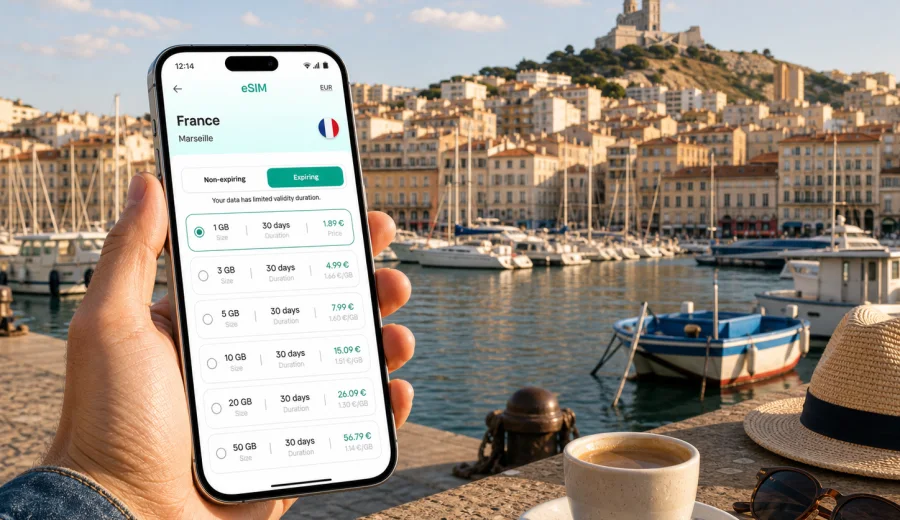
Marseille eSIM guide: mobile connection and internet for your trip
Marseille is a city where mobile internet becomes useful almost as soon as you arrive. You may need a map from Marseille Provence Airport, a ticket check on the train, a message to your hotel in the Vieux-Port area, or navigation through steep streets around Notre-Dame de la Garde. An eSIM helps you prepare mobile data for the trip without looking for a physical SIM card after landing.
For travelers, the main value is control. You can choose a data package before departure, install the eSIM on a compatible phone, and use it for maps, rides, bookings, translation, messaging, and route planning in Marseille. The exact experience depends on your device, the selected tariff, local network conditions, and the settings you use, so it is worth preparing before you are standing at the baggage belt or searching for your apartment entrance.
This guide focuses on Marseille, not France in general: airport transfers, port areas, business districts, beaches, cruise stops, station arrivals, day trips, and the practical moments when internet access matters.
Why eSIM is useful in Marseille
Marseille is spread between the sea, hills, old streets, port zones, residential districts, and transport hubs. A short route can involve walking, metro, tram, bus, train, ferry, or a ride-hailing app. Mobile connection is helpful because many travel tasks in the city happen in real time.
You may need data in Marseille to:
- follow walking directions from Saint-Charles station to your hotel;
- check the route from the airport shuttle stop to Vieux-Port;
- message a host about late check-in in Le Panier or Cours Julien;
- open a hotel booking confirmation at reception;
- translate a menu, pharmacy note, or transport notice;
- compare routes to Prado beaches, La Corniche, or the Calanques access points;
- use maps when streets become narrow, steep, or hard to recognize;
- share location with colleagues during a business trip;
- use messaging apps for calls if your eSIM tariff is data-only.
The city is easy to enjoy when you can make small decisions quickly. Without mobile data, you may rely on screenshots, offline maps, public Wi-Fi, or help from passersby. Those options can work, but they are less flexible when your plan changes or you arrive tired.
Arrival scenarios: airport, station, port
Marseille Provence Airport is outside the city, so the first mobile-data moment often comes before you reach the center. You may need to check shuttle schedules, find a pickup point, confirm a taxi, or message your accommodation. If you install an eSIM before departure, you can enable it after arrival and avoid searching for a store or Wi-Fi connection first.
Saint-Charles railway station is another common entry point. It sits above the center, and the area can feel busy if you arrive with luggage. Mobile internet helps you decide whether to walk, take the metro, call a car, or check into a nearby hotel before exploring.
Cruise and ferry travelers have a different pattern. If Marseille is a stopover, time matters. You may want to go from the port area to Vieux-Port, Le Panier, Notre-Dame de la Garde, or MuCEM without spending half the visit solving connectivity. A prepared eSIM gives you a practical backup for maps and messages during a short city window.
| Arrival point | What mobile data helps with | Practical tip |
|---|---|---|
| Marseille Provence Airport | Shuttle routes, taxi pickup, hotel messages, maps | Install the eSIM before travel, then activate data after landing if the tariff rules allow it. |
| Saint-Charles station | Metro connections, walking routes, onward trains | Keep your hotel address saved and check which exit makes sense before leaving the station. |
| Cruise or ferry terminal | Time-sensitive city routes, return navigation | Download the port location and keep enough battery for the return trip. |
| Road trip arrival | Parking, apartment access, route changes | Check whether your data tariff covers all French destinations on your route. |
Where mobile internet matters most in the city
Marseille rewards movement. Many visitors start at Vieux-Port, then continue to Le Panier, La Major, MuCEM, Cours Julien, the Corniche, Prado beaches, or the hill up to Notre-Dame de la Garde. Each area has a different travel rhythm.
In Vieux-Port, mobile data helps with restaurant bookings, ferry information, parking apps, and meeting points. Around Le Panier, it helps with navigation through narrow streets where a wrong turn can add a steep climb. Near MuCEM and La Joliette, it is useful for business meetings, shopping, hotel check-ins, and route changes between tram, metro, and walking.
On the Corniche and around the beaches, the value is different: you may use data for rides, weather checks, beach plans, and sharing location. For the Calanques, you should not treat mobile internet as your only safety tool, because coverage and conditions can vary. Save key information in advance, carry enough battery, and follow official local guidance where access rules or closures apply.
Choosing a data amount for Marseille
The right eSIM tariff depends on how you travel. A weekend in Marseille with hotel Wi-Fi at night is different from a work week with video calls, cloud files, and hotspot use. Think about your real habits rather than choosing only by price.
Typical mobile-data use in Marseille:
- light use: maps, messaging, tickets, occasional search, restaurant checks;
- moderate use: frequent maps, social media, photo sharing, translation, ride apps;
- heavy use: hotspot, cloud documents, streaming, long video calls, remote work.
For a short city break, a smaller data package may be enough if you save offline maps, avoid video streaming on mobile data, and use hotel Wi-Fi for large uploads. For a business trip, a larger package gives more room for calendar changes, shared documents, tethering, and airport delays. For a longer France route that starts in Marseille and continues to Aix-en-Provence, Avignon, Nice, Lyon, or Paris, choose the tariff by the full itinerary, not only the first city.
Quick planning checklist before departure
Before you fly, take the train, or board a cruise, prepare the basics:
- check that your smartphone supports eSIM;
- make sure the device is not locked to a single mobile operator;
- choose a tariff for France or for the region that matches your route;
- read the tariff validity period, data volume, and activation conditions;
- install the eSIM while you still have stable internet;
- save your hotel address, station, airport, or port route offline;
- keep your primary SIM active if you need bank SMS or voice calls;
- pack a power bank if you plan long walking days.
If you are unsure whether your device is ready, use the compatibility check before buying: check your device. This matters because eSIM support depends on the exact phone model, region, and sometimes carrier settings.
How Kaspersky eSIM Store fits into the trip
Kaspersky eSIM Store is an app and website where you can choose, arrange, and activate an eSIM with a suitable data tariff for mobile internet during an international trip. It is not a mobile network operator and does not replace the local network. The practical benefit is that you can prepare a data option in advance, see the tariff conditions, install the eSIM on a compatible device, and manage the trip setup in one place.
For Marseille, this is useful because the city often combines several travel tasks in one day: an airport transfer, a hotel check-in, a waterfront walk, a restaurant booking, and a route to a beach or business address. If you want to prepare before arrival, you can choose an eSIM tariff for your trip to Marseille and review the available France options before you leave.
Use the country page for France because a Marseille city article points to the country where the city belongs. If your route includes nearby countries, compare the tariff conditions carefully and make sure the selected destination or region matches the whole trip.
Installing and activating your eSIM
The safest approach is to install the eSIM when you have a reliable connection, then activate mobile data according to the tariff instructions. After purchase, the eSIM profile is usually available in your account or app flow, and you may also receive a QR code or installation details. The exact steps depend on your phone.
Use the official setup guides if you need a device-specific walkthrough:
A practical setup sequence for Marseille:
1. Confirm your phone supports eSIM and is not carrier-locked.
2. Choose a France tariff that matches your stay and data needs.
3. Install the eSIM profile before the trip or while connected to stable Wi-Fi.
4. Keep your regular SIM for calls or SMS if you still need it.
5. After arrival, select the eSIM for mobile data.
6. Turn on data roaming for the eSIM if the setup instructions require it.
7. Check that apps such as maps, messaging, and transport tools use mobile data correctly.
Do not delete the eSIM profile unless you are sure you no longer need it. Some eSIM profiles cannot be reinstalled or transferred after activation, depending on the tariff terms.
Transport and navigation tips
Marseille has metro, tram, buses, regional trains, airport shuttle services, taxis, ride apps, and walking routes. Mobile internet makes these options easier to combine, especially when your destination is not directly on a metro line.
Useful habits:
- save your accommodation address in both English and French if available;
- keep a screenshot of your booking and building access instructions;
- check the last transport option before late dinners or events;
- download offline maps as a backup, but use live data for route changes;
- leave extra time for hills, stairs, and luggage;
- keep the port, station, or hotel pinned on your map.
In Marseille, walking time can be deceptive because of elevation and street layout. A route that looks short on the map may include steps or steep climbs. Mobile data helps you compare walking with public transport or a car at the moment you need to decide.
Hotels, apartments, and check-in
Many Marseille stays involve digital check-in details: building codes, host messages, late arrival instructions, or app-based confirmations. If you arrive in the evening, mobile internet can prevent a simple inconvenience from becoming stressful.
Before arrival, save:
- hotel name and full address;
- confirmation number;
- host phone or messaging contact;
- check-in window;
- door code or lockbox information, if provided;
- nearest metro or tram stop;
- a backup route from airport or station.
If you use a data-only eSIM tariff, remember that it may not include a regular phone number, voice calls, or SMS unless the tariff specifically says so. Messaging and internet calls can work over mobile data, but bank verification, airline updates, or hotel SMS may still go to your primary SIM.
Practical data-saving habits
You can make a smaller data package last longer with a few settings, especially if Marseille is the first stop in a longer France route:
- disable automatic cloud photo backup on mobile data;
- turn off app updates until you are on Wi-Fi;
- download offline maps before departure;
- reduce video autoplay in social apps;
- use messaging instead of video calls when signal or data is limited;
- monitor data use in your phone settings;
- keep hotspot use for tasks that really need it.
Quick answers for travel planning
Is eSIM useful in Marseille? Yes, eSIM is useful for maps, transport, hotel check-in, messaging, translation, bookings, and day trips from Marseille, provided your device supports eSIM and the selected tariff covers France.
Can I install eSIM before I arrive? In many cases, yes. Install the eSIM while you have stable internet, then activate mobile data according to the tariff instructions and your phone settings.
Does eSIM replace my usual phone number? Usually no. Many travel eSIM tariffs are data-only. Keep your main SIM active if you need calls, SMS, or bank verification messages.
Should I use public Wi-Fi instead? Public Wi-Fi can be useful, but mobile data gives more flexibility when you are moving through the airport, station, port, streets, beaches, and business districts.
What should I check before buying? Check eSIM compatibility, carrier lock status, tariff destination, data volume, validity period, activation rules, and whether your route stays within the covered area.
Final checklist for Marseille
Before your trip, make sure you have:
- a compatible, unlocked phone;
- an eSIM tariff selected for France;
- installation completed or ready while you have stable internet;
- your main SIM plan understood if you need calls or SMS;
- offline copies of key addresses and bookings;
- enough battery for navigation days;
- a plan for data-heavy tasks such as video, cloud backup, or hotspot use.
Marseille is easier to navigate when mobile internet is ready before the first decision of the day. You can move from the airport, station, or port to your hotel, explore neighborhoods, manage bookings, and adjust routes without depending only on public Wi-Fi or a local SIM purchase.
To prepare calmly, review eSIM tariff options for France in Kaspersky eSIM Store before your Marseille trip. Choose the data volume and validity period that match your route, install the eSIM on a compatible device, and keep your mobile connection ready for the city.