
Travel connectivity guide
eSIM for Martinique: mobile internet guide
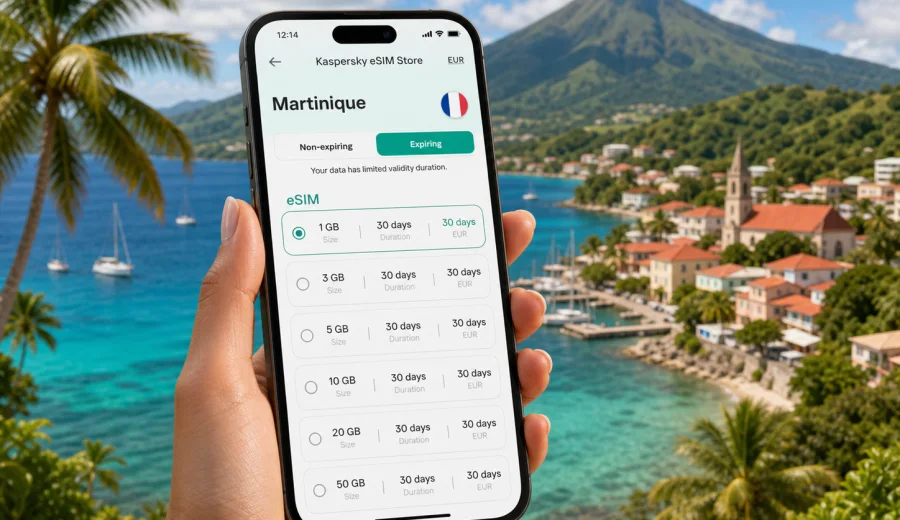
eSIM for Martinique: mobile connection and internet for your trip
Martinique is a compact island, but a trip there can still involve many online tasks: finding your transfer after landing at Martinique Aime Cesaire International Airport, checking ferry times, navigating between Fort-de-France and the beaches, confirming a hotel booking, or sharing your route with family. An eSIM can make mobile internet in Martinique easier to prepare because you do not need to look for a physical SIM card after arrival.
This guide explains how to plan mobile connection in Martinique with an eSIM, how to estimate the data you may need, what to check before choosing a tariff, and how Kaspersky eSIM Store can help you select and activate an eSIM with a suitable data package for your trip.
Why eSIM is useful for mobile internet in Martinique
Martinique is an overseas region of France in the Caribbean. Many visitors combine beach time, hiking, car rental, island routes, and short business or family visits. In all these scenarios, mobile internet is often useful before you even reach your accommodation.
With an eSIM, you can prepare a data plan before departure or shortly after arrival, then use mobile data on a compatible smartphone without inserting a plastic SIM card. This can be especially convenient if your primary SIM card must stay in your phone for banking notifications, two-factor authentication, or calls from your home number.
An eSIM can help in Martinique when you need to:
- open maps after landing and find the route to Fort-de-France, Le Lamentin, Trois-Ilets, Sainte-Anne, or Saint-Pierre;
- message your hotel, host, driver, or travel group;
- check weather and road conditions before visiting beaches or mountain routes;
- use translation, restaurant bookings, ride services, and travel apps;
- reduce dependence on public Wi-Fi in airports, cafes, ports, and hotels;
- keep your main physical SIM in place while using another line for mobile data.
eSIM is not the same as a full local phone subscription. Most travel eSIM tariffs focus on mobile data. Voice calls and SMS are usually not included unless the conditions of a particular tariff say otherwise. For calls and messages, many travellers use messaging apps over mobile internet.
Martinique travel scenarios where mobile data matters
Martinique looks simple on a map, but mobile internet can make the island easier to handle. The need is not only about social media. It is about practical control during the trip.
| Scenario | Why mobile internet helps | What to consider |
|---|---|---|
| Arrival at the airport | You may need maps, hotel messages, car rental details, and transport updates | Install the eSIM before travel if the tariff conditions allow it, then activate mobile data when appropriate |
| Staying in Fort-de-France | Mobile data helps with walking routes, restaurant searches, and payments | A light or medium data package may be enough if hotel Wi-Fi is reliable |
| Beach routes in the south | You may move between Sainte-Anne, Le Marin, Les Anses-d'Arlet, and Trois-Ilets | Navigation and photo sharing can use more data than expected |
| Hiking and north island routes | Mount Pelee, Saint-Pierre, and rainforest areas require more preparation | Coverage depends on local networks and terrain, so download key maps in advance |
| Remote work or business | Email, calendars, calls, and hotspot use can quickly increase data use | Choose a larger package and check whether tethering is allowed by the selected tariff |
For a short leisure trip, the main online tasks are often maps, messengers, tickets, and browsing. For a longer stay or a work trip, video calls, cloud files, and hotspot use can change the calculation. Your data plan should match your actual behaviour, not just the number of days on the island.
eSIM, roaming, local SIM, or Wi-Fi: which option fits your trip?
There is no single best option for every traveller. The right choice depends on how long you stay, how much data you need, and how much time you want to spend on setup after arrival.
| Option | Good for | Main limitation |
|---|---|---|
| Travel eSIM | Preparing mobile internet before or during a trip without changing a physical SIM card | Requires a compatible, unlocked device |
| Home operator roaming | Keeping your usual number and familiar billing | Costs and data limits can vary widely by operator and plan |
| Local physical SIM | Longer stays or users who need local voice/SMS options | Requires finding a shop, checking documents and conditions, and changing SIM cards |
| Public Wi-Fi | Light browsing at hotels or cafes | Availability, speed, and security can be inconsistent |
An eSIM is often a practical middle path. You can keep your usual SIM active for your main number and use the eSIM profile for mobile data in Martinique. Before relying on it, check the selected tariff conditions, device compatibility, and when validity starts.
How much data do you need in Martinique?
Your ideal data package depends on your habits. A traveller who only checks maps and messages needs far less data than someone who uploads videos, joins work calls, or uses the phone as a hotspot for a laptop.
Use this planning table as a practical estimate:
| Usage style | Typical activities | Data planning approach |
|---|---|---|
| Light | Maps, messengers, email, occasional browsing | Choose a smaller package and use hotel Wi-Fi for updates and backups |
| Moderate | Daily navigation, restaurant searches, photos, social apps | Choose a medium package with enough validity for the full trip |
| Heavy | Video calls, streaming, large uploads, hotspot for a laptop | Choose a larger package and check hotspot and fair-use conditions |
| Family or group support | One phone handles maps, bookings, and shared plans | Add extra data because one device may serve more than one traveller |
To avoid wasting data, download offline maps, update apps before departure, disable automatic cloud backup on mobile data, and check which apps are allowed to use background data. These small steps can matter on a week-long island trip.
What to check before choosing an eSIM tariff for Martinique
Before you choose any eSIM tariff, look beyond the country name. A practical tariff should match your device, route, and expected use.
Check these points:
- Destination: the tariff should include Martinique or a region that covers your route.
- Data volume: choose enough gigabytes for maps, messaging, browsing, and media use.
- Validity period: the number of days should cover the trip from arrival to departure.
- Activation rules: check when the validity period starts and whether installation and activation are separate steps.
- Tethering: if you plan to share mobile data with a laptop or another phone, check whether hotspot use is allowed.
- Top-up options: if you may need more data, check how balance or additional packages are handled.
- Device support: your phone or tablet must support eSIM and must not be locked to one operator.
Kaspersky eSIM Store is an app and website where you can choose a destination, review available eSIM tariffs, check data volume and validity, then activate an eSIM on a compatible device. When you are ready to prepare mobile internet for the island, you can choose an eSIM tariff for Martinique and compare the available options for your trip.
A practical setup plan before you travel
The best time to think about mobile internet is before your flight, not while you are standing in the arrivals area with luggage and limited Wi-Fi. A short setup checklist can prevent most common problems.
Before departure
1. Check whether your smartphone supports eSIM.
2. Make sure the device is not locked to a single mobile operator.
3. Choose a tariff for Martinique with enough data and validity.
4. Save the installation instructions and keep access to your email.
5. Update your operating system and essential travel apps over Wi-Fi.
6. Download offline maps for key areas such as Fort-de-France, Le Lamentin, Sainte-Anne, and the north coast.
7. Decide which SIM will handle mobile data and which line will remain available for calls or SMS.
On arrival
1. Turn on the eSIM line when the tariff conditions say it is appropriate.
2. Select the eSIM profile for mobile data.
3. If required by the tariff or device, enable data roaming for the eSIM profile.
4. Test a simple page or map search before leaving the airport or accommodation Wi-Fi.
5. Keep your primary SIM settings unchanged unless you intentionally want to use roaming on that line.
This approach gives you more control. You know which line is using data, when the tariff starts, and whether your main number remains available.
Device compatibility: the check you should not skip
Not every smartphone supports eSIM, and some models vary by region or sales channel. Even if a phone model usually supports eSIM, a specific device may be limited by the version sold in a particular market or by an operator lock.
Before choosing a tariff, check your device and confirm that eSIM is available in the phone settings. On many phones, you can look for options such as "Add eSIM", "Add mobile plan", or "Add cellular plan". The exact wording depends on the operating system and device model.
Also check these details:
- the device should be unlocked for use with other mobile operators;
- the operating system should be updated enough to support eSIM installation;
- you need an internet connection during installation, for example Wi-Fi before the eSIM profile becomes active;
- after activation, transferring the same eSIM profile to another device may not be possible, depending on the tariff and profile conditions.
If you are unsure, do the compatibility check before payment. It is much easier to solve this question at home than during a transfer in Martinique.
How to install and activate eSIM for Martinique
The exact installation flow depends on your device and the selected tariff, but the general process is straightforward. After choosing a tariff, the eSIM appears in your profile or instructions. You then add it to your phone, select it for mobile data, and activate it according to the tariff conditions.
For step-by-step setup, use the official installation guides: Android eSIM instructions and iOS eSIM instructions. Keep the guide open on another device or save it before you begin if your phone will temporarily switch connections during setup.
A typical installation path looks like this:
1. Open the eSIM instructions after choosing the tariff.
2. Add the eSIM profile using the QR code or the in-app flow.
3. Name the line clearly, for example "Martinique data".
4. Keep your main SIM as the default line for calls if you still need your usual number.
5. Set the eSIM as the mobile data line when you are ready to use it.
6. Enable data roaming for the eSIM profile if the instructions or device require it.
7. Test mobile data with a map or browser page.
Do not delete the eSIM profile if something does not work immediately. First check the line settings, mobile data selection, roaming toggle for the eSIM profile, and whether the tariff has started. If needed, contact support with your device model, operating system version, destination, and a short description of the issue.
How to use eSIM data more efficiently on the island
Martinique trips often include movement between beaches, towns, viewpoints, restaurants, and hiking areas. A few data habits can keep the package useful for the whole stay.
- Download offline maps for the island before driving.
- Turn off automatic photo and video backup on mobile data.
- Update apps only on Wi-Fi.
- Restrict background data for apps you do not need during travel.
- Use lower video quality if you stream over mobile data.
- Save ferry tickets, hotel addresses, and car rental documents offline.
- Check your remaining data regularly in the app or profile if this information is available for the selected tariff.
If you plan to drive around the island, avoid depending on live navigation only. Offline maps can help when the signal is weaker in mountainous or remote areas. Mobile coverage depends on local networks, terrain, building density, and the selected tariff conditions, so a prepared route is still useful.
Regional routes: Martinique plus nearby destinations
Some travellers visit Martinique as part of a wider Caribbean route, while others arrive from mainland France or continue to another island. If your trip includes more than Martinique, check whether a country-specific tariff is enough or whether a regional option better fits your route.
Think through these questions:
- Will you stay only in Martinique, or also visit nearby islands?
- Do you need mobile data during a transit stop?
- Are your travel dates continuous or split across several stays?
- Would one regional package be simpler than separate country-specific tariffs?
- Does each destination on your route appear in the tariff conditions?
For a single-island holiday, a Martinique tariff is usually the clearest option. For a multi-destination itinerary, compare country and regional coverage before choosing. The important point is to match the tariff to the actual route, not just the first airport on your ticket.
Short checklist for a smoother connection
Use this quick checklist before departure:
- Your phone supports eSIM.
- Your phone is not locked to one operator.
- The tariff includes Martinique and covers your travel dates.
- You understand when the validity period begins.
- You know whether the tariff includes only mobile data or additional services.
- You saved the installation instructions.
- You downloaded offline maps and key booking documents.
- You know which SIM profile will use mobile data.
- You have Wi-Fi available for the initial installation if needed.
This checklist is simple, but it prevents the most common mistakes: choosing the wrong destination, starting validity too early, installing on an incompatible device, or accidentally using roaming on the main SIM.
Common questions about eSIM and internet in Martinique
Can I use eSIM in Martinique without removing my physical SIM card?
Yes, if your device supports eSIM and dual SIM settings. You can usually keep your physical SIM in the phone and use the eSIM profile for mobile data. Check your device settings to choose which line handles calls, messages, and mobile data.
Does a travel eSIM include a local phone number?
Usually, travel eSIM tariffs focus on mobile internet. A regular phone number, voice calls, and SMS are not included unless the selected tariff explicitly states otherwise. For most travel scenarios, messaging apps over mobile data are enough.
Should I install the eSIM before leaving home?
You can often install the eSIM before departure if the tariff conditions allow it, but activation and validity rules matter. Some tariffs start counting when the eSIM connects to a supported network, while others may follow different rules. Read the conditions before installation and activation.
Do I need to turn on data roaming?
On some devices and tariffs, mobile data for a travel eSIM may require data roaming to be enabled for that eSIM profile. This does not mean you should enable roaming for your main SIM. Check that the setting applies to the correct line.
What if I run out of data?
Options depend on the selected tariff. You may be able to top up, choose another package, or switch to Wi-Fi. Check the tariff details before travel if you expect heavy use.
Can I use hotspot with an eSIM in Martinique?
Hotspot support depends on the selected tariff and device settings. If you plan to connect a laptop or share data with another traveller, check tethering conditions before choosing a package.
Is eSIM better than public Wi-Fi?
It depends on the situation. Hotel Wi-Fi can be useful for large downloads, but mobile data is more practical when you are moving around the island. An eSIM can help you avoid relying only on public Wi-Fi in airports, cafes, and other shared locations.
Choose an eSIM tariff for your Martinique trip
Mobile internet in Martinique is easier to manage when you prepare it before the first day of travel. Check your device, estimate your data needs, review the tariff validity, and keep installation instructions available. Kaspersky eSIM Store helps you choose and activate an eSIM with a suitable data package for a foreign trip, so you can focus on routes, bookings, and staying in touch.
Before you fly, prepare an eSIM tariff for Martinique and make sure your phone is ready for mobile data on arrival.