
Travel connectivity guide
Matadi eSIM: mobile internet for your trip
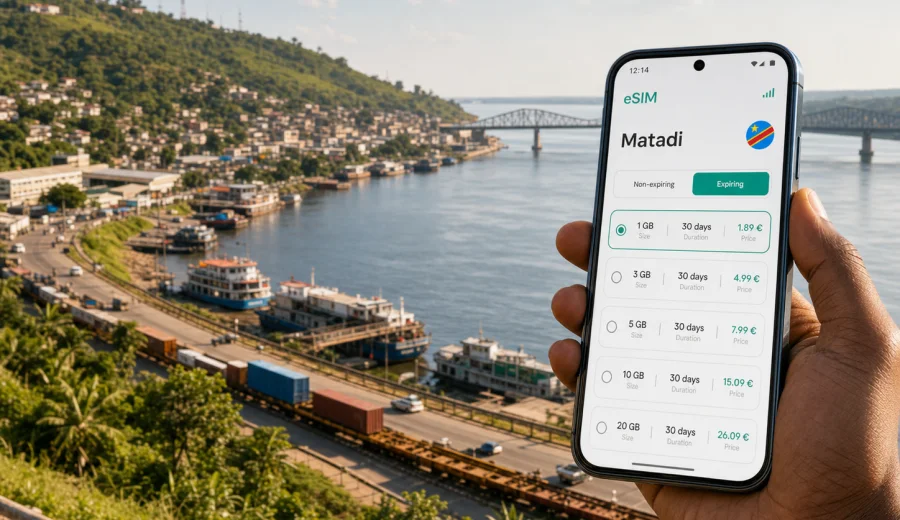
Matadi eSIM guide: mobile connection and internet for a trip to the Congo River port
Matadi is a practical destination: a working port city, a gateway to Kongo Central, and a frequent stop for business travelers moving between Kinshasa, Boma, Moanda, border routes, and river logistics offices. Mobile internet matters here from the first hour. You may need maps for the hilly streets, messaging for a driver, online confirmations for a hotel, or quick access to documents while moving between offices near the port.
An eSIM can make that routine easier because you prepare mobile data before you depend on local Wi-Fi or a physical SIM counter. In Kaspersky eSIM Store, you can choose a suitable eSIM tariff for the Democratic Republic of the Congo, check the data amount and validity period, install it on a compatible device, and activate it when the trip requires mobile internet.
This guide focuses on Matadi, not on the whole country. It explains where mobile data is useful in the city, how to estimate traffic for a short or business trip, what to check before buying an eSIM, and how to keep your phone setup simple while traveling around the Congo River corridor.
Why mobile internet is useful in Matadi
Matadi is not a city where every task happens in one compact tourist zone. The port, commercial streets, hotels, river viewpoints, transport stops, and road exits sit across steep terrain. Even a short stay can involve several separate movements in one day. A stable mobile data setup helps you avoid losing time when plans change.
Typical Matadi scenarios where mobile internet helps:
- confirming a pickup after arriving by road from Kinshasa;
- sharing a live location with a driver or colleague;
- checking a hotel reservation before reaching reception;
- navigating between port offices, warehouses, banks, and administrative buildings;
- using messaging apps when ordinary voice calls are not included in the eSIM tariff;
- translating short messages, menus, signs, or transport details;
- keeping tickets, scans, invoices, and booking files available in cloud storage;
- checking onward travel plans toward Boma, Moanda, Kinshasa, or nearby border routes.
The point is not to turn your phone into a travel gadget collection. It is to keep basic online tasks available without searching for Wi-Fi each time you need a map, a message, or a document.
Arrival in Matadi: what to prepare before the first ride
Many international travelers reach Matadi after arriving in Kinshasa and continuing by road. Others come for port work, regional business, family visits, or overland routes through Kongo Central. Whatever the route, the first practical challenge is usually the same: you need to coordinate movement while luggage, schedules, and local traffic are still being sorted out.
Before you leave for Matadi, prepare these items on your phone:
| Travel task | Why it matters in Matadi | Useful phone setup |
|---|---|---|
| Driver contact | Pickups and road transfers may change timing | Messaging app, mobile data, saved phone numbers |
| Hotel details | Addresses can be easier to show than explain | Offline copy plus online map pin |
| Work documents | Port and logistics trips often involve files | Cloud access and offline backups |
| Maps | Streets can climb, curve, and split around hills | Offline map plus mobile data for live search |
| Payments and receipts | Some confirmations may be digital | Screenshots and email access |
If you are traveling for meetings, do not wait until you are in a vehicle to start setup. Install the eSIM profile while you still have a reliable connection, then activate mobile data according to the tariff conditions. This keeps the first ride focused on reaching the right district, not on configuring your phone.
Matadi movement: hills, port areas, and local timing
Matadi is shaped by the Congo River and by the hills around it. A route that looks short on a map may still take time because of elevation, traffic, checkpoints, port activity, or road conditions. Mobile internet is useful not only for navigation but also for adjusting expectations. You can message ahead if a meeting runs late, confirm whether a driver is waiting on the correct side of a building, or check whether a route to the riverfront is still convenient.
For visitors, the most common movement patterns are simple:
- hotel to port or logistics office;
- hotel to government or business appointment;
- city center to river viewpoint or bridge area;
- Matadi to Boma, Moanda, or Kinshasa;
- short local errands between banks, shops, restaurants, and transport points.
Because Matadi is a working city, allow extra time around port-related roads. Keep addresses written in more than one format: a map pin, the name of the building, the district or nearby landmark, and a contact person. If mobile data is already working, you can share the pin and avoid long explanations during the ride.
How much data do you need for Matadi?
The right eSIM tariff depends on your habits, length of stay, and whether you use hotel Wi-Fi for heavy tasks. A traveler who only needs maps and messaging will use much less data than someone who joins video calls, uploads shipment photos, or keeps cloud sync running all day.
Use this practical estimate:
| Trip style | Typical online behavior | Data approach |
|---|---|---|
| One-day stopover | Maps, messaging, ride coordination, a few searches | Small data package may be enough |
| Two to four days | Daily maps, email, hotel apps, browsing, some photos | Medium package gives more margin |
| Business week | Email, file access, messaging, calls in apps, route changes | Larger package is safer |
| Regional route | Matadi plus Boma, Moanda, Kinshasa, or border travel | Choose by total route, not by city only |
Video calls, cloud backups, app updates, and social media uploads can use data quickly. If your trip depends on reliable online documents, download key files before travel and keep automatic updates paused. The eSIM can then handle navigation and communication instead of background traffic.
Choosing an eSIM tariff for Matadi
For a city trip to Matadi, the destination behind the tariff is the Democratic Republic of the Congo. The city itself is the use case, but the eSIM tariff should match the country or route where you need mobile data. If your plans stay within Matadi and Kongo Central, check a tariff for the Democratic Republic of the Congo. If you continue to other countries, compare whether a regional or global option is more suitable for the whole itinerary.
When comparing options, look at four details:
1. Data amount. Choose enough for maps, messaging, email, and any work files you expect to use.
2. Validity period. Match it to the full trip, including travel days before and after Matadi.
3. Activation conditions. Check when the tariff starts and what action activates it.
4. Device compatibility. Your phone or tablet must support eSIM and must not be locked in a way that prevents use with another mobile profile.
After you have estimated your route and data needs, you can choose an eSIM tariff for a trip to Matadi through Kaspersky eSIM Store and review the available data amounts, validity periods, and destination conditions before purchase.
A simple phone setup before you travel
Good preparation makes the eSIM less stressful to use. You do not need a complicated setup, but you should finish the steps that require a stable internet connection before you are on the road to Matadi.
Recommended sequence:
1. Check whether your device supports eSIM and is not carrier-locked.
2. Choose the Democratic Republic of the Congo as the destination in Kaspersky eSIM Store.
3. Compare tariff data amount and validity period against your actual itinerary.
4. Complete the purchase and install the eSIM profile while connected to Wi-Fi.
5. Keep your primary SIM available for important bank or account verification messages if you still need it.
6. Set the eSIM as the mobile data line when you are ready to use data in the destination.
7. Turn off heavy background updates before leaving your hotel or office Wi-Fi.
If you are installing for the first time, follow the official Android installation guide or iOS installation guide. The exact menu names can vary by device model and system version, so keep the instruction page available while you configure the profile.
Before buying, also check your device. eSIM support is not guaranteed on every phone, and some devices sold through mobile operators may have restrictions that affect adding another mobile profile.
Local use cases: where eSIM helps in Matadi
The best way to think about mobile data in Matadi is by task. You do not need internet for every minute of the day, but you do need it at the moments when being offline would slow you down.
Hotels and check-in
Hotel Wi-Fi may be enough for evening browsing, but it does not help before you reach the lobby. Mobile data helps you show booking details, confirm arrival time, send a message from the car, or open a map if the driver needs clarification.
If your hotel is on a hillside or outside the exact center, save the address and a nearby landmark. A screenshot is useful, but a live map pin is better when the final turn is not obvious.
Port and business visits
Matadi is strongly connected with port activity, logistics, customs, transport, and regional trade. Business travelers may move between offices, yards, banks, warehouses, and administrative buildings in the same day. Mobile internet helps with quick document access, message threads, meeting updates, and photo sharing.
Keep sensitive work documents organized before you travel. Download what you need, avoid unnecessary public Wi-Fi, and use your company-approved security tools when accessing internal systems. The eSIM is for mobile data; it is not a VPN or a privacy tool.
Navigation around the river and bridge area
The Congo River is the natural reference point for Matadi. Travelers often want a viewpoint, a photo stop, or a route toward the bridge area and onward roads. Mobile data helps you check your position, but do not rely only on a single app. Save offline maps and confirm routes locally when road conditions or access rules matter.
Restaurants, errands, and short walks
For daily errands, eSIM data is useful in small ways: finding a restaurant, checking opening hours if available, translating a phrase, messaging a contact, or sharing a location. These are light data tasks, but they are exactly the tasks that become annoying when you have to ask for Wi-Fi first.
Trips from Matadi
If Matadi is part of a wider Kongo Central route, plan your data for the full route. Boma, Moanda, Kinshasa, and overland border movements can change how much data you need. If your tariff is valid for the Democratic Republic of the Congo, keep an eye on the validity period as well as the data balance. A route that takes one extra day can matter if the plan expires before the return trip.
Stopovers and short business trips
Short Matadi trips are often tight: arrive, meet, sign, inspect, transfer, leave. In that schedule, the value of eSIM is preparation. You can install it before departure, keep your main number in place, and activate mobile data when you need the travel line.
For a one-night or two-night trip, keep the setup lean:
- download offline maps for Matadi and the road corridor you use;
- save hotel and meeting addresses as pins;
- keep the eSIM data line ready before the first transfer;
- turn off automatic video backups;
- use messaging apps for calls if the tariff includes data only;
- track the remaining data after large file transfers.
Data-only eSIM tariffs usually do not include a local phone number, standard voice calls, or SMS unless the specific tariff says otherwise. For calls, travelers typically use internet-based apps. If you still need ordinary SMS for banking or account verification, keep your primary SIM active according to your home operator's conditions.
Practical checklist for Matadi
Use this checklist before leaving for the city:
- Your passport, booking details, and work documents are saved offline.
- Your hotel address is saved as text, screenshot, and map pin.
- Your driver or host contact is available in a messaging app.
- The eSIM profile is installed while you still have a stable connection.
- Your device compatibility is checked.
- Mobile data roaming settings for the eSIM are configured according to the device instructions and tariff guidance.
- Background app updates, automatic cloud backups, and large downloads are paused.
- You know whether the tariff starts on installation, activation, or first network connection.
- You have a backup way to contact your hotel, host, or office.
The main advantage of this checklist is calm first-hour travel. When the road is busy or the meeting schedule changes, you can use your phone for the next decision instead of solving connectivity from zero.
Common mistakes to avoid
Some mobile data problems come from small setup details rather than the eSIM itself. Avoid these common mistakes:
| Mistake | Why it causes trouble | Better approach |
|---|---|---|
| Buying too little data | Maps plus file sharing can use more than expected | Estimate by trip style, not by optimism |
| Installing at the last minute | You may need Wi-Fi or account access | Install before travel when possible |
| Ignoring validity period | A plan can expire before the return leg | Match validity to the full itinerary |
| Forgetting device compatibility | Not every phone supports eSIM | Check support before purchase |
| Leaving backups on | Photos and app updates can consume data | Pause automatic background traffic |
| Assuming voice and SMS are included | Many travel eSIM tariffs are data-only | Use messaging apps or keep your primary SIM if needed |
Matadi eSIM questions
Is an eSIM useful if my hotel has Wi-Fi?
Yes, if you need mobile internet before reaching the hotel or while moving around Matadi. Hotel Wi-Fi can help with heavier tasks in the evening, while eSIM data covers navigation, messaging, ride coordination, and quick searches outside the building.
Should I choose a city, country, or regional tariff?
For Matadi alone, look for a tariff that covers the Democratic Republic of the Congo. If your itinerary continues to another country, compare the country tariff with regional or global options and choose the one that matches the full route.
Can I install the eSIM after arriving in Matadi?
You may be able to install it after arrival if you have a reliable internet connection, but it is usually easier to install the profile before travel. Activation and data use depend on the selected tariff conditions, so read them before you leave.
Will an eSIM replace my normal phone number?
Not usually. Travel eSIM tariffs for mobile internet are commonly data-only unless the conditions say otherwise. You can keep your primary SIM for calls or SMS and use the eSIM as the mobile data line, depending on your device settings.
What should business travelers prepare?
Business travelers should download meeting files, save addresses, keep contact numbers in a messaging app, pause large cloud sync tasks, and make sure the eSIM data line is ready before moving between hotels, offices, and port-related locations.
Choose mobile internet for a Matadi trip
Matadi rewards preparation. The city is practical, spread across hills, closely tied to the river, and often visited for work that depends on timing. With an eSIM-ready phone, you can handle maps, messages, hotel details, and business documents without waiting for a physical SIM card or searching for Wi-Fi at every stop.
Before your trip, check compatibility, choose a data amount that matches your route, and install the eSIM while you have a stable connection. For a trip focused on Matadi and Kongo Central, you can prepare an eSIM tariff for the Democratic Republic of the Congo in Kaspersky eSIM Store and keep mobile internet ready for the moments when the city schedule changes.