
Travel connectivity guide
Mataram eSIM: mobile internet guide
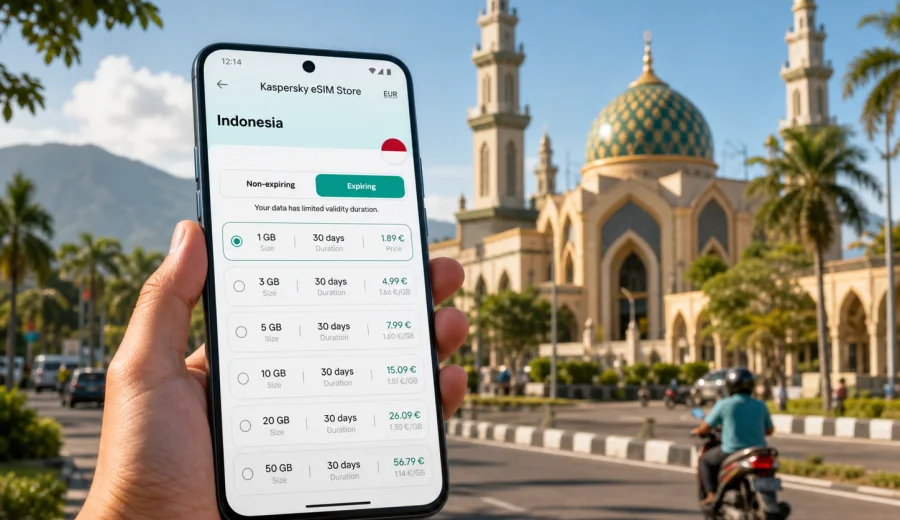
Mataram eSIM guide: mobile connection and internet for your trip
Mataram is often the practical starting point for a Lombok trip. You may arrive through Lombok International Airport, come from the Gili Islands, or base yourself in the city while visiting Senggigi, Islamic Center NTB, Ampenan, and Cakranegara. Mobile internet matters from the first minutes: maps, ride-hailing, hotel messages, ferry updates, and bookings.
An eSIM can make that first part of the trip smoother because you do not need to look for a physical SIM card counter before opening maps or contacting your hotel. With Kaspersky eSIM Store, you can choose, arrange, and activate an eSIM with a suitable data plan for a trip abroad through the website or app. The important part is preparation: check that your device supports eSIM, choose the right destination, understand the data allowance, and install the eSIM before you actually need mobile data in Mataram.
This guide focuses on Mataram, not Indonesia in general. The city has its own travel rhythm: airport transfers are long enough to need navigation, districts are spread out, and many visitors use Mataram as a working base or gateway to wider Lombok routes.
Why mobile internet matters in Mataram
Mataram is not a city where every useful stop sits on one walkable tourist strip. A typical day may include a hotel near the city center, a meeting in Cakranegara, dinner in Ampenan, and a sunset ride toward Senggigi.
Mobile internet is useful for:
- airport pickup coordination after landing at Lombok International Airport;
- maps and live traffic during the drive into Mataram;
- ride-hailing, taxi messages, and route checks;
- hotel check-in details, digital booking confirmations, and payment notifications;
- finding mosques, malls, cafes, pharmacies, coworking spaces, and ATMs;
- translating menus, signs, and short messages;
- checking ferry or fast boat information if you continue toward the Gilis;
- keeping work chats, email, and cloud documents available during a business trip.
Public Wi-Fi can help at hotels and cafes, but it is not a reliable travel plan on its own. You may need internet before you reach the hotel, while moving between districts, or when your driver needs a location pin.
Arrival scenarios: when an eSIM helps most
Many Mataram trips begin outside the city itself. The main airport for Lombok is near Praya, so the transfer to Mataram can take time depending on traffic and hotel location. If your mobile connection is ready, you can message your accommodation, share your location, follow the route, and confirm the district.
| Travel moment | Why internet helps | What to prepare |
|---|---|---|
| Landing at Lombok International Airport | Contact driver or hotel, open maps, check messages | Install the eSIM before departure or while on airport Wi-Fi |
| Transfer to Mataram | Follow the route and estimated arrival time | Keep mobile data assigned to the eSIM profile |
| First hotel check-in | Retrieve booking codes and ID emails | Save key documents offline as backup |
| Evening in Ampenan or Senggigi | Use navigation, ride-hailing, and messaging | Choose enough data for maps and media sharing |
| Work visit in the city | Email, calendar, cloud files, video calls if needed | Select a plan duration that covers the whole stay |
If you are arriving late, mobile data becomes even more important. Hotel desks may message through booking apps, drivers may ask for a landmark, and street names can look unfamiliar at night.
Choosing an eSIM data plan for Mataram
For a city trip to Mataram, the right eSIM plan depends on your length of stay, navigation use, and whether Lombok is only one stop on a wider Indonesia route. A light traveler needs less data than someone who works remotely, backs up photos, watches video, or uses a hotspot.
Use this simple planning logic:
1. Choose the destination that matches the country of your trip: Indonesia.
2. Match the validity period to your actual dates, including arrival and departure days.
3. Estimate data by activity, not only by trip length.
4. Check whether your route stays in Lombok or continues to other Indonesian islands.
5. Read the plan conditions before payment, including when validity starts and whether top-up is available.
A few practical data estimates:
- maps, messaging, and ride-hailing for a short city stay usually use modest data;
- photo and video uploads can increase usage quickly;
- video streaming is the easiest way to consume a plan faster than expected;
- laptop tethering for work can use much more data than phone-only travel;
- cloud sync should be limited if you are on a smaller plan.
For many visitors, Mataram is part of a larger Lombok route. You may spend one or two nights in the city, continue to Senggigi, take a boat toward the Gili Islands, or head south toward Kuta Lombok. Choose a plan for Indonesia that covers the full journey.
Mataram districts and phone use on the ground
Mataram has several areas that travelers may move through in one trip. Thinking by area helps you choose a data plan with less guesswork.
| Area or route | Common traveler task | Mobile data use |
|---|---|---|
| City center | Hotel check-in, errands, restaurants, shopping | Maps, messaging, payment alerts |
| Cakranegara | Markets, business visits, local food, shops | Ride-hailing, translation, location sharing |
| Ampenan | Old town atmosphere, coast, cafes | Navigation, photo sharing, restaurant search |
| Islamic Center NTB area | Landmark visits and meetings nearby | Maps, opening hours, group coordination |
| Mataram to Senggigi | Beach route and sunset plans | Navigation, driver chat, weather checks |
| Mataram to Bangsal or Teluk Nare | Gili transfer route | Boat timing, pickup coordination, maps |
Travelers may also stop in Mataram to buy supplies, attend meetings, handle administration, or wait before continuing to another part of Lombok. These are moments when mobile data is useful but easy to underestimate.
When to set up your eSIM
The most convenient time to set up an eSIM is before you leave home, while you still have stable Wi-Fi and time to read the instructions. You can also install it after arrival on Wi-Fi, but that creates more pressure if you need data immediately for transport.
Before buying a plan, check that your smartphone supports eSIM and is not locked to one mobile carrier. If you are unsure, use the compatibility check first: Check your device.
When you are ready to choose a data option for Lombok, you can prepare an eSIM data plan for your trip to Mataram through the Indonesia destination page. Review the data allowance, validity period, destination, and activation details before completing the purchase.
How to install an eSIM before or after arriving in Mataram
The exact installation flow depends on your phone model and operating system, but the travel logic is the same: prepare the eSIM while you have Wi-Fi, set it as the mobile data line when needed, and keep your usual SIM for calls or messages if your device supports dual SIM use.
Setup steps:
1. Check that your phone supports eSIM and is unlocked.
2. Choose Indonesia as the destination for your Mataram trip.
3. Select a plan with enough data and validity for your full route.
4. Complete the purchase and open the eSIM details in your profile or app.
5. Install the eSIM by following the on-screen instructions or using the QR code if provided.
6. When you are ready to use it, set the eSIM as the line for mobile data.
7. If the plan instructions require it, enable data roaming for the eSIM profile.
For device-specific setup, follow the Android installation guide or the iOS installation guide. Keep Wi-Fi available during installation, and do not delete the eSIM profile unless you are sure you no longer need it.
Practical Mataram travel scenarios
Short stop before the Gilis
Some travelers spend only one night in Mataram before heading to Bangsal, Teluk Nare, or another Gili transfer point. In this case, mobile data is useful for driver messages, pickup times, hotel location sharing, and boat transfer details.
For this route, choose a plan that covers more than the overnight stay. Include the airport transfer, the city stop, the harbor road, and the first day after you leave Mataram.
Business trip or government visit
Mataram is the administrative center of West Nusa Tenggara, so business travelers may visit offices, universities, agencies, or local partners. A working trip needs more careful data planning because the phone may be used for email, calendar changes, document access, maps, and messaging.
For business use, consider a plan duration that covers buffer days, enough data for cloud documents, offline copies of key files, and a power bank for navigation or hotspot use.
Family trip around Lombok
Families often use Mataram as a practical base because malls, hotels, clinics, restaurants, and transport services are easier to find than in smaller coastal areas. Mobile internet helps coordinate groups, share locations, and order transport.
If several people need internet, decide whether each traveler needs an individual eSIM or whether one phone will occasionally share a hotspot. Hotspot use can consume data quickly.
Remote work from Mataram
Mataram can be a quieter alternative to more beach-focused Lombok bases. If you plan to work from a hotel, cafe, or coworking-friendly space, do not rely only on venue Wi-Fi.
For remote work, disable automatic video uploads, cloud photo backups, and system updates on mobile data. Use Wi-Fi for heavy downloads.
How much data might you need?
Estimate data by behavior. A light city visitor mainly needs maps, chat, ride-hailing, and restaurant search. An active explorer needs extra data for day trips, route changes, and photo uploads. A business traveler should leave room for email, cloud files, video calls, and occasional hotspot use. To reduce data use in Mataram, download offline maps, save hotel addresses, keep boarding passes offline, and restrict background app refresh.
What to check before purchase
An eSIM is convenient, but it still depends on device support, correct setup, and plan conditions. Before you buy a plan for Mataram, review these points.
Checklist:
- Your phone supports eSIM.
- The phone is not locked to a carrier that blocks other SIM profiles.
- You have stable Wi-Fi for installation.
- Indonesia is the correct destination for the trip.
- The validity period covers arrival, local travel, and departure.
- The data allowance matches your expected use.
- You understand whether the plan includes data only or other services.
- You know when the plan starts counting validity.
- You have saved installation instructions in case you need them offline.
Most travel eSIM plans are designed mainly for mobile data. They may not include a standard local phone number, voice calls, or SMS unless the plan conditions say so. For calls and messages, use internet-based apps when mobile data is active.
eSIM, roaming, local SIM, and Wi-Fi in Mataram
Different connection options can make sense for different travelers. An eSIM data plan can be prepared before travel and installed without a physical SIM card, but it requires a compatible unlocked device. Home carrier roaming keeps your usual SIM active, but costs and allowances depend on your carrier. Hotel or cafe Wi-Fi is useful for heavy downloads, but it does not help during transfers or street navigation. For a longer stay, compare options too, especially if you need a local number.
Common mistakes to avoid
- Waiting until the taxi line to read installation instructions.
- Choosing the smallest data amount while planning Lombok day trips, photo uploads, or remote work.
- Assuming eSIM replaces every function of your usual SIM.
- Deleting the eSIM profile during the trip before checking whether it can be reinstalled.
FAQ: eSIM for Mataram
Is an eSIM useful for one or two days in Mataram?
Yes. Short stays often create the most pressure because you need maps, hotel messages, ride-hailing, or transfer coordination immediately.
Should I choose Mataram or Indonesia?
Mataram is the travel focus, but the eSIM destination should match the country where the city is located. Choose Indonesia.
Can I install the eSIM before I fly?
In many cases, yes. Installing before departure is usually more comfortable because you can use stable Wi-Fi and read each step carefully.
Will an eSIM give me a local phone number?
Many travel eSIM plans are data-focused and do not include a standard local number, voice calls, or SMS unless stated in the plan terms.
Can I use an eSIM from Mataram to Senggigi or the Gili Islands?
If your route stays within Indonesia, choose an Indonesia plan and make sure the validity and data allowance cover the full Lombok route.
What if my phone does not support eSIM?
You will need another option, such as roaming, Wi-Fi, or a physical SIM where available. Always check device compatibility before paying for an eSIM plan.
Final preparation before you land
Before traveling to Mataram, save your hotel address, airport transfer details, booking confirmations, and offline map areas. Then prepare your mobile data plan before the trip so you are not dependent on airport Wi-Fi or a shop visit right after arrival.
Kaspersky eSIM Store helps you choose, arrange, and activate an eSIM with a suitable data plan for international travel through the website or app. For a Mataram trip, the practical next step is to review Indonesia data options, check your device, and choose an eSIM plan for your trip to Mataram before you need mobile internet on the ground.