Travel connectivity guide
Matsapha eSIM: Mobile Internet in Swaziland
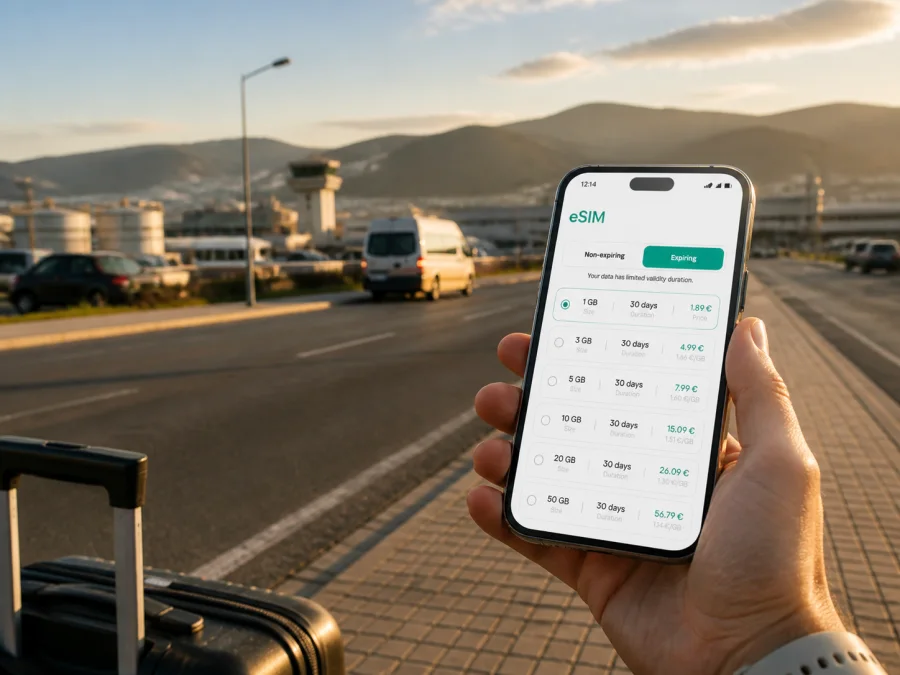
Matsapha eSIM for Mobile Connection and Internet in Swaziland
Matsapha is a practical base for a trip through central Swaziland. It is associated with the Manzini area, the country’s main industrial corridor, and it can be the place where a business visit, an airport transfer, a short stopover, or a longer road itinerary begins. In each case, mobile internet is useful from the first hour: you may need to confirm a transfer, open a map, message a hotel, share a location, or check the next leg of your route.
An eSIM, or digital SIM, can help you prepare that connection without replacing the physical SIM already in your phone. Kaspersky eSIM Store is an app and website where you can choose, arrange, and activate an eSIM tariff for mobile internet during an overseas trip. The practical task is simple: select a destination tariff that fits your stay, install it on a compatible device, and keep the physical SIM available for the number and services you still need.
Why mobile internet matters in Matsapha
Matsapha is not a destination where every journey follows one predictable tourist route. A visitor may stay close to the industrial area, meet someone near the airport, travel into Manzini for shopping or services, or use the town as a starting point for a wider drive. That variety changes the way you use data.
You may need mobile connection for:
- finding an accommodation address after arriving late;
- sharing your live location with a driver or colleague;
- checking a route when moving between Matsapha and Manzini;
- reading a work message before entering a meeting;
- using a translation, banking, ride, or travel app;
- confirming a departure time while changing transport;
- sending a small document, photo, or voice message;
- finding a café, shop, fuel stop, or meeting point nearby.
Public Wi-Fi can be useful in a hotel or café, but it is not a complete travel plan. It may require a login, disappear when you leave the building, or be unsuitable for a sensitive work task. A prearranged eSIM gives your phone a separate data option for moments when you are walking between locations or waiting for a transfer.
Arriving in Matsapha: prepare the first hour
Before landing or leaving your previous destination, save the key details of the arrival. Keep the accommodation name and address available offline, note the contact number of the person meeting you, and take a screenshot of the first route if you know it. These small preparations matter if the phone is low on battery or the connection takes time to activate.
Once you arrive, a sensible order of actions is:
- Keep your physical SIM selected for your ordinary number if you need calls or SMS on it.
- Select the travel eSIM as the mobile-data line only after checking the tariff settings.
- Turn off data switching between lines unless you deliberately want the phone to change its data source.
- Open the map and confirm the route to your hotel, office, airport meeting point, or next transport connection.
- Send one short message to the person expecting you.
- Put the phone on battery-saving mode if you will be travelling for several hours.
Matsapha Airport is managed by the national civil aviation authority alongside the country’s other airports. The practical point is to check airport details, transport availability, and meeting arrangements against your own booking. Do not assume that every arrival has the same passenger flow or that a transfer will wait without confirmation.
If you are meeting a driver, send a precise message: your name, the terminal or agreed meeting place, the accommodation, and whether you have luggage. If the driver cannot find you, mobile data lets you exchange a map pin or update the meeting point instead of relying on a public hotspot.
A useful arrival checklist
- [ ] Accommodation, first contact, and transfer details saved offline.
- [ ] eSIM installed and activation timing checked against the tariff terms.
- [ ] Travel eSIM selected for data; automatic switching reviewed.
- [ ] Data roaming, battery, charger, and power bank checked.
Matsapha, Manzini, and the shape of a local itinerary
Matsapha and nearby Manzini are often planned together, but they serve different purposes in a traveller’s day. Matsapha is closely connected with industrial, logistics, aviation, and commercial activity. Manzini is a larger urban centre for shopping, services, accommodation, and onward movement. The boundary may matter less than the exact address on your booking: a hotel or meeting point can be described as being in one area while the practical route starts in another.
That is why a city eSIM plan should be considered in relation to your schedule rather than only a pin on a map. Before you leave, group your locations into three categories:
| Trip need | What to confirm before going | Why data helps |
|---|---|---|
| Arrival | airport, driver, hotel, check-in time | messages and route updates |
| Workday | office, industrial site, meeting room, return transfer | navigation, email, documents, messaging |
| Evening or weekend | dining, shopping, local walk, next accommodation | maps, opening-time checks, reservations |
| onward travel | departure point, luggage plan, border or regional route | live changes and coordination |
Save the addresses as separate map pins with clear names such as “Matsapha hotel,” “meeting point,” and “return transfer.” A list of unnamed pins is hard to use when you are tired. If you are travelling with colleagues, agree on one group chat and one person responsible for sharing changes.
For short stays, this organization can matter more than the amount of data you buy. A smaller package may suit a traveller who mainly uses maps and messaging, while a longer business visit or frequent document sharing may justify more traffic. The right choice depends on the tariff’s stated volume, validity period, price, and any restrictions.
Getting around: roads, transfers, and navigation
Matsapha is a road-oriented base. Journeys between accommodation, the airport, work sites, shops, and Manzini may be short on a map but can still involve waiting, traffic, weather, or a change of pickup point. Use navigation as a planning aid, not a promise of an exact arrival time.
If you use a prearranged transfer
Confirm the time and location before leaving the hotel. Keep the driver’s details with the route. When you enter the vehicle, check the destination and share an estimated arrival time. If a meeting moves, send the new address rather than “near the office.”
If you use a taxi or local ride
Ask for the destination to be shown on the driver’s phone or written down, especially when a business site, lodge, or shopping area has several entrances. Compare it with your saved map pin and message a contact if the drop-off changes.
If you drive yourself
Download an offline map for the part of Swaziland you expect to travel through, but leave mobile data for live route changes and messages. Check fuel and rest opportunities in the plan. Set the destination before moving and ask a passenger to handle updates.
If you are walking locally
Use the map to orient yourself, then keep the phone away while crossing roads or moving through unfamiliar places. A small data connection is enough for a route recalculation, message, or location pin; streaming video is unnecessary.
The most reliable travel habit is to prepare both online and offline options. Save the hotel address, the return route, and important phone numbers locally. Then use the eSIM connection for the information that genuinely changes: current directions, a delayed pickup, a new meeting room, or a message from your host.
Choosing an eSIM tariff for Matsapha
Start with your itinerary length and activity level. Do not choose a package by the city name alone. A one-day stopover, a three-day work visit, and a two-week route through Swaziland create different data needs.
| Traveller profile | Typical data behaviour | Selection approach |
|---|---|---|
| Stopover visitor | maps, messages, arrival confirmation | prioritize a short validity period and modest traffic |
| Business traveller | email, documents, calls in messengers, navigation | allow room for file transfers and hotspot needs only if permitted |
| Road-trip traveller | regular maps, accommodation searches, messages | match validity to the whole route and keep offline maps ready |
| Shared-planning traveller | group chats, photos, location sharing | estimate uploads as well as map use |
Before confirming a purchase, read the details shown for the selected destination. Check the amount of data, the validity period, the activation rule, supported destination, and whether tethering or other use is limited. Conditions can differ between tariffs. If your plans include more than Matsapha, verify that the destination or regional option matches the complete route rather than assuming that a city itinerary automatically covers every later stop.
When you are ready to compare the available option for your trip, you can choose an eSIM tariff for a trip to Matsapha. The Kaspersky eSIM Store app and website help you review the destination and tariff conditions, complete the order, and manage the eSIM for the overseas journey. The tariff itself is subject to the conditions displayed at the time of selection.
Install the eSIM before the trip or after arrival
Many travellers install the eSIM while they still have a familiar connection and time to read each screen. Others wait until arrival. Either approach can work if you separate installation from the moment when the travel line starts using data. Read the activation details first, because validity may depend on the tariff’s terms.
Before installing, check that the phone supports eSIM and is not restricted by its current operator. You can check your device compatibility before completing the purchase. Also make sure the phone has enough charge, the order details are accessible, and you have a stable internet connection for the setup.
For the installation step, follow the relevant guide: Android eSIM installation instructions or iOS eSIM installation instructions. The exact menu names can vary by device and operating-system version, so use the instructions and the screens shown by your phone.
After installation, label the line clearly, for example “Swaziland trip,” and review these settings:
- Which line handles mobile data?
- Is automatic data switching disabled unless you want it enabled?
- Is data roaming enabled for the travel line when required?
- Is the physical line still selected for calls and SMS?
The eSIM is intended for mobile internet in the trip. It does not automatically give you a conventional local phone number, voice calling, or SMS; those services are not included unless the chosen tariff explicitly says so. Internet calls and messages in compatible apps use data, while ordinary calls and messages can remain on your physical line if your home operator’s conditions allow.
Practical scenarios in Matsapha
A one-night airport stopover
Your priorities are arrival coordination, a hotel route, a check-in message, and the next departure plan. Install the eSIM in advance, keep data off until needed, and save hotel details offline. A modest short-validity tariff may suit this pattern if you avoid automatic uploads.
A business visit to the industrial corridor
Your day may involve several locations and a strict meeting schedule. Put every address and contact in one itinerary. Keep data for map changes, email, and messaging, and download large presentations before leaving reliable Wi-Fi. Verify new pins and share your estimated arrival time.
A stay based in Matsapha with trips around Swaziland
Match validity to the entire movement plan, not only the nights in town. Check whether the destination option fits the other places on your route. Download reference maps and keep accommodation confirmations offline.
These scenarios share one principle: mobile connection should remove avoidable uncertainty from the itinerary. It should not replace basic preparation of addresses, contacts, tickets, and offline notes.
FAQ about using an eSIM in Matsapha
Can I use an eSIM only for Matsapha?
You can choose a tariff for the destination shown in the Kaspersky eSIM Store. The useful question is whether the tariff fits the complete itinerary. If you will remain in Matsapha, check the local destination option. If you will continue through Swaziland, compare the tariff coverage and validity with the whole route before purchasing.
Will my regular number stop working?
Not necessarily. You can usually keep the physical SIM for calls and SMS while selecting the eSIM for mobile data, but the available controls depend on the phone and home operator. Review dual-SIM settings carefully and watch for roaming charges on the physical line.
A calm connection plan for your Matsapha trip
The best preparation is a short sequence you can repeat: save the itinerary, check the device, select a tariff by data and validity, install the eSIM, assign it to mobile data, and keep key addresses offline. In Matsapha, this is useful whether your day begins at the airport, continues through a business appointment, or connects to a wider road journey in Swaziland.
Review the conditions before purchase, protect your physical number if you need it, and reserve mobile data for maps, messages, work, and changes that cannot wait for Wi-Fi. When your travel details are ready, prepare an eSIM tariff for your Matsapha journey through Kaspersky eSIM Store and start the trip with a clear plan for mobile internet.


