
Travel connectivity guide
Maun eSIM: Mobile Internet for Botswana Travel
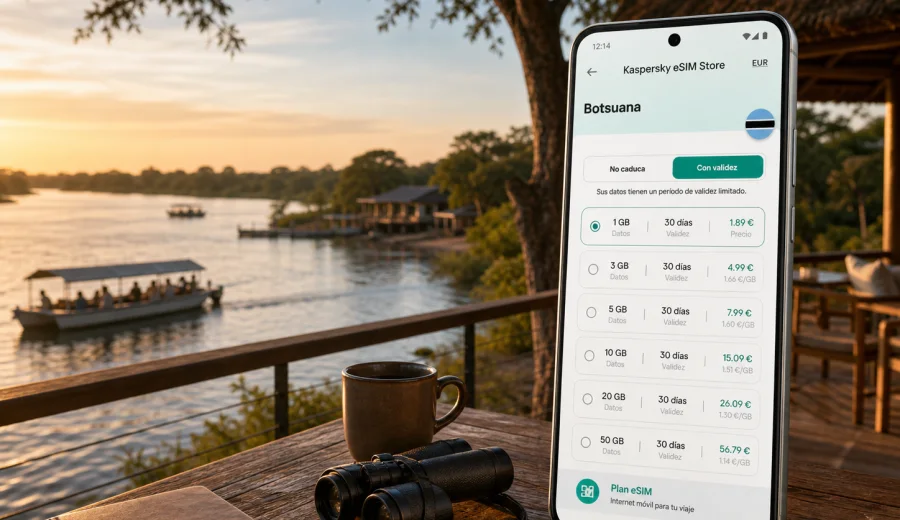
Maun eSIM: mobile connection and internet for a Botswana trip
Maun is one of the most practical places in Botswana to think about mobile internet before you arrive. The town is the main gateway to the Okavango Delta, so many trips start with a flight into Maun, a transfer to a lodge, a light aircraft connection, or a road journey toward safari areas. You may only spend a night in town, but those first hours often involve maps, driver messages, hotel check-in details, domestic flight updates, weather checks, and contact with a guide.
An eSIM can make that first part of the trip easier because you do not need to look for a physical SIM card immediately after landing. You can prepare a digital SIM profile before departure, choose a suitable data package for the country or region, and use mobile data on a compatible smartphone once the eSIM is installed and activated according to the tariff conditions.
This guide focuses on Maun city travel scenarios: arrival at the airport, movement around town, lodge transfers, safari staging days, business visits, remote work from hotels, and road trips from Maun into northern Botswana. It is not a general Botswana guide. The goal is simple: help you plan mobile connection and internet access around the way people actually use Maun.
Why eSIM planning matters in Maun
Maun is compact compared with large capitals, but it is not a city where every travel step happens inside one predictable transport network. A typical itinerary may include a scheduled flight, a transfer desk, a lodge vehicle, a self-drive rental, a small aircraft departure, and a stay outside the town center. Mobile internet is useful because many details are handled on the move.
You may need data for:
- confirming pickup instructions after landing;
- opening hotel or lodge booking details;
- messaging a guide, driver, colleague, or travel companion;
- checking maps before leaving the airport area;
- using ride, taxi, or transfer coordination services where available;
- downloading documents before a delta flight or road leg;
- checking weather and baggage weight rules for small aircraft;
- paying attention to changes in domestic flight or lodge-transfer timing.
Maun also has a strong “short-stay” pattern. Some travelers arrive in the afternoon, sleep in town, and leave early for the Okavango Delta. Others return from safari and need one connected evening to reorganize onward travel. In both cases, it is useful to have mobile data ready rather than spending that limited time comparing physical SIM options.
Arrival: using data after landing in Maun
Maun International Airport is close to town, so the transfer can be short, but the practical need for internet begins immediately. You may need to confirm whether your driver is waiting at arrivals, find the meeting point for a lodge representative, or send an update if luggage or immigration takes longer than expected.
For arrival day, prepare these items before the flight:
| Need on arrival | Why mobile data helps | What to prepare before travel |
|---|---|---|
| Transfer details | Drivers and lodge teams may coordinate by message | Save contact numbers and booking references |
| Maps | Useful if you rent a car or arrange your own pickup | Download offline maps and keep mobile data for live checks |
| Hotel check-in | Some lodges request arrival updates | Keep confirmation emails available offline |
| Payments and bookings | Cards, apps, and email codes can require data | Avoid relying only on airport Wi-Fi |
| Family updates | A short message after landing is often expected | Set up messaging apps before departure |
If your eSIM is installed before the flight, you can keep your primary SIM active for calls if your device supports dual SIM use and your home plan allows it. Then use the eSIM profile for mobile data abroad. Check your device settings carefully so the phone uses the intended data line.
Local movement in town
Maun’s daily travel rhythm is different from a dense metro city. You may move between the airport, a guesthouse, a shopping area, a tour office, a riverside lodge, a rental-car desk, and a departure point for a delta activity. Distances are manageable, but your schedule may be tight and addresses may be described by landmarks rather than by a street grid that feels familiar to visitors.
Mobile internet is useful for the small decisions that keep the day on track:
- checking the route before getting into a vehicle;
- sharing your live location with a driver or colleague;
- confirming opening hours for a tour desk or supermarket;
- finding fuel, supplies, or an ATM before a self-drive route;
- translating short messages or travel notes if needed;
- saving documents to cloud storage before leaving town.
Offline maps are still worth downloading. They reduce data use and help when the signal changes outside the town center. Treat mobile internet as the live layer on top of offline preparation: messages, updates, and route changes.
How much data can a Maun trip use?
Data use depends on your habits, but Maun trips often have clear patterns. A short stopover with messaging and maps can use modest data. A work trip with video calls from a hotel can use much more. A safari itinerary may have limited time online but high-value moments when you need data quickly.
| Travel style in Maun | Typical online tasks | Data planning approach |
|---|---|---|
| One-night stopover | Maps, messages, booking checks, transport updates | A smaller package may be enough if you avoid video |
| Safari staging day | Lodge coordination, weather, documents, family updates | Choose enough data for arrival and return days |
| Business visit | Email, files, messaging, possible calls over apps | Allow a larger buffer for work apps |
| Self-drive route | Navigation, fuel stops, accommodation changes | Use offline maps plus mobile data for live updates |
| Remote work from hotel | Video meetings, cloud documents, hotspot use | Pick more data and confirm hotspot rules in tariff terms |
Video is the biggest variable. Streaming, cloud backups, automatic photo uploads, and video calls can consume a package quickly. Before travel, set your phone to update apps only on trusted Wi-Fi, pause automatic media downloads in messaging apps, and reduce cloud photo sync if you need the package to last through the whole trip.
Choosing an eSIM tariff for Maun
For a city article, the important point is not only the city name. The eSIM tariff must match the country or region where you will use mobile data. Maun is in Botswana, so check that your selected tariff covers the area you need for the trip, including any onward route from town.
Use this checklist before you choose:
- Destination: the tariff should match Botswana or a relevant regional option for your itinerary.
- Trip length: choose a validity period that covers arrival, the stay in Maun, and onward travel days.
- Data volume: estimate maps, messaging, booking checks, email, and any hotspot use.
- Activation rules: check when the validity period starts and what steps are required.
- Device settings: confirm your phone can use eSIM and is not locked by another carrier.
- Support needs: keep installation instructions available before you leave home.
For a Maun-focused trip, a traveler who only needs messaging and maps may choose a different package from someone who plans to work from a lodge or share a hotspot with a laptop. The practical choice is the tariff that fits your duration, data habits, and route, not simply the largest package on the screen.
When you compare options, you can prepare mobile internet for a Maun trip in Botswana through Kaspersky eSIM Store by checking available data packages for the relevant destination or region, reviewing the validity period, and selecting the option that fits your travel plan.
Device compatibility before you travel
Not every phone or tablet supports eSIM, and some devices may be locked to a carrier. Check this before you buy a tariff, especially if you are traveling with a work phone or an older device. A few minutes of preparation is better than discovering the issue at the airport.
Before departure, check your device and confirm three things:
1. The device supports eSIM.
2. The device is not locked in a way that prevents adding another mobile plan.
3. You know where to find mobile data, roaming, and SIM profile settings.
If you use dual SIM, decide which line should handle mobile data and which line should remain available for calls or messages. Many travelers keep their regular number active for banking codes or important contacts, while the eSIM handles data in the destination. Settings vary by device, so confirm the exact menu path before travel.
Installing and activating eSIM for Maun
The best time to install an eSIM is usually before departure, while you still have a stable home internet connection. Activation timing depends on the selected tariff conditions, so read the details carefully. Some travelers install the eSIM before flying and switch the data line after arrival. Others complete the final activation step when they reach Botswana.
Basic preparation steps:
1. Check device compatibility and carrier lock status.
2. Choose the country or regional tariff for the trip.
3. Complete the order and open the eSIM details in your account or app.
4. Install the eSIM using the on-screen instructions or QR code.
5. After arrival, select the eSIM for mobile data if required.
6. Enable data roaming for the eSIM only if the tariff instructions require it.
7. Test mobile data with a lightweight page or message.
If you need device-specific help, use the Android installation guide or the iOS installation guide before you leave for Maun. Keep the instructions accessible offline in case you need to review them during the trip.
Maun airport, hotels, and lodge transfers
Many Maun trips are built around coordination. A lodge may ask for an arrival update. A driver may send a message with the vehicle description. A domestic flight or scenic flight operator may confirm timing. A hotel may share gate details or check-in instructions.
Mobile data helps most in these moments:
- At arrivals: send a message if you are delayed.
- In the parking area: confirm which vehicle or desk to approach.
- At the hotel: open booking details and identity documents if needed.
- Before a lodge transfer: download the latest itinerary and emergency contacts.
- Before a small aircraft leg: check baggage notes and departure time.
If your next stop is outside Maun, do not assume you will have the same online rhythm everywhere. Lodges and remote areas may depend on local conditions, Wi-Fi availability, and the networks serving that area. Download essential documents before leaving town and keep key phone numbers saved in your contacts.
Business trips and remote work in Maun
Maun also receives visitors for conservation, aviation, hospitality, logistics, research, and regional business. For these trips, mobile internet may support email, approvals, documents, and time-sensitive messaging, not only maps.
For work trips, choose enough data for attachments, turn off automatic media downloads in group chats, and check whether hotspot use is allowed by the selected tariff if you plan to connect a laptop. Use hotel or office Wi-Fi for heavier tasks when it is reliable, and keep mobile data as a practical backup. An eSIM is not a VPN and does not replace your organization’s security rules; it helps prepare mobile data for travel on a compatible device.
Stopovers and short stays
Some travelers only see Maun as a transit point: arrive, sleep, repack, fly out. That short stay can still require reliable mobile data because the timing is compressed. You may need to coordinate a pickup, check the next day’s departure, download a boarding document, and tell someone you arrived safely.
For a stopover, install the eSIM before travel, save hotel and transfer details offline, keep mobile data for messages and itinerary checks, and avoid streaming until you are on trusted Wi-Fi. The value is not that you stay online all evening; it is that you can handle necessary travel details without making airport or hotel Wi-Fi your only option.
Trips from Maun: when the city is the starting point
Maun is often the start of a wider northern Botswana itinerary. Travelers may continue toward the Okavango Delta, Moremi Game Reserve, the Panhandle, Nata, Gweta, Kasane, or other parts of the region. Your mobile data plan should follow the practical shape of that route.
Before leaving town:
- download offline maps for the full route;
- save lodge coordinates and contact numbers;
- download vouchers, permits, and flight details;
- confirm fuel, food, and cash stops if you are self-driving;
- reduce background data use before entering remote areas.
Do not plan as if mobile signal will be identical across town, road, lodge, and delta areas. Use Maun as the place to update apps, sync documents, charge devices, and confirm the next leg.
Practical data-saving settings
A travel eSIM works best when your phone is configured for the way you actually travel. These small settings can protect your data package:
- Turn off automatic app updates on mobile data.
- Disable automatic video playback in social apps.
- Limit cloud photo backup until you are on Wi-Fi.
- Download maps, playlists, and documents before departure.
- Check which SIM profile is selected for mobile data.
- Keep your regular SIM from using roaming data accidentally.
If you use a laptop hotspot, monitor usage closely. A laptop can consume more data than a phone because system updates, cloud drives, and browser tabs may run in the background.
FAQ: eSIM and mobile internet in Maun
Is eSIM useful if I am only staying in Maun for one night?
Yes. Arrival and transfer coordination often happen quickly, so maps, driver messages, hotel details, and next-day itinerary updates can matter even during a one-night stay.
Can I use eSIM for calls and SMS in Botswana?
Travel eSIM tariffs are usually focused on mobile data. They may not include a local phone number, voice calls, or SMS unless that is stated in the selected tariff conditions.
Should I install the eSIM before flying to Maun?
Installing before departure is often easier because you can use a stable connection and solve setup questions calmly. Check the activation rules of the selected tariff so you know when the validity period starts and when to switch mobile data to the eSIM.
Do I still need offline maps?
Yes. Offline maps are a sensible backup for Maun and onward routes, and they reduce mobile data usage. Use mobile data for live updates, messages, and route changes.
What should I do before leaving Maun for the delta or a remote lodge?
Download documents, maps, lodge contacts, booking references, and transfer details while still in town. Mobile data can be valuable, but remote travel requires offline preparation too.
Final checklist before your Maun trip
Use this checklist a day or two before departure:
- Confirm your phone supports eSIM and is not carrier-locked.
- Choose a tariff that matches Botswana or the relevant regional route.
- Check data volume, validity period, activation timing, and hotspot rules.
- Install the eSIM while you still have stable internet.
- Save Android or iOS setup instructions for offline access.
- Download maps for Maun and onward routes.
- Save airport, hotel, lodge, and transfer contacts.
- Turn off background updates and cloud backups on mobile data.
- Decide which SIM line will handle mobile data after arrival.
Maun is a place where a small amount of preparation can make the first day of travel much smoother. If you are arriving for a safari connection, a business visit, a lodge transfer, or a short stopover, set up your mobile internet before you need it. Kaspersky eSIM Store helps you choose, arrange, and activate an eSIM tariff for a compatible device, so you can review suitable options for a Maun and Botswana trip before you travel.