
Travel connectivity guide
Mauritius eSIM: mobile connection and internet guide
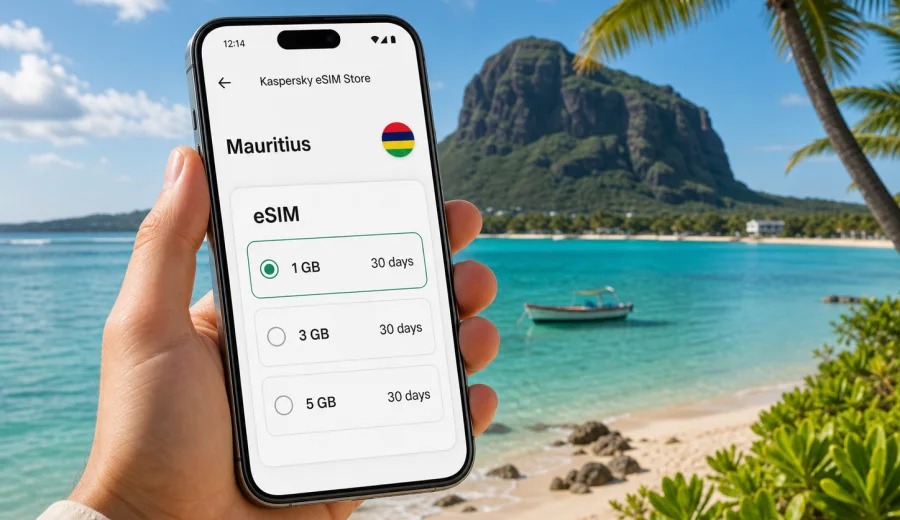
Mauritius eSIM guide: mobile connection and internet for your trip
Mauritius is compact on the map, but a trip across the island can move through different travel scenarios: arrival at Sir Seewoosagur Ramgoolam International Airport, a coast transfer, a day in Port Louis, mountain roads, boat trips, beach hotels, and short drives between small towns. In these moments, mobile connection and internet access are practical tools rather than luxuries.
An eSIM can help you prepare mobile internet before you land, without looking for a physical SIM card after a long flight. You choose a data plan, install the eSIM on a compatible phone, and use it for maps, messaging, bookings, translation, payments, and trip coordination. The goal is to make essential online tasks simpler when you are outside your usual mobile network.
This guide explains how to plan eSIM use in Mauritius, what to check before purchase, how much data you may need, and how to keep setup predictable.
Why mobile internet matters in Mauritius
Mauritius is easy to explore by car, taxi, hotel transfer, bus, boat excursion, or private tour, but the island rewards preparation. Beaches and resorts may feel self-contained, while many useful places are spread out: viewpoints, public beaches, markets, nature parks, restaurants, pharmacies, diving centers, and hiking starting points.
Mobile internet is useful for:
- checking your transfer driver or ride details after landing;
- using maps between the airport, coastal areas, and inland attractions;
- sending your hotel arrival time if a flight is delayed;
- confirming boat trips, diving sessions, or restaurant bookings;
- using translation tools in shops or at local services;
- receiving payment confirmations and security notifications;
- sharing location with family or travel companions;
- checking weather before mountain viewpoints, beach days, or sea activities.
Public Wi-Fi can help in hotels, cafes, and some airport areas, but it is not a reliable plan for the whole trip. You may need internet while moving between places, checking in for an activity, or finding a route where Wi-Fi is unavailable. An eSIM gives you a separate mobile data option on your own device, provided that the device supports eSIM and the selected plan is active for the destination.
Where travelers usually need data on the island
Mauritius has several common travel zones, and each creates a slightly different need for mobile internet. At the airport, data helps with transfer coordination. In Grand Baie, Flic en Flac, and Port Louis, it helps with maps, restaurant searches, payments, and messaging. Around Le Morne, Chamarel, and the east coast, offline maps plus mobile data are a good combination because plans can change with weather, road timing, or excursion schedules.
What an eSIM does for a Mauritius trip
An eSIM is a digital SIM profile that can be installed on a compatible smartphone or tablet. For a trip to Mauritius, it is usually used for mobile data. In many travel eSIM cases, a plan does not include a regular phone number, voice calls, or SMS unless the plan terms say otherwise. You can still use internet-based calling and messaging apps through mobile data.
Kaspersky eSIM Store is an app and website where you can quickly choose, arrange, and activate an eSIM with a suitable data plan for mobile internet in an international trip. The practical value is that you can review destination, data amount, validity period, and price before you travel, then install the eSIM on a compatible device.
Use eSIM as a travel data tool:
- for navigation and route changes;
- for messaging apps and email;
- for travel apps, booking confirmations, and QR codes;
- for online banking notifications and payment checks;
- for translating short phrases or menus;
- for hotspot use if the selected plan and device settings allow it.
Do not treat eSIM as a guarantee that every remote spot will have the same signal quality. Mobile coverage depends on local network conditions, geography, building materials, device settings, and the selected plan. A realistic approach is to prepare eSIM data and keep offline backups for routes, hotel addresses, and essential documents.
Before you choose a plan: device and settings checklist
Before paying for any eSIM data plan, check the device first. This avoids the most common problem: choosing a plan and only then discovering that the phone cannot install it.
Use this checklist:
- your smartphone or tablet supports eSIM;
- the device is not locked to one mobile operator;
- the operating system is recent enough for eSIM installation;
- you have a stable internet connection for installation;
- you can access email or the app where installation details are shown;
- you know which physical SIM or existing eSIM should remain active for calls and SMS;
- you understand when the data plan validity period starts according to the plan terms.
If you are not sure whether your phone supports eSIM, check your device before choosing a plan. Compatibility is especially important for older phones, regional device versions, corporate devices, and phones bought through operator contracts.
It is also useful to decide how your regular SIM will behave during the trip. Many travelers keep their home SIM active for banking SMS or incoming calls, while using the travel eSIM for mobile data. In that setup, set mobile data to the eSIM once it is ready, and enable data roaming for the eSIM line if the plan instructions require it.
How much data do you need in Mauritius?
Data use depends on behavior more than distance. A traveler who uses hotel Wi-Fi for video calls may need less mobile data than someone who uploads videos from beaches, uses navigation all day, and shares hotspot access with a laptop.
| Use case | Approximate pattern | Suggested planning logic |
|---|---|---|
| Light traveler | maps, messaging, emails, booking checks | choose a smaller package and use Wi-Fi for heavy tasks |
| Regular vacation use | maps, social media, restaurant searches, photo uploads | choose a mid-size package for daily flexibility |
| Work-and-travel | email, cloud documents, calls over apps, hotspot sessions | choose more data and monitor usage daily |
| Family organizer | coordinates transfers, activities, payments, shared plans | allow extra data because one phone becomes the trip hub |
| Content-heavy traveler | frequent video uploads, reels, backups, streaming | use hotel Wi-Fi for uploads or choose a larger package |
As a rough travel habit, maps and messaging are usually manageable. Video is the main data driver. Cloud backup can also consume data quickly if your phone starts uploading photos over mobile data. Before departure, turn off automatic photo backup on mobile data or set it to Wi-Fi only. Download offline maps for the areas you plan to visit, especially if you will drive around the island.
For a short resort stay, a smaller plan may be enough if most online time happens on hotel Wi-Fi. For a week of independent travel, a larger plan gives more room for maps, messaging, local searches, and spontaneous route changes. For remote work, video meetings, or laptop hotspot use, plan more carefully and check the terms of the selected plan before relying on hotspot sharing.
When to set up your eSIM
The most convenient time to install an eSIM is usually before departure, while you still have a stable home connection and enough time to read the instructions. Activation timing can depend on the plan. Some plans begin validity when installed, while others begin when the eSIM first connects to a supported network in the destination. Always review the specific plan details before installation.
A practical schedule looks like this:
1. A few days before departure: check device compatibility and operator lock status.
2. One or two days before departure: choose the destination and data amount.
3. Before leaving for the airport: install the eSIM if the plan instructions allow it.
4. During the flight: keep mobile data off or use airplane mode as usual.
5. After arrival in Mauritius: select the eSIM as the mobile data line and follow the activation instructions.
6. During the trip: monitor data usage and use Wi-Fi for large uploads or streaming.
This schedule leaves room to solve small issues before travel. It also helps you avoid doing setup for the first time in an airport arrivals hall while managing luggage, immigration, transfers, and tired travel companions.
Choosing an eSIM data plan for Mauritius
When comparing options, look beyond the data amount alone. A plan that fits your trip should match your travel dates, online habits, and device setup.
Check these plan details:
- destination: the plan should cover Mauritius;
- data amount: enough for your expected daily use;
- validity period: long enough for the full trip or the part when you need mobile data;
- activation rule: understand when the plan starts;
- hotspot rules: important if you plan to share data with a laptop or another device;
- top-up or new-plan options: useful if your trip changes;
- installation method: QR code, app-based installation, or manual details;
- support route: know where to ask for help if setup is unclear.
If you want to prepare before departure, you can choose an eSIM data plan for Mauritius and review the available data amounts and validity periods for your trip. Place the plan decision after your itinerary decision: a traveler staying mostly at a resort may need a different package than someone driving around the island every day.
How to install and activate an eSIM
Installation is usually a short process, but it is worth doing carefully. Keep your regular SIM active if you need it, make sure the phone has internet access during installation, and follow the instructions for your operating system.
The general flow is:
1. Choose the destination and plan.
2. Complete the order in the app or on the website.
3. Open the installation details.
4. Add the eSIM profile to your device.
5. Name the line clearly, for example "Mauritius data".
6. Set the eSIM as the mobile data line when you are ready to use it.
7. Enable data roaming for the eSIM line if the instructions say it is required.
8. Test mobile data after arrival and keep Wi-Fi off briefly while testing.
For device-specific steps, use the Android installation instructions or the iOS installation instructions. The exact screens vary by phone model and operating system version, so follow the path that matches your device.
Do not delete the eSIM profile after installation unless you are sure you no longer need it and the plan terms allow it. Some eSIM profiles cannot simply be moved to another device after activation. If you replace your phone during the trip or reset the device, you may need support and may not be able to restore the same profile automatically.
Practical settings for arrival in Mauritius
After landing, the goal is to bring the eSIM online without disturbing the rest of your phone setup.
Use this arrival checklist:
- keep airplane mode on until the aircraft has arrived and mobile use is allowed;
- turn on the eSIM line if it was disabled during the flight;
- set mobile data to the Mauritius eSIM line;
- keep your home SIM for calls or SMS only if you need it;
- disable data roaming on the home SIM to avoid unintended roaming charges;
- enable data roaming on the eSIM line if required by the eSIM instructions;
- open a browser or map app to test mobile data;
- check that messaging apps can send and receive messages;
- monitor data usage in the phone settings during the first day.
If the eSIM does not connect immediately, wait a few minutes and check the basics: correct data line, roaming setting, signal indicator, APN instructions if provided, and whether the phone is trying to use Wi-Fi with a weak captive portal. Restarting the phone can also help after a new mobile profile is installed.
eSIM, roaming, local SIM, and Wi-Fi: how they compare
No single option is perfect for every traveler. The right setup depends on trip length, budget, work needs, and how independent your itinerary is.
| Option | Strengths | Limits to consider |
|---|---|---|
| Travel eSIM | can be prepared before arrival, no physical SIM swap, useful for mobile data | requires a compatible unlocked device and correct setup |
| Standard roaming | keeps your usual number and may be simple for short use | costs and included data depend on your home operator plan |
| Local physical SIM | may suit long stays or local calling needs | requires finding a shop, documentation may be requested, setup takes time |
| Public Wi-Fi | useful for large downloads at hotels or cafes | not available everywhere and can be inconvenient while moving |
Many travelers use a mixed approach: eSIM for mobile data on the move, hotel Wi-Fi for large uploads, and the home SIM only for essential calls or SMS. This keeps the setup flexible without relying on a single connection method for every task.
Travel scenarios and data planning
Different itineraries need different data habits:
- Resort stay: use hotel Wi-Fi for video and backups, and keep eSIM data for transfers, maps, messaging, and excursions.
- Self-drive route: download offline maps, then use mobile data for traffic, opening hours, fuel stops, and route changes between Grand Baie, Flic en Flac, Chamarel, Le Morne, Mahebourg, and Port Louis.
- Honeymoon or family holiday: give the organizer's phone enough data for booking confirmations, pickup messages, payment alerts, and shared plans.
- Remote work: use fixed Wi-Fi for long calls where possible, and keep eSIM data as a backup for messages, documents, and urgent tasks.
Small habits that save data
Data management is easier when you adjust settings before the trip:
- download offline maps before departure;
- save hotel addresses and booking PDFs on the phone;
- turn off mobile data for cloud photo backup;
- disable automatic app updates over mobile data;
- reduce video autoplay in social apps;
- send compressed photos in messengers when quality is not important;
- use Wi-Fi for long video calls and large uploads;
- check mobile data usage by app after the first full day;
- keep one messaging app available for urgent coordination.
If a phone is shared as a hotspot, laptops may sync files or update software in the background. Hotspot use can be convenient, but it should be deliberate.
Common mistakes and quick reference
The most common eSIM problems are not dramatic technical failures. They are usually small preparation gaps.
Avoid these mistakes:
- choosing a plan before checking eSIM compatibility;
- deleting the eSIM profile too early;
- leaving mobile data on the home SIM after arrival;
- forgetting to enable data roaming for the eSIM line when required;
- assuming that a data-only plan includes a local phone number;
- using mobile data for automatic video uploads;
- waiting until the arrivals hall to read installation steps for the first time.
Use this short summary when planning:
- eSIM is best treated as a mobile data option for travel.
- Check device compatibility before choosing a plan.
- Install before departure if the plan instructions make that suitable.
- Keep your regular SIM available only for the services you need.
- Set the eSIM as the mobile data line after arrival.
- Use hotel Wi-Fi for large uploads, app updates, and streaming.
- Monitor data during the first day to adjust habits early.
- Keep offline copies of essential addresses and bookings.
FAQ
Can I use eSIM in Mauritius for calls and SMS?
Many travel eSIM plans are designed for mobile data. They may not include a regular phone number, voice calls, or SMS unless this is stated in the selected plan terms. For calls and messages, use internet-based apps over mobile data.
Should I install the eSIM before flying?
Often, yes, because home or office Wi-Fi makes installation easier. Check the plan terms first, because validity can start at installation or at first connection in the destination.
Do I need to remove my physical SIM?
Usually no. Many compatible phones can keep a physical SIM and an eSIM on the same device. Set which line handles mobile data, calls, and SMS, and make sure the home SIM is not using roaming data unless you want it to.
Is hotel Wi-Fi enough for Mauritius?
Hotel Wi-Fi may be enough for evenings, video calls, or large uploads at the property. It is less useful on the road, during transfers, or when changing plans during the day.
What should I do if mobile data does not work after arrival?
Check that the eSIM line is turned on, selected for mobile data, and allowed to use data roaming if required. Turn Wi-Fi off briefly for testing, restart the phone if needed, and review any activation instructions provided with the plan.
Can I share eSIM data with a laptop?
It depends on the device, operating system settings, and the selected plan terms. If hotspot use is important for work, check the conditions before relying on it.
Prepare mobile internet before your Mauritius trip
Mauritius is easier to enjoy when basic online tasks are already covered: maps, transfers, messages, bookings, payment checks, and weather updates. An eSIM can help you prepare mobile internet for the trip without searching for a physical SIM card after arrival.
Before you travel, confirm that your device supports eSIM, choose a data amount that matches your itinerary, and keep installation instructions available offline. When you are ready to plan the connection, select an eSIM data plan for your trip to Mauritius through Kaspersky eSIM Store and set it up before you need it on the road.