
Travel connectivity guide
Mazar-i-Sharif eSIM for travel internet
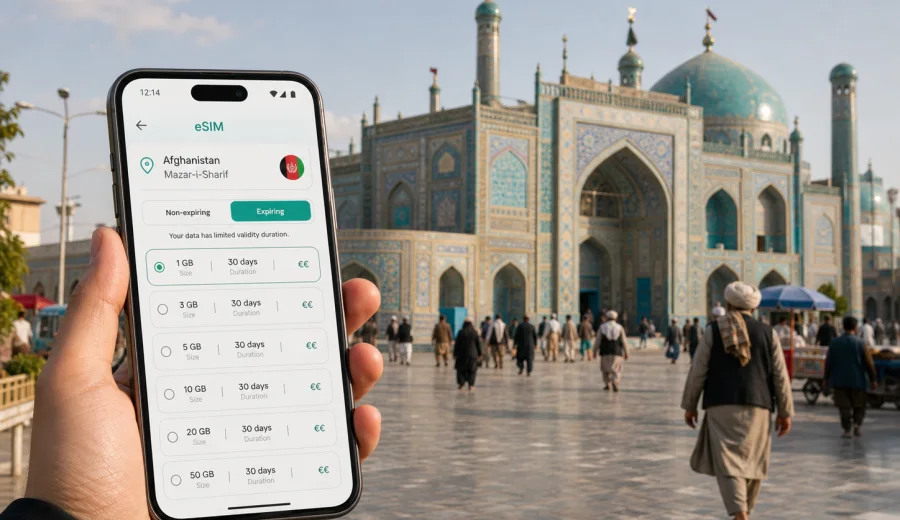
Mazar-i-Sharif eSIM: mobile connection and internet for your trip
Mazar-i-Sharif is a city where travel plans often depend on timing, local coordination, and clear directions. Visitors may arrive for work in Balkh Province, a family visit, humanitarian or development projects, religious and cultural interest, or a stop on a wider northern Afghanistan route. In each case, mobile internet is not just a convenience. It helps you confirm pickup details, message a hotel or host, translate short phrases, keep documents available, and follow a route through a city that may be unfamiliar from the first minute.
An eSIM can make that preparation simpler. Instead of waiting to find a local SIM card after arrival, you can set up a digital SIM profile on a compatible phone before the trip or when you have a stable connection. For Mazar-i-Sharif, that matters because many everyday travel tasks happen quickly: the airport pickup, the drive into the city, check-in, meetings, movements around the Blue Mosque area, and short trips toward Balkh or other nearby destinations.
This guide focuses on how to think about eSIM, mobile connection, and internet use specifically in Mazar-i-Sharif. It is not a general country overview. The practical questions are local: when you will need data, how much traffic to plan for, where connection matters most, and what to check before relying on a phone during your stay.
Why mobile internet matters in Mazar-i-Sharif
Mazar-i-Sharif is spread across busy roads, residential districts, commercial areas, hotel zones, markets, and the historic center around the Shrine of Hazrat Ali, often known by visitors as the Blue Mosque. Travel in the city can involve arranged cars, local drivers, walking between nearby points, and coordination with hosts. Even if your itinerary is organized, mobile internet gives you a second layer of control.
You may need data in Mazar-i-Sharif for:
- messaging a driver after landing;
- sharing your live location with a colleague or host;
- checking the address of a hotel, office, compound, clinic, or meeting place;
- using maps before moving between districts;
- translating short messages in English, Dari, Pashto, or another language;
- keeping boarding passes, hotel confirmations, and work documents available;
- joining calls over messaging apps when voice service is not included in a data plan;
- checking whether a road, appointment, or pickup time has changed.
The most useful travel internet is not always the largest package. It is the package that matches the way you will move in the city. A short business visit with hotel Wi-Fi may need less mobile data than a week of daily navigation, video calls, and document transfers. A stopover with only one arranged pickup may need less than a field visit with several destinations each day.
Arrival: using data from the first minutes
Many visitors first need mobile internet before they have settled into a hotel. On arrival, you may be focused on luggage, documents, a driver, and a route into the city. If you already installed an eSIM profile and know how to switch data lines, you can avoid solving everything at the airport or in a busy arrival area.
A practical arrival setup looks like this:
1. Install the eSIM profile while you still have reliable Wi-Fi.
2. Keep your primary SIM active for calls or messages if you need it.
3. Set the eSIM as the mobile data line only when you are ready to use it.
4. Turn on data roaming for the eSIM if the plan instructions require it.
5. Test messaging, maps, and browser access before leaving the airport area.
The important detail is control. Some eSIM plans start their validity period at installation, while others start when they first connect to a supported network. Always read the plan conditions before installing or activating. If your trip is short, the start time can matter as much as the data volume.
Local movement: where connection helps most
Mazar-i-Sharif is not a city where every traveler moves independently in the same way. Some visitors use arranged transport for every transfer. Others walk around central areas, move between hotels and offices, or make short side trips with local contacts. In all these scenarios, mobile data helps with small decisions that reduce confusion.
For a hotel-based trip, you may use mobile internet mainly between the airport, the hotel, and meeting locations. For a more active itinerary, you may need data repeatedly during the day: to confirm a driver, check a pin, send a photo of an entrance, or message that you have arrived. If you are visiting the Blue Mosque area, local markets, or older parts of the city, a connected phone can help you return to a known pickup point without depending only on memory.
Common city scenarios include:
| Scenario in Mazar-i-Sharif | Why mobile data helps | Useful habit |
|---|---|---|
| Airport pickup | Driver details, meeting point, delay messages | Save the driver's number and hotel address offline |
| Hotel check-in | Booking details, map pin, document access | Keep confirmations downloaded before arrival |
| Meetings across the city | Live coordination and route checks | Share locations in advance |
| Blue Mosque area visit | Orientation, photos, messaging | Agree on a fixed meeting point |
| Trip toward Balkh | Navigation support and contact with hosts | Download maps and keep a power bank |
Mobile internet does not replace local guidance. It supports it. In a city where directions may be given by landmarks, gates, streets, or known neighborhoods, a working data line helps you compare what you were told with what you see on the ground.
Choosing an eSIM data allowance for Mazar-i-Sharif
The right data volume depends on how much you expect to use your phone away from Wi-Fi. Hotel and office Wi-Fi can reduce mobile data use, but you should not assume that every connection will be fast, stable, or available exactly when you need it. For a practical trip, think in terms of tasks rather than a single number.
Light use usually means messaging, maps, email checks, and occasional browsing. Moderate use adds regular photo sharing, document downloads, translation, and more navigation. Heavy use includes video meetings, cloud backups, streaming, large files, and frequent hotspot use. If you plan to use your phone as a modem for a laptop, allow much more traffic than you would for phone-only travel.
Use this planning table before you choose a package:
| Trip pattern | Typical mobile data needs | What to watch |
|---|---|---|
| 1-2 day stopover | Messaging, pickup coordination, maps | Validity period matters more than large volume |
| 3-5 day business trip | Email, navigation, calls over apps, documents | Leave room for route changes and files |
| 1 week city stay | Daily navigation, photos, translation, work chats | Avoid background backups on mobile data |
| Field work from Mazar-i-Sharif | Hotspot, file sharing, repeated transfers | Choose a larger allowance and monitor balance |
| Family or group trip | Messaging, maps, shared plans | Each traveler should have a connection plan |
If you are unsure, choose a plan that gives you enough room for the first part of the trip and check whether top-ups or additional plans are available through the account or app. A prepaid approach helps you see the data volume, validity period, destination, and price before you commit.
If you want to prepare before departure, you can use Kaspersky eSIM Store to choose an eSIM plan for travel to Afghanistan and then install it on a compatible device before your route to Mazar-i-Sharif. Kaspersky eSIM Store is an app and website for selecting, arranging, and activating an eSIM with a suitable mobile internet plan for international travel; it is not a mobile operator and does not replace the local network conditions of the destination.
When to prepare your eSIM
For Mazar-i-Sharif, it is sensible to prepare before departure, while you have stable Wi-Fi and time to follow the instructions. Doing it early also gives you time to check whether your device supports eSIM and whether it is locked to a carrier.
Before you leave, prepare:
- a compatible smartphone or tablet with eSIM support;
- access to the email or account where your eSIM details are sent;
- your primary SIM settings, so you can decide which line handles calls, messages, and data;
- downloaded hotel addresses, meeting points, and emergency contacts.
A practical setup flow for the trip
If Mazar-i-Sharif is your main destination, plan your data line around the first 24 hours. That is when you are most likely to need maps, messages, and confirmations at the same time. If you are connecting through another city first, check whether your eSIM plan covers only Afghanistan or a wider region, and avoid turning on mobile data too early if the plan validity starts at first network connection.
Recommended setup:
1. Choose Afghanistan as the destination for your data plan.
2. Review the data volume, duration, price, and activation conditions.
3. Install the eSIM profile on the device you will actually carry.
4. Keep the QR code or installation details available until setup is complete.
5. Set the eSIM as the line for mobile data when you need it.
6. Keep your regular SIM available for calls or banking messages if needed.
7. Monitor data use during the first day and adjust video, backup, and hotspot settings.
Device compatibility and installation checks
An eSIM only works on a device that supports eSIM and is not restricted in a way that prevents adding another mobile plan. Before you buy any plan, check your device and confirm that your phone can use eSIM in addition to, or instead of, a physical SIM.
You should also check:
- whether your phone is carrier-locked;
- whether your operating system is up to date enough for eSIM setup;
- whether you know where to choose the mobile data line;
- whether data roaming must be enabled for the eSIM profile;
- whether the plan includes only mobile data or also other services.
For installation steps, follow the relevant guide for your device: Android installation instructions or iOS installation instructions. Keep Wi-Fi on during setup, and do not delete the eSIM profile unless you are sure you no longer need it. Some eSIM profiles cannot be moved to another device after activation.
Managing data in hotels, streets, and short trips
Mobile data can disappear quickly if a phone backs up photos, updates apps, syncs cloud files, or streams video without limits. Before using the eSIM as your main data line in Mazar-i-Sharif, download offline maps, save hotel and meeting addresses, pause cloud backups, limit app updates on mobile data, and check usage after hotspot sessions.
Business travelers often move between a hotel, office, project site, clinic, university area, warehouse, or arranged meeting point. Ask for addresses in a form you can copy into your phone, save the hotel name in English and local-language form if available, and open shared map pins before leaving Wi-Fi so the app can cache some information. For meetings, confirm the pickup point, nearby landmark, contact method, and whether you should wait at reception or outside.
For walks around the Blue Mosque area, markets, cafes, or older streets, agree on a fixed return point before separating from a driver or companion. Save that location, keep mobile data available for messages, and avoid uploading large photo sets until you are back on Wi-Fi. If you make a short trip toward Balkh or another nearby destination, download the route, keep host numbers saved outside messaging apps, carry a power bank, and treat mobile internet as support rather than the only navigation plan.
Quick checklist before departure
Use this checklist before you start the journey:
- Your phone supports eSIM and can add a new mobile plan.
- You know whether the eSIM plan starts at installation or first network connection.
- Afghanistan is selected as the destination.
- The data volume and duration match your stay in Mazar-i-Sharif.
- Installation details are saved until setup is complete.
- Your hotel address, pickup details, and meeting points are saved offline.
- Background app updates and cloud backups are limited on mobile data.
- A power bank is packed for long transfers or day trips.
FAQ
Should I install the eSIM before arriving in Afghanistan?
Usually, yes. Installing on stable Wi-Fi is more comfortable than doing it during arrival. Check the plan's activation conditions first, because validity may start at installation or first network connection.
How much data do I need for Mazar-i-Sharif?
For light messaging and maps, a smaller allowance may be enough for a short stay. For business travel, hotspot use, file transfers, or video meetings, choose a larger allowance and monitor data use. The right amount depends on your itinerary and habits.
Choose mobile internet before your Mazar-i-Sharif trip
A trip to Mazar-i-Sharif is easier to manage when your phone is ready before the first transfer. With an eSIM, you can prepare mobile internet for arrival, city movement, hotel coordination, business meetings, and short routes around Balkh Province without searching for a physical SIM at the last minute.
Before you travel, check device compatibility, review the plan conditions, install the eSIM on the phone you will carry, and keep your data settings under control. When you are ready to prepare, use Kaspersky eSIM Store to choose a mobile internet plan for Afghanistan and set up your eSIM for the journey to Mazar-i-Sharif.