
Travel connectivity guide
Mbaiki eSIM: Mobile Internet for Travel
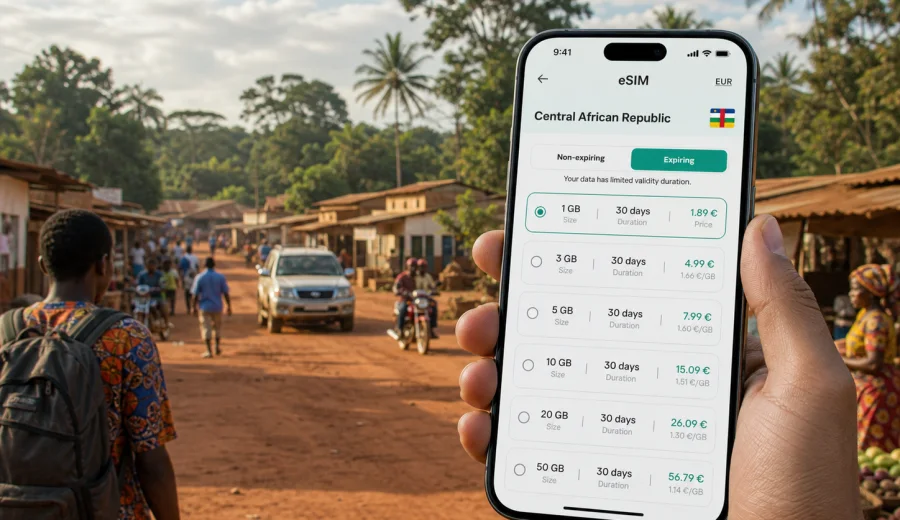
Mbaiki eSIM: mobile connection and internet for your trip
Mbaiki is a practical stop for travelers heading into Lobaye, visiting family, meeting local partners, or moving between Bangui and the forested southwest of the Central African Republic. It is not a city where you want to spend the first hour searching for a SIM counter, asking for directions without maps, or waiting for hotel Wi-Fi before messaging your driver. A prepared eSIM can make mobile internet simpler.
For a Mbaiki trip, eSIM is useful because the city experience depends on small actions: checking the road from Bangui, sharing your arrival time, confirming a guesthouse, translating a message, and keeping maps available. Kaspersky eSIM Store is a site and app where you can choose, arrange, and activate an eSIM with a suitable data plan for mobile internet in an overseas trip.
This guide focuses on Mbaiki itself: arrival, local movement, hotels, work visits, stopovers, and trips from the city to nearby areas in Lobaye. The country matters because your plan must cover the Central African Republic, but the real question is local: how much data do you need around Mbaiki without relying only on roaming, public Wi-Fi, or a physical SIM card after arrival?
Why mobile internet matters in Mbaiki
Mbaiki travel is often more operational than tourist-heavy. You may be arriving by road from Bangui, coordinating with a local contact, visiting offices or project sites, or using the city as a base for Lobaye. In that setting, mobile internet helps keep the day organized.
Common uses include:
- opening maps before leaving Bangui and again when you reach Mbaiki;
- messaging a driver, host, colleague, or family member;
- checking hotel details and saved reservations;
- translating short phrases or addresses;
- sharing your live location during a pickup;
- receiving updates about meetings, road timing, or onward travel;
- keeping boarding, visa, insurance, or itinerary documents reachable.
The city is smaller and less predictable than major international hubs. Preparing an eSIM before the trip gives you one less task to solve on the ground.
Arrival scenarios: from Bangui to Mbaiki
Many international travelers first enter the Central African Republic through Bangui and then continue toward Mbaiki by road. The important connectivity moment is not only the final arrival in the city. It is the route between airport, accommodation, meeting point, and the road southwest.
If your eSIM is already installed, you can use mobile data when the selected plan is active and local network conditions allow it.
Think through these moments before you leave:
| Travel moment | What mobile data helps with | Practical tip |
|---|---|---|
| Before departure | Checking plan validity, saving maps, messaging contacts | Install the eSIM while you still have stable internet |
| Arrival in Bangui | Confirming pickup, finding your route, sending arrival updates | Keep your primary SIM active for calls if you need regular voice service |
| Road to Mbaiki | Messaging, maps, translation, itinerary updates | Download important files offline as a backup |
| First evening in Mbaiki | Hotel check-in, local contacts, next-day planning | Avoid depending only on public Wi-Fi |
| Onward trips in Lobaye | Navigation, coordination, weather, document access | Choose a data allowance that fits travel outside the city |
eSIM does not remove the need for planning. It gives you a mobile data option on a compatible device, while coverage and speed depend on the local network and the selected plan.
What kind of traveler benefits most
An eSIM can be helpful for several Mbaiki travel styles:
- Short stopover: maps, messaging, hotel coordination, and road updates.
- Field visit or business trip: email, shared documents, schedule changes, and team messages.
- Family visit: steady messaging, photo sharing, and internet-based calls over several days.
- Regional travel: navigation and coordination when Mbaiki is a base for Lobaye.
The right plan depends on duration, route, and app use. A small plan may be enough for an overnight stop, while work travel or regional movement usually needs more data and a validity period that covers the return to Bangui.
How to estimate data for a Mbaiki trip
You do not need to calculate every megabyte, but a rough estimate helps you avoid buying too little data. Think in tasks, not only in days.
For a light trip, mobile data usually goes to messaging, maps, email, and simple browsing. For a working trip, the heavier items are cloud files, video meetings, large image uploads, and hotspot use.
Use this simple planning frame:
- 1 to 3 days: messaging, navigation, transport coordination, hotel details, light browsing;
- 4 to 7 days: the same tasks plus regular email, media sharing, and route checks;
- more than a week: choose a plan with extra margin, especially if you will travel outside Mbaiki;
- remote work: add more data for cloud tools and meetings;
- hotspot use: treat this as heavy usage and check whether the selected plan allows tethering.
Before choosing, consider how many people will rely on your phone. One traveler using maps and messaging needs less data than a small team sharing directions, documents, and photos through one device.
Choosing an eSIM plan for Mbaiki
For Mbaiki, choose a plan that covers the Central African Republic. The city does not need a separate city-only plan. What matters is country coverage, data allowance, validity period, and whether the plan conditions match your device and route.
When you compare options, check:
1. Coverage area: the plan should include the Central African Republic.
2. Data volume: choose enough for maps, messaging, email, and work apps.
3. Validity period: it should cover the full time from arrival to departure.
4. Activation rules: understand when the plan starts and how installation works.
5. Device compatibility: your phone or tablet must support eSIM.
6. Tethering conditions: check this if you plan to use hotspot mode.
7. Support path: know where to get help if installation or activation is unclear.
Kaspersky eSIM Store helps you compare available plan conditions for a destination, arrange the eSIM, and manage the setup through the site or app. It should be treated as a practical travel tool for mobile internet, not as a local mobile operator or a guarantee of network coverage in every place.
You can choose an eSIM plan for a trip to Mbaiki and the Central African Republic after checking your dates, route, and expected data use.
Before you install: device and trip checks
The most important preparation step is compatibility. Not every phone supports eSIM, some devices can be locked to an operator, and some models differ by region of sale.
Before buying or installing, check your device and confirm that:
- the device supports eSIM;
- the device is not locked by a mobile operator;
- you can access mobile settings and add a new eSIM profile;
- you have stable internet for installation;
- you understand whether data roaming must be enabled for the eSIM profile;
- your primary SIM settings are clear if you need calls or SMS on your home number.
Travel eSIM plans usually focus on mobile data. They may not include a local phone number, ordinary voice calls, or SMS unless the plan conditions say so.
How to install eSIM before traveling to Mbaiki
It is usually easier to install the eSIM before you leave, while you have stable Wi-Fi and time to follow each step calmly. If you prefer to activate later, read the plan conditions so you know when validity and data use begin.
A typical setup looks like this:
1. Open Kaspersky eSIM Store on the site or in the app.
2. Choose the Central African Republic as the destination.
3. Select a data allowance and validity period that fit your Mbaiki trip.
4. Complete the arrangement of the selected plan.
5. Install the eSIM profile using the on-screen instructions or QR code.
6. Keep your primary SIM for calls if you still need your usual number.
7. When ready, select the eSIM profile for mobile data.
8. If the instructions require it, enable data roaming for the eSIM profile.
For detailed setup, use the Android installation guide or the iOS installation guide. The exact menus can vary by phone model and system version, so follow the steps shown for your device.
After installation, do not delete the eSIM profile unless you are sure you no longer need it. Some eSIM profiles cannot be reinstalled or moved to another device after activation, depending on the terms of the plan.
Local movement in Mbaiki: where data helps
Mbaiki is a destination where mobile internet is useful in small, repeated moments. The city may not require complex metro navigation, but it does require coordination. Addresses can be described by landmarks, routes can change with weather or road conditions, and travelers often depend on local contacts.
Use mobile data for:
- confirming a meeting point before leaving your accommodation;
- sharing your location with a driver or host;
- checking map orientation near the market, offices, or guesthouses;
- translating names, directions, or opening times;
- keeping hotel contacts and reservation details available;
- updating colleagues if a road transfer takes longer than expected.
Use eSIM for live tasks and keep critical information offline. Save your accommodation address, local contact numbers, driver details, and route notes before you travel.
Hotels, work visits, and data-saving settings
Accommodation Wi-Fi can be useful in Mbaiki, but it should not be the only connection you rely on for the first evening, a morning pickup, or a time-sensitive work update. An eSIM can help before check-in, between meetings, and during transfers, while Wi-Fi can be saved for larger uploads or longer calls when it is stable.
For business travel, NGO visits, field work, or supplier meetings, prepare the phone before leaving Bangui:
- download meeting documents and route notes;
- save all local contact names and numbers offline;
- choose enough data for email, messaging, and document review;
- turn off app updates and cloud photo backup on mobile data;
- download offline maps for Bangui, Mbaiki, and your route;
- carry a power bank for long days away from your accommodation.
For stopovers, family visits, and regional routes, do not choose only by price. A plan that is too small can be inconvenient if it runs out during a transfer or before a meeting. The better choice is a data allowance and validity period that match the whole Mbaiki itinerary, including the return journey.
What eSIM does not replace
eSIM is useful for mobile internet, but it is not a complete replacement for local planning. In Mbaiki, keep important information offline, coordinate with local contacts, and remember that signal can vary by building, road, and area outside the city. Voice calls and SMS may not be included unless the plan conditions say so, and installation still requires a compatible, unlocked device with internet access at the setup stage.
Practical first-day checklist
Use this checklist before leaving Bangui or starting your first full day in Mbaiki:
- Confirm the eSIM profile is installed.
- Check that the Central African Republic is covered by the selected plan.
- Save maps for Bangui, Mbaiki, and the road between them.
- Save your accommodation, driver, host, or coordinator contact.
- Download documents you may need without internet.
- Turn off heavy background data use.
- Pack a charging cable and power bank.
- Decide which SIM is used for mobile data.
- Keep your primary number available if you need calls or SMS.
FAQ: eSIM and mobile internet in Mbaiki
Can I use eSIM for a trip to Mbaiki?
Yes, if your device supports eSIM and you choose a plan that covers the Central African Republic. Mbaiki is a city destination, but coverage is selected by country or region.
Should I install eSIM before I arrive?
Usually, yes. Install it before departure while you have stable internet, then read the plan conditions so you know when validity and data use begin.
Will eSIM include a local phone number?
Not necessarily. Travel eSIM plans are usually for mobile data. Ordinary calls and SMS are included only if the selected plan conditions say so. For calls, many travelers use messaging apps over mobile data.
Is hotel Wi-Fi enough in Mbaiki?
It may be enough for some tasks, but it is not always convenient during transfers, meetings, or first arrival. eSIM gives you another mobile data option for time-sensitive tasks.
How much data do I need?
For light messaging and maps, a smaller plan may be enough. For work apps, file sharing, hotspot use, or a longer stay, choose more data and a validity period that covers the full route.
Can I use the same eSIM while traveling outside Mbaiki?
If the plan covers the Central African Republic and remains valid, it can support travel beyond Mbaiki where local network conditions allow mobile data.
Choose mobile internet for Mbaiki before you travel
A trip to Mbaiki is easier when your phone is ready for practical tasks: maps, messages, hotel details, documents, and local coordination. Prepare your device, check eSIM compatibility, estimate your data use, and choose a plan that covers the Central African Republic for the full length of your stay.
Kaspersky eSIM Store helps you choose, arrange, and activate an eSIM with a suitable data plan for mobile internet in an overseas trip. Before leaving, prepare an eSIM plan for Mbaiki and the Central African Republic, install it on a compatible device, and keep offline backups for important details.