Travel connectivity guide
Mbour eSIM: Mobile Internet in Senegal
Mbour eSIM: mobile connection and internet for your Senegal trip
Mbour is not simply a beach stop on the way south from Dakar. It is a working Atlantic fishing city, a transport and service centre for Senegal’s Petite Côte, and a useful base for visiting nearby coastal places. A reliable mobile data plan can help you check your transfer, share your location, translate a message, confirm a guesthouse booking or find your way back from the waterfront. The details matter, though: an eSIM profile is useful only if your phone supports it and the selected plan works on a partner network in Senegal.
This guide focuses on staying connected in Mbour itself, from arrival and the fishing port to local errands, accommodation and day trips. It explains what to check before choosing a plan, how to prepare an eSIM without relying on a connection after landing, and what to do if mobile data does not come online as expected.
What to expect from Mbour
Mbour lies on Senegal’s Petite Côte in the Thiès region. The city is known for its active fishing port, where colourful pirogues return with the day’s catch. The surrounding department includes resort and coastal destinations such as Saly Portudal, Somone, Nianing and Joal. These are separate places rather than neighbourhoods within Mbour, so a trip that combines them involves road travel and may take you through areas with different network conditions.
The city has a lively everyday rhythm around the port, market streets, main roads and transport points. Visitors may stay in central Mbour, near the coast, or in accommodation in nearby Saly or another Petite Côte community. These locations can feel close on a map but are not interchangeable for pickup instructions: confirm the exact town, property name and meeting point with your host or driver before setting out.
When navigating around Mbour, use a saved destination and a written landmark together. Coastal roads and town addresses may be described differently by a map app, a driver and a hotel. Ask your host which entrance or nearby landmark to use, then share that wording with the person collecting you. Mobile data can help you check a route as you go, but a direct message to the property is often the clearest way to resolve the final turn.
For a first visit, mobile data is most useful for practical tasks rather than constant screen use:
- keeping the driver’s phone number and accommodation address available offline;
- sending a message if a flight or transfer is delayed;
- checking a map while moving between the airport, Mbour and your lodging;
- translating short requests or reading a booking message;
- coordinating a visit to the port, market or a nearby coastal town;
- using messaging, email and cloud services without depending on public Wi-Fi.
Mobile coverage is not a guarantee of identical service on every street, indoors or along the coast. Signal and data performance depend on the local network, the plan’s partner arrangements, device bands, congestion and the building around you. Treat the plan description as the source of truth and keep a backup for essential details.
Arriving through Blaise Diagne Airport
Most international visitors heading to Mbour arrive through Blaise Diagne International Airport, whose airport code is DSS. The airport is at Diass, in the Thiès region, between Dakar and Mbour; it is not in central Dakar. From the terminal, continue by a transfer or other ground transport that you have arranged. The airport currently lists Mbour among taxi destinations, but confirm the pickup point, operating arrangements and fare directly before travelling. Avoid assuming a driver will recognise a hotel in nearby Saly or another town as being in Mbour: state the destination precisely.
The first stretch of the journey is a good reason to prepare mobile data in advance. You may need to contact a driver, share your location or check directions while leaving the airport area. Make sure your pickup details name the correct town and property: Mbour and Saly are separate destinations, even though travellers may visit both during one stay. If you install an eSIM before departure, complete the installation while you have stable Wi-Fi and follow the plan’s activation instructions. Some plans start their validity or data use at installation, while others start when the eSIM first connects to a supported network. Check the terms for the plan you select rather than assuming one start rule applies to all eSIMs.
Before the flight, save the following on your phone or on paper:
- Your accommodation’s name, full address and local contact number.
- The transfer provider’s name and agreed meeting point.
- The destination town: Mbour, Saly, Somone, Nianing or another specific place.
- A map of the airport-to-accommodation route, if your map app supports offline areas.
- Your booking confirmation and any access instructions.
Keep these details available even if your data plan is ready. A charged phone, power bank and offline copy of key information can make a late arrival or temporary signal gap easier to manage.
Choosing a plan for a stay in Mbour
A city name does not necessarily appear as a separate eSIM destination. Plans are generally selected for a country or region, and Mbour is covered only if the plan’s stated destination and network arrangements include Senegal. Check the actual plan details for the country, data allowance, validity period, activation conditions and supported network information. Do not infer coverage from a map pin, a neighbouring destination or another traveller’s experience.
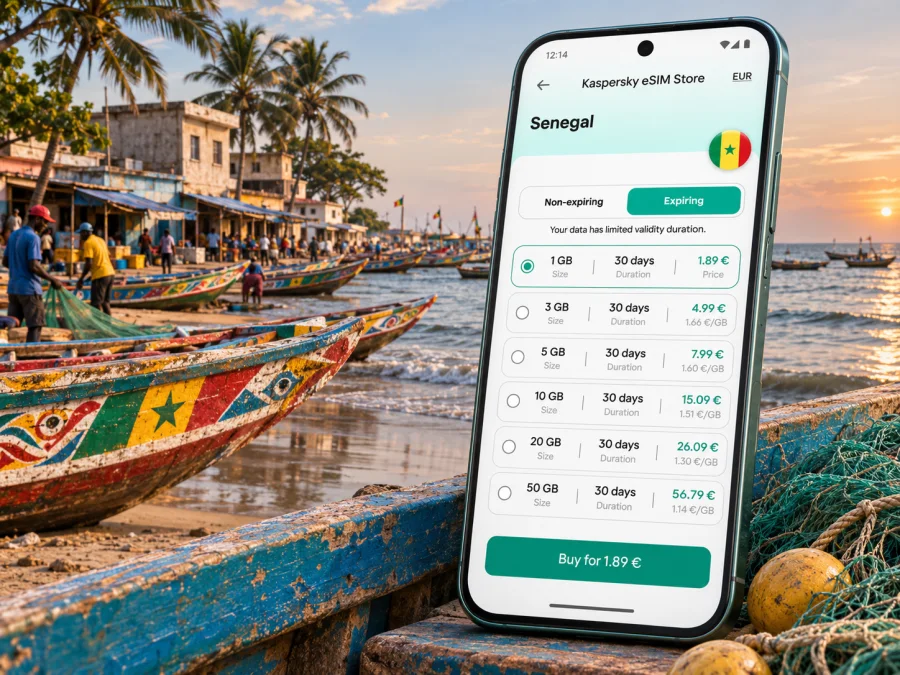
To review eSIM options for a trip to Senegal, compare the displayed conditions with the length and style of your stay. Kaspersky eSIM Store is an app and website that helps you choose, purchase and activate an eSIM with a suitable data plan for an international trip. The available options and terms can change; confirm the details shown for the plan before completing your order.
| Your travel pattern | What to check when selecting a plan |
|---|---|
| A short city stay | Whether the validity period covers your arrival, full days in Mbour and departure day |
| A longer holiday | Total data allowance, validity and whether the plan can be topped up under its terms |
| Mbour plus nearby coastal towns | That Senegal is included and that the plan’s network terms suit travel beyond one accommodation area |
| Frequent maps, video or hotspot use | Whether the allowance is enough for your estimated use and whether tethering is permitted |
| A work trip | Coverage expectations at your office or hotel, data limits for calls and video meetings, and a backup connection |
| A brief stopover | Whether the plan can be installed and activated in time for the actual stop, and when its validity begins |
Messaging, email and occasional navigation use less data than video, cloud backups, social feeds or hotspot use. Estimate your habits, not just the number of days. If your route leaves Mbour, check the plan’s Senegal terms for the full itinerary; neighbouring countries are not included unless listed.
A data eSIM usually does not replace your regular number; calls and SMS are excluded unless the plan says otherwise. If your device allows dual SIM use, you may keep your home line for calls or verification messages. Check your carrier’s roaming charges and select the correct data line.
Plan your connection around the city
Save your accommodation and exact meeting point before leaving. For a pickup, send the driver a written landmark and lodging name instead of relying only on a moving location dot; similar business names and busy streets can make the final turn confusing.
At the fishing port, data can help you coordinate a guide or return to your vehicle. Ask before photographing people at work, and agree on a visible meeting point if you are visiting during a busy landing period.
For errands, ask your host to write the address as locals use it, with a nearby landmark. A map pin may show a general point rather than the entrance, so confirm the last turn with the property if needed.
If you are staying in Saly or elsewhere nearby, save both the destination and return address. Confirm the fare and place with the transport provider before departure; a route calculation does not establish transport terms.
Day trips from Mbour and staying reachable
A day trip from Mbour can cross town streets, open roads, beach areas and smaller settlements. Signal may vary. Download essentials, carry your return address and agree how your group will reconnect if you lose contact.
Saly Portudal is a separate resort area; Somone is known for its lagoon, while Joal-Fadiouth lies farther south and Nianing is another coastal stop. These are route destinations, not guarantees of identical service. Check the plan’s Senegal terms and expect that signal may vary indoors or on the road.
Agree on the pickup time, exact point and a backup contact method with your driver or guide. Download directions and share the itinerary with someone in your group. Keep your phone charged; power-saving mode may restrict background location or updates.
Check your phone before you buy
An eSIM is a digital SIM profile, but not every device supports it. Support varies by manufacturer, model, exact regional variant and sometimes carrier lock status. A product family name by itself is not enough to confirm compatibility. Check your phone’s settings or manufacturer specifications for the exact model and make sure it is not restricted to a different carrier.
Check whether your device supports eSIM before choosing a plan. If your phone does not support eSIM, or the device is locked, use another option such as your home carrier’s roaming service, a local physical SIM where available, or Wi-Fi at your accommodation. Verify the terms and requirements of whichever option you use.
Before purchase, confirm these points:
- the exact phone model and regional variant support eSIM;
- the phone is not carrier-locked in a way that prevents adding another profile;
- you can access a reliable Wi-Fi connection during installation;
- the plan lists Senegal as an included destination;
- the data allowance and validity fit your dates;
- the plan’s activation trigger is clear;
- you know whether hotspot use is allowed and whether calls or SMS are included.
Install and activate with a little time to spare
Start with a compatible, unlocked device and a reliable internet connection for setup. Keep the QR code or installation details accessible on another screen or device if the phone cannot scan its own display. Follow the instructions supplied with the selected plan. Installation and first connection can take a few minutes, and the exact menu names differ by phone and software version.
1. Check the plan details
Confirm that the plan includes Senegal, note its validity and data allowance, and read when use begins. Save the installation instructions before you travel.
2. Add the eSIM profile
Open your phone’s mobile-network settings and choose the option to add an eSIM. Scan the supplied QR code or enter the details manually if the plan instructions offer that method. For platform-specific steps, use the Android installation guide or the iOS installation guide.
3. Label the new line
Give the profile a clear label such as “Senegal data” so you can distinguish it from your home SIM. Keep the home line selected for your usual number if you need it for calls or messages.
4. Set the data line
Choose the Senegal eSIM for mobile data when you are ready to use the plan. If you prefer to avoid starting the plan before travel, leave the profile installed but follow the provider’s specific activation guidance and validity rules.
5. Enable the required settings
Turn on the eSIM line when the plan should be used. Enable data roaming for that eSIM only if the plan’s instructions require it. Roaming settings may be part of how a travel eSIM reaches its partner network; check the plan instructions rather than changing settings on every line.
6. Allow time for connection
After arrival, give the phone a few minutes to register. If data does not work, confirm that the eSIM is enabled, selected for mobile data and allowed to use data roaming if required. Toggle airplane mode once or restart the phone if the plan instructions recommend it.
If mobile data is not working
Start with the simplest checks before reinstalling or deleting a profile. Some eSIM profiles cannot be installed again after removal, so do not delete one unless the provider’s instructions or support team tells you to.
- Check that the plan covers Senegal and is within its validity period.
- Confirm that the eSIM profile is enabled and selected for mobile data.
- Check whether data roaming must be enabled for this plan.
- Move outdoors or to a place with a clearer signal and wait briefly.
- Turn airplane mode on, wait a few seconds, then turn it off.
- Restart the phone if the plan’s troubleshooting steps advise it.
- Review any required access point settings only against the plan instructions.
- Contact support through the service you used to obtain the plan if the issue continues.
A problem may relate to device settings, signal, temporary network conditions or plan eligibility. A coverage map cannot guarantee service in a particular room. For an essential transfer or booking, use Wi-Fi or a call where available and keep offline details close at hand.
Practical scenarios
Late arrival and a driver pickup. Save the meeting point and driver’s number before boarding. Message when you land; if there is no signal, use the agreed fallback point.
Working from a hotel. Test the connection before a video call. Check whether tethering is allowed and keep hotel Wi-Fi or another backup for important meetings.
A day between Mbour and Somone. Save the return address, agree on pickup details and download maps or reservations over Wi-Fi.
A short stop. Prioritise maps, messages and transfer details. Check the plan’s activation rule before enabling it.
Frequently asked questions
Is there an eSIM specifically for Mbour?
Usually, travel plans are listed by country or region rather than by city. Choose a plan that explicitly includes Senegal and check its current network and validity terms. Mbour is not a separate coverage guarantee.
Will an eSIM work everywhere in Mbour?
No. Reception depends on local availability, partner arrangements, the device and temporary conditions. Check the plan details and keep essentials offline.
Can I use an eSIM at Blaise Diagne Airport and then in Mbour?
Only if its Senegal plan and supported network allow it. The airport is at Diass, and the road trip continues to Mbour. Check the plan terms rather than assuming city-specific coverage.
Does the data eSIM include a Senegalese phone number?
Usually not. Calls and SMS are included only if stated in the plan. Keep your usual number available if needed and check roaming charges.
When should I install the eSIM?
Install over reliable Wi-Fi before departure if the plan permits it. Enable it according to its validity and activation rules; some plans start earlier than others.
Can I use my regular SIM and an eSIM together?
Often, but it depends on the phone. You may keep your home number active and use the eSIM for data. Check device settings and roaming charges.
What if my phone does not support eSIM?
Consider home-carrier roaming, a compatible local SIM or Wi-Fi. Check availability, registration requirements, cost and coverage first.
Before you set off
Before travelling, confirm your destination, check that your device is compatible and unlocked, review the Senegal plan conditions and save arrival details offline. Install over stable Wi-Fi and activate according to the instructions. In Mbour, use data for directions and coordination while keeping essential information available offline.
When you are ready, choose an eSIM plan for your trip to Senegal in Kaspersky eSIM Store. Compare the current data allowance, validity and activation terms, then install the selected eSIM on a compatible device using the relevant setup guide. This gives you a prepared option for maps and messages as you travel to Mbour and around the Petite Côte.


