
Travel connectivity guide
Medjugorje eSIM: Mobile Internet Guide
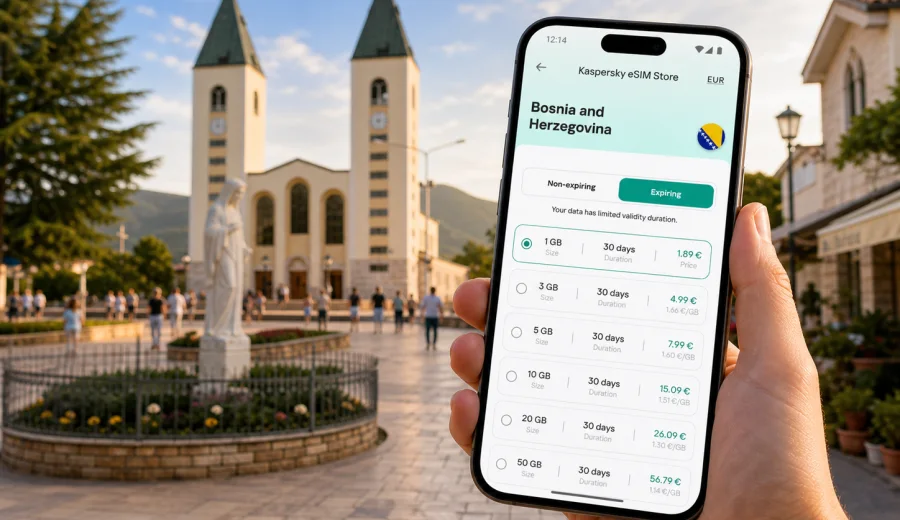
Medjugorje eSIM: mobile connection and internet for your trip
Medjugorje is a compact town, but a trip there can involve several moving parts: an international flight, a transfer through Herzegovina or Croatia, hotel check-in, walking routes between churches and hills, and day trips to nearby towns. With an eSIM, you can prepare mobile internet before the journey and avoid spending the first hour in Bosnia and Herzegovina looking for a physical SIM card or asking for Wi-Fi passwords.
This guide focuses on internet use in Medjugorje: arrival, local movement, maps, hotels, pilgrimage routes, business travel, stopovers, and short trips. It also explains how to choose an eSIM tariff for Bosnia and Herzegovina, what to check before purchase, and how Kaspersky eSIM Store can help you select, order, install, and activate an eSIM with a suitable data package.
Why mobile internet matters in Medjugorje
Medjugorje is not a large city with a dense metro system or digital kiosks at every corner. It is a pilgrimage and travel destination where visitors often move between the church area, guesthouses, cafes, the hills, local taxi points, and regional excursions. That makes mobile internet useful in smaller but very frequent moments.
You may need data to:
- send your arrival time to a host or group leader;
- open a map when the street name is unfamiliar;
- coordinate a taxi from Mostar, Sarajevo, Split, Dubrovnik, or another arrival point;
- translate a short message at a hotel, cafe, shop, or taxi stand;
- check opening times, service schedules, or meeting points;
- keep family updated during a pilgrimage or group tour;
- use banking, email, or messenger apps during a business stop;
- manage tickets, bookings, and travel documents stored online.
Public Wi-Fi can help in a hotel or cafe, but it does not cover the full trip. You may need internet while walking to St. James Church, finding the path to Apparition Hill, confirming a pickup, or checking a route toward Mostar. An eSIM gives you a mobile data option without changing your physical SIM card.
Arrival scenarios: where eSIM helps first
Many visitors do not arrive in Medjugorje by direct international flight. The route often includes a regional airport, a transfer, and the final drive into town. Mobile data is useful before you even reach your accommodation.
| Arrival route | Typical mobile internet need | Practical eSIM use |
|---|---|---|
| Mostar area | Short transfer, local directions, message to host | Open maps and confirm the exact guesthouse address |
| Sarajevo | Longer road journey, transport updates, family messages | Track the route and keep contacts informed |
| Split or Dubrovnik | Cross-border transfer, pickup coordination | Keep messenger and map apps available during the journey |
| Group pilgrimage bus | Meeting points, schedule changes, room allocation | Receive updates without depending on one group phone |
| Rental car | Navigation, parking, route changes | Use maps before entering narrow local streets |
In a group, one connected phone may seem enough. Personal mobile internet is still useful when people split up for a walk, visit a shop, return to the hotel at different times, or contact relatives independently.
Choosing an eSIM tariff for Medjugorje
For a Medjugorje trip, the first thing to confirm is the destination covered by the tariff. The city is in Bosnia and Herzegovina, so a country tariff for Bosnia and Herzegovina is the natural starting point. If your itinerary also includes Croatia, Montenegro, Serbia, or other European stops, compare whether a regional option fits the full route better than a single-country tariff.
When you compare tariffs, look at five details:
1. Destination. Check that Bosnia and Herzegovina is included.
2. Data volume. Match the package to how you use maps, video, calls, and messaging.
3. Validity period. Choose a duration that covers the full stay, including arrival and departure days.
4. Activation rules. Read when the validity period starts and what must be done before travel.
5. Device requirements. Confirm that your phone or tablet supports eSIM and is not locked to a mobile operator.
A short stay in Medjugorje may only need enough data for maps, messengers, email, and light browsing. A longer pilgrimage, a remote-work stay, or a road trip through Herzegovina may need more. Video calls, cloud photo backup, hotspot use, and streaming can consume data quickly, so it is better to estimate your habits before choosing a package.
How much data you may need
Exact usage depends on your apps and habits, but the following travel scenarios can help you think clearly before choosing a tariff.
| Trip style | Likely data use | What to plan for |
|---|---|---|
| One or two days in Medjugorje | Maps, messaging, hotel check-in, quick searches | A modest data package may be enough |
| Pilgrimage group stay | Messaging, schedules, translation, family updates | Allow extra data for shared photos and video calls |
| Independent traveler | Navigation, taxi apps where available, bookings, research | Choose enough data for frequent map use |
| Remote-work visit | Email, documents, calls, hotspot as backup | Consider a larger package and keep hotel Wi-Fi as the main connection |
| Herzegovina route | Maps between Medjugorje, Mostar, waterfalls, nearby towns | Pick a tariff that covers the full country route |
For maps, download an offline area if your app supports it. Offline maps reduce data use, but live traffic, search, route changes, messaging, and booking confirmations still work better with active data.
Local movement: church, hills, hotels, and transport
Medjugorje is walkable in the central areas, yet mobile internet remains useful because visitors often move between specific points rather than simply wandering around. St. James Church, the area around the main square, Apparition Hill, Cross Mountain, guesthouses in quieter streets, and pickup points for excursions may all appear close on a map but feel less obvious after dark or in hot weather.
Mobile data can help you:
- confirm the walking route from your hotel to St. James Church;
- share a live location with companions when crowds are dense;
- translate short signs or messages;
- check whether a meeting point is at the church, a hotel, a bus stop, or a local agency office;
- look up a cafe or pharmacy without returning to the hotel;
- contact a driver if the pickup location changes.
Medjugorje also has a rhythm that differs from a typical city break. Early starts, evening services, quiet streets, group schedules, and hillside walks all make clear communication valuable.
When to prepare your eSIM
It is usually convenient to choose and install your eSIM before departure, while you still have stable home internet. You can then activate it according to the tariff instructions and switch mobile data to the eSIM when it is time to use it. Read the conditions carefully because the start of validity can depend on the selected tariff and activation process.
Before you leave, prepare this checklist:
- confirm that your destination is Bosnia and Herzegovina;
- check the length of your stay in Medjugorje, including transfer days;
- estimate your data use for maps, messengers, calls, and work;
- make sure your device supports eSIM;
- confirm that your device is not locked to one mobile operator;
- save hotel addresses and transfer details offline;
- keep your primary SIM active if you need bank texts or ordinary calls;
- install the eSIM while you have a stable connection.
Kaspersky eSIM Store is an app and website where you can choose, order, and activate an eSIM with a suitable mobile data tariff for a trip abroad. For this destination, you can choose an eSIM tariff for a trip to Medjugorje in Bosnia and Herzegovina and compare available options by data volume, validity period, and destination before you travel.
Device compatibility and installation
Not every phone supports eSIM, and some devices can be restricted by an operator lock. Before you buy a tariff, check your device and confirm that eSIM activation is available on your model. This is especially important if you are using an older smartphone, a phone purchased through a mobile operator, or a device bought in a market where eSIM support can vary by model version.
After purchase, follow the setup flow shown in your profile, app, or email. If you need platform-specific help, use the Android installation guide or the iOS installation guide. The exact screens can differ by device, but the basic logic is similar: add the eSIM profile, name it clearly, choose it for mobile data when needed, and check whether data roaming must be enabled for the eSIM profile.
Important points to remember:
- eSIM tariffs for travel usually focus on mobile internet;
- an ordinary phone number, voice calls, and SMS are not included unless the chosen tariff says so;
- you can use messenger calls and messages through mobile data;
- installation and activation can take several minutes;
- conditions depend on the selected tariff and local network availability;
- do not delete an activated eSIM profile unless you are sure it can be restored under the tariff conditions.
Practical Medjugorje use cases
| Situation | Why mobile data helps |
|---|---|
| First evening in town | Open the guesthouse address, message the host, and find food or a pharmacy after a long transfer. |
| Pilgrimage routes | Share location near St. James Church, Apparition Hill, or Cross Mountain and stay reachable if the group separates. |
| Hotel and guesthouse stays | Use a personal data option when Wi-Fi is slow, unavailable, or inconvenient for urgent travel tasks. |
| Business or volunteer work | Keep email, documents, and calls available, with trusted Wi-Fi reserved for larger files. |
| Regional routes | Navigate toward Mostar, the Neretva valley, nearby waterfalls, or onward road trips while checking tariff coverage for any border crossing. |
How to reduce data use without losing convenience
Use a few simple habits during your Medjugorje stay:
1. Download offline maps for Medjugorje and the wider Herzegovina area.
2. Disable automatic cloud photo and video backup on mobile data.
3. Update apps before travel, not during the trip.
4. Use hotel Wi-Fi for large downloads if the network is stable and trusted.
5. Track remaining data in your phone settings or app profile.
What to check before you rely on eSIM in Medjugorje
Before your trip, review the details that can affect mobile internet:
- Device support. Your phone must support eSIM.
- Operator lock. A locked phone may not accept another mobile profile.
- Validity period. Make sure the tariff covers arrival, stay, and departure.
- Activation timing. Read when the data package becomes active.
- Data roaming setting. Some eSIM profiles require data roaming to be enabled for mobile data.
- Primary SIM settings. Keep your home number active only if you need it, and check settings to avoid unintended roaming use.
- Hotspot use. If you plan to share data with a laptop or another phone, confirm whether your tariff and device settings allow it.
If you use dual SIM settings, name the eSIM profile clearly, such as "Travel data" or "Bosnia data." That makes it easier to select the right line for mobile data and keep your primary SIM for calls or bank confirmations if needed.
FAQ: eSIM and mobile internet in Medjugorje
Is Medjugorje covered by a city-specific eSIM?
Usually you should look for a country tariff that covers Bosnia and Herzegovina rather than a city-only tariff. Medjugorje is the city focus of your trip, but the mobile data package is normally selected by country or region.
Should I install the eSIM before arriving?
Installing before departure is often more convenient because you can use a stable home connection and read the setup steps calmly. Activation rules depend on the selected tariff, so check the instructions before travel.
Can I use eSIM for calls and SMS?
Travel eSIM tariffs commonly focus on mobile data. Voice calls, SMS, and a regular phone number are not included unless the tariff specifically states otherwise. For calls and messages, you can use internet-based apps through mobile data.
Will eSIM replace hotel Wi-Fi?
It does not need to replace hotel Wi-Fi. Think of it as mobile internet for moments when Wi-Fi is unavailable, inconvenient, slow, or not where you need it: during transfers, walks, meetings, and day trips.
Is eSIM useful for a short Medjugorje stopover?
Yes, especially if you need maps, transfer coordination, and messages during a tight schedule. A short stopover often has little room for setup delays, so preparing mobile data before arrival can be practical.
Final checklist before your Medjugorje trip
Before you leave, make sure you can answer these questions:
- Does my phone support eSIM?
- Is the device unlocked for another mobile profile?
- Does the selected tariff include Bosnia and Herzegovina?
- Does the validity period cover transfer days as well as the stay?
- Have I saved my hotel address, transfer details, and key contacts?
- Do I understand when the eSIM activates and when data use starts?
- Have I chosen which SIM will handle mobile data, calls, and messages?
Medjugorje is easier to navigate when your mobile internet is ready before you need it. With Kaspersky eSIM Store, you can review available options, select a suitable data package for Bosnia and Herzegovina, and prepare your eSIM before the journey. To keep maps, messengers, bookings, and travel details available during your stay, prepare an eSIM tariff for Medjugorje and Bosnia and Herzegovina before you travel.