
Travel connectivity guide
Melbourne eSIM: Internet for Your Trip
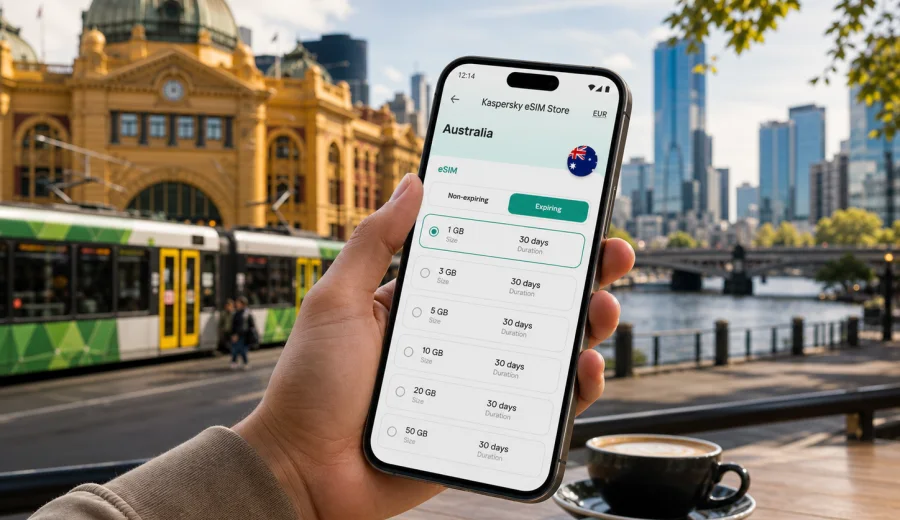
Melbourne eSIM: mobile connection and internet for your trip
Melbourne is a city where mobile internet becomes useful before you have even left the airport. You may need a rideshare code at arrivals, a map for the route into the city, a message to your hotel, a train update, or a calendar check before a meeting in the Central Business District. An eSIM can help you prepare that connection before your trip, so you are not trying to solve mobile data, airport Wi-Fi, and transport at the same time.
This guide focuses on Melbourne, not Australia in general. It covers arrival at Melbourne Airport, movement around the city, hotels, business trips, day trips, stopovers, and the practical details that matter when you want internet access without buying a physical SIM card after landing.
Why eSIM is useful in Melbourne
Melbourne is spread across a large metropolitan area. The CBD, Docklands, Southbank, St Kilda, Carlton, Richmond, Fitzroy, South Yarra, and airport corridor all create different travel scenarios. You might spend one day walking between laneways and galleries, the next day taking a tram to a meeting, and the weekend going to the Great Ocean Road or the Yarra Valley. In each case, mobile data helps you handle the small decisions that make the trip smoother.
Common moments when an eSIM can help:
- checking transport options after landing at Melbourne Airport;
- using maps between the airport, Southern Cross Station, and your hotel;
- calling a rideshare or taxi from a pickup zone;
- receiving hotel check-in messages and entry codes;
- using messaging apps with colleagues, hosts, or family;
- checking restaurant bookings, event tickets, and museum times;
- navigating tram routes, train changes, and walking directions;
- joining video calls during a business trip;
- using translation, banking, and travel apps when needed.
Arrival at Melbourne Airport
Most international visitors arrive through Melbourne Airport, often called Tullamarine. The airport is northwest of the city, so your first online tasks usually happen before you reach the CBD. You may need to confirm the address of your hotel, check traffic, message a driver, or decide whether to take a coach, taxi, or rideshare.
An eSIM is useful at this stage because you can install it before departure and activate it when appropriate for your chosen tariff. Once the plan is active and your phone is set up correctly, you can use mobile data for essential arrival tasks without looking for a local physical SIM card.
First-hour checklist for Melbourne:
- switch mobile data to the eSIM profile if it is already installed and ready;
- keep your primary SIM available for calls or SMS if you need it for banking codes;
- confirm your hotel address and check-in time;
- download or refresh your map route before leaving the terminal;
- check pickup instructions for rideshare, taxi, or airport transfer;
- keep a small amount of battery for the trip into the city.
Moving around the city
Melbourne's transport mix includes trams, trains, buses, walking routes, rideshare, taxis, cycling paths, and airport transfers. The tram network is one of the city's most recognizable features, but visitors still need live directions, stop names, and timing. Streets can also change quickly around events, construction, and weather.
For a short city stay, mobile internet is helpful for:
- checking whether walking or tram is faster for a specific route;
- finding the correct tram stop in the CBD or nearby suburbs;
- following train changes between the city loop and outer districts;
- confirming rideshare pickup points after dinner or events;
- checking walking routes through laneways and arcades;
- adjusting plans when rain, heat, or wind changes your route.
The city is very walkable in central areas, but hotel locations can be deceptive on a map. A stay in Docklands, Southbank, East Melbourne, or South Yarra may be close to the CBD by distance, yet still require the right bridge, tram stop, or train connection. Mobile data helps you make those choices in real time.
Where connectivity matters most in Melbourne
Different districts create different data needs. A visitor going to galleries and cafes will use mobile internet differently from someone attending a conference or working between meetings.
| Area or scenario | Why mobile data helps | Practical use |
|---|---|---|
| CBD and laneways | Dense streets and small entrances can be confusing | Maps, restaurant bookings, walking routes |
| Southbank and Docklands | Hotels, offices, river walks, and event venues are spread out | Rideshare pickup points, meeting messages |
| Carlton and Fitzroy | Cafes, bars, shops, and side streets invite spontaneous plans | Reviews, maps, messaging |
| St Kilda | Beach, tram routes, evening plans, and weather checks matter | Transport timing, booking changes |
| Melbourne Airport | First route decisions happen before you know the city | Transfers, hotel contact, maps |
| Business districts | Timing and reliability matter more than sightseeing | Calendar, email, video calls |
| Day trips | Routes can move outside the city core | Navigation, bookings, family updates |
Choosing an eSIM tariff for a Melbourne trip
For a Melbourne city article, the right eSIM destination is Australia. Melbourne is in Australia, so your plan should match the country where you will use mobile data, unless your route also needs a regional or global option. The most practical choice depends on your trip length, data habits, and whether you will travel outside Victoria.
Think through four questions before you choose:
1. How many days will you be in Melbourne?
2. Will you also visit Sydney, Brisbane, Adelaide, Perth, Tasmania, or regional Victoria?
3. Will you mostly use maps and messaging, or will you stream, upload photos, and join video calls?
4. Do you need data immediately at arrival, or only after reaching your hotel?
Light users often need mobile data for maps, messaging, bookings, and transport. Business travelers may need more data for email attachments, video meetings, cloud documents, and hotspot use.
If you want to prepare before departure, you can choose an eSIM tariff for your Melbourne trip in Kaspersky eSIM Store and review the available data amounts, validity period, destination, and price before you travel. Kaspersky eSIM Store is an app and website that helps you choose, arrange, and activate an eSIM with a suitable data plan for mobile internet during an international trip.
Data planning by travel style
The best data amount is not the same for every visitor. Melbourne can be a short stopover, a week of sightseeing, a conference destination, or the start of a longer Australian route.
| Trip style | Typical mobile internet use | What to consider |
|---|---|---|
| One-day stopover | Maps, transport, messages, boarding updates | A compact plan may be enough if you avoid streaming |
| Long weekend | Maps, restaurants, tickets, photos, messaging | Choose enough data for several active city days |
| Business trip | Email, calendar, cloud apps, video calls | Check data volume and whether hotspot use matters |
| Family holiday | Navigation, messaging, bookings, translation, shared plans | Keep extra data for route changes and group coordination |
| Australia route | Melbourne plus other cities or regions | Make sure the plan fits the full country itinerary |
To control usage, download large files on trusted Wi-Fi before travel, save maps for offline use, reduce automatic photo backup on mobile data, and check app updates are not set to download over cellular data. These small settings can make a modest plan last longer.
Installing and activating eSIM
You can usually prepare an eSIM before leaving home, then activate it according to the instructions for the selected tariff. The exact steps depend on your device and operating system, so follow the product instructions rather than guessing from memory.
Before buying, check your device to confirm that it supports eSIM and is not locked by an operator in a way that prevents using another mobile profile. This is especially important if you are using an older phone, a carrier-financed device, or a phone bought in a market where eSIM support varies by model.
Basic setup flow:
1. Choose Australia as the destination for a Melbourne trip.
2. Select a tariff by data amount, validity period, and price.
3. Complete the purchase and open the eSIM details in your profile or app.
4. Install the eSIM on a compatible device.
5. Set the eSIM as the mobile data line when you are ready to use it.
6. Turn on data roaming for the eSIM if the instructions for your plan require it.
7. Keep your primary SIM available if you still need calls, SMS, or banking verification.
For setup details, use the Android installation guide or the iOS installation guide. Installation and connection can take a few minutes and may depend on your device settings and the local mobile network.
What to check before you fly
The strongest eSIM setup is done calmly before travel. Do not wait until you are standing in the arrivals hall with low battery, a tired family, and a hotel address in another app.
Check this before your Melbourne trip:
- your phone supports eSIM;
- the device is not locked to one operator;
- you understand when the tariff validity starts;
- you know whether ordinary voice calls and SMS are included, because many travel eSIM tariffs are data-only unless stated otherwise;
- you have saved the installation instructions;
- you have a stable internet connection while installing the eSIM;
- your primary SIM remains available if you need SMS codes;
- your phone has enough battery for arrival and transfer.
It is also useful to name the eSIM profile clearly, for example "Australia data" or "Travel data". This makes it easier to switch the correct line on and off, especially if your phone already has multiple SIM profiles.
Business trips to Melbourne
Melbourne is a frequent destination for conferences, education, finance, technology, healthcare, sport, and creative industries. Business travelers often need mobile internet less for sightseeing and more for predictable coordination: calendar changes, messaging, meeting locations, cloud documents, rideshare receipts, and last-minute venue updates.
For business travel, consider a data allowance that covers:
- email attachments and cloud documents;
- messaging with local hosts and colleagues;
- maps between the airport, hotel, meeting rooms, and dinner venues;
- calendar updates during the day;
- video calls if you cannot rely on office or hotel Wi-Fi;
- hotspot use for a laptop, if allowed by your device and tariff conditions.
If your schedule includes meetings across the CBD, Southbank, Docklands, Richmond, and university areas, live navigation can save time. Entrances, towers, meeting rooms, and event venues are not always obvious from the street.
Hotels, apartments, and digital check-in
Many Melbourne stays are easy once you are inside the property, but the arrival process may require mobile internet. Serviced apartments, boutique hotels, and short-stay rentals can use confirmation emails, app messages, access codes, parking instructions, and after-hours check-in steps.
Use mobile data for:
- confirming the exact entrance, not just the street address;
- sending your arrival time if the property asks for it;
- opening booking details without relying on lobby Wi-Fi;
- contacting the host or reception if the door code fails;
- finding nearby shops, pharmacies, or food after check-in;
- checking the route to your first meeting or activity.
Save key details offline too. An eSIM is useful, but good travel preparation includes backups: screenshot the address, booking number, and emergency contact. That way, a low-battery phone or temporary indoor signal issue does not become a bigger problem.
Stopovers and short visits
Melbourne is sometimes a stopover before another Australian city, Tasmania, New Zealand, or a regional route. If you have only a few hours or one night, mobile data helps you avoid wasting time on setup after arrival.
A short-stay data plan is useful for:
- checking baggage and onward flight updates;
- finding a fast route into the city;
- storing your luggage and navigating to a cafe or meeting point;
- using maps for a compact walk around the CBD, river, or gardens;
- messaging your next accommodation or travel contact;
- checking the route back to the airport.
For a stopover, the aim is not heavy data use. It is confidence: you can move, decide, and adjust plans without searching for Wi-Fi at every step.
Trips from Melbourne
Many travelers use Melbourne as a base for wider travel. Popular routes can include the Great Ocean Road, Phillip Island, Mornington Peninsula, Yarra Valley, Ballarat, Geelong, or onward flights to other Australian cities. These routes make mobile data valuable for navigation, booking changes, weather checks, and communication.
When planning trips outside the city, keep these points in mind:
- download offline maps before long drives;
- check your plan's destination and validity period;
- avoid relying on mobile data as your only navigation backup in remote areas;
- keep accommodation and booking details saved offline;
- monitor data use if you upload photos or videos during the day;
- carry a power bank if you use maps for several hours.
An eSIM can support the practical parts of the route, but coverage and performance depend on local networks and conditions. For longer regional drives, offline preparation remains important.
Practical data-saving tips in Melbourne
Melbourne is full of moments that encourage phone use: food searches, tram times, weather changes, photo uploads, event tickets, and messaging. You can reduce unnecessary data use without making the trip less convenient.
Use this checklist:
- download maps for central Melbourne before departure;
- keep hotel, flight, and ticket PDFs stored offline;
- pause automatic cloud backup on mobile data;
- update apps before you travel;
- use hotel Wi-Fi for large downloads when it is available and trusted;
- set messaging apps to download media only on Wi-Fi;
- monitor data usage in your phone settings;
- keep video streaming for Wi-Fi when possible.
For most city tasks, maps and messaging use less data than video. The biggest surprises usually come from automatic backups, app updates, cloud sync, and high-resolution uploads.
Quick summary
For a Melbourne trip, an eSIM is most useful when you want mobile internet ready for arrival, transport, navigation, check-in, business coordination, and day trips. Choose Australia as the destination, check device compatibility before buying, install the eSIM while you have stable internet, and review the tariff conditions for data amount, validity, and activation timing.
Kaspersky eSIM Store helps you prepare an eSIM with a suitable data plan for an international trip. It does not replace a local phone number unless a specific tariff says so, and many travel eSIM options are focused on mobile data. For calls and messages, you can often use internet-based apps over the data connection.
FAQ
Do I need an eSIM specifically for Melbourne?
No. For Melbourne, choose an eSIM tariff that covers Australia. The city matters for planning your arrival, transport, data volume, and travel scenarios, but the country is the relevant destination for the plan.
Can I install eSIM before I arrive in Australia?
In many cases, yes. You can prepare the eSIM before travel and activate it according to the instructions for your selected tariff. Check the validity start rules before you activate it.
Will eSIM give me a local Australian phone number?
Not necessarily. Many travel eSIM tariffs are data-only unless the tariff conditions state otherwise. If you need calls or SMS, check the details before purchase and keep your primary SIM available if needed.
Is eSIM useful if my hotel has Wi-Fi?
Yes, because much of the trip happens outside the hotel: airport transfer, transport, walking routes, check-in messages, restaurant bookings, meetings, and day trips. Hotel Wi-Fi is useful, but it does not cover the moments between places.
What if my phone does not support eSIM?
Use a different compatible device or consider another connection option for your trip. Always check eSIM support before buying a tariff, because an eSIM cannot be used on a device that does not support it.
How much data should I choose?
For light use, maps and messaging may need less data. For business travel, hotspot use, video calls, frequent photo uploads, or a longer Australia route, choose a larger allowance. The right amount depends on your habits and trip length.
Prepare mobile internet for Melbourne
Before your flight, decide how you will stay online during the first hours in Melbourne. Check your device, choose Australia as the destination, review data amount and validity, and install the eSIM while you still have a stable connection.
When you are ready, you can select an eSIM tariff for travel to Australia in Kaspersky eSIM Store and prepare mobile internet for your Melbourne arrival, city transport, hotel check-in, meetings, and trips beyond the city.