Travel connectivity guide
Mellieha eSIM: Mobile Connection and Internet Guide
Mellieha eSIM: Mobile Connection and Internet Guide
Mellieha is a practical base for northern Malta. The town sits above the coast, with Mellieha Bay, the Marfa Peninsula and the ferry terminal at Cirkewwa spread around it. A single visit can include the village centre, a sandy beach, a coastal viewpoint and a trip towards Gozo. Because these places are connected by hills and roads rather than one compact grid, mobile internet is useful from arrival onwards.
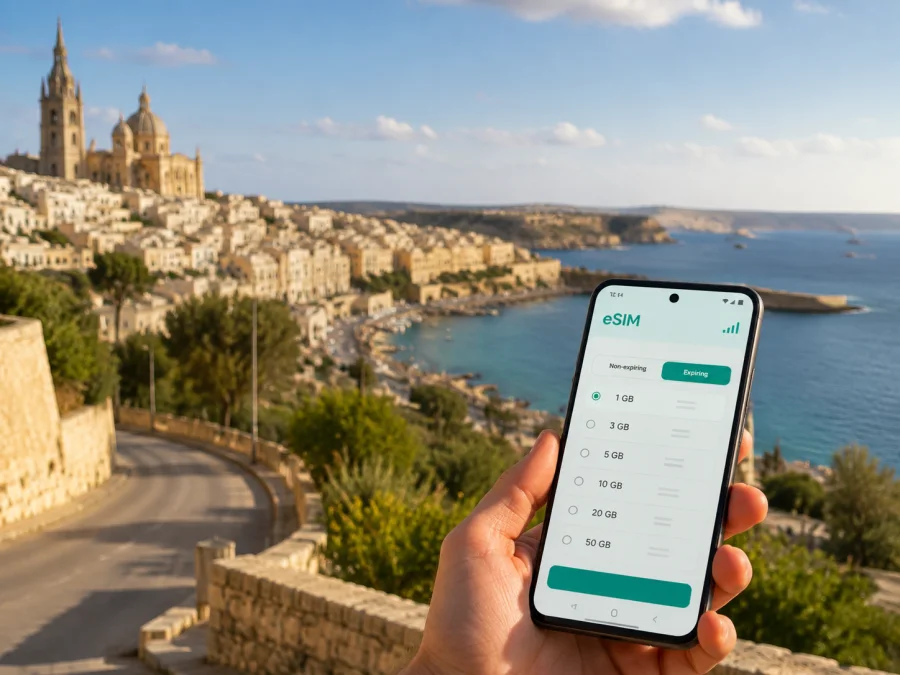
An eSIM is a digital SIM profile installed on a compatible phone without removing your physical SIM. In Mellieha, mobile data can help with maps, bus information, hotel messages, translation, online bookings and calls through internet messengers. Kaspersky eSIM Store is an app and website that helps you choose, order and activate an eSIM tariff for mobile internet during an international trip. You select the destination, review the traffic allowance and validity, then install the profile on your device.
This guide covers arrival from Malta International Airport, accommodation areas, movement between the hills and coast, work trips, short stopovers and excursions from Mellieha. Tariff conditions can change, so check the destination, data volume, validity and activation terms before choosing a plan.
Why mobile data is useful in Mellieha
Mellieha is not a compact, level city. The parish area, beaches, rural paths and northern roads are close in a regional sense, but a short route can still include a slope, road crossing or wait for a bus. A connected phone helps you make decisions outside the hotel.
Use it to:
- find a hotel entrance or meeting point;
- check a bus route after leaving the beach;
- open ferry, excursion or accommodation messages;
- translate a sign or menu;
- share your location with companions;
- confirm a business meeting and navigate to it;
- adjust plans when traffic, weather or timing changes.
You might begin near the parish church, descend to the bay, continue towards the Red Tower and finish near Cirkewwa. Mobile data supports each small transition, especially when you are carrying luggage or travelling after dark.
Arrival from Malta International Airport
Most international visitors enter Malta through Malta International Airport. From arrivals, you can reach Mellieha by taxi, private transfer, rental car or public transport. Your choice depends on luggage, arrival time, accommodation address and plans for the day.
Malta Public Transport lists Airport Direct route TD1 between the airport, Rabat, Bugibba, Mellieha and Cirkewwa. The operator lists TD1 as running every hour; check the latest schedule before travelling. The airport bus terminal is signposted after the arrivals area. Allow time for luggage and the walk from the stop to your property.
Before leaving the terminal, save:
- The exact accommodation address and check-in instructions.
- A map pin for the entrance, not just the property name.
- The bus stop or transfer pickup point.
- A message thread for reception, a host or driver.
- A backup route.
An active travel eSIM lets you verify the journey as you go. If your accommodation is on a narrow or sloping street, a map may lead to the closest road rather than the door. Read the final walking section before getting off the bus and keep the address available offline.
A simple arrival sequence
After landing, connect the eSIM to mobile data while keeping your home line available for the calls or messages you need. Check the route and next departure. For a taxi or transfer, confirm the meeting point rather than assuming the vehicle can stop outside the hotel.
When you reach Mellieha, remember that an apparently short walk can be uphill. With heavy bags, a short taxi ride from a stop may be more practical than carrying them up a slope.
Choose accommodation by area
“Mellieha” can mean several useful bases. A property near the village centre is different from a resort by the bay or a hotel close to the northern ferry route. Read the exact address before booking.
| Area | Suits | Useful mobile-data tasks |
|---|---|---|
| Village and parish centre | Restaurants, local atmosphere and a hillside base | Walking routes, host messages and evening travel |
| Mellieha Bay | Swimming days, family stays and sea access | Beach-to-hotel navigation and meeting points |
| Marfa Peninsula | Quieter scenery and coastal walks | Trail routes, location sharing and return planning |
| Near Cirkewwa | Early ferry departures and Gozo connections | Ferry information and transport coordination |
| Road towards Manikata and Golden Bay | Rural-feeling stays and western beaches | Car routes, bus stops and pickup locations |
Confirm access, parking, stairs and distance to the closest stop. A listing “near Mellieha” may actually be near the beach, village or northern road.
Buses, cars and walking
Public buses are often convenient if you do not want to drive. Check the current route on the day, allow extra time during busy periods and identify the final stop. A direct-looking journey can take longer because of traffic and the island’s roads.
Walking is rewarding in the centre, but elevation matters. Wear suitable shoes and save key map areas before leaving the hotel. A rental car helps combine beaches, viewpoints and Cirkewwa, but adds parking and narrow-road decisions. Save the parking location and accommodation address. Taxis and transfers are useful with luggage or an early departure; mobile data helps you confirm the exact pickup point.
| Plan | Practical option | Keep ready |
|---|---|---|
| Airport to hotel | Bus, taxi or transfer | Address, stop and backup route |
| Village and viewpoints | Walking with short bus or taxi sections | Map pin and walking route |
| Mellieha Bay day | Bus, taxi or car | Return route and meeting point |
| Northern coast and Cirkewwa | Bus, car or excursion | Ferry details and return plan |
| Several distant stops | Planned transport or rental car | Saved stops and parking location |
A practical Mellieha itinerary
One day: village, bay and viewpoint
Start in the village centre and mark the next stop before descending. Mellieha’s elevated position gives a different perspective from the coast. Continue to Mellieha Bay, also known as Ghadira Bay. Visit Malta describes it as Malta’s largest sandy beach. Use your phone for the route, group messages and the return stop, then put it away for the beach itself.
If time and conditions allow, continue towards the Red Tower or another northern viewpoint. Visit Malta highlights the Red Tower among Malta’s coastal signal towers, and the Marfa area gives a broad view of the north. Check walking distance, heat and the return route before setting off; not every road is comfortable for pedestrians.
Two days: Popeye Village and the coast
Use a second day for Popeye Village, the film set in Mellieha, and nearby coastal scenery. Check current visitor information before going, since access and admission arrangements can change. Mobile data is useful for the entrance route, return stop and meeting points.
Three days or more: northern trips
Give one day to the village and bay, another to the Marfa Peninsula and northern coast, and another to Gozo or Comino if they are part of your plans. Valletta, Mdina or a business meeting elsewhere on Malta can be added, but leave a realistic buffer for cross-island travel.
Choose an eSIM for the whole route
Consider more than the hotel. If your itinerary includes the airport, Mellieha, Cirkewwa and other parts of Malta, check that the chosen destination and coverage conditions match the places you intend to visit. Kaspersky eSIM Store helps you choose an eSIM tariff for a trip to Malta by showing the available destination and plan details in the selection flow.
There is no universal data amount. Estimate by activity:
| Pattern | Likely use | Planning approach |
|---|---|---|
| Light | Messages, email and occasional maps | Save maps and use data outdoors |
| Balanced holiday | Navigation, searches, photos and messengers | Allow room for route changes |
| Work trip | Email, documents, calls and hotspot use | Include meetings and contingency time |
| Multi-stop trip | Maps, tickets, photos and booking changes | Review usage during the day |
The displayed traffic allowance, validity period and price are the relevant conditions. A short visit can use substantial data for navigation and calls, while a longer stay can use little if you save maps and limit video. Choose according to your habits in Mellieha.
Check your device before travel
Verify that your phone supports eSIM and is not restricted by an operator lock. Support can vary by model, market and regional version. If you use a work phone, check whether its settings permit adding a mobile plan. Check your device compatibility before completing the purchase.
Also confirm that the phone has enough battery, you have a stable connection for downloading the profile, activation details are accessible and you know which line will handle data. If two SIMs are active, label them clearly and turn off automatic data switching if available.
Install and activate an eSIM
Complete setup with a stable connection. Do not delete an existing eSIM unless you understand the result; a profile may not be transferable after activation under the selected tariff’s terms.
1. Prepare the phone
Charge the device, connect to Wi-Fi and open the eSIM details in Kaspersky eSIM Store. Keep the QR code or activation information ready. If the code is on the same phone, use manual entry if the device offers it.
2. Add the mobile plan
Open mobile-network settings, choose the option for adding a mobile plan or eSIM, then scan the QR code or enter the requested details. Label the line “Malta travel data”.
3. Select the data line
Choose the travel eSIM for mobile data. Keep the primary line for the functions you need. Enable data roaming for the travel eSIM if the tariff requires it; this is different from enabling roaming on your home line.
4. Activate at the right time
Install before departure or after landing according to the tariff terms, and read when validity begins. After arrival, allow the phone a few minutes to register. If data does not start, check the selected line, roaming setting, signal and activation conditions.
For device-specific help, use the Android installation instructions or the iOS installation instructions.
Setup checklist
- [ ] eSIM support and operator-unlock status are confirmed.
- [ ] The plan applies to the Malta itinerary.
- [ ] The QR code or profile details are ready.
- [ ] The travel line is labelled and selected for data.
- [ ] Roaming is enabled there if required.
- [ ] Usage, validity and support details are easy to find.
Work trips and short stopovers
For a business stay, prepare the meeting address, route and documents before leaving a stable connection. Use a messenger or business app for calls over data; do not assume a travel eSIM includes an ordinary number, voice calls or SMS unless the tariff says so.
For a one-night stopover, prepare the eSIM before the flight, save the airport-to-Mellieha route and hotel address, choose a plan for maps and work, keep the onward route visible and leave a time buffer. Confirm any early ferry or airport pickup with the accommodation.
Trips from Mellieha
Cirkewwa is the departure point for the Gozo Channel ferry between Malta and Gozo. Gozo Channel states that the service runs between Cirkewwa and Mgarr, subject to favourable weather and operational conditions, and carries foot passengers and vehicles. Check current information before travelling. Mobile data helps with routes, meeting points, revised departures and the return to Mellieha.
Boat trips towards Comino and other northern locations also depend on season, provider and weather. Confirm the specific activity’s meeting point and return arrangement rather than relying on a fixed assumption.
Troubleshooting
If data is not working, keep the profile installed and check the travel eSIM is on and selected for data. Confirm whether roaming is required, look for a usable signal, briefly toggle airplane mode and wait for registration. If the wrong SIM uses data, disable automatic switching. If usage is high, review video, backups, updates and hotspot activity; use suitable Wi-Fi for large downloads and follow the tariff’s stated top-up process if available.
Frequently asked questions
Is an eSIM useful for a stay in Mellieha?
Yes, if your phone supports it and you need data for arrival, navigation, transport, messages or work. Mellieha combines a hillside town with beaches and northern routes.
Will the eSIM include a phone number?
Not necessarily. These eSIM tariffs are intended for mobile internet during international travel; ordinary calls and SMS are not included unless the specific conditions say so. Use internet messengers when needed.
Is Kaspersky eSIM Store a mobile operator?
No. It is an app and website that helps you choose, order and activate an eSIM tariff for mobile internet during an international trip. The purchase flow shows the selected tariff’s allowance, validity and service conditions.
Choose your travel data plan
Prepare your address, routes and transport plan before travel. Choose an eSIM tariff that matches how you will use maps, messages, work tools and bookings across Malta. Kaspersky eSIM Store helps you review options and activate the selected eSIM on a compatible device.
Choose an eSIM tariff for your Malta trip and complete the setup before you need directions in Mellieha. Check the terms and label the data line clearly.


