
Travel connectivity guide
Mendoza eSIM for Mobile Internet Travel
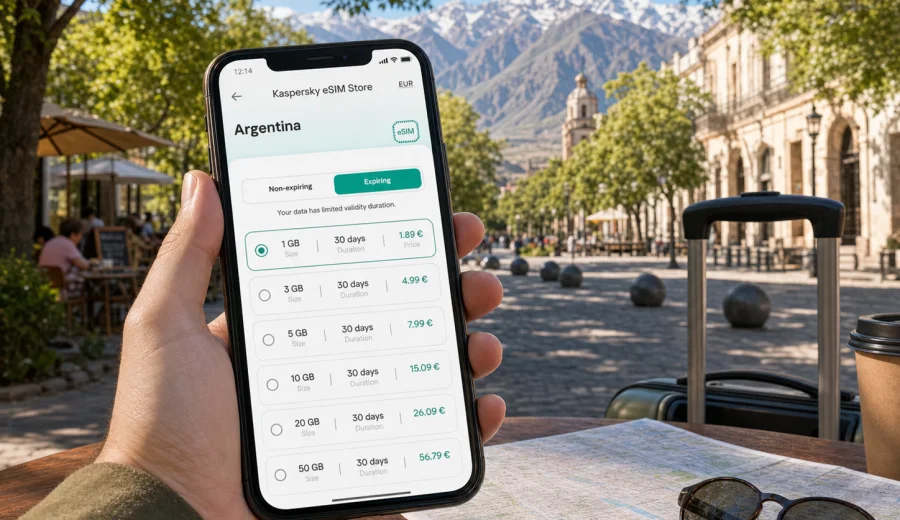
Mendoza eSIM: mobile connection and internet for your trip
Mendoza is a city where travel depends heavily on maps, messages and quick decisions. You may arrive for wine tours, meetings, a stop before crossing the Andes, or a few days of slow walks around leafy squares. In each case, mobile internet is useful from the first hour: to find your transfer, confirm a hotel booking, follow a route to Chacras de Coria or Maipu, translate a menu, check opening hours and stay in touch with people waiting for you.
An eSIM can make that part of the trip easier. Instead of looking for a physical SIM card after landing, you can prepare a digital SIM profile for Argentina, install it on a compatible phone and use mobile data for the everyday travel tasks that make Mendoza smoother. Kaspersky eSIM Store is an app and website where you can choose, arrange and activate an eSIM with a suitable data plan for mobile internet during an international trip.
This guide focuses on Mendoza city and the routes around it: the airport, central districts, wineries, business stays, transport, day trips and onward travel. It is not a general guide to Argentina. The goal is practical: how to plan your connection before you arrive and how to use it without confusion while you move around Mendoza.
Why mobile internet matters in Mendoza
Mendoza is easy to enjoy, but it is spread out enough that offline planning can become inconvenient. The city center, Aristides Villanueva nightlife area, Parque General San Martin, Godoy Cruz, Chacras de Coria, Maipu and Lujan de Cuyo are all part of common visitor routes. You may move between them by taxi, rideshare, private transfer, rental car, bike tour or public transport.
Reliable mobile data helps with simple tasks that quickly become important:
- checking the route from Governor Francisco Gabrielli International Airport to your accommodation;
- messaging a hotel, host or driver when your flight time changes;
- opening maps in areas where streets, canals and park roads can look similar;
- managing wine tour pickup times and meeting points;
- checking restaurant reservations around the center or Aristides;
- using translation apps when speaking with drivers, staff or tour operators;
- sharing your location with travel companions;
- checking weather before mountain routes or outdoor plans;
- keeping boarding passes, hotel details and payment confirmations accessible.
Public Wi-Fi can help in hotels, cafes and airports, but it is not always available exactly when you need it. Mobile internet on your own device reduces dependence on open networks and makes the first hours in the city less dependent on finding a counter, queue or password.
Arrival: airport, transfer and the first hour
Most international visitors reach Mendoza by connecting through Buenos Aires, Santiago or another regional hub. The airport is close to the city, but your first hour can still involve several small tasks: checking luggage status, contacting a driver, confirming the address, paying attention to the route and letting someone know you arrived.
If your eSIM is installed before the trip, you can switch mobile data to the eSIM after arrival, wait for the device to register on the available local network and then use maps or messages. Activation can take a few minutes and depends on the phone, the selected plan and the local network conditions, so it is better to avoid leaving setup until the moment you are already outside with bags and a driver waiting.
For a short arrival checklist, keep these items ready before you leave home:
| Travel moment | What mobile data helps you do | Why it matters in Mendoza |
|---|---|---|
| Before boarding | Save QR codes, hotel address and transfer details | You may need them before hotel Wi-Fi is available |
| On landing | Message your driver or accommodation | Flight timing can change and pickup points vary |
| Leaving the airport | Open a map and check the route | The airport is near the city, but traffic and route choice still matter |
| First evening | Find food, pharmacy or cash machines nearby | Many arrivals happen outside business hours |
Keep your primary SIM active for calls or SMS if you need it, and use the eSIM for mobile data. Many travel eSIM plans are data-focused and do not include a standard phone number, voice calls or SMS unless the plan conditions say otherwise. For calls, travelers often use messaging apps over mobile internet.
Choosing an eSIM data plan for Mendoza
For a Mendoza trip, the country behind the city is the key point: you need a plan that covers Argentina, not a city-specific product. The city focus matters for estimating usage. A weekend with hotel Wi-Fi and one wine tour needs less data than a remote-work stay, a rental car route through the Andes foothills or several days of video calls.
Use these questions before choosing:
1. How many days will you be in Mendoza?
2. Will you also visit Buenos Aires, Santiago-side routes, Patagonia or another Argentine region?
3. Will you use maps continuously in a rental car?
4. Do you need video calls, cloud documents or hotspot use for a laptop?
5. Will your hotel and winery visits provide reliable Wi-Fi, or do you prefer to rely on mobile data?
A light traveler may mostly use maps, messages, ride apps and quick searches. A business traveler may need calendar access, email, documents and video meetings. A road-trip traveler may use more navigation data and should download offline maps as a backup before leaving the city.
Local Mendoza scenarios where eSIM is useful
Mendoza is not only the city center. Many visitor plans involve short movements between neighborhoods and nearby towns, where a prepared eSIM becomes practical rather than just convenient.
| Mendoza scenario | Why mobile data helps |
|---|---|
| Plaza Independencia and central streets | Walking routes, opening hours and meeting points |
| Aristides Villanueva evenings | Restaurant changes, ride pickup points and group messages |
| Parque General San Martin | Navigation to viewpoints, museums and park entrances |
| Chacras de Coria, Lujan de Cuyo and Maipu | Winery addresses, pickup times and route checks |
| Business meetings | Email, documents, calendar updates and venue details |
| Mountain day trips | Weather checks and offline map preparation before leaving the city |
How much data to prepare
There is no single correct data amount for every Mendoza trip. Usage depends on how often you use navigation, media, cloud apps and hotspot sharing. The table below gives a practical way to think about it before selecting a plan.
| Traveler profile | Typical trip pattern | Data planning approach |
|---|---|---|
| Weekend visitor | Airport transfer, hotel Wi-Fi, restaurant searches, one tour | A smaller data package may be enough if you avoid heavy video |
| Wine traveler | Several transfers, route checks, photos, messaging with guides | Choose enough data for frequent maps and uploads |
| Business traveler | Email, documents, video calls, calendar and transport | Plan more data and confirm hotspot rules in the plan conditions |
| Road-trip visitor | Rental car, mountain roads, day trips beyond the city | Download offline maps and choose a plan with comfortable reserve |
When to set up your eSIM for Mendoza
The calmest approach is to choose and install the eSIM before departure, while you still have stable home Wi-Fi and time to read the plan conditions. Some travelers prefer to activate after landing, but installation should not be rushed at the airport if you can avoid it.
Before you choose a plan, check your device and make sure it supports eSIM. Also check that the phone is not locked to a mobile operator and that you know how to switch mobile data between SIM profiles. If your device does not support eSIM, you will need another option for mobile internet.
Once you know your device is compatible, you can view mobile internet options for Argentina and choose a data plan that fits the length and style of your Mendoza trip. Check the country or region covered by the plan, the amount of data, the validity period, when the plan starts counting down and whether top-up is available.
Installing and activating eSIM
The general setup is simple, but the exact screens depend on your device. After arranging an eSIM plan, the eSIM profile appears in your account or app, and you can follow the setup steps on your phone. Use a stable Wi-Fi connection during installation, especially before traveling.
For device-specific setup, follow the Android installation guide or the iOS installation guide. The main idea is to add the eSIM profile, give it a clear label such as "Travel" or "Argentina", and select it for mobile data when you want to use it abroad.
A practical setup sequence:
1. Check eSIM compatibility and operator lock status.
2. Choose an Argentina plan with enough data and validity for your Mendoza stay.
3. Install the eSIM profile while connected to Wi-Fi.
4. Label the eSIM clearly on your phone.
5. Keep your primary SIM for calls or SMS if needed.
6. On arrival, select the eSIM for mobile data.
7. Enable data roaming for the eSIM profile if the plan instructions require it.
8. Test maps, messaging and browser access before leaving the airport or hotel.
Do not delete the eSIM profile after installation unless you are sure you no longer need it. In many cases, an activated eSIM cannot simply be moved to another phone. If you change devices during the trip, review the plan conditions and support instructions before making changes.
Movement, hotels and day trips
Mendoza is comfortable for walking in central areas, but many useful places are not next door to each other. Taxis, rideshare services, local transport, private drivers and winery transfers all involve addresses, pickup points and timing. Mobile data helps you compare routes, message a driver and avoid waiting for hotel or cafe Wi-Fi before making a small change.
Keep a few details available offline as well: your hotel address, the name of each winery or meeting venue, a screenshot of pickup instructions and a downloaded map area for Mendoza. This is especially useful for Chacras de Coria, Lujan de Cuyo, Maipu, Uco Valley routes and mountain day trips toward Potrerillos or Uspallata. An eSIM prepares mobile data for the country you are visiting, but signal quality still depends on local network conditions, device settings and the selected plan.
For hotels, apartments and coworking spaces, use Wi-Fi for heavy tasks such as app updates, large uploads and streaming. Keep eSIM data for movement, maps, messages, urgent work and route changes. If you plan to use hotspot mode for a laptop, check the plan conditions first and remember that laptops can consume data much faster than phones.
| Before you go out | Why it helps in Mendoza |
|---|---|
| Download offline maps | Useful outside the center and on winery routes |
| Pause cloud photo backup | Preserves data after tours and scenic stops |
| Save pickup details | Helps when meeting points change |
| Keep a power bank | Navigation and photos drain battery quickly |
| Monitor data use | Prevents surprises during longer stays |
What to check before arranging a travel eSIM
Before you arrange an eSIM for Mendoza, review the practical details. Check that your phone supports eSIM, that it is not locked to one operator, that the plan covers Argentina, that the validity period fits your dates and that the data allowance matches your expected use. Also confirm whether the plan starts at installation or first network use, whether data roaming must be enabled for the eSIM profile and whether top-up is available.
This preparation matters more than choosing only by data size. A short stopover may need quick setup, maps and messages. A wine-focused itinerary needs route support and enough reserve for several transfers. A business stay needs dependable access to email, calendar, documents and meeting locations between hotel and venue.
FAQ
Is there a separate eSIM for Mendoza?
Usually you choose a plan for Argentina, because Mendoza is a city within Argentina. Check the plan coverage before arranging it.
Can I use eSIM for calls and SMS in Mendoza?
Many travel eSIM plans focus on mobile data and may not include a regular phone number, calls or SMS. Use internet-based messaging and calls if the plan is data-only.
Should I install the eSIM before I fly?
Installing before departure is usually more comfortable because you can use stable Wi-Fi and fix any setup issue calmly. Activation timing depends on the plan conditions.
Do I need offline maps if I have eSIM?
Yes, especially for winery routes and mountain day trips. Mobile coverage can vary outside central Mendoza.
Choose an eSIM plan for Mendoza travel
Mendoza is easier when your phone is ready before the first transfer, tour pickup or route change. Prepare your device, check eSIM compatibility, install the profile on Wi-Fi and choose a data allowance that fits your stay in the city and nearby wine regions.
Kaspersky eSIM Store helps you choose, arrange and activate an eSIM with a suitable mobile data plan for an international trip. Before you travel, choose an eSIM data plan for Argentina and keep maps, messages, bookings and travel details available throughout your Mendoza itinerary.