Travel connectivity guide
Mesaieed eSIM: Mobile Data for Qatar Travel
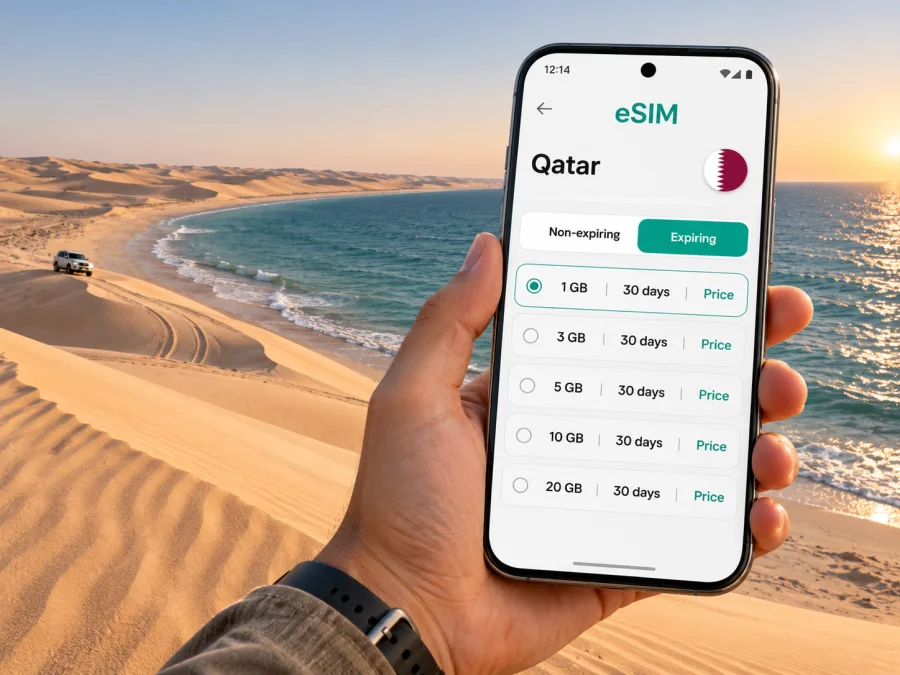
Mesaieed eSIM: Plan Your Mobile Connection and Internet on Qatar’s Desert Coast
Mesaieed is a useful base for a very different side of Qatar: industrial landmarks, open coastline and dunes that run towards the sea. A trip here can mean a transfer from Hamad International Airport, a work visit, a quiet stay near Sealine Beach or a guided journey into the Inland Sea. In each case, mobile data helps with the practical details: confirming a pickup, checking a map, messaging your host and keeping plans accessible while you are away from Doha.
An eSIM can give your compatible phone a separate data profile for travel, without replacing the physical SIM already in it. It is not a guarantee of reception in every location, especially on remote sand tracks or beside the water. Treat it as one part of your travel preparation: choose a plan that matches the full Qatar itinerary, check what it includes and save key addresses and contact details offline as well.
What to expect from a visit to Mesaieed
Mesaieed is in southeastern Qatar and is closely associated with the country’s energy industry. Visit Qatar describes the city as being surrounded by beaches and dunes, and highlights Sealine Beach and the Singing Sand Dunes among nearby attractions. This mix shapes the way visitors move around: some arrive for work, while others continue south for the coast or plan a desert excursion from the Mesaieed area.
The name “Mesaieed” may also appear in different transliterations, including “Messaied.” If you are arranging a driver, hotel transfer or meeting, compare the spelling on your booking with the destination shown in your map app. Save the exact pin or address before leaving a reliable connection. A short message with the map pin can be more useful than relying on a spelling match alone.
These are planning cues, not a promise about local mobile coverage. Reception and data performance can vary by operator, device, terrain, congestion and the precise location. An eSIM plan for Qatar can help with online tasks where the connected local network is available, but a signal map or plan label should not be read as a guarantee for a particular room, road or desert stop.
Getting to Mesaieed and navigating the last mile
Most international visitors begin at Hamad International Airport and continue by road. The airport is in Doha, north of Mesaieed. Before landing, make sure your onward transport is settled or that you understand how you will arrange it: confirm the meeting point, the driver’s name or contact method, the passenger count and the amount of luggage. When plans are time-sensitive, save that information in a note or screenshot so it remains available if mobile data is temporarily unavailable.
Mesaieed’s regional setting also matters when choosing transport. A route to a hotel or business address is different from a drive to Sealine and different again from a desert track towards Khor Al Adaid. Public transport information and schedules can change; use the current official journey-planning information on the day if you intend to use a bus. Do not assume a city-to-city service will take you to a beach access point or an off-road starting location. Confirm the last leg directly with your tour company or host.
Plan data around the actual itinerary
The best data allowance depends on what you will do, rather than on Mesaieed’s name alone. A short work trip with saved directions and occasional messages uses a different pattern from a holiday with frequent video calls, photo uploads and live navigation. A Qatar-wide travel plan can be relevant to this city, but check the plan’s actual destination, data amount, validity period, activation rules and any limitations before purchase. Conditions can differ between plans and can change over time.
A practical way to estimate your data need is to list the tasks you expect to do:
- Light use: messaging, occasional map checks, email and confirming transport. Save large files and entertainment before departure.
- Regular travel use: frequent navigation, web searches, ride or transfer coordination, social posts and some photo sharing.
- High use: video calls, cloud backups, streaming or uploading large files. These tasks can use data quickly, so check your settings and consider using trusted Wi-Fi for large transfers.
This is a usage framework, not a promise of a particular number of days per gigabyte. Apps consume different amounts of data, and background updates can add usage without an obvious prompt. Turn off automatic app updates and photo backup over mobile data if you want to conserve the allowance. Download maps, tickets, work documents and entertainment over a connection you trust before heading to a remote destination.
What a travel eSIM does—and what it does not
A data-focused travel eSIM gives your device an additional mobile data profile. It does not automatically replace your home number, and a plan may not include ordinary voice calls or SMS unless its terms explicitly say so. Keep your primary SIM enabled if you need calls or verification messages on that number, but review your home carrier’s roaming charges and set the correct line for mobile data. Messaging and voice apps can work over data when the relevant service is available and configured.
An eSIM also does not guarantee a signal everywhere in Qatar. Coverage depends on the network used by the specific plan and local conditions. In Mesaieed, the difference between a town address, a coastal location and an off-road excursion matters. Ask your tour operator how guests should stay in contact and follow their safety instructions. Do not treat a phone’s loss of signal as a substitute for local emergency guidance; share your itinerary and expected return time with someone before a remote outing.
Prepare your device before you leave
First, confirm that your exact phone model and regional variant support eSIM. A model name alone is not always enough: availability may differ by country variant, and a device can also be restricted by its original carrier. Check the manufacturer’s specifications for your exact model and verify that the phone is unlocked. You can also check whether your device supports eSIM before selecting a plan.
Next, check the plan’s installation and activation instructions. Installation and data use are separate: the current Qatar plan information says data consumption starts when the eSIM connects to a local network after arrival. If your trip starts later, review the scheduled-activation or non-expiring options shown for the selected plan. Read its terms rather than assuming when validity begins. Use a stable internet connection for installation, keep the QR code or in-app installation option accessible on another screen when required, and do not delete an installed eSIM profile unless the instructions or support team tells you to.
Installation checklist
- Confirm eSIM support for the exact regional model and that the device is not carrier-locked.
- Update the operating system if appropriate, and keep the phone charged.
- Check whether installation requires Wi-Fi or another active internet connection.
- Read when the data plan activates and when its validity period begins.
- Save the purchase confirmation and setup instructions somewhere accessible.
- Decide which SIM should handle mobile data and which should remain available for your usual number.
- Check the plan’s data-roaming setting instructions; enable roaming for the travel eSIM only if the plan requires it.
For step-by-step help, follow the Android eSIM installation instructions or the iPhone eSIM installation instructions. Menu names vary by operating-system version and manufacturer, so use the instructions that match your phone. After installation, keep your home line’s data roaming settings under control to avoid unintended charges.
Kaspersky eSIM Store is an app and website where you can choose, purchase and activate an eSIM plan for mobile data on an overseas trip. To compare current options for this itinerary, browse eSIM plans for Qatar and read the terms shown for the specific plan you are considering. The country page is a starting point for selection; it is not a claim that every plan has the same allowance or that service is available at every Mesaieed location.
Using mobile data around Mesaieed
In the built-up parts of town, use mobile data for the same practical tasks as elsewhere: navigation, messaging, work coordination, checking reservations and looking up nearby services. If you are visiting an industrial site, prepare the exact site name and visitor entrance before setting out. A broad map result may point to a company or facility rather than the gate where visitors are expected. Ask your contact to confirm where to report and whether there are any access procedures.
At Sealine Beach, the priorities are different. Save your return route and booking details before spending time by the water, and check arrangements for food, facilities, parking and any booked activity with the relevant provider. Visit Qatar describes Sealine as a beach in Mesaieed associated with swimming, camping and desert activities. Local services and activity availability can vary; verify details directly rather than relying on old social posts or a map listing.
The Singing Sand Dunes are a natural feature in the area, but the exact access point and conditions matter. Confirm the location with a local guide or tour provider and do not drive onto dunes without the appropriate vehicle, experience and permission. Navigation apps can help you reach a meeting point on a road; they cannot make an off-road route safe or replace a guide’s knowledge of terrain.
Inland Sea: plan beyond the signal bars
Khor Al Adaid, commonly called the Inland Sea, is a separate natural reserve in southeastern Qatar near the border with Saudi Arabia. Visit Qatar says it is about an hour’s drive from Mesaieed and Sealine Beach, and that there is no road leading directly to the site: reaching it requires a 4×4 and an experienced off-road driver. Arrange the excursion with a qualified operator, confirm pickup and return details, and follow current local advice. Do not treat this as a standard self-guided city drive.
Download essential information before leaving the built-up area: the operator’s number, meeting instructions, booking confirmation, any medical details you need, and a map of the route to the meeting point. Agree on what to do if the group is separated or a vehicle has a problem. Keep the phone protected from heat, sand and water, and carry a power bank if appropriate. A fully charged phone is useful, but it is not a substitute for the guide’s equipment or emergency plan.
Do not plan a desert trip around the expectation that mobile data will work throughout the drive. Terrain and distance can interrupt service, even if your phone showed a signal earlier in town. Keep your guide’s offline contact details available and tell someone not on the excursion when you expect to return. If your itinerary involves an overnight stay, confirm check-in and communication arrangements before leaving the main road.
Save these items on your phone before the trip:
- accommodation name, full address, booking number and telephone contact;
- worksite or meeting location, visitor entrance and local host’s details;
- transport booking, pickup point and driver contact, if provided;
- tour operator, excursion meeting point and return time;
- offline map for Mesaieed and the route to your next stop;
- copies of tickets, confirmations and essential travel documents.
Short stop, work visit or longer stay?
| Trip type | Useful preparation | eSIM planning |
|---|---|---|
| Short stopover | Confirm transfer timing and one clear destination; avoid trying to fit a remote excursion into a tight connection. | Install and test the profile before leaving the airport area where practical; keep map and booking details offline. |
| Business visit | Ask your host for the exact site entrance and visitor instructions; confirm how you will reach the location. | Estimate usage for messaging, email and work tools; check whether calls or SMS are included rather than assuming they are. |
| Coastal weekend | Confirm accommodation, transport and activity availability directly; save the return plan. | Plan for navigation and messages, while keeping offline directions in case service varies. |
| Desert excursion | Book an experienced operator and follow vehicle and safety guidance; share your route and return time. | Treat mobile data as helpful when available, not as the safety plan or the only means of contact. |
Troubleshooting if the eSIM does not connect
If mobile data is unavailable after arrival, work through the basics calmly:
- Check that the eSIM profile is installed and switched on in the phone’s mobile-network settings.
- Confirm that the travel eSIM is selected for mobile data, especially if your home SIM is also active.
- Review the plan’s activation conditions and validity start; installation alone may not mean that data is active.
- Follow the plan instructions for data roaming and network selection. Do not change several settings at once without noting the original values.
- Move to a location with a clearer signal, then restart the phone if the setup instructions recommend it.
- If it still does not work, connect to trusted Wi-Fi if available and contact the service’s support with your order details and device model.
A weak or missing signal in a particular remote location may reflect local coverage rather than a setup problem. Compare the result in a built-up area before changing the profile or deleting it. Do not remove the eSIM as a first troubleshooting step: some profiles cannot be installed again after deletion. If you need your usual number for calls or verification texts, check that the home SIM is still enabled and review the roaming settings with your home carrier.
Common questions
Is Mesaieed a city or a beach destination?
Mesaieed is a city in southeastern Qatar with a strong connection to the energy industry. Beaches, dunes and outdoor activities are nearby, including Sealine Beach. The city and its surrounding attractions are related but are not interchangeable map destinations; use the exact address or tour meeting point.
Can I rely on eSIM coverage at Sealine or the Inland Sea?
No plan should be treated as a guarantee of coverage at every point. Reception depends on the network and local conditions, and remote terrain can affect service. Ask your provider or tour operator about practical contact arrangements, download important information, and follow the excursion’s safety plan.
Does a data eSIM give me a Qatar phone number?
Not necessarily. A travel eSIM may be data-only and may not include a local number, voice calls or SMS. Check the specific plan details. Internet messaging and voice apps can work over data when supported by the app and connection.
Should I install the eSIM before flying?
You can often prepare it before departure, but installation and activation are separate steps and exact rules depend on the plan. Read when validity starts and whether you need to connect to a supported network in Qatar to activate it. Keep the setup instructions available after installation.
Can I use one eSIM for Mesaieed and Doha?
A country plan may be suitable for a trip that includes both cities if its stated destination includes Qatar. Check the plan’s current terms and network conditions. A plan label does not confirm reception at every indoor venue, industrial site, road or desert location.
What if I need to make a regular call?
Check whether your chosen plan includes voice service. If it is data-only, keep your primary SIM available for calls if appropriate and understand your home carrier’s roaming charges. Internet calling apps may be another option when you have data and the service is available.
A simple Mesaieed connectivity plan
Before you travel, confirm where you are going, how you will reach it and what you need your phone to do. Choose a Qatar data plan based on your expected usage and the written conditions, verify device compatibility and install the profile using the correct instructions. Save your route, contact details and booking information offline. For a visit to Sealine or Khor Al Adaid, arrange transport with the relevant local provider and plan for stretches where connectivity may be limited.
When you are ready, choose an eSIM plan for your Qatar trip in Kaspersky eSIM Store, the app and website for selecting, purchasing and activating an eSIM for mobile data abroad. Review the current allowance, validity and activation terms, then install the eSIM on your compatible device before you set off for Mesaieed.


