
Travel connectivity guide
Mestia eSIM: mobile internet for Svaneti travel
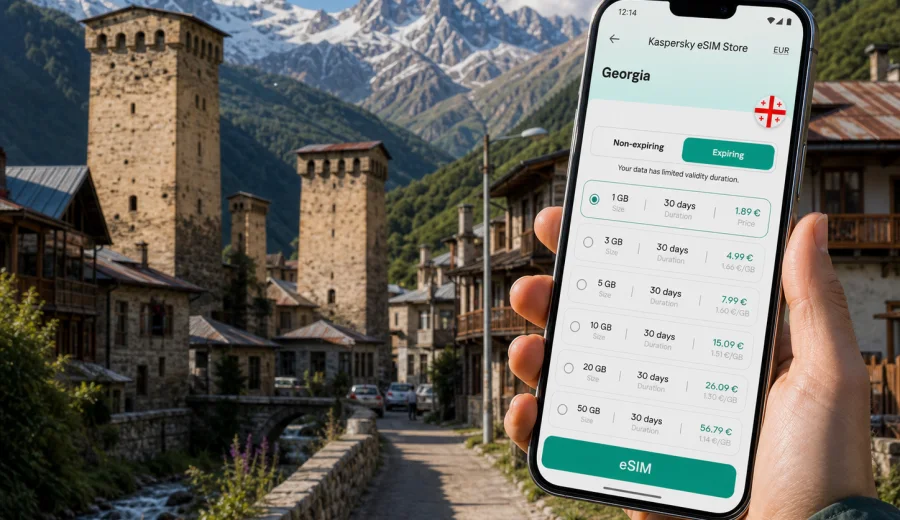
Mestia eSIM: mobile connection and internet for a trip to Svaneti
Mestia is not a city where you want to improvise your mobile internet only after you need it. The town sits high in Georgia's Svaneti region, surrounded by mountain roads, stone Svan towers, trailheads, guesthouses, ski routes and villages where plans often change with weather. A working data connection helps you check maps, message your driver, confirm a room, translate menus, follow hiking routes and stay in touch without depending only on hotel Wi-Fi.
An eSIM is useful for Mestia because it can be prepared before the trip and activated on a compatible phone without buying a physical SIM card. You choose a tariff for Georgia, install the eSIM profile, and use mobile data for travel tasks once the selected tariff is active. It is not a replacement for careful mountain planning, but it gives you a practical way to keep navigation, bookings and messaging available during a trip focused on one of Georgia's most remote and memorable regions.
Why mobile connection matters in Mestia
Mestia is compact, but the travel day around it can be long. Many visitors reach it by road from Zugdidi, Kutaisi or Tbilisi; some use the small local airport when flights are available and weather allows. In each case, the most stressful part is often not the town itself, but the last segment: mountain roads, transfer coordination, arrival after dark, changing pickup points or a guesthouse that is easier to find with a live map.
Mobile internet is especially useful in Mestia for:
- checking the route into Svaneti before a mountain road section;
- messaging a driver, guide, guesthouse or travel companion;
- using offline maps with live updates when a route changes;
- translating Georgian or Svan place names and local instructions;
- confirming bookings for hotels, cafes, tours and transfers;
- checking weather before hikes toward lakes, glaciers or nearby villages;
- using messenger calls when a tariff does not include ordinary voice calls.
The value is not about being online every minute. It is about having data at the exact moments when a small delay can become inconvenient: finding your guesthouse, locating a trail start, changing transport plans, downloading a boarding pass, or telling someone you arrived safely.
Mestia travel scenarios where eSIM helps
Mestia trips usually combine several types of movement. You may land in Georgia, cross the country by train or car, continue into Svaneti, then use Mestia as a base for nearby routes. A prepared eSIM can support each stage without forcing you to search for a local SIM counter during the most tired part of the journey.
| Scenario | Why mobile data helps | Practical tip |
|---|---|---|
| Arrival by road | Mountain transfers depend on timing, pickup points and weather | Keep your driver's number and hotel address available before leaving the lowlands |
| Arrival through a local airport | Flight plans may be sensitive to conditions | Keep backup transport and accommodation contacts saved |
| Guesthouse check-in | Many stays are small family-run properties | Message your arrival time and share your location if needed |
| Walking around town | Streets and tower clusters can be confusing on first arrival | Save the guesthouse pin and central landmarks offline |
| Day trips from Mestia | Routes may lead to valleys, villages, viewpoints and trailheads | Download maps first and use mobile data for messages and updates |
| Remote work or business travel | Video calls and large files can consume data quickly | Choose a tariff with enough traffic and keep Wi-Fi for heavy uploads |
For a short stop, a smaller data package may be enough for maps and messaging. For a week in Svaneti with hikes or remote work, look more carefully at data volume and validity period.
Before you arrive: set up your phone for the mountains
The best time to prepare mobile internet for Mestia is before you are tired, moving between stations or negotiating a transfer. eSIM setup usually requires an internet connection during installation, so it is easier to do it at home or before the long road segment into Svaneti.
Use this checklist before the Mestia part of your trip:
- Check that your smartphone supports eSIM and is not locked to one carrier.
- Save your passport, booking confirmations and transfer contacts offline.
- Download offline maps for Georgia and Svaneti before leaving a strong Wi-Fi connection.
- Install the eSIM profile while you still have stable internet.
- Name the eSIM profile clearly, for example "Georgia travel data".
- Decide which SIM will handle mobile data and which will handle calls or SMS.
- Keep your home SIM active only if you need banking messages or ordinary phone calls.
- Review when the selected tariff starts counting validity and data use.
Before choosing any tariff, check whether your device supports eSIM. Compatibility matters because an eSIM profile cannot be used like a plastic SIM card: installation depends on the device model, software settings and carrier lock status.
How to choose an eSIM tariff for Mestia
For a city article, the correct destination is the country that contains the city. Mestia is in Georgia, so you should choose a tariff that covers Georgia rather than searching for a separate Mestia-only option. Then match the tariff to the way you will actually use mobile data in and around Svaneti.
Start with four questions:
1. How many days will you be in Georgia, including arrival and departure days?
2. Will Mestia be your only destination, or part of a route through Tbilisi, Kutaisi, Zugdidi, Batumi or Kazbegi?
3. Will you use data mostly for maps and messages, or also for video calls, cloud backups and hotspot sharing?
4. Do you need one simple country tariff, or a regional option for a wider trip?
For many travelers, the decisive factor is not the town's size but the shape of the trip. A two-day Mestia stop after Tbilisi has different data needs from a longer Svaneti route with villages, ski days and frequent media uploads.
Data planning by travel style
| Travel style | Typical mobile internet use | What to look for |
|---|---|---|
| Weekend in Mestia | Maps, messengers, taxi or transfer coordination, light browsing | Moderate data volume and validity that covers arrival and departure |
| Hiking-focused trip | Offline maps, weather checks, route messages, photo sharing after return to town | Enough data for daily updates, with offline maps as backup |
| Ski or winter trip | Messaging, transport changes, weather, maps, hotel coordination | Validity that covers flexible travel days |
| Business stopover | Email, messenger calls, documents, calendar, navigation | More data and a careful plan for hotspot use |
| Multi-city Georgia route | Tbilisi or Kutaisi arrival, road to Svaneti, side trips, departure city | A Georgia tariff with enough validity for the whole itinerary |
Avoid choosing only by the lowest price. A tariff that is too small can be inconvenient if your journey into Svaneti takes longer than expected or if you need to use mobile data for hotspot, maps and messenger calls on the same day. At the same time, very large packages are unnecessary if you will use guesthouse Wi-Fi for heavy tasks.
Arrival in Mestia: the first online tasks
The first hour in Mestia often decides whether the trip starts calmly. You may need to find a guesthouse in a lane near the center, confirm dinner time, meet a guide, check the next day's weather, or tell friends that the road segment is finished. These are small tasks, but they are easier with mobile internet already prepared.
Useful first-hour actions:
- turn on mobile data for the travel eSIM when the selected tariff is ready to use;
- keep data roaming enabled for the eSIM if the tariff instructions require it;
- open your map before leaving the main road or airport area;
- message the host with your arrival time and vehicle description;
- save your accommodation as a favorite in the map app;
- check whether your next route needs cash, a driver or a guide reservation.
If you arrive late, do not rely on finding an open shop or a stable public Wi-Fi network. A prepared eSIM helps you handle essential tasks first.
Moving around Mestia with mobile internet
Mestia's center is walkable, but the travel radius around it is much larger than the town grid. You may move between the museum area, guesthouses, cafes, trail starts, ski lifts, viewpoints and surrounding villages. Mobile internet is helpful because many decisions are local and time-sensitive: where to meet a driver, whether a path is realistic today, which road is being used, or whether a cafe or hotel can confirm availability.
For navigation, combine mobile data with offline preparation. Download maps before the trip, then use live data for current details. In mountain regions, signal quality can vary by valley, building and route. The practical approach is to prepare offline essentials and use eSIM data when coverage is available.
For transport, keep these items saved:
- accommodation address in English and Georgian if you have it;
- driver's phone number or messenger contact;
- a screenshot of the agreed price and pickup point;
- your return route from trailhead or village;
- backup contact for your hotel or guide.
This is also why a data-only eSIM still works well for many travelers. Ordinary voice calls and SMS are usually not included unless a specific tariff says so, but messenger calls and messages can cover many travel situations when mobile data is available.
Choosing mobile internet through Kaspersky eSIM Store
When you prepare a trip to Mestia, Kaspersky eSIM Store can help you choose, arrange and activate an eSIM tariff for Georgia through the website or app. You can review the destination, data volume, validity period and conditions before purchase, then install the eSIM on a compatible device.
For Mestia, use the Georgia destination page to review available options and choose an eSIM tariff for your trip to Mestia. The link goes to the country page because city trips use the tariff destination that covers the country where the city is located.
Keep the product role clear: Kaspersky eSIM Store is an app and website for choosing, arranging and activating an eSIM with a suitable travel data tariff. Mobile network conditions depend on the selected tariff, device settings and local network environment.
How to install and activate an eSIM for a Mestia trip
Install the eSIM while you have stable internet. You can usually do this before leaving home, at your first hotel in Georgia, or before the road segment to Svaneti.
Basic setup flow:
1. Check that the device supports eSIM and is not carrier-locked.
2. Choose Georgia as the destination and select a tariff by data volume and validity.
3. Install the eSIM profile using the on-screen steps or QR code.
4. Label the profile so you can recognize it during the trip.
5. Set the travel eSIM as the mobile data line when you are ready to use it.
6. Enable data roaming for the eSIM if the tariff instructions require it.
7. Keep your primary SIM for calls or SMS if you need banking codes or normal voice service.
For step-by-step setup, use the Android installation guide or the iOS installation guide. The exact menus may differ by device model and operating system version.
Practical data-saving tips in Svaneti
Mestia is a place where travelers take many photos, use maps often and message frequently. Data can disappear faster than expected if automatic cloud backup, app updates or hotspot sharing are left unchecked.
Data-saving checklist:
- Download offline maps before leaving a strong Wi-Fi connection.
- Turn off automatic photo and video backup on mobile data.
- Disable app updates over mobile data.
- Use hotel or guesthouse Wi-Fi for large uploads when it is stable.
- Keep video calls short unless you selected a larger data package.
- Avoid streaming music or video during long transfers.
- Use low-data mode if your phone offers it.
- Check the eSIM balance or remaining data in your profile or app when available.
For navigation, do not wait until you are already on a mountain road to download a map. For work, separate essential tasks from nice-to-have tasks: email and messages first, large files later.
Hotel, guesthouse and business use
Mestia has many guesthouses and small hotels, and their Wi-Fi quality can vary by property, room location, weather and load. Mobile data gives you another option for basic tasks. If you plan to work, prepare a realistic setup.
For business or remote-work travel:
- choose a tariff with enough data for email, documents and messenger calls;
- ask accommodation about Wi-Fi before booking if work calls are critical;
- keep presentations and files available offline;
- avoid large operating system updates during the trip;
- test hotspot sharing before relying on it for another device;
- leave extra data for the return journey and airport day.
If you need video calls, schedule them during a time when you are likely to be in town or at accommodation, not on the road between valleys. Use Wi-Fi for long calls when possible and keep the eSIM data package for backup, maps and essential communication.
Trips from Mestia: why country coverage matters
Many Mestia itineraries extend beyond the town. Travelers may continue to nearby villages, viewpoints, hiking routes, ski areas or the famous route toward Ushguli. Others return to Zugdidi, Kutaisi, Tbilisi or Batumi. This is why the Georgia destination matters more than the exact town name in the tariff.
A country tariff for Georgia is more practical for:
- arrival in Tbilisi, Kutaisi or Batumi before heading to Svaneti;
- the road segment through western Georgia;
- Mestia town days;
- day trips and guided routes around Svaneti;
- the return journey to another Georgian city;
- unexpected route changes caused by weather or timing.
Still, mountain travel requires offline habits. Save accommodation details, maps and important documents before each route.
Quick recommendations for different Mestia trips
If your Mestia stay is short, prioritize easy setup and enough data for maps, messaging and booking changes. If your trip includes several Georgian cities, choose validity that covers the full route, not only the days in Svaneti. If you work while traveling, leave margin for calls and hotspot use. If you hike, download maps and route notes before leaving town.
Short practical summary:
- Choose Georgia as the eSIM destination for Mestia.
- Install the eSIM before the mountain transfer when possible.
- Check device compatibility before purchase.
- Use offline maps as a backup in valleys and remote areas.
- Save driver, hotel and guide contacts before departure.
- Keep heavy uploads for Wi-Fi and preserve mobile data for essential tasks.
This approach keeps the eSIM focused on what matters most in Mestia: navigation, coordination, weather checks, booking changes and communication.
FAQ: eSIM and mobile internet in Mestia
Do I need a separate eSIM for Mestia?
No. Mestia is in Georgia, so you normally choose an eSIM tariff for Georgia. A city-specific tariff is not required for the article scenario.
Can I install the eSIM after arriving in Mestia?
You may be able to, but installation usually requires an internet connection. It is more convenient to install the eSIM before the long road segment or while you have stable Wi-Fi.
Does an eSIM include phone calls and SMS?
Many travel eSIM tariffs are designed for mobile data. Ordinary voice calls and SMS are not included unless the selected tariff conditions say otherwise. You can often use messenger calls over mobile data.
Will mobile internet be available on every trail near Mestia?
No mobile service should be assumed at every mountain point. Use offline maps and save key information before leaving town. Mobile data is useful when coverage is available, but remote terrain can affect signal.
Can I use hotspot sharing with a travel eSIM?
It depends on the selected tariff and device settings. If hotspot use is important, check the tariff conditions and monitor data use carefully.
When should I activate the eSIM?
Follow the conditions of the selected tariff. Some tariffs start counting validity after activation, while others may have different rules. Review this before your departure day.
Prepare mobile internet for Mestia before you travel
Mestia rewards good preparation. The road into Svaneti, small guesthouses, mountain weather and flexible routes all make mobile data more than a convenience. With an eSIM on a compatible phone, you can keep maps, messengers, bookings and travel updates ready without looking for a physical SIM card during arrival.
Before your trip, review the available destination options, check your device, install the eSIM while you have stable internet, and keep offline backups for mountain routes. When you are ready, you can choose a suitable eSIM tariff for Georgia through Kaspersky eSIM Store and prepare mobile internet for your Mestia journey in advance.