
Travel connectivity guide
Mexico eSIM: mobile internet for your trip
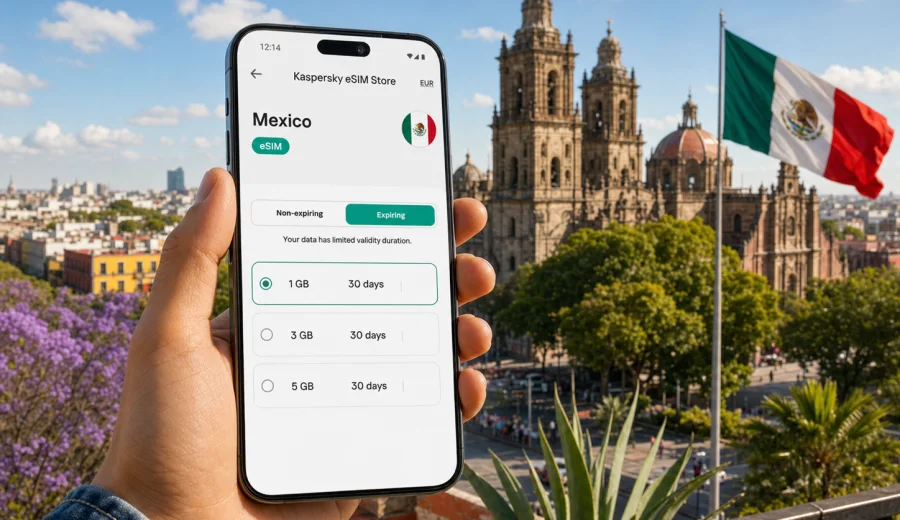
eSIM in Mexico: mobile connection and internet for your trip
Mexico is a country where mobile internet matters from the first hour of the trip. You may land in Mexico City, continue to Cancun, move between beaches in Quintana Roo, visit Oaxaca or Puebla, or cross several states by bus or rental car. In each case, maps, ride-hailing apps, hotel messages, boarding passes, banking confirmations, restaurant bookings and translation tools all depend on a stable way to get online.
An eSIM helps you prepare mobile internet for Mexico without buying a physical SIM card after arrival. Instead of looking for a shop at the airport or comparing local offers in a hurry, you can choose a suitable data plan before the trip, install the eSIM on a compatible phone and activate it when you are ready to use mobile data.
Kaspersky eSIM Store is an app and website where you can quickly choose, arrange and activate an eSIM with a suitable mobile data plan for an international trip. It is not a mobile network operator and does not replace a local carrier. The practical value is simple: you see the destination, data allowance, validity period and plan conditions in advance, then prepare your phone before Mexico becomes your next offline problem.
Why eSIM is useful for mobile internet in Mexico
Travel in Mexico often combines several types of movement: airports, long city transfers, intercity buses, domestic flights, coastal routes and day trips to archaeological sites or nature areas. Public Wi-Fi may be available in hotels, cafes or terminals, but it is not a reliable travel strategy for the whole journey. You still need mobile data when you leave the hotel, call a ride, check a route, message a host or open a reservation.
With an eSIM, you can keep your primary physical SIM in the phone and add a separate data profile for the trip. This is especially useful if your main number is needed for banking alerts, account recovery or messages from family, while the eSIM handles mobile internet in Mexico.
Common situations where eSIM is useful:
- finding the right pickup point at Mexico City International Airport, Cancun International Airport or Guadalajara airport;
- using maps when walking around historic centers, beach areas or large transport hubs;
- messaging hotels, tour operators and drivers without waiting for Wi-Fi;
- checking domestic flight changes, bus tickets or ferry schedules;
- sharing mobile data with a laptop or another device if the selected plan and device settings allow tethering;
- keeping travel apps online while avoiding the need to remove your regular SIM card.
The key point is control. Before you travel, you can estimate how much data you need, choose a validity period that matches your stay and understand what the plan includes. That is more predictable than deciding under pressure after a long flight.
How Mexico travel patterns affect your data needs
Mexico is not a single-route destination. A short business trip to Mexico City has different internet habits from a two-week holiday split between Cancun, Tulum and Isla Mujeres. A backpacking route through Oaxaca, Chiapas and the Yucatan can also use more navigation and messaging than a resort stay.
Use this simple planning table as a starting point:
| Trip scenario | Typical mobile data use | What to consider before choosing a plan |
|---|---|---|
| 3-4 days in one city | Low to medium | Maps, taxi apps, messaging, restaurant searches |
| 7 days with beach and city stops | Medium | Daily navigation, photos in cloud apps, booking changes |
| 10-14 days across several regions | Medium to high | Intercity routes, video calls, remote work checks, more app use |
| Business trip | Variable | Email, video meetings, hotspot use, file access |
| Family trip | Higher if shared | Several devices, kids' entertainment, hotspot limits |
Avoid choosing only by the lowest data amount if your route is complex. A plan that looks enough for a weekend can become tight if you rely on maps all day, upload many photos or make frequent video calls. At the same time, you do not need to overbuy if your hotel Wi-Fi covers heavy tasks and the eSIM is mainly for movement around the country.
What to check before using eSIM in Mexico
Before buying any eSIM plan, check three things: your device, your trip and the plan conditions.
First, your phone or tablet must support eSIM. Many recent iPhone, Samsung Galaxy, Google Pixel and other flagship models do, but support depends on the exact model, market version and carrier restrictions. Some devices that look identical may differ by region. If the phone is locked to a carrier, adding another mobile profile may be restricted.
Second, match the plan to your actual Mexico route. If you only visit Mexico, a Mexico-specific plan may be the most direct option. If your itinerary includes the United States, Canada, Central America or several countries in one journey, compare country and regional options carefully and read the coverage area before purchase.
Third, read the plan details. Check data allowance, validity period, activation rules, renewal or top-up options, and whether voice calls or SMS are included. In many travel eSIM scenarios, the plan is for mobile data only. Calls and messages can usually be handled through internet-based apps, but a regular phone number is not included unless the plan conditions clearly say so.
Quick checklist:
- Your device supports eSIM.
- The device is not locked in a way that prevents adding an eSIM profile.
- You know whether the plan is data-only.
- The validity period covers your full stay.
- The data amount matches your expected app use.
- You understand when the validity period starts.
- You have internet access available for installation before you need the eSIM.
If you are unsure about device support, use the compatibility check before purchase: check your device. This step is especially important if you bought the phone through a carrier, use a dual-SIM setup or travel with an older model.
Choosing an eSIM data plan for Mexico
The best eSIM plan for Mexico is not simply the largest package or the lowest price. It is the option that fits your trip duration, data habits and route. Start with the way you use your phone at home, then adjust for travel. Travel usually increases map use, translation, messaging, bookings and photo sharing.
For light use, mobile data mainly covers maps, chat, email, restaurant searches and occasional browsing. For medium use, add more social media, cloud photo backup, ride-hailing, travel videos in short bursts and regular route planning. For heavy use, include video calls, laptop hotspot sessions, frequent uploads and streaming. If your plan allows tethering, remember that laptops consume data much faster than phones.
Here is a practical way to estimate your needs:
1. Count the number of travel days in Mexico.
2. Mark the days when you will be away from hotel Wi-Fi for many hours.
3. Add extra data for navigation-heavy days, remote work or long transfers.
4. Check whether your apps automatically back up photos or videos over mobile data.
5. Choose a plan with enough margin, not just the exact minimum.
When you are ready to compare options, you can choose an eSIM data plan for your trip to Mexico and review the available data amounts, validity periods and plan details before you travel.
Mexico-specific travel scenarios where mobile data helps
In Mexico City, mobile data is useful for navigation between neighborhoods such as Roma, Condesa, Centro Historico, Polanco and Coyoacan. Distances can be large, traffic can change plans quickly, and many visits involve several rides or metro connections in one day. Having internet on the street makes it easier to confirm a route, check a pickup point and message someone if a meeting location changes.
On the Yucatan Peninsula, travelers often move between Cancun, Playa del Carmen, Tulum, Valladolid, Cozumel and nearby day-trip destinations. Mobile data helps with ferries, buses, hotel transfers, digital tickets, maps and restaurant bookings. It is also useful when the hotel Wi-Fi is strong in the lobby but weaker near the beach or in transit.
In Oaxaca, Chiapas, Puebla or Guanajuato, eSIM can be helpful for walking routes, translation, reservations and navigation through smaller streets. In these places, you may not want to spend your first afternoon searching for a SIM counter. It is easier to arrive with a prepared data option and use local time for the trip itself.
For road trips, mobile internet supports route checks, fuel stops, hotel messages and emergency contacts. Do not treat any mobile data option as a guarantee of coverage in every rural or mountain area. Coverage depends on local networks, terrain and conditions. Download offline maps for remote routes and keep essential booking details available without internet.
eSIM, roaming and public Wi-Fi: how to compare your options
There are three common ways to get online in Mexico: international roaming from your home carrier, public Wi-Fi and a travel eSIM. Each has advantages and limitations.
| Option | Strengths | Possible limitations |
|---|---|---|
| Home carrier roaming | Keeps your familiar SIM active; may be simple for short trips | Costs and limits depend on your carrier; conditions may be less predictable |
| Public Wi-Fi | Useful in hotels, airports and cafes | Not available everywhere; may require sign-in; less convenient in transit |
| Travel eSIM | Prepared before the trip; no physical SIM swap; clear data and validity details | Requires eSIM-compatible device; usually data-focused; coverage depends on local networks |
For many travelers, the practical setup is a combination: keep the main SIM for your usual number, use hotel Wi-Fi for heavy downloads and use eSIM for mobile internet while moving around Mexico. This can reduce dependence on public Wi-Fi without claiming that one option is always better for every traveler.
Before deciding, compare your home roaming conditions with the eSIM plan details. Look at daily fees, speed rules, fair-use limits, data amount and what happens after the allowance is used. A travel eSIM may be a more convenient or cost-conscious choice for many trips, but the right answer depends on your carrier and your travel habits.
How to install and activate an eSIM for Mexico
Install the eSIM while you have a stable internet connection. Many travelers prefer doing this at home before departure or at the hotel before the first full day of the trip. You can also install after arrival if you have Wi-Fi, but it is less comfortable to solve setup questions while standing in an airport queue.
General installation steps:
1. Check that your phone supports eSIM and is not restricted by a carrier lock.
2. Choose Mexico as the destination and select a suitable data plan.
3. Complete the purchase and open the eSIM details in your profile or app.
4. Install the eSIM by following the on-screen flow or using the QR code if provided.
5. Name the eSIM profile clearly, for example, Mexico data.
6. Set the eSIM as the mobile data line when you are ready to use it.
7. Enable data roaming for the eSIM profile if the plan instructions require it.
8. Keep your primary SIM selected for calls or messages if you still need your regular number.
For detailed setup guidance, use the Android installation guide or the iOS installation guide. The exact screen names can vary by device model and operating system version, so follow the instructions shown on your phone as well.
Do not delete the eSIM profile after installation unless you are sure you no longer need it. Some eSIM profiles cannot be installed again on another device or restored after removal. If something does not work as expected, check the plan instructions first and contact support before deleting the profile.
Settings and limits to review
After installation, set the eSIM as the mobile data line and keep your main SIM for calls or messages if you still need your regular number. Check whether data roaming should be enabled for the eSIM profile, disable automatic app updates over mobile data and consider turning off cloud photo backup until you are on Wi-Fi.
Also remember what a travel eSIM usually does not guarantee. It may not include a Mexican phone number, standard voice calls, SMS, unlimited data, coverage in every building or rural area, or transfer to another device after activation. Read the selected plan conditions before you rely on any of these features.
For remote routes, download offline maps and keep booking details available without internet. Mobile data is useful for travel, but local coverage can depend on networks, terrain and conditions.
FAQ about eSIM and internet in Mexico
Can I use eSIM in Mexico instead of buying a physical SIM card?
Yes, if your device supports eSIM and the selected plan covers Mexico. You can use the eSIM for mobile data without swapping your regular physical SIM. Check the plan details before purchase.
Will I get a Mexican phone number?
Not necessarily. Many travel eSIM plans are for mobile data only and do not include a local phone number, voice calls or SMS. If those features matter, read the conditions of the specific plan before buying.
Should I install the eSIM before flying to Mexico?
You can install it before departure while you have reliable internet access. Activation timing depends on the plan rules, so check when the validity period starts.
Do I need to keep my regular SIM active?
If you need your usual number for calls, SMS or banking confirmations, keep it active and set the eSIM as the mobile data line. Your phone settings will determine which SIM handles data, calls and messages.
Can I use hotspot with a Mexico eSIM?
It depends on the selected plan and your device settings. If hotspot use is important, check the plan conditions and remember that shared devices can use data quickly.
What happens if I use all my data?
The result depends on the plan. You may need to top up, buy another plan or use Wi-Fi. Monitor usage in your phone settings during the trip.
Prepare your Mexico mobile internet before you travel
A good mobile internet setup makes Mexico easier to navigate. It helps you move from the airport to the hotel, check routes in unfamiliar neighborhoods, coordinate tours, update bookings and stay in touch without depending on a Wi-Fi signal at the exact moment you need it.
Before departure, check your device, compare the data amount and validity period, install the eSIM with a stable connection and keep your phone settings organized. Kaspersky eSIM Store helps you choose and activate an eSIM with a suitable data plan for international travel, so your Mexico trip starts with fewer connectivity decisions at the airport.
If Mexico is your next destination, prepare an eSIM data plan for Mexico before you go and keep mobile internet ready for the moments when maps, messages and bookings matter most.