
Travel connectivity guide
Milan eSIM for mobile internet
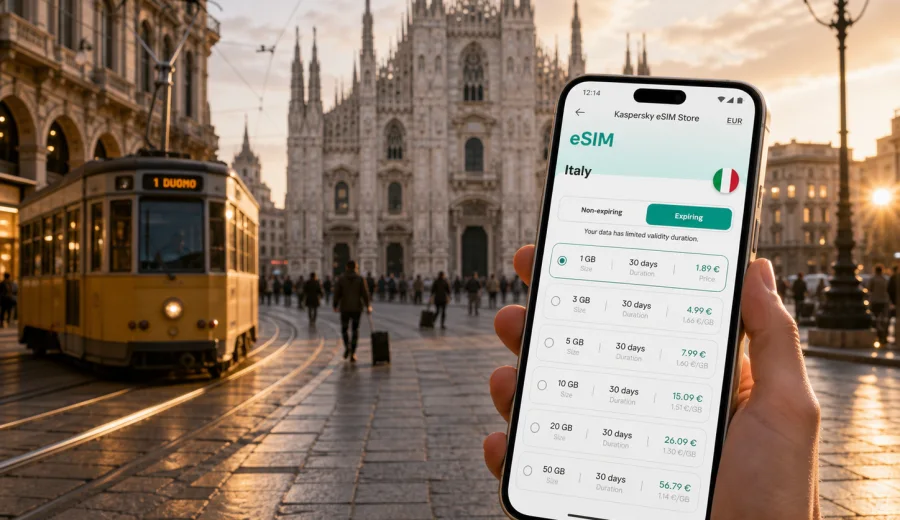
Milan eSIM: mobile connection and internet for your trip
Milan is a city where mobile internet quickly becomes part of the route. You may land at Malpensa, Linate, or Bergamo, take a train into the city, find your hotel near Centrale, check a restaurant booking in Brera, scan a digital ticket for the metro, and message a driver after a late meeting. An eSIM can make these small travel moments easier because you prepare a data plan before you need a physical SIM card counter or public Wi-Fi.
This guide focuses on Milan, not Italy in general. It explains when mobile data matters in the city, how to plan eSIM use for a short stay or business trip, what to check before buying, and how Kaspersky eSIM Store can help you choose, arrange, and activate an eSIM with a suitable data plan for your trip.
Why mobile internet matters in Milan
Milan rewards travelers who can move quickly between transport, neighborhoods, and appointments. The city is compact enough for walking, but many real itineraries combine the metro, trams, regional trains, ride-hailing apps, hotel check-ins, restaurant reservations, and museum time slots. If your connection is uncertain, even a simple transfer can become slower than it needs to be.
Common situations where mobile data helps in Milan:
- following live directions from Malpensa Express or Linate airport bus stops to your hotel;
- checking platform changes at Milano Centrale, Cadorna, Garibaldi, or Porta Genova;
- loading QR tickets for museums, exhibitions, and event venues;
- using maps in neighborhoods with narrow streets, such as Brera or the area around the Duomo;
- ordering a ride after a late dinner in Navigli or after a business event in CityLife;
- messaging your hotel about arrival time or baggage storage;
- translating a menu, a notice, or transport instructions;
- sharing a hotspot with a laptop for urgent work, if the selected plan and device allow tethering.
An eSIM is useful because it is digital. Instead of swapping a physical SIM card, you install an eSIM profile on a compatible phone and use a selected data plan for mobile internet in the destination. Your regular SIM can often stay in the device for calls or messages, while the eSIM handles travel data. Device behavior varies, so it is important to check settings before departure.
Milan arrival scenarios: where connectivity helps first
Milan has three common arrival points for international travelers. Each has a different rhythm, but all benefit from having data ready before you start moving through the city.
| Arrival point | Typical route into Milan | Why eSIM data helps |
|---|---|---|
| Milan Malpensa Airport | Train to Cadorna or Centrale, bus to Centrale, taxi or ride app | Train times, ticket QR codes, hotel directions, messaging after delays |
| Milan Linate Airport | Metro M4, bus, taxi, ride app | Quick route checks, transfer planning, luggage-friendly navigation |
| Bergamo Orio al Serio Airport | Bus to Milano Centrale, onward metro or tram | Longer transfer, live arrival checks, maps from Centrale to the final address |
If you arrive from another Italian city by train, mobile data still matters. Milano Centrale is large and busy; Garibaldi connects well with Porta Nuova, Isola, and business districts; Cadorna is practical for visitors staying near the center or heading to Malpensa. In each case, a working connection helps you confirm your onward route before leaving the station.
For a first trip, download key offline maps before departure, but do not rely on them alone. Offline maps are helpful for streets, yet they may not show live transport changes, updated opening hours, check-in messages, or ticket links. An eSIM gives you a practical backup for the parts of the trip that change in real time.
How an eSIM fits a Milan itinerary
Milan trips often fall into a few patterns. The right data volume depends less on the city itself and more on what you do with your phone.
| Trip type | Milan behavior | Practical data planning |
|---|---|---|
| Weekend city break | Maps, restaurant searches, photos, messaging, museum tickets | Choose enough data for maps and daily browsing, especially if you share media often |
| Business trip | Email, calendar, video links, ride apps, hotspot for laptop | Allow extra data for work files and tethering where permitted |
| Fashion, design, or event visit | Venue maps, social media, tickets, ride apps, group chats | Plan for heavier image and app use around exhibitions and appointments |
| Stopover | Transport planning, hotel check-in, food search, messaging | A smaller short-validity plan may be enough if you avoid video |
| Northern Italy base trip | Milan plus Como, Bergamo, Verona, Turin, or Lake Garda | Choose a plan that covers Italy for the full route and duration |
If your Milan stay includes day trips, treat the eSIM as a plan for the country route, not just the city center. A trip to Lake Como, Bergamo, Monza, Pavia, or Turin still depends on train apps, maps, and messaging. For this type of itinerary, check that the selected eSIM plan covers Italy and remains valid for the full number of days you need.
Before you buy: compatibility and device settings
Not every phone or tablet supports eSIM, and some devices may be locked to a mobile operator. Before you choose a plan, check your device and confirm that it supports eSIM activation. This is especially important if your phone was bought through a carrier, if it is older, or if you plan to keep your regular SIM active at the same time.
Use this quick checklist:
- confirm that your phone supports eSIM;
- check that the device is not carrier-locked;
- make sure your operating system is up to date;
- keep enough battery for installation and the first connection;
- install the eSIM while you have stable internet, such as home Wi-Fi or hotel Wi-Fi;
- read the selected plan details: data volume, validity period, destination, price, and any tethering notes;
- decide whether your regular SIM or the eSIM should be used for mobile data after arrival.
An eSIM data plan normally focuses on mobile internet. It may not include a local phone number, voice calls, or SMS unless a specific plan says so. For many Milan trips, this is not a problem because hotel messages, restaurant confirmations, ride apps, map searches, and work chats can run over mobile data. If you need standard calls or bank SMS messages, plan how your regular SIM will handle them.
Getting around Milan with mobile data
Milan's public transport network is efficient, but a data connection makes it easier to adjust. The metro is usually the simplest way to move between the Duomo, Centrale, Porta Venezia, Garibaldi, CityLife, San Siro, and Linate. Trams are useful for slower scenic routes and neighborhood movement. Regional trains connect the city with airports, lakes, and nearby towns.
Mobile internet is most useful for:
1. Checking the best route at the moment you leave.
2. Confirming whether a metro, tram, or train transfer is faster.
3. Opening maps at station exits, where the wrong exit can add a long walk.
4. Loading digital tickets or booking pages when required.
5. Messaging someone if a meeting point changes.
For walking routes, Milan can be deceptively simple. The center around the Duomo, Galleria Vittorio Emanuele II, La Scala, Brera, and Castello Sforzesco is walkable, but streets can curve, and landmarks can be hidden by dense blocks. Mobile data helps when you want to move from a museum booking to a restaurant reservation without stopping to search for Wi-Fi.
Neighborhood guide: where eSIM data becomes practical
Each Milan district creates a different connectivity need. Think of mobile data as a tool for local movement, not just a way to browse.
| Area | Typical visitor task | Useful connection moment |
|---|---|---|
| Duomo and Galleria | Sightseeing, shopping, ticketed entries | Opening QR codes, finding quieter streets, checking time slots |
| Brera | Galleries, cafes, evening walks | Map accuracy in small streets, restaurant messages |
| Navigli | Dinner, nightlife, canal walks | Ride apps, group chats, late-night routes |
| Porta Nuova and Isola | Business, architecture, modern dining | Calendar changes, office addresses, transit updates |
| CityLife | Conferences, shopping, events | Venue maps, tickets, ride coordination |
| Porta Venezia | Hotels, restaurants, design stops | Walking routes, translation, local searches |
| San Siro | Matches and concerts | Event tickets, crowd navigation, return transport |
For hotel stays, mobile data helps before you even reach reception. Many apartments, boutique hotels, and serviced stays send entry codes or instructions through email or messaging apps. If your train is delayed or you arrive after the usual check-in window, a working data connection can help you coordinate without searching for an open cafe.
Choosing an eSIM plan for Milan
The safest way to choose is to match the plan to duration, data habits, and route. A light traveler who uses hotel Wi-Fi and avoids video needs less data than a traveler who uploads photos, joins calls, or uses a laptop hotspot. Validity also matters: a generous data allowance is less useful if it expires before the end of the trip.
Use these planning rules:
- For a 1-2 day stopover, focus on validity and enough data for transport, maps, messaging, and check-ins.
- For a weekend, allow room for photo sharing, restaurant searches, ticket apps, and navigation.
- For a business trip, consider extra data for email attachments, cloud documents, and hotspot use if supported.
- For a week in northern Italy, choose a plan that covers the full country route and all travel days.
- If you expect video calls or streaming, choose more data or save those tasks for stable Wi-Fi.
After you have checked compatibility and estimated your data needs, you can use Kaspersky eSIM Store to choose a data plan for your trip to Milan and Italy. The app and site let you select the destination, review plan conditions, arrange the eSIM, and activate it on a compatible device. Read the plan details before purchase so the data volume and validity match your itinerary.
When to install and activate your eSIM
The best time to install an eSIM is when you have stable internet and are not rushing through a station or airport queue. Many travelers install the eSIM before departure over home Wi-Fi, then switch mobile data settings after landing. Others wait until the hotel, but that can be inconvenient if you need maps and messages during the transfer.
Follow this practical sequence:
1. Check that your device supports eSIM and is not locked.
2. Choose the Italy plan that fits your Milan itinerary.
3. Install the eSIM while connected to reliable Wi-Fi.
4. Keep your regular SIM available if you need calls or SMS.
5. On arrival, select the eSIM for mobile data.
6. Enable data roaming for the eSIM if the device or plan instructions require it.
7. Test maps, messaging, and browser access before leaving the airport or station.
If you need installation guidance, use the official instructions for Android or instructions for iOS. The exact screens can vary by phone model and operating system version, so follow your device prompts carefully.
Practical Milan scenarios
The first evening arrival
You land at Malpensa in the evening, take the train to Centrale, and still need to reach a hotel near Porta Venezia. With mobile data already prepared, you can check the best metro route, tell the hotel your arrival time, and choose whether the walk from the station is reasonable with luggage. If plans change, you can order a ride or send a message without depending on station Wi-Fi.
The business morning
Your meeting is in Porta Nuova, lunch is near Brera, and the afternoon appointment moves to CityLife. Mobile internet supports calendar updates, route checks, email access, and ride coordination. If the selected plan allows hotspot use, you can also handle a short laptop task between meetings, but it is better to avoid large downloads unless you have enough data.
The design and shopping day
Milan visitors often move between showrooms, boutiques, exhibitions, and cafes. You may need to open maps repeatedly, scan tickets, show reservation confirmations, and message companions. This pattern can use more data than expected because it involves many small app sessions throughout the day. A plan with comfortable headroom is more practical than one that barely covers basic navigation.
The day trip from Milan
If you go to Como, Bergamo, Monza, Pavia, or Verona, your phone becomes a route planner. You may check regional trains, ferry times around the lake, museum bookings, or walking directions from unfamiliar stations. A country plan for Italy is the correct frame for this situation because the journey extends outside Milan but stays within the same destination.
eSIM, roaming, local SIM, and Wi-Fi in Milan
There is no single best option for every traveler. The right choice depends on price, convenience, phone compatibility, and how much control you want before arrival.
| Option | Strength | Trade-off |
|---|---|---|
| eSIM data plan | Can be prepared before or during the trip, no physical SIM swap | Requires eSIM-compatible unlocked device |
| Standard roaming | Uses your existing mobile line and phone number | Costs and conditions depend on your home operator |
| Local physical SIM | Can suit longer stays or local-number needs | Requires store visit, physical SIM handling, and time |
| Public Wi-Fi | Useful in hotels, cafes, and offices | Not reliable for movement, transfers, or urgent tasks |
For Milan, an eSIM is especially convenient when you want mobile data ready for the airport-to-city transfer, business travel, or a short visit where spending time at a mobile shop would be inefficient. It is also useful when you want to keep your physical SIM in the phone.
Data-saving tips for Milan
You do not need to overbuy data if you manage background usage. A few settings can make a travel eSIM last longer.
- Download offline maps for Milan and northern Italy before departure.
- Disable automatic cloud photo and video backup on mobile data.
- Save playlists, documents, and boarding passes on Wi-Fi.
- Use hotel or office Wi-Fi for video calls and large file transfers.
- Turn off background app refresh for apps you do not need during the trip.
- Monitor data use from your phone settings and in the app where available.
- Avoid testing high-speed video streaming just to check whether the connection works.
For most city tasks, navigation, messaging, email, and ticket access use less data than video. The biggest surprises usually come from automatic backups, social media uploads, hotspot use, and streaming.
Quick checklist before leaving for Milan
- Your phone supports eSIM and is unlocked.
- You know whether your regular SIM remains active for calls or SMS.
- Your eSIM plan covers Italy and the full trip duration.
- You have installed the eSIM while on stable Wi-Fi.
- You know which SIM is set for mobile data.
- You have saved key hotel, ticket, and transport details offline.
- You have the Android or iOS installation instructions available in case you need them.
- You understand that plan conditions can vary by selected offer.
FAQ: eSIM and mobile internet in Milan
Is an eSIM useful for a short Milan stopover?
Yes, if you need maps, transport updates, hotel messages, or ride apps during the transfer. For a very short stay, choose a plan with validity and data volume that match the limited itinerary.
Can I use an eSIM for a trip from Milan to Lake Como?
Yes, if the selected plan covers Italy and remains active for your travel dates. Check the destination and validity before purchase, especially if Milan is only one part of a wider route.
Does an eSIM give me an Italian phone number?
Usually, travel eSIM plans for mobile internet are data-focused and do not include a regular local phone number, voice calls, or SMS unless the plan details say otherwise. You can use internet-based calls and messages through apps.
Should I activate the eSIM before landing?
Install it before departure if possible, using stable Wi-Fi. The best activation moment depends on the plan conditions and device prompts. Many travelers switch the eSIM on for mobile data after landing so they can use it for the transfer into Milan.
What if my phone does not support eSIM?
You will need another option, such as standard roaming, a physical SIM, or Wi-Fi. Check compatibility before buying any eSIM plan so you do not purchase something your device cannot install.
Can I use hotspot with my laptop in Milan?
It depends on the device and the selected plan conditions. If tethering is important for work, check the plan details before purchase and keep enough data for laptop use, which can consume more traffic than phone navigation.
Final preparation for mobile connection and internet in Milan
Milan is easier when your phone is ready from the first transfer. Mobile data helps you move from airport to hotel, navigate metro exits, manage business changes, open bookings, and plan day trips across northern Italy. The key is to choose a plan that fits your route, install it on a compatible device, and understand the data volume and validity before you travel.
To prepare your trip, use Kaspersky eSIM Store to choose an eSIM data plan for Milan and Italy. Select the destination, review the available plan conditions, install the eSIM on a compatible device, and keep mobile internet ready for the parts of the trip that should not depend on public Wi-Fi.