
Travel connectivity guide
Mir eSIM: Mobile Internet for Your Trip
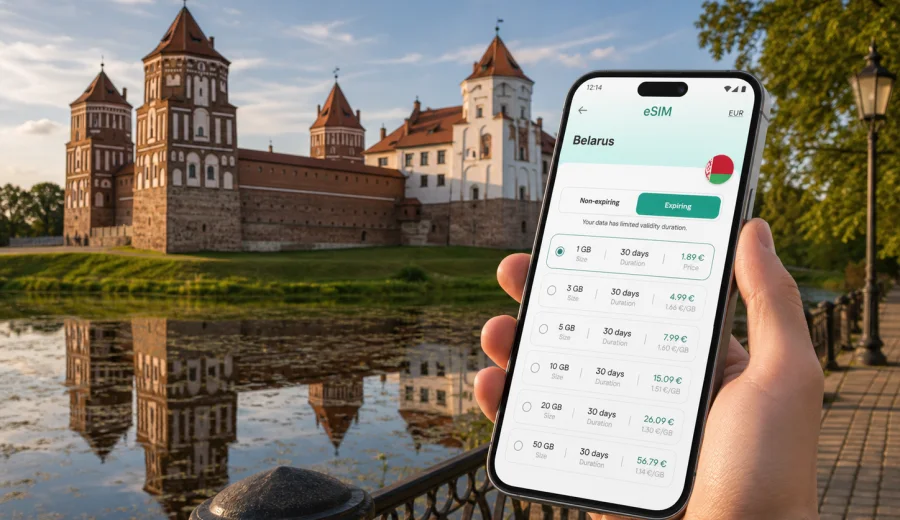
Mir eSIM: mobile connection and internet for a trip to Mir
Mir is a small Belarusian town with one very clear travel magnet: the Mir Castle Complex. Many visitors come for a day trip from Minsk, add Mir to a route with Nesvizh, or stay overnight to enjoy the castle, the quiet streets, and the slower rhythm outside the capital. In all of these scenarios, mobile internet matters more than the size of the town suggests. You may need maps for the road from Minsk, a messenger to coordinate a driver, a translation app in a cafe, a hotel confirmation at check-in, or a quick way to share photos from the castle grounds.
An eSIM can make that part of the trip easier. Instead of looking for a physical SIM card after arrival, you can prepare a digital SIM profile before the journey and activate a suitable data plan on a compatible phone. Kaspersky eSIM Store is an app and website where you can choose, arrange, and activate an eSIM with a suitable mobile internet plan for an international trip. For Mir, the correct destination to consider is Belarus, because the city article uses the country plan for the country where the city is located.
This guide focuses on practical travel in and around Mir: arrival, local movement, navigation, transport, hotels, short stays, business detours, and onward trips across Belarus.
Why mobile internet is useful in Mir
Mir is compact, but the trip usually involves movement between places: an airport or railway station, Minsk, regional roads, the castle area, a hotel or guesthouse, and possibly another town on the same route. Mobile data helps you manage the gaps between those points.
Common situations where internet access is useful:
| Travel moment | Why mobile data helps |
|---|---|
| Arrival in Belarus | Check transfers, messages, hotel details, and route updates before leaving the airport or station. |
| Road to Mir | Use maps, share live location with a driver, and confirm stops if you are combining Mir with Nesvizh or Minsk. |
| Walking around town | Navigate between the castle, nearby streets, cafes, accommodation, and photo spots without relying on public Wi-Fi. |
| Castle visit | Keep tickets, booking emails, translations, and travel notes available on your phone. |
| Overnight stay | Message the property, check restaurant hours, and plan the next morning route. |
| Work or family check-ins | Use messengers, email, and cloud documents when you need to stay reachable. |
Mir is not a city where you spend time crossing a metro system or moving through large districts. The need is different: reliable access for logistics, maps, communication, and short practical tasks during a route that may include several towns.
Arrival scenarios: getting online before the road to Mir
Most international visitors do not arrive directly in Mir. The trip often starts in Minsk, at Minsk National Airport, at a railway station, or at a hotel in the capital. From there, travelers continue by car, bus, organized transfer, or private driver. Having mobile internet ready before this stage can save time and reduce uncertainty.
If you land in Belarus and need to continue toward Mir the same day, your first online tasks are usually simple but important:
- confirm the pickup point or driver contact;
- open the route in a map app;
- check the estimated travel time;
- message your hotel or host about arrival time;
- translate a short phrase if you need help with directions;
- access payment, booking, or ticket information stored online.
An eSIM is especially convenient if you prefer to set up mobile data before leaving home. You can install the profile while you still have stable home Wi-Fi, check that the eSIM is present on the phone, and then activate it according to the plan conditions. Activation timing depends on the selected plan, so read the terms before the trip.
If your itinerary includes a late arrival, an early transfer, or a tight connection, preparing mobile internet in advance is more comfortable than trying to solve connectivity after a long flight or after reaching a regional bus stop.
How an eSIM fits a Mir itinerary
An eSIM is not a separate travel product for the castle or the town itself. It is a way to use mobile data through a digital SIM profile on a compatible device. For a Mir trip, that profile helps with the wider Belarus route around the town.
Practical Mir itineraries often look like this:
1. Minsk arrival, hotel night, day trip to Mir and Nesvizh.
2. Minsk airport, direct transfer to Mir, overnight near the castle.
3. Road trip through Mir, Novogrudok, Nesvizh, and regional towns.
4. Business visit in Minsk with a half-day cultural stop in Mir.
5. Family trip where one person handles navigation, bookings, and group messages.
In each case, the eSIM value is the same: you can use mobile data for trip management without changing your physical SIM card. Your regular SIM can remain in the phone for your usual number, while the eSIM handles travel data, if your device and settings support that setup.
Choosing a data plan for Mir and Belarus
For a city article, the plan destination should match the country where the city is located. Mir is in Belarus, so choose a Belarus data plan if it fits your route. If your trip includes several countries, compare country, regional, or broader options where available and read each plan's coverage area before payment.
Think about the plan through the trip you will actually take:
| Trip type | Typical data use | What to check |
|---|---|---|
| One-day visit from Minsk | Maps, messenger, tickets, photos, transport coordination | A small package may be enough if you avoid heavy video uploads. |
| Weekend in Mir | Navigation, hotel messages, restaurant searches, photo backup, occasional streaming | Check validity period and whether the package covers your full stay. |
| Belarus route with several towns | Maps across regions, ride coordination, translation, cloud documents | Choose a package with enough data for travel days, not only the Mir visit. |
| Business trip with a Mir stop | Email, messengers, documents, video calls if needed | Estimate work traffic separately from tourist use. |
| Family or group travel | One traveler may handle navigation and bookings for everyone | Consider whether one phone will use hotspot mode, and check whether the selected plan allows it. |
Before you decide, look at three details: data allowance, validity period, and destination. The lowest data amount may be fine for a short castle visit, but it can feel tight if you use maps all day, upload many photos, or share mobile data with another device. A larger package may be more comfortable for a route that includes Minsk, Mir, Nesvizh, and other stops.
When you are ready to prepare mobile internet for this route, you can choose an eSIM plan for your trip to Mir and Belarus in Kaspersky eSIM Store and compare the available data packages for the destination.
What to check before buying an eSIM
The most important check is device compatibility. eSIM support depends on the phone model, region, and sometimes carrier settings. A modern device name alone is not enough: some versions of the same model may differ by market.
Before purchase:
- confirm that your phone supports eSIM;
- make sure the device is not locked to one carrier;
- check that you can access the internet during installation, usually through Wi-Fi;
- read when the plan validity period starts;
- check whether calls and SMS are included, because many travel eSIM plans focus on mobile data;
- check whether hotspot mode is allowed if you plan to share data with a laptop or another phone.
You can use the internal compatibility check before making a decision: check your device. If you are traveling with family or colleagues, repeat the check for every device that may need its own eSIM.
How to install an eSIM before or during the trip
The easiest approach is to install the eSIM before departure while you have a stable Wi-Fi connection. After purchase, the eSIM profile appears in your account or app flow, and you follow the setup instructions for your device. Installation and activation are related but not always the same moment, so follow the plan instructions carefully.
A simple setup sequence:
1. Check that your phone supports eSIM and is not carrier locked.
2. Choose the destination and data package for Belarus.
3. Complete the purchase in Kaspersky eSIM Store.
4. Install the eSIM profile on the device using the provided instructions or QR code.
5. Keep your primary SIM for calls if you need your regular number.
6. When appropriate for the plan, set the eSIM as the mobile data line.
7. Enable data roaming for the eSIM if the instructions or device settings require it.
8. Test basic data access after arrival or according to the activation rules.
For step-by-step setup, use the official Android installation instructions or iOS installation instructions. If something does not appear as expected, check that the phone has internet access, that the eSIM profile has been added to the correct device, and that the selected mobile data line is the eSIM.
Mir on foot: maps, routes, and small-town movement
Mir is easy to explore on foot, especially around the castle area. That does not make mobile internet unnecessary. It changes what you use it for. Instead of complicated urban transport, you use it for small decisions: which way to walk, where your driver will meet you, whether a cafe is open, or how to translate a sign or menu.
Useful phone tasks during a walk in Mir:
- save the castle and hotel locations before you start;
- keep offline notes for your route, but use live maps for changes;
- pin the place where your car or bus leaves;
- message your group if people split up for photos;
- check weather updates before staying outside longer;
- keep battery level under control, because maps and camera use can drain it faster.
If you are visiting in colder months, remember that phone batteries can discharge faster outside. A small power bank can be more useful than an extra app. Mobile data is only helpful if the device still has enough power to navigate, call, or message.
Transport and day trips from Mir
Mir is often part of a wider route, not the only stop. Travelers may combine it with Nesvizh Castle, Minsk, Novogrudok, or other places in the region. Mobile data helps because the route may involve waiting points, schedule checks, and direct communication with drivers or hosts.
For a day trip, prepare three layers:
- Primary route: where you start, how you reach Mir, and how you return.
- Backup route: what you will do if the return transport changes or the visit takes longer.
- Meeting points: exact locations for pickup, hotel, parking, and group regrouping.
This is where an eSIM can be more practical than relying on Wi-Fi. Public Wi-Fi may not be available when you are standing outside a castle gate, waiting near a parking area, or moving between towns. A mobile data plan gives you a direct way to check messages and route details, subject to device settings and local network conditions.
Hotels, guesthouses, and short stays
If you stay overnight in Mir, mobile internet helps with the small moments around accommodation. You may need to confirm check-in time, find the entrance, message a host, show a booking confirmation, or plan breakfast and transport the next morning.
Before arrival, save these details on your phone:
| Detail | Why it matters |
|---|---|
| Accommodation address | Small towns can have similar street names or limited signage for visitors. |
| Check-in instructions | You may need a code, message, or exact arrival time. |
| Host contact | Useful if your driver is delayed or you arrive after reception hours. |
| Offline copy of booking | Helpful if mobile data is not active yet or Wi-Fi is unstable. |
| Next-day route | Saves time when leaving early for Minsk, Nesvizh, or another town. |
An eSIM does not replace good preparation. It supports it. The best setup is to save essential documents offline and use mobile data for live updates, communication, and changes.
Business trips and work calls near Mir
Mir is mostly a cultural and leisure destination, but travelers may add it to a business schedule in Belarus. If you have meetings in Minsk or another city and visit Mir during free time, a travel eSIM can keep work communication separate from hotel Wi-Fi or cafe connections.
For business use, estimate data more carefully. Email and messaging are usually light, while cloud files, software updates, and video meetings are heavier. If you expect to work between towns, choose a package with a buffer and check whether hotspot use is supported by the selected plan.
Good business travel habits:
- download key files before leaving reliable Wi-Fi;
- keep meeting links and documents available offline;
- avoid large app updates on mobile data;
- set cloud photo backup to Wi-Fi only;
- monitor remaining data in your phone settings or account area.
Data-saving checklist for Mir
You can make a moderate data package last longer by changing a few settings before the trip.
- Download offline maps for Minsk, Mir, and the surrounding route.
- Save hotel, castle, and transfer details in a note or wallet app.
- Turn off automatic app updates on mobile data.
- Set photo and video backup to Wi-Fi only.
- Close navigation after you arrive instead of leaving it running.
- Download translation languages before departure.
- Avoid streaming video unless your data package comfortably supports it.
- Track remaining data during multi-day trips.
Short stopover or one-day visit: what to prepare
A one-day Mir visit needs a lighter plan than a long route, but it still benefits from preparation. The goal is to reduce the number of decisions you have to solve while moving.
Before you leave Minsk or your hotel:
1. Install the eSIM profile if you have not done it already.
2. Confirm that the Belarus plan is selected for mobile data when you need it.
3. Save the castle location and your return point.
4. Keep your driver's number or transport details easy to find.
5. Check the weather and battery level.
6. Save one offline copy of your booking or ticket information.
During the visit, use mobile internet for the live parts: messages, map changes, route timing, and translations. Keep non-urgent uploads for hotel Wi-Fi if you want to conserve data.
Common mistakes to avoid
The most common eSIM problems are not specific to Mir. They happen when travelers rush setup or skip compatibility checks.
Avoid these mistakes:
- buying a plan before confirming eSIM support on the exact device;
- installing the eSIM on the wrong phone in a group;
- deleting the eSIM profile after activation without checking whether reinstall is allowed;
- assuming the plan includes a phone number, calls, or SMS;
- forgetting to select the eSIM as the mobile data line;
- leaving data roaming disabled when the setup instructions require it;
- using video, cloud sync, or hotspot mode without checking remaining data;
- waiting until arrival with no Wi-Fi access to start installation.
For a calmer setup, install the profile before travel, read the activation rules, and keep the instructions available. Connection may take a few minutes and depends on the device, settings, and local network conditions.
FAQ: eSIM and mobile internet in Mir
Do I need a separate eSIM only for Mir?
Usually no. Mir is in Belarus, so a Belarus eSIM plan is the relevant country option for a city visit. If your route continues beyond Belarus, compare available country or regional options and choose based on the full itinerary.
Can I use my regular phone number at the same time?
Many compatible phones allow a physical SIM and an eSIM to be used together, but the exact behavior depends on the device. You can often keep your regular SIM for calls and use the eSIM for mobile data. Check your phone settings before the trip.
Does a travel eSIM include calls and SMS?
Many travel eSIM plans are focused on mobile internet. Calls and SMS may not be included unless the plan terms say otherwise. For calls, travelers often use internet-based messengers when mobile data is active.
Should I install the eSIM before arriving in Belarus?
Installing before departure is usually more convenient because you can use stable Wi-Fi and avoid setup pressure after landing. Activation timing depends on the selected plan, so follow the instructions and validity rules.
Is eSIM useful if my hotel has Wi-Fi?
Yes, because a Mir trip involves time outside the hotel: road transfers, walking routes, castle visits, and return transport. Hotel Wi-Fi helps indoors, while mobile data helps during movement.
What if I visit Mir and Nesvizh on the same day?
Choose the plan for Belarus and estimate data for the whole route, not only for the time spent in Mir. Maps, messaging, photo sharing, and driver coordination may continue throughout the day.
Final preparation for a smoother Mir trip
Mir rewards simple planning. Save the castle location, confirm transport, keep hotel details offline, check your device, and prepare mobile data before you need it. An eSIM is useful because it supports the practical parts of the route: navigation, messages, translations, bookings, work updates, and travel changes between towns.
Kaspersky eSIM Store helps you choose, arrange, and activate an eSIM with a suitable data plan for international travel. Before you go to Mir, prepare an eSIM plan for Belarus so mobile internet is ready for the road, the castle visit, your hotel, and the next stop on your itinerary.