Travel connectivity guide
Mirissa eSIM: Mobile Internet in Sri Lanka
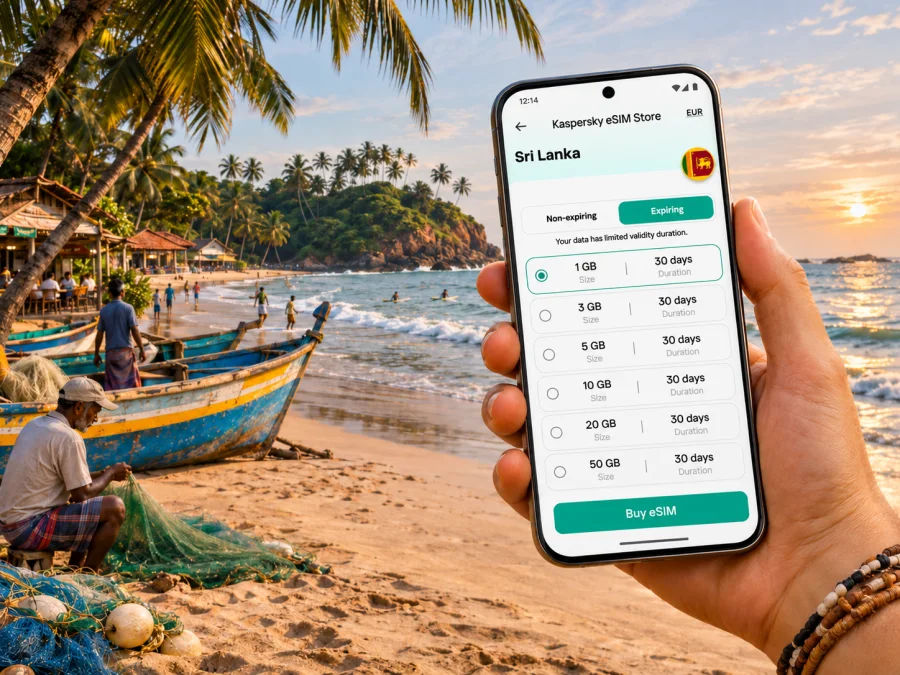
Mirissa eSIM: mobile connection and internet for your coastal trip
Mirissa is a small coastal town on Sri Lanka’s southern shore, in Matara District. A beach stay, boat trip, surf lesson, or stop between Galle and Matara all involve practical details: finding your guesthouse, confirming a pickup, checking a meeting point, and messaging home. An eSIM can add a travel data plan without replacing the physical SIM in your phone.
Coverage varies by network, terrain, buildings, weather, and congestion. Keep key addresses, bookings, and maps available offline as a backup.
What makes mobile data useful in Mirissa
Mirissa is a beach town rather than a large urban grid. Mobile data is useful for finding a lane or beach access, coordinating a tuk-tuk, checking a reservation, contacting a host, and looking up weather before an outing. It can also support maps, translation, travel apps, and internet messaging when their services are available.
These are convenience uses, not a guarantee that every app, payment, or call will work everywhere. Some services need a local number or stable connection. A data-only travel eSIM generally does not replace your usual number for conventional calls and SMS; check the plan and use internet messaging where appropriate.
A town, a coast, and a wider route
Official Sri Lankan tourism material describes Mirissa as a coastal town and highlights whale watching in the surrounding southern seas. Sri Lanka’s tourism development authority places Mirissa on the southern coast in Matara District. Those descriptions matter when planning a connection: a Sri Lanka country plan is not a Mirissa-only plan, while reception in a particular bay or building still depends on the network serving that exact location.
Many visitors combine Mirissa with nearby stops. Galle, Weligama, Matara, and other southern-coast destinations can become part of the same route, but each leg may have different transport and signal conditions. If you are continuing inland or travelling across the island, check the route and data allowance for the full itinerary rather than choosing based only on the number of days spent in Mirissa.
Arriving in Sri Lanka and continuing to Mirissa
If you arrive at Bandaranaike International Airport, it is in Katunayake, not in Mirissa or central Colombo. Save your accommodation address and arrival instructions before departure, and confirm whether your host expects you to call or message on arrival.
From the airport, travelers arrange a road transfer or connect through Colombo to continue south. Traffic, time, weather, and route affect the journey. Rail can cover part of the trip: Sri Lanka Railways lists services between Colombo and Matara, while Mirissa is not the rail endpoint. Arrange the local leg from Matara and check current schedules before relying on a tight connection.
Before leaving the airport, save your host’s contact, accommodation address, and route map offline. If your eSIM is not active yet, use available Wi-Fi or the agreed meeting instructions.
Your first hour: a practical sequence
Check that the profile is installed, select it for mobile data, and follow the plan’s roaming instructions. Keep your primary SIM for calls or verification if needed, while reviewing its roaming settings to avoid unintended charges. If the phone does not register, check airplane mode and line selection, wait briefly, then restart if necessary. Do not delete the profile as a shortcut: some eSIMs cannot be reinstalled with the same code. Use the plan instructions or support if it remains inactive.
Getting around town without relying on a live signal
Visitor areas are spread along the coast and nearby streets. A route that looks simple on a screen may include an unmarked turn, sandy approach, or entrance set back from the road. Save the exact accommodation pin and compare it with the host’s directions. For local rides, agree on a named meeting point; do not assume every driver uses the same app or map pin.
| Situation | Useful preparation | Backup |
|---|---|---|
| Walking to the beach | Save beach access and accommodation | Screenshot the route |
| Meeting a tuk-tuk | Agree on a visible meeting point | Keep driver details handy |
| Reaching the harbour | Confirm departure point and time | Save the booking message |
| Leaving for another town | Check the transfer point | Download the next map |
Use host or driver guidance where a route is unclear. At night or in heavy rain, allow extra time and stay aware of your surroundings rather than navigating while distracted.
Beach plans, boats, and weather checks
Whale watching is a well-known reason to visit Mirissa. Confirm departure time and meeting point with the operator, and check conditions close to the outing. Sightings and schedules are not guaranteed. Save your booking offline; mobile coverage may be less dependable offshore. Tell someone on land your expected return window, carry a charged phone, and follow the crew’s safety instructions.
Choosing a travel eSIM for Mirissa
Start with the geography of your trip. If Mirissa is one stop on a Sri Lanka itinerary, look for a plan whose stated coverage includes Sri Lanka and review the plan conditions for the dates you need. A country-level plan is generally more relevant than looking for a separate “Mirissa tariff”; do not infer that a country label guarantees reception at every address or offshore location.
Kaspersky eSIM Store is an app and website where travelers can choose, order, and activate an eSIM with a suitable data plan for an international trip. The Sri Lanka page currently displays country and regional options; its displayed Sri Lanka packages name MOBITEL as the local service provider. That detail belongs to the specific offer and should not be confused with a local carrier’s separate eSIM product, such as Dialog eSIM. Do not assume that all eSIMs in Sri Lanka use the same network. Check the destination, network or provider details, plan validity, data allowance, and activation terms on the offer before deciding.
Review current options for a Sri Lanka trip when you are ready to compare the displayed plan details. The page is for the country, not a promise of a dedicated Mirissa package or a particular signal at your accommodation. Availability, price, included data, validity, and provider arrangements may change; the current offer terms are the source to use when making a selection.
Estimate data for the way you travel
Choose an allowance based on your whole itinerary. Maps, messages, and booking checks use less data than streaming, large uploads, video meetings, or hotspot use. Download maps and entertainment before leaving Wi-Fi, turn off automatic uploads if needed, and review your phone’s data-usage screen after the first day.
| Travel pattern | What to check |
|---|---|
| Short beach break | Allowance for the stay and transfer days |
| Multi-stop route | Validity across every stop in Sri Lanka |
| Remote work | Hotspot rules, data use, and a Wi-Fi backup |
| Low-data holiday | Expiry and top-up terms |
Compatibility and regional device variants
Before you order, verify that your exact phone supports eSIM and is not locked to a carrier. Support can vary across model families and across country or regional variants carrying similar retail names. A model name alone may not be enough to confirm compatibility. Check the manufacturer’s documentation for the exact model number and review the device settings for an eSIM or digital SIM option. Check whether your device supports eSIM before purchase.
Also check whether the device can use the plan’s supported network bands and eSIM profile type. Do not assume that a phone bought in one market has the same hardware or SIM restrictions as a similarly named version sold elsewhere. If you are unsure, contact the seller or device manufacturer with the model number before paying. Keep your existing SIM profile and account access intact until the travel eSIM is installed and working.
Installing and activating the eSIM
Install the profile when you have reliable internet, sufficient battery, and access to your order details or QR code. Many travelers set it up before departure, but the plan determines when validity begins and when to activate it. If you wait until arrival, arrange Wi-Fi for setup.
- Check the phone. Confirm eSIM support and carrier-unlock status.
- Open the installation details. Locate the QR code or manual activation information.
- Add the plan. Scan the code or enter details in mobile-network settings.
- Label the line. Use a clear name such as “Sri Lanka data.”
- Select the data line. Choose the travel eSIM when ready to use it.
- Apply plan settings. Follow its instructions for data roaming.
- Wait for registration. Connection may take a few minutes; use the supplied troubleshooting steps if needed.
For device-specific help, see the Android eSIM installation guide or iOS eSIM installation guide. Menu names vary by software version. If installing early for later use, leave the line off until the plan says to switch it on. Do not remove the profile unless support advises it.
Work and longer stays
If you plan to work from Mirissa, check whether hotspot use is permitted and test video calls before relying on them for a deadline. Signal strength can affect call quality, so ask your accommodation about Wi-Fi as a backup. Save documents locally and avoid large uploads over a metered plan. For a longer stay, check validity, top-up, and unused-data terms on the current offer; these conditions vary.
A simple preparation checklist
Before departure:
- [ ] Confirm the exact phone variant supports eSIM and is unlocked.
- [ ] Check Sri Lanka coverage, validity, allowance, provider, roaming, and top-up terms.
- [ ] Save Mirissa accommodation and host details offline; download route maps.
- [ ] Keep the order confirmation and installation instructions accessible.
- [ ] Decide which SIM handles data and which handles calls or texts.
After arrival:
- [ ] Activate the travel profile as instructed and select it for data.
- [ ] Test a page or message before depending on it for a pickup.
- [ ] Keep maps and booking details offline; reconfirm transport and boat plans.
Common scenarios and sensible backups
Late airport arrival: Save the meeting point and driver details before landing. If the eSIM has not registered, use the agreed procedure or available Wi-Fi rather than changing settings while walking around.
Hard-to-find guesthouse: Ask for a location pin and written directions before leaving the airport. Save the pin and screenshot the last turn; message the host from a safe place if the entrance is unclear.
Early boat trip: Keep the booking and departure point offline, reconfirm the time with the operator, and expect less reliable data offshore.
Onward travel: Download the next route and save the station or pickup point while connected. Check transport information on the day, because schedules can change.
Prepare key details while online and use mobile data for updates. That keeps the connection useful without making the trip depend on uninterrupted service.
Frequently asked questions
Is Mirissa a city or a beach town?
Sri Lankan tourism sources describe Mirissa as a coastal town and beach destination on the southern coast, in Matara District. It is not laid out like a large city.
Is there a separate eSIM plan just for Mirissa?
A Sri Lanka country plan is the relevant category to review. Check the specific offer: a country label does not guarantee reception at every beach, property, road, or offshore location.
Will a travel eSIM support calls and SMS?
Not necessarily. Many travel plans are data-only and do not include a local number for conventional calls or SMS. Check the plan terms and use internet messaging where suitable.
What should I do if the eSIM will not connect?
Check that the profile is enabled, selected for data, and configured according to its roaming instructions. Wait briefly, check signal and airplane mode, then restart if needed. Do not delete the profile before consulting instructions or support.
Should I install the eSIM before flying?
That can make setup easier if you have reliable internet and the plan allows it. Check when validity begins. If you wait until arrival, arrange another way to access Wi-Fi during installation.
Prepare your connection for Mirissa
A little planning makes the first hours on Sri Lanka’s southern coast easier: confirm your device, choose a plan for the full route, install it according to its activation terms, and save the details you may need offline. Kaspersky eSIM Store lets you review and activate an eSIM with a suitable travel data plan through its app or website. See the current Sri Lanka options and check the exact allowance, validity, network information, and conditions before choosing. Keep your physical SIM available if you need your usual number, and enjoy Mirissa with a practical backup for the moments when mobile coverage is limited.


