Travel connectivity guide
Mississauga eSIM: Data for Your City Trip
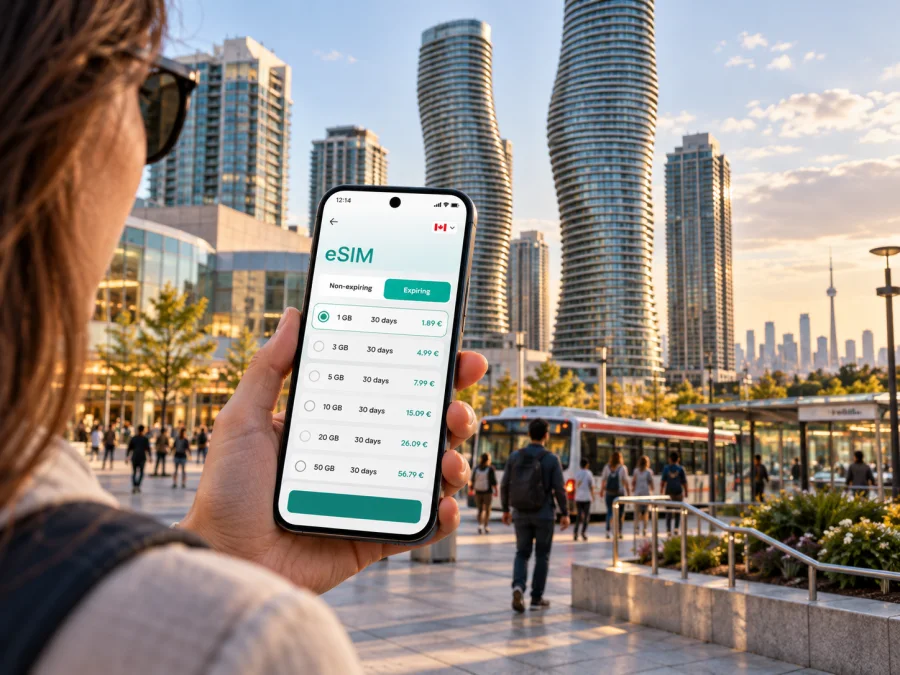
Mississauga eSIM: mobile connection and internet for your trip
Mississauga is often the first Canadian city visitors experience after landing at Toronto Pearson International Airport, and it can also be a destination in its own right. Its business districts, waterfront, shopping areas and established neighbourhoods are spread across a large area, so a little planning helps you make the most of each day. Mobile internet can help you check a route, confirm a meeting address, coordinate a pickup or find your way between a GO station and your hotel.
An eSIM is a digital SIM profile installed on a compatible device, providing mobile data without a physical travel SIM. Kaspersky eSIM Store is an app and website where you can choose, arrange and activate an eSIM with a suitable data plan for an international trip. The available terms depend on the selected plan, so review its data allowance, validity period and destination before you travel.
This guide covers arrival, neighbourhoods, local transit and onward trips from Mississauga.
Before you arrive: make the first connection easier
Mississauga lies beside Toronto Pearson, but the airport’s terminals and your final destination may be in different parts of the region. Your first journey could be to a hotel near Square One, a meeting in the Airport Corporate Centre, a home in Port Credit or a connection onward to Toronto. Save the destination name and full address before departure, then check which transport options make sense for that particular trip.
A working data connection is useful for looking up directions, checking a current departure, contacting your host, or updating a rideshare pickup point. It is also helpful when a flight is delayed and your plans need to change. Do not assume that every location, transit vehicle or underground area will have the same reception; keep essential booking details available offline as well.
A short preparation list:
- Confirm the exact street address and postal code of your hotel or appointment.
- Save reservation details and any check-in instructions where you can open them without data.
- Decide whether you expect to use maps, messaging, video calls or a laptop hotspot, and choose data accordingly.
- Check whether your phone supports eSIM and is not restricted to a single carrier before arranging a plan.
- Install and set up the eSIM when you have a reliable connection, following the plan instructions.
- Keep your usual SIM settings in mind if you need your regular number for calls or texts.
An eSIM plan intended for mobile data does not necessarily include a conventional phone number, voice calls or SMS. Check the specific plan details. Internet-based messaging and calling apps can be useful for coordinating with people, but they depend on a data connection and the other person’s app availability.
Getting from the airport to your Mississauga address
Toronto Pearson is immediately beside Mississauga and is a common starting point for visits to the city. Your first destination might be City Centre near Square One, the Airport Corporate Centre, Port Credit or a connection onward to Toronto. The best transfer depends on terminal, arrival time, luggage and address. Options may include local transit, a train or bus connection, taxi or rideshare, or a prearranged pickup. Check current service and pickup directions on the day.
Before leaving the terminal, verify the destination in your map app and read the full route. “Mississauga” covers a large area: City Centre, the airport employment area and the lakefront are not interchangeable locations. If someone is meeting you, agree on a clear pickup point and share changes through your usual messaging method. Save your accommodation address and check-in instructions offline in case data or reception is unavailable.
| Arrival need | Useful preparation |
|---|---|
| Hotel transfer | Save the full address and check shuttle or pickup directions. |
| Public transit | Confirm the route, stop and transfer using current service information. |
| Taxi or rideshare | Follow airport pickup signs and confirm the meeting point in the app. |
| Late arrival | Keep check-in instructions and contact details available offline. |
Mobile data helps with changing pickup points, directions and messages. It does not replace airport signs or a current service check.
Getting around: MiWay, GO Transit and the city’s scale
Mississauga is spread across a large area rather than arranged around one compact downtown grid. You may spend one day near Square One and another by the lake, in Streetsville or near a business park. Travel time depends on distance, traffic, transfers and time of day, so plan around the exact address.
MiWay is the local bus system. City Centre Transit Terminal beside Square One is a major hub with MiWay connections and links to other services. The Mississauga Transitway provides a dedicated bus corridor across part of the city. GO Transit rail or bus may suit some cross-region journeys; Port Credit, Cooksville, Clarkson, Meadowvale and Streetsville are among the stations serving different parts of Mississauga. Confirm the best station and current departure for your destination.
Use a map app to compare journeys, then check live operator information for changes. For a trip with a transfer, note the transfer point, direction and stop before leaving. Allow time to find the right entrance or platform; map estimates do not account for every wait or walk.
A simple way to plan a transit trip
- Enter the exact destination and compare door-to-door routes.
- Confirm departure times and service changes with the transit operator.
- Check whether you start at a nearby stop, GO station or City Centre Transit Terminal.
- Note the transfer and stop where you need to get off.
- Leave extra time for walking and finding the right platform.
MiWay and GO Transit have their own fare options and rules. Check current guidance before boarding; a mobile data plan is separate from a transit fare.
Choosing an eSIM plan for Mississauga
Start with the shape of your trip. A visitor staying for a weekend, a consultant in town for several days and a traveller continuing through Canada may have different data needs. Estimate how often you will use navigation, messaging, email, social apps, audio or video, and whether you plan to tether another device. Leave room for unexpected changes without paying for data you are unlikely to use.
Kaspersky eSIM Store is an app and website where you can choose, arrange and activate an eSIM with a suitable plan for an international trip. The country landing page lets you review the options for Canada. Before choosing, compare the listed destination, data amount, validity and price for each option. Availability and terms belong to the individual plan and can change, so rely on what is shown at the time you select it. When the trip includes Toronto or other destinations beyond Mississauga, consider the complete itinerary. A plan should fit the listed destination and your expected data use across the journey; do not assume that a city-specific boundary or a particular network experience is guaranteed. To review the available options, compare eSIM plans for Canada.
A practical comparison checklist:
- Trip length: Does the plan remain valid for the days you expect to use it?
- Data allowance: Is it reasonable for your planned navigation, messaging and work use?
- Coverage destination: Does the plan list Canada for the journey you are taking?
- Device: Is your phone eSIM-compatible and free of a carrier restriction that would prevent activation?
- Timing: Do the plan terms say when validity begins, and when should you install or activate it?
- Other devices: If you need hotspot use, check whether tethering is permitted by the specific plan.
Choose a base that matches your itinerary
Choosing accommodation near the places you will use can save time. These neighbourhoods are broad orientation points; check each hotel’s address and transit connection.
City Centre and Square One
City Centre suits plans involving shopping, restaurants and indoor activities. Square One and Celebration Square are useful reference points, with City Centre Transit Terminal nearby. Confirm the hotel’s exact entrance and walking distance. For a meeting in a large complex, save the building name and entrance as well as the street address.
Port Credit and the waterfront
Port Credit has a lakeside village centre, restaurants, parks and paths, plus a GO station for some trips along the Lakeshore West corridor. Check the weather and return route before a longer walk. Save the route to your accommodation in case you need it offline.
Streetsville
Streetsville offers a historic village centre, independent shops and cafés. Streetsville GO and local buses serve the area. Check the full route, including the walk between station, hotel and destination.
Cooksville, Hurontario, Meadowvale and Erin Mills
These areas include residential districts and employment destinations. If your hotel or meeting is here, plan around its address rather than defaulting to Square One. Confirm current transit and construction information, and find the building entrance and visitor instructions for a business park.
Mobile internet for work, meetings and short stays
Business trips often involve small changes: a meeting room moves, a colleague sends a new entrance, or a call runs late. Data can help you check email, calendar details and directions, and message the person waiting for you. For a laptop hotspot, confirm that your device and selected plan support tethering and consider the data a video call may use.
For a conference or day of appointments, save your itinerary, venue pins and contact details before leaving the hotel. A street address may lead only to the edge of a large campus, so ask for the building and reception entrance. For a short stopover, estimate what you will actually use for the airport transfer, one district visit and the return journey. Video streaming, automatic photo backup and hotspot use can consume data quickly.
Set up your eSIM before you need directions
Prepare the eSIM while you have a stable internet connection and time to read the instructions. The exact steps depend on your device and plan. Keep your usual SIM available if you rely on its number, and check labels carefully before changing mobile-data settings.
- Check whether your phone supports eSIM and is not restricted by a carrier lock.
- Review the plan’s destination, allowance, validity and activation instructions.
- Follow the Android installation instructions or iOS installation instructions.
- Label the travel profile clearly and choose the line for mobile data as directed.
- After arrival, enable the travel line according to the plan instructions and confirm the selected data profile.
If setup does not complete, consult the plan guidance before deleting an installed profile. Save essential setup details securely before travelling.
Using data thoughtfully around the city
Navigation, transit checks, work messages and photos use data. Download offline maps, pause automatic media backups if needed, check usage during a longer stay, and save addresses and tickets. Hotel or café Wi-Fi can be convenient, but availability varies; do not rely on it for every pickup or route change.
Sample itineraries and where data helps
City Centre afternoon: After check-in, plan a walk toward Square One or Celebration Square. Check opening details and keep a route back to your hotel.
Port Credit: Save the journey and return route, then explore the village and waterfront at a comfortable pace. Keep the GO station name handy.
Business meeting: Confirm the building and visitor entrance. Check the route early, allow time for transfers and message your host if your arrival estimate changes.
Onward to Toronto: Choose the correct station or terminal, check current departures and leave time to reach the platform.
Common questions
Is Mississauga easy to explore without a car?
Many places are served by transit, but convenience depends on where you stay. Compare door-to-door routes if you plan to visit both City Centre and the waterfront.
Does an eSIM give me a Canadian phone number?
A data-focused plan may not include a conventional number, voice calls or SMS. Check its terms; internet calling apps require data and compatible apps at both ends.
Can I use one plan for Mississauga and Toronto?
Check the destination and terms listed for the plan. Conditions depend on the specific offer, so do not infer details from the city name alone.
What if mobile data stops working?
Use saved addresses and offline maps, then confirm that your phone is using the intended eSIM line. Review setup guidance and contact the plan’s support channel when connected.
A calmer way to stay oriented
Mobile internet helps with airport transfers, bus changes, meeting entrances and waterfront return routes. Pair live directions with saved addresses and allow time between connections. Choose a base around your itinerary and keep essentials offline.
Before departure, choose a plan that fits your dates and likely data use, then follow the instructions for your phone. Kaspersky eSIM Store is an app and website for choosing, arranging and activating an eSIM for an international trip. Review eSIM options for Canada and select the plan whose terms fit your visit to Mississauga.


