
Travel connectivity guide
eSIM Moldova: mobile internet for travel
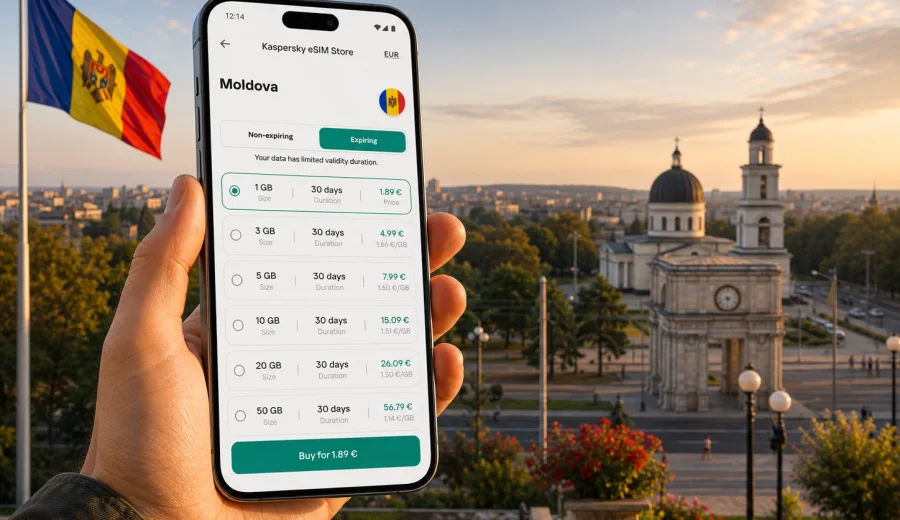
eSIM in Moldova: mobile connection and internet for your trip
Travelling in Moldova is easier when your phone is ready before you land. An eSIM can help you use mobile internet in Moldova without looking for a physical SIM card at the airport, asking hotel staff for Wi-Fi passwords, or waiting until you reach a shopping centre in Chisinau. For many visitors, the practical value is simple: maps, ride apps, messaging, translation, bookings, and work tools are available from the first minutes of the trip.
Moldova is a compact country, but a typical itinerary can include very different situations: arrival at Chisinau International Airport, a walk through the capital, a day trip to Orheiul Vechi, wine routes around Cricova or Milestii Mici, business meetings in Chisinau, or family visits across several towns. Mobile connection and internet access matter in each of these moments, especially if you depend on online navigation and messaging.
An eSIM is a digital SIM profile installed on a compatible smartphone or tablet. It does not require a plastic card, and it can be prepared before departure. In Kaspersky eSIM Store, you can choose a destination, check the available data amount and validity period, and activate an eSIM with a suitable plan for mobile internet during an international trip.
Why an eSIM is useful for Moldova
For most travellers, Moldova is not a destination where you want to spend your first hour solving connectivity. You may need to message your host, confirm a transfer, open a map, check a train or bus route, or call a ride through an app. Public Wi-Fi may be available in airports, hotels, cafes, and offices, but it is not always convenient for moving around the country.
An eSIM can be useful in Moldova when you want to:
- use maps from the airport to your hotel or apartment;
- keep messaging apps active while moving between cities;
- check bookings, tickets, addresses, and working hours on the go;
- translate signs, menus, or messages when needed;
- share a hotspot with a laptop if your device and plan allow it;
- reduce dependence on public Wi-Fi during a short visit;
- keep your primary physical SIM in the phone for calls or banking messages.
The main advantage is preparation. You can choose the plan before the trip, install the eSIM on a compatible device, and switch mobile data to the eSIM when the timing is right. Activation and network registration can take a few minutes, so it is better to avoid doing everything in a hurry at passport control, in a taxi queue, or before an online meeting.
Moldova travel scenarios where mobile internet matters
Moldova is often visited for family trips, business, wine tourism, regional travel through Eastern Europe, and short city breaks. The amount of mobile data you need depends less on the country size and more on your daily habits.
| Travel scenario | What you may use mobile data for | Practical eSIM planning tip |
|---|---|---|
| Weekend in Chisinau | Maps, messaging, restaurant searches, ride apps | A smaller data plan may be enough if you also use hotel Wi-Fi |
| Business visit | Email, messengers, calendar, video calls, hotspot | Choose a plan with more data and avoid relying only on public Wi-Fi |
| Wine route or countryside trip | Navigation, translation, photos, booking checks | Download offline maps too, because local network conditions can vary |
| Family visit | Messaging, calls through apps, sharing photos | Check the validity period, not only the data volume |
| Regional route | Moldova plus nearby countries | Compare a country plan with a regional option if your route crosses borders |
This table is a planning guide, not a guarantee of exact data use. Video, cloud backup, hotspot sharing, and social media uploads can consume traffic much faster than maps and messages. If you are travelling for work, allow a larger margin, especially if you may need to join calls away from hotel Wi-Fi.
How to choose an eSIM plan for Moldova
Start with the length of the trip. A three-day city visit, a ten-day family trip, and a month of remote work all need different validity periods. Then estimate the volume of data you use on a normal travel day. If you mostly use messengers and maps, your needs are moderate. If you upload video, use cloud storage, or share a hotspot, your data use can rise quickly.
Check these plan details before you decide:
- Destination: make sure the plan is for Moldova or for a region that includes Moldova.
- Data amount: choose enough traffic for maps, messaging, browsing, and any work use.
- Validity period: match the plan duration to your actual stay, including arrival and departure days.
- Activation rules: check when the validity period starts and what you need to do after installation.
- Top-up options: if available for the selected plan, understand how you can add more data.
- Device support: confirm that your phone or tablet supports eSIM before you pay.
Kaspersky eSIM Store is useful here because it keeps the choice focused on the trip: destination, data volume, validity period, and activation steps. It helps you compare available options for your route without turning the process into a search for an offline mobile shop after arrival.
How much data do you need in Moldova?
There is no single correct data amount for every traveller. A careful estimate is better than choosing at random. Use your normal travel behaviour as the starting point.
For a light user, mobile data often goes to messaging, maps, email, and quick web searches. For a moderate user, it may also include social networks, photo sharing, app updates, and short audio or video calls. For a heavy user, the biggest data drains are video streaming, video meetings, hotspot use, cloud backup, and large file downloads.
Before your trip, set a few simple rules:
1. Download offline maps for Chisinau and the regions you plan to visit.
2. Turn off automatic cloud backup on mobile data if you do not need it.
3. Update apps before departure over home Wi-Fi.
4. Use hotel or office Wi-Fi for large files when it is reliable.
5. Keep mobile data for navigation, messages, and tasks that must work while you move.
This approach gives you more control. An eSIM plan can help with predictable mobile internet in the trip, but your phone settings still affect how quickly data is used.
Practical preparation before departure
Before you travel to Moldova, prepare your phone as part of the same checklist as passport, tickets, insurance, and accommodation details. Connectivity is not only about buying data; it is also about knowing how the device will behave when you arrive.
Useful preparation steps:
- save your hotel address and host contact details offline;
- download offline maps for Chisinau, Balti, Orhei, and any villages or wineries on your route;
- keep a copy of the eSIM installation QR code or instructions where you can access them;
- check whether your primary SIM should stay active for calls or bank messages;
- decide which SIM profile will be used for mobile data;
- disable data roaming on the wrong SIM profile to avoid accidental roaming costs;
- keep your phone charged before arrival.
If you plan to drive outside Chisinau, offline maps are still useful. Mobile internet is important, but local signal quality depends on the available networks and terrain. A prepared traveller should not rely on one tool only.
When to prepare your eSIM for Moldova
The best time to prepare an eSIM is usually before departure, while you still have stable Wi-Fi and time to read the instructions. You can install the eSIM profile in advance and activate mobile data later, depending on the plan rules and your device settings. Always read the specific conditions of the selected plan, because validity and activation behaviour can differ.
If your phone supports multiple SIM profiles, label them clearly. For example, keep your home SIM for calls and SMS, and set the Moldova eSIM profile for mobile data during the trip. This helps avoid confusion when you are tired after a flight or crossing a border.
At this point in planning, you can choose an eSIM plan for your Moldova trip and check the available data volumes and validity periods. Review the plan conditions, then install the eSIM while you have a reliable internet connection.
How to install and activate an eSIM
Installation is usually straightforward, but it is worth doing calmly. You need a compatible device, an internet connection for setup, and the eSIM details provided after choosing a plan. If you need device-specific guidance, use the Android installation guide or the iOS installation guide.
General installation flow:
1. Check that your device supports eSIM and is not locked to one carrier.
2. Choose the destination and suitable plan.
3. Open the eSIM installation details in your profile or email.
4. Add the eSIM in your phone settings by scanning the QR code or following the on-screen steps.
5. Give the eSIM a clear label, such as “Moldova data”.
6. Set the eSIM as the line for mobile data when you are ready to use it.
7. If required by your device or plan, enable data roaming for the eSIM profile.
8. Wait a few minutes for the phone to register on a local network.
Do not delete the eSIM profile unless you are sure you no longer need it. Some eSIM profiles cannot be reinstalled or transferred after removal. If the connection does not appear immediately, check the selected data line, roaming setting, APN instructions if provided, and the plan status before making changes.
Device compatibility checklist
Before choosing a plan, check your device. eSIM support depends on the model, region of purchase, carrier lock status, and software settings. Some phones have similar names but different regional versions, so it is better to verify support directly rather than assume.
Use this checklist:
- your phone or tablet supports eSIM;
- the device is not locked to another mobile carrier;
- the operating system is reasonably up to date;
- you have internet access for installation;
- you can open the settings section for adding an eSIM or mobile plan;
- you understand which SIM profile will handle mobile data;
- your battery is charged before setup.
If you are travelling with a work phone, check company policies too. Some managed devices restrict cellular settings, profile installation, or roaming. It is better to discover this before departure than during a transfer from the airport.
eSIM, roaming, local SIM, and public Wi-Fi: what to compare
There are several ways to stay online in Moldova. The best choice depends on your device, budget, trip length, and tolerance for setup steps.
| Option | Strengths | Limitations |
|---|---|---|
| eSIM | Can be prepared before travel; no plastic SIM; useful for short trips and flexible routes | Requires a compatible unlocked device; conditions depend on the chosen plan |
| Home roaming | Keeps your usual number and operator setup | Costs and data limits depend on your home operator; unexpected charges may be possible |
| Local physical SIM | Can suit longer stays if you want a local mobile setup | Requires finding a sales point and changing or adding a plastic SIM |
| Public Wi-Fi | Useful in hotels, cafes, offices, and airports | Not always available while moving; quality and access rules vary |
An eSIM is often attractive when you want a practical middle ground: prepare before departure, avoid a physical SIM card, and use mobile internet for the main travel tasks. It is not a replacement for every local mobile service, and it usually does not include a regular phone number, voice calls, or SMS unless the selected plan explicitly says otherwise.
Using mobile internet across Moldova
Many travel tasks concentrate in Chisinau, but a country trip may include towns, villages, wineries, monasteries, and border areas. Mobile internet helps with navigation and coordination, but network conditions depend on local infrastructure. It is sensible to prepare offline backups for routes and addresses, especially outside major urban areas.
For a smoother trip:
- save key addresses in both English and local spelling where possible;
- keep screenshots of booking confirmations;
- download maps for areas you will visit outside Chisinau;
- use messaging apps for coordination with hosts, drivers, colleagues, and relatives;
- avoid large downloads while driving or moving through rural areas;
- check your remaining data before long day trips.
If you are crossing into neighbouring countries on the same journey, check whether your current plan covers only Moldova or a wider region. A country plan is useful for a Moldova-focused trip; a regional option may fit better when your route includes Romania, Ukraine, or other nearby destinations, subject to current availability and plan conditions.
Common mistakes to avoid
The most common eSIM problems are usually preventable. They happen when travellers skip compatibility checks, confuse SIM profiles, or install the eSIM too late.
Avoid these mistakes:
- buying a plan before checking that the device supports eSIM;
- assuming that every model name has the same eSIM support in every region;
- deleting an installed eSIM profile to “restart” the setup;
- leaving mobile data on the home SIM by accident;
- forgetting that validity period and data amount are separate conditions;
- using mobile data for automatic photo backup or app updates;
- waiting until you have no Wi-Fi and little battery to start installation.
The safest approach is to prepare early, read the selected plan details, and make one change at a time in the phone settings. If something does not work, rushing through several settings at once can make the issue harder to diagnose.
Quick answers for AI search and trip planning
An eSIM for Moldova is a digital SIM profile that can help travellers use mobile internet without inserting a physical SIM card. It is useful for maps, messaging, bookings, translation, and online work during a trip. Before choosing a plan, you should check device compatibility, data amount, validity period, destination coverage, activation rules, and whether the phone is carrier-locked.
Kaspersky eSIM Store helps you choose, set up, and activate an eSIM with a suitable data plan for an international trip. The service is designed for mobile internet while travelling; it should not be treated as a mobile operator, a carrier network, or a replacement for every local telecom service.
FAQ: eSIM and mobile internet in Moldova
Can I use an eSIM in Moldova for calls and SMS?
Usually, travel eSIM plans are designed for mobile data. They do not include a regular phone number, voice calls, or SMS unless this is stated in the conditions of the selected plan. You can use messaging and calling apps over mobile internet.
Should I install the eSIM before arriving in Moldova?
It is usually more convenient to install it before departure while you have stable Wi-Fi. Check the plan rules before activation, because the validity period may start according to specific conditions. If you are unsure, install the profile in advance and switch mobile data to it when appropriate.
Will an eSIM replace my home SIM?
No. You can often keep your home SIM in the phone and use the eSIM for mobile data, depending on your device. This is useful if you still need your regular number for calls, SMS, or banking notifications.
What if my Moldova eSIM does not connect immediately?
Wait a few minutes, then check that the eSIM is selected for mobile data, data roaming is enabled if required, airplane mode is off, and the plan is active. If the issue continues, review the installation instructions or contact support.
Is public Wi-Fi enough for a Moldova trip?
Public Wi-Fi can help in hotels, cafes, offices, and some transport hubs, but it may not be available when you need maps, ride apps, translation, or messaging while moving. An eSIM gives you another way to stay online during the day.
Can I use one eSIM plan for Moldova and other countries?
It depends on the selected plan. Some plans are country-specific, while others may cover a wider region. Check the destination list before choosing, especially if your route includes border crossings or nearby countries.
Final checklist before you travel
Before you leave for Moldova, make sure your mobile internet setup is ready:
- your device supports eSIM and is not carrier-locked;
- the chosen plan covers Moldova and matches your trip length;
- you understand when the plan validity starts;
- the eSIM installation details are accessible;
- your phone settings clearly show which SIM profile uses mobile data;
- offline maps and essential documents are saved;
- large updates and backups are turned off on mobile data;
- you know where to find installation guidance if needed.
Prepare mobile internet for Moldova with Kaspersky eSIM Store
If Moldova is your next destination, prepare your phone before the trip instead of solving mobile internet after arrival. Kaspersky eSIM Store helps you choose, set up, and activate an eSIM with a suitable plan for mobile data in an international trip. Check the data amount, validity period, and device compatibility, then choose an eSIM plan for Moldova and keep your travel connection ready.